
1. Introduction
Thank you for choosing the EvoSpark Vibration Plate Exercise Machine. This manual provides essential information for the safe and effective use of your new fitness equipment. Please read it thoroughly before operation and retain it for future reference.
The EvoSpark Vibration Plate is designed to provide a full-body workout experience, utilizing dual motors for powerful and smooth vibrations. It features an acupressure surface, adjustable speed settings, and includes resistance bands to enhance your exercise routine.

Image 1.1: The EvoSpark Vibration Plate Exercise Machine, showcasing its compact design and potential for various exercises.
2. Important Safety Information
To reduce the risk of serious injury, always read and follow all warnings and instructions before using this equipment. Consult your physician before starting any new exercise program, especially if you have pre-existing medical conditions.
- Ensure the machine is placed on a flat, stable surface.
- Keep children and pets away from the machine during operation.
- Do not use the machine if you are pregnant, have a pacemaker, or have any metal implants.
- Stop exercising immediately if you feel dizzy, faint, or experience pain.
- Maximum user weight capacity is 204.12 kg (450 lbs). Do not exceed this limit.
- Always wear appropriate athletic footwear.
- Do not insert any objects into the machine's openings.
3. Setup and Assembly
The EvoSpark Vibration Plate Exercise Machine comes 100% pre-assembled, requiring no complex installation. Simply unpack and prepare for use.
3.1 Unpacking
- Carefully remove the machine and all components from the packaging.
- Verify that all included components are present: 1 Vibration Platform, 1 Remote Control, 2 Resistance Bands, 1 User Manual.
- Retain packaging materials for future storage or transport.
3.2 Placement
- Place the vibration plate on a firm, level surface.
- Ensure there is adequate space around the machine for safe movement during exercise.
- The anti-slip suction cups on the base provide stability during use.

Image 3.1: The EvoSpark Vibration Plate and its included accessories, demonstrating its pre-assembled state and readiness for use.
4. Operating Instructions
The EvoSpark Vibration Plate offers various modes and intensity levels to customize your workout.
4.1 Powering On/Off
- Connect the power cord to a suitable electrical outlet.
- Press the main power switch located on the side of the machine.
- The LED display will illuminate.
- To turn off, press the main power switch again and unplug the machine.
4.2 Using the Control Panel and Remote Control
The machine can be controlled via the integrated touch screen panel or the included remote control.

Image 4.1: Detailed view of the control panel, remote, and other features of the EvoSpark Vibration Plate.
- Power Button: Starts and stops the vibration.
- Speed Adjustment: Use the '+' and '-' buttons to adjust the vibration speed from 1 to 120 levels.
- Program Modes: Select from pre-set automatic modes (Walking, Jogging, Running) designed for different exercise demands.
- Time Setting: Adjust the workout duration.
4.3 Bluetooth Music Playback
Enhance your workout by connecting your smartphone via Bluetooth to play music through the machine's integrated speakers.
- Ensure the vibration plate is powered on.
- Activate Bluetooth on your smartphone.
- Search for 'Music-OTD' in your device's Bluetooth settings and pair.
- Once connected, you can play music from your device.

Image 4.2: Demonstrating Bluetooth connectivity for music playback during a workout or relaxation session.
5. Exercise Guidelines and Positions
The EvoSpark Vibration Plate supports various exercises to target different muscle groups and achieve full-body conditioning.
5.1 Understanding Vibration Zones
The platform features distinct zones for varying intensity:
- Walking (Relax): Place feet closer to the center for a gentler vibration.
- Jogging (Comfortable): Place feet slightly wider for moderate intensity.
- Running (Strong): Place feet at the widest points for maximum vibration intensity.
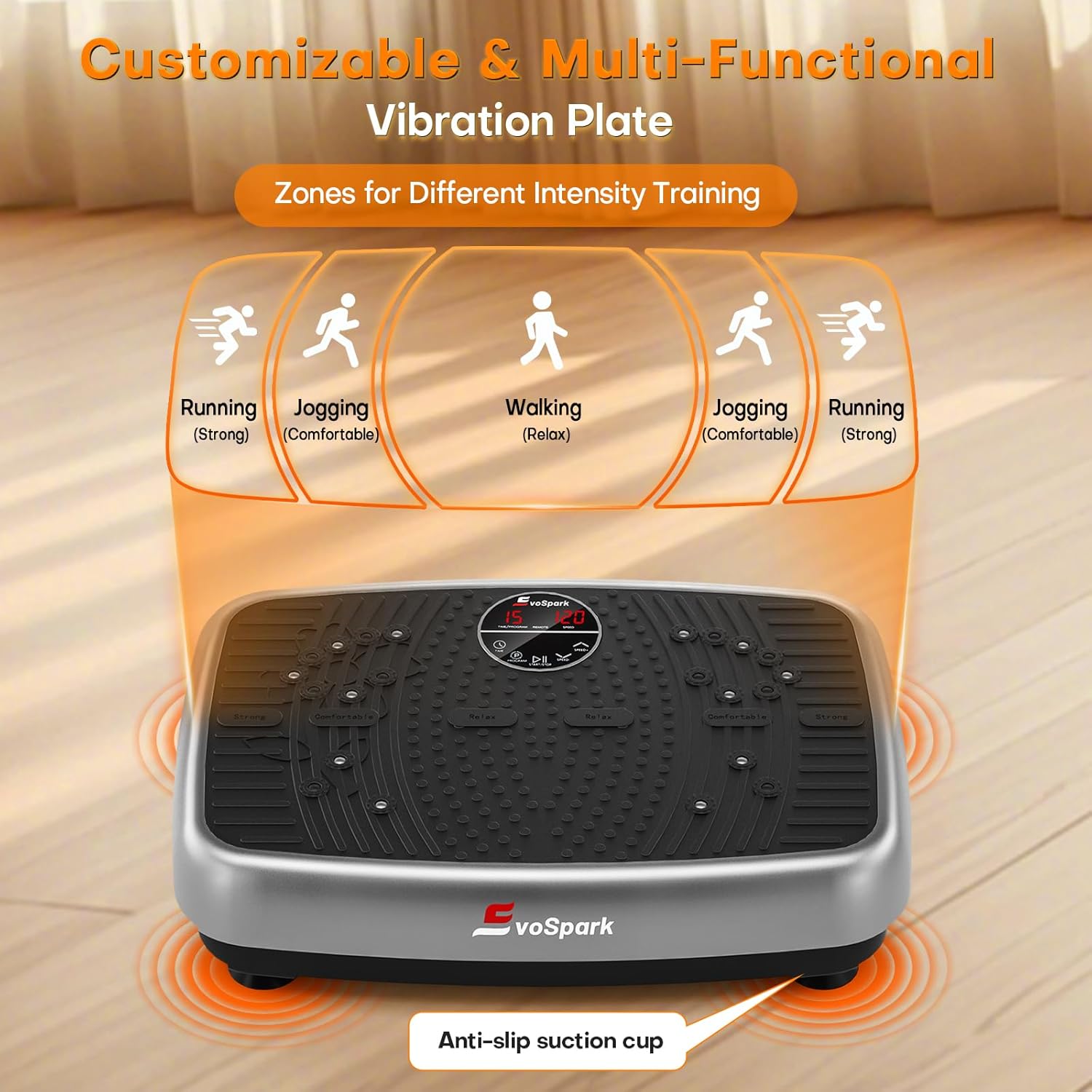
Image 5.1: Illustration of the customizable vibration zones based on foot placement.
5.2 Recommended Exercises
Utilize the included resistance bands for enhanced upper body and core workouts. Examples of exercises include:
- Squats: Stand on the plate with feet in the 'running' zone, perform squats while holding the resistance bands.
- Plank: Place hands on the plate (or forearms) and hold a plank position.
- Calf Raises: Stand on the plate and perform calf raises.
- Arm Training: Stand or sit on the plate, use resistance bands for bicep curls, tricep extensions, or shoulder presses.
- Seated Pose: Sit on the plate for improved blood circulation and relaxation.

Image 5.2: Examples of low-impact, high-efficiency exercises for recovery and fitness using the vibration plate.
5.3 Acupressure and Foot Massage
The innovative acupressure surface stimulates pressure points on the feet, promoting circulation and providing a relaxing massage experience.

Image 5.3: Visual representation of the magnet health massage and shiatsu massage features on the platform.
6. Maintenance and Storage
Proper maintenance ensures the longevity and optimal performance of your EvoSpark Vibration Plate.
6.1 Cleaning
- Always unplug the machine before cleaning.
- Wipe the surface with a soft, damp cloth. Do not use abrasive cleaners or solvents.
- Ensure no moisture enters the internal components.
6.2 Storage
- Store the machine in a cool, dry place away from direct sunlight and extreme temperatures.
- Its compact size allows for easy storage under a bed or in a closet.
- Keep the remote control and resistance bands with the unit to prevent loss.
7. Troubleshooting
If you encounter any issues with your EvoSpark Vibration Plate, refer to the following common problems and solutions.
- Machine does not power on:
- Check if the power cord is securely plugged into both the machine and the wall outlet.
- Ensure the main power switch is in the 'ON' position.
- Verify the wall outlet is functional by plugging in another device.
- No vibration:
- Ensure the machine is powered on and the start button has been pressed.
- Check the speed setting; increase it if it's too low.
- Remote control not working:
- Replace the batteries in the remote control.
- Ensure there are no obstructions between the remote and the machine's sensor.
- Unusual noise during operation:
- Ensure the machine is on a flat, stable surface and not touching any other objects.
- Check for any loose parts or debris under the machine.
If the problem persists after attempting these solutions, please contact customer support.
8. Specifications
| Feature | Specification |
|---|---|
| Brand | EvoSpark |
| Model | B0FL2GMDD8 |
| Motor Type | Dual Motors |
| Motor Power | 150W |
| Speed Levels | 1-120 |
| Maximum Weight Capacity | 204.12 kg (450 lbs) |
| Product Dimensions (L x W x H) | 51 x 35 x 13 cm |
| Item Weight | 8.04 kg |
| Material | Alloy Steel |
| Noise Level | <30dB |
| Included Components | Vibration Platform, Remote Control, 2 Resistance Bands, User Manual |

Image 8.1: Illustration of the dual motor system and ultra-quiet operation of the EvoSpark Vibration Plate.
9. Warranty and Support
EvoSpark is committed to providing premium and safe home exercise equipment. Our products undergo rigorous testing to ensure quality and customer satisfaction.
9.1 Customer Support
If you have any questions, concerns, or require assistance with your EvoSpark Vibration Plate, please contact our customer support team. Provide your model number (B0FL2GMDD8) and a detailed description of the issue for prompt service.
- Contact Method: Please refer to the contact information provided with your purchase or on the official EvoSpark website.
9.2 Warranty Information
Your EvoSpark Vibration Plate is covered by a manufacturer's warranty. Details regarding the warranty period and terms are typically included with your purchase documentation. Please retain your proof of purchase for warranty claims.