1. Introduction
Thank you for choosing the Healthkeep Smart Body Fat Scale. This manual provides essential information for the safe and effective use of your new scale. Please read it thoroughly before use and retain it for future reference. This device is designed to help you monitor various body composition metrics and track your health progress over time.
2. Safety Information
- This scale is intended for general health monitoring and is not a substitute for professional medical advice. Consult a healthcare professional for any health concerns.
- Do not use this device if you have a pacemaker or other internal medical device.
- Keep the scale dry. Avoid placing it in wet environments or submerging it in water.
- Place the scale on a hard, flat, and stable surface for accurate measurements. Uneven surfaces can affect accuracy.
- The maximum weight capacity of this scale is 180 kg (400 lb). Do not exceed this limit.
- Do not jump on the scale. Step on and off carefully.
- Keep out of reach of children.
3. Package Contents
- Healthkeep Smart Body Fat Scale (Model: FI2019LB-I)
- User Manual
- AAA Batteries (4x)
4. Product Overview
The Healthkeep Smart Body Fat Scale features advanced technology to provide comprehensive insights into your body composition.
Key Features:
- Revolutionary Dual VA Displays: One screen displays weight, while the other shows vital health metrics.
- 16 Comprehensive Health Measurements: Includes Heart Rate, Cardiac Index, Weight, BMI, Body Fat, Muscle Rate, Fat-free Body Weight, Subcutaneous Fat, Visceral Fat, Body Water, Skeletal Muscle, Muscle Mass, Bone Mass, Protein, BMR, and Body Age.
- Heart Rate Monitoring: Provides a holistic view of cardiovascular health.
- Advanced ITO Technology: Ensures precise measurements, enhanced durability, and easy cleaning.
- Multi-User Management: Supports up to 24 user profiles via the Fitdays app.
- High Precision: Measures with an accuracy of 0.05 kg (0.1 lb) up to 180 kg (400 lb).
- User-Friendly Operation: Features auto-calibration, auto on/off, and auto-zero.
- Large & Stable Platform: Dimensions of 28 x 28 x 2.7 cm for enhanced stability and safety.
Components:
The scale consists of a tempered glass surface with ITO coating, dual VA display screens, and anti-slip padding on the bottom.

Image: Overview of the Healthkeep Smart Body Fat Scale, displaying weight and other metrics, alongside a smartphone and smartwatch showing synchronized data.
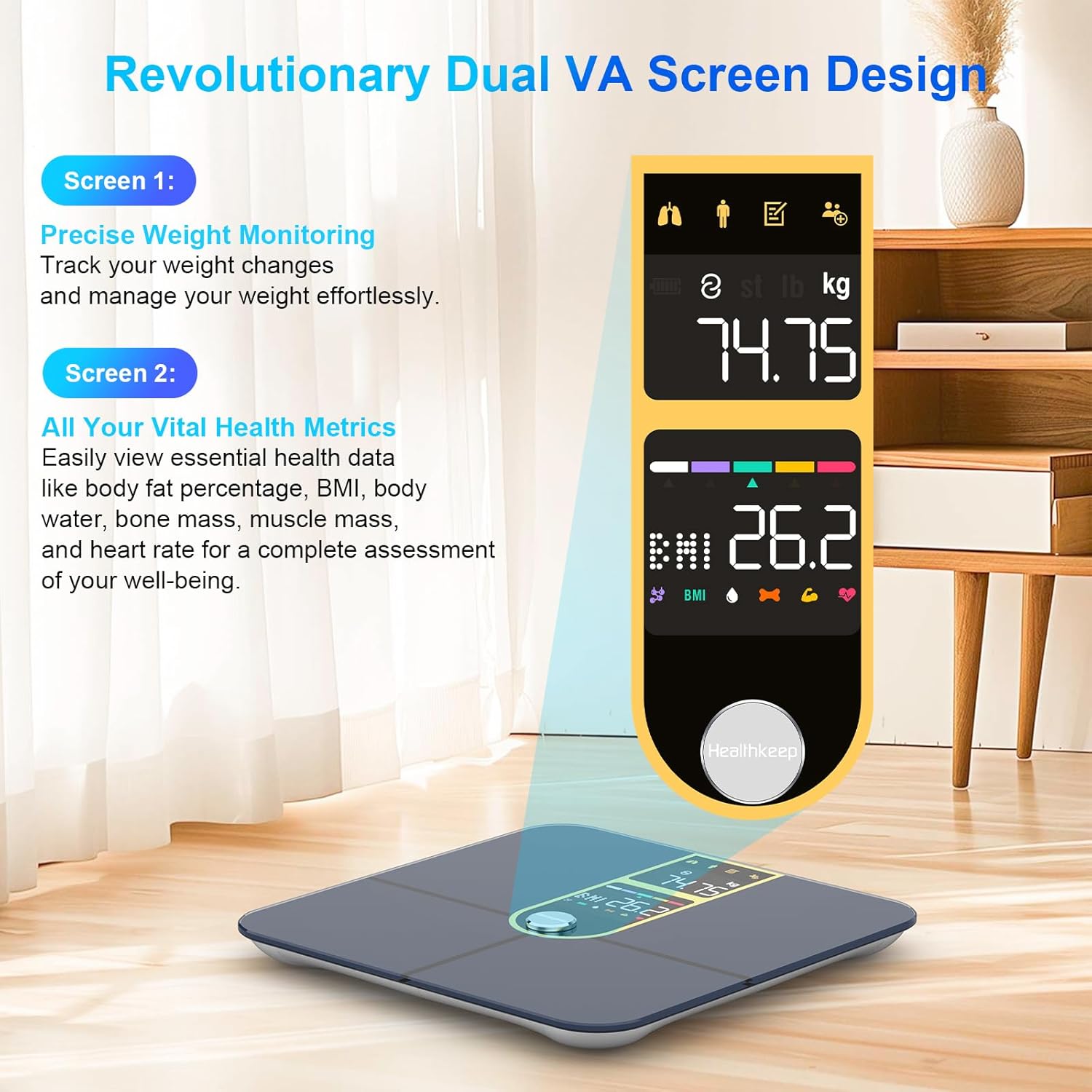
Image: Detailed view of the scale's dual VA screens. Screen 1 shows precise weight monitoring, and Screen 2 displays vital health metrics like body fat, BMI, body water, bone mass, muscle mass, and heart rate.
5. Setup
5.1 Battery Installation
- Open the battery compartment on the underside of the scale.
- Insert the four AAA batteries, ensuring correct polarity (+/-).
- Close the battery compartment securely.
5.2 Initial Placement
Place the scale on a hard, flat, and stable surface. Avoid carpets or soft flooring, as this can affect measurement accuracy.
5.3 App Download and Pairing
- Download the "Fitdays" app from the App Store (iOS) or Google Play (Android).
- Create an account and set up your personal profile (gender, height, age, etc.).
- Enable Bluetooth on your smartphone.
- Step onto the scale to activate it. The scale will automatically attempt to pair with the app.
- Confirm the pairing within the Fitdays app.

Image: Illustration of the Fitdays app and its compatibility with various fitness applications such as Apple Health, Fitbit, Samsung Health, and Google Fit, along with an Apple Watch displaying health data.
6. Operating Instructions
6.1 Taking a Measurement
- Ensure your feet are clean and dry.
- Step onto the scale barefoot, placing your feet on the ITO-coated surface. Ensure your feet make good contact with the electrodes.
- Stand still on the scale. The dual VA displays will show your weight first, followed by other body composition metrics.
- The measurements will automatically synchronize with the Fitdays app on your paired smartphone.

Image: A person standing barefoot on the scale, demonstrating how to take a measurement. The image highlights the 16 comprehensive health measurements displayed, including Heart Rate, BMI, Body Fat, and Bone Mass.
6.2 Understanding the Dual Displays
- Screen 1: Primarily displays your current weight.
- Screen 2: Cycles through various body composition metrics such as Body Fat percentage, BMI, Body Water, Bone Mass, Muscle Mass, and Heart Rate.
6.3 Multi-User Functionality
The Fitdays app supports up to 24 user profiles. To add or switch users:
- Open the Fitdays app.
- Navigate to the user management section.
- Add a new user profile or select an existing one.
- Ensure the correct user profile is selected in the app before taking a measurement to ensure data is recorded accurately for that individual.

Image: A family demonstrating the multi-user management feature, with a smartphone displaying the Fitdays app showing different user profiles and their respective body fat and BMI readings.
7. App Integration (Fitdays App)
The Fitdays app is your central hub for tracking and analyzing your health data. It provides comprehensive insights into your progress over daily, weekly, monthly, and yearly periods.
- Data Tracking: Monitor trends for weight, BMI, body fat percentage, muscle mass, bone mass, heart rate, and all other 16 metrics.
- Goal Setting: Set and track personal fitness and health goals.
- Third-Party App Sync: Seamlessly sync your data with popular health platforms such as Samsung Health, Apple Health, Fitbit, and Google Fit.

Image: A woman tracking her fitness journey using the Fitdays app, which displays detailed graphs and insights into her progress over time.
8. Maintenance and Care
- Cleaning: Wipe the scale surface with a soft, damp cloth. Do not use abrasive cleaners or chemical detergents. A small amount of alcohol can be used if necessary.
- Storage: Store the scale in a cool, dry place away from direct sunlight and extreme temperatures.
- Battery Replacement: If the display becomes dim or shows a low battery indicator, replace all four AAA batteries simultaneously.
- Avoid Impact: Do not drop the scale or subject it to heavy impact, as this may damage the sensors or glass surface.
9. Troubleshooting
| Problem | Possible Cause | Solution |
|---|---|---|
| Scale does not turn on | Low or dead batteries; Incorrect battery installation | Replace batteries; Ensure correct polarity |
| Inaccurate readings | Scale on uneven surface; Not standing still; Dirty ITO surface; Calibration needed | Place on hard, flat surface; Stand still; Clean surface; Step on and off to re-calibrate |
| App not connecting via Bluetooth | Bluetooth off; App not open; Scale not active; Interference | Ensure Bluetooth is on; Open Fitdays app; Step on scale to activate; Move closer to scale |
| Body composition data not displayed | Not standing barefoot; Poor contact with ITO surface | Step on barefoot; Ensure feet cover the ITO electrodes |
10. Specifications

Image: Technical diagram illustrating the dimensions of the Healthkeep Smart Body Fat Scale, measuring 28 cm in length and width, and 2.7 cm in height.
| Feature | Detail |
|---|---|
| Product Dimensions | 11.02 x 11.02 x 1.06 inches (28 x 28 x 2.7 cm) |
| Item Model Number | FI2019LB-I |
| Weight | 3.31 Pounds |
| Manufacturer | Healthkeep |
| Brand | Healthkeep |
| Color | Golden |
| Recommended Uses | Adults |
| Special Features | Bone Mass, Heart Rate, Large Display, Muscle Mass, Smart |
| Display Type | LCD (Dual VA Displays) |
| Maximum Capacity | 180 kg (400 lb) |
| Measurement Precision | 0.05 kg (0.1 lb) |
| Connectivity | Bluetooth (Compatible with iOS & Android) |
11. Warranty and Support
Healthkeep products are manufactured to high-quality standards. For information regarding warranty coverage, technical support, or customer service, please refer to the contact details provided with your purchase or visit the official Healthkeep website. Please retain your proof of purchase for warranty claims.