
Introduction
Welcome to your new Ieejdn 59" Home Office Executive Desk. This manual provides essential information for the assembly, operation, and maintenance of your desk. Please read these instructions carefully before beginning assembly and retain for future reference.
Safety Information
This product requires careful assembly to ensure stability. Always use appropriate tools and follow the instructions provided.
Due to the desk's estimated weight of 65 pounds, it is recommended to have an extra person assist with assembly and moving the desk to prevent injury.
Ensure all screws and fasteners are securely tightened before use. Periodically check and re-tighten as necessary.
Do not overload the desk or drawers. Distribute weight evenly to maintain stability.
Package Contents
Before assembly, verify that all components are present and undamaged. If any parts are missing or damaged, please contact customer support.
- Desktop Panel
- Pedestal Units (2)
- Drawer Components (7 sets)
- Built-in Power Strip Unit
- Hardware Pack (screws, bolts, cam locks, dowels, etc.)
- Instruction Manual
Tools Required
Please note that not all assembly tools are included with the product. You may need the following:
- Phillips Head Screwdriver
- Hammer (for dowels, if applicable)
Assembly Instructions
Please follow these steps carefully. It is recommended to assemble the desk in the room where it will be used, and with the assistance of another person due to its size and weight.
- Unpack Components: Carefully remove all parts from the packaging. Lay them out on a clean, soft surface (e.g., carpet or a blanket) to prevent scratches.
- Attach Legs: Securely attach the legs to the pedestal units using the provided screws. Tighten using the appropriate tool. Refer to the included diagrams for correct orientation.
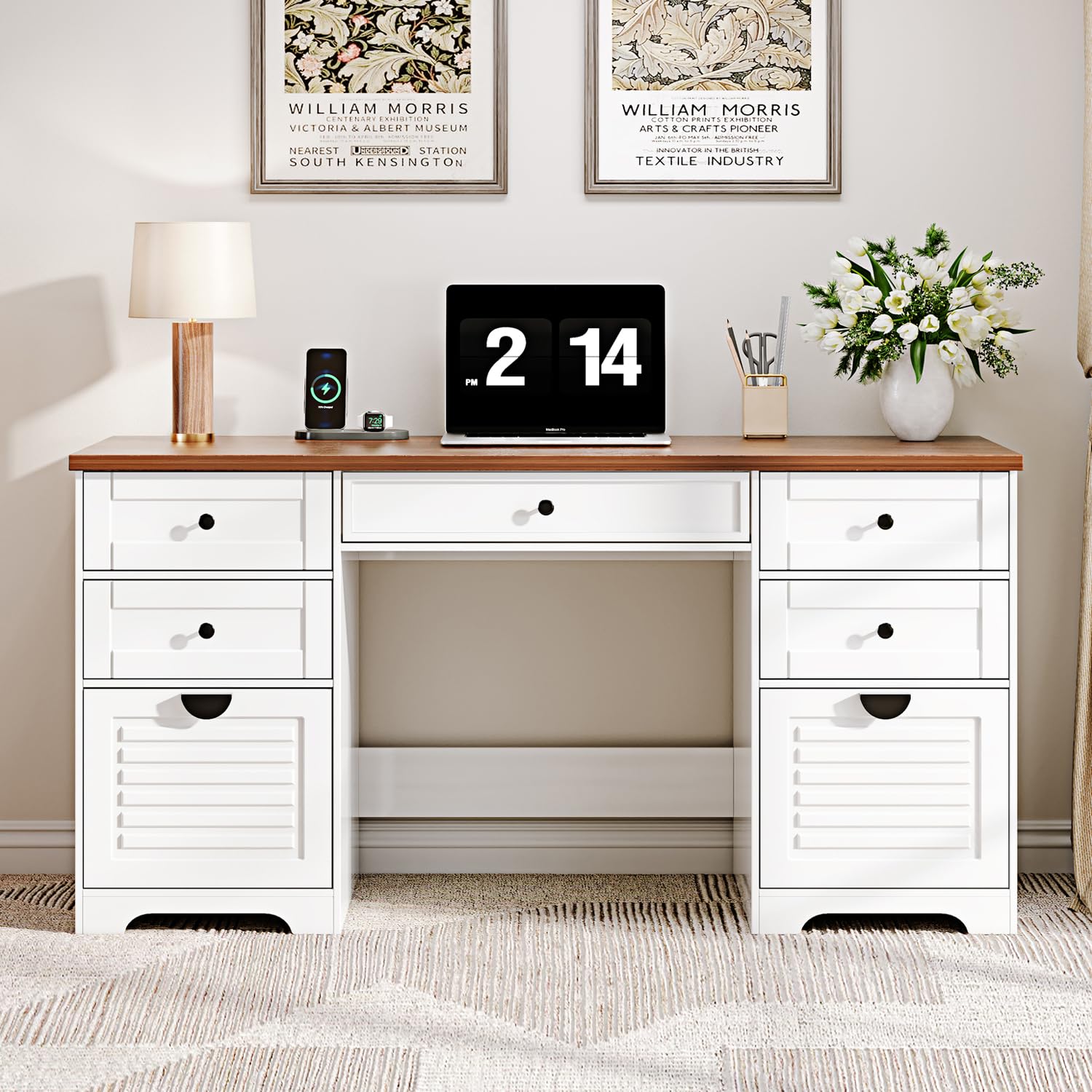
Image: An illustrative view of the desk, demonstrating the general structure where legs attach to the pedestal base. Ensure all screws are firmly secured.
- Assemble Drawers: Insert drawer slides into the side panels of the pedestal units. Assemble the drawer boxes according to the detailed diagrams in your separate assembly guide, ensuring smooth operation.
- Connect Desktop: With assistance, carefully place the desktop onto the assembled pedestal units. Connect the desktop to the frame using the provided bolts. Ensure all connections are tight and stable.
Image: An illustrative view of the desk, showing the desktop being carefully aligned and secured to the pedestal units. Two people are recommended for this step to prevent damage.
- Install Power Strip: Locate the designated area for the built-in power strip. Securely install the power strip unit, ensuring the power cord is accessible and not pinched.
- Final Check: Verify that all screws, bolts, and connections are tight. Gently test the stability of the desk and the smooth operation of all drawers.
Operating Instructions
Power Strip Usage
The desk is equipped with a built-in power strip featuring 4 standard plug sockets, 1 USB port, and 1 Type-C port for convenient device charging and power.
- Connect the desk's integrated 4.9-foot power cord to a standard wall outlet.
- Use the standard AC sockets for computers, printers, and other AC-powered devices.
- Use the USB and Type-C ports to charge compatible electronic devices such as phones and tablets.
- Do not exceed the maximum power rating of the strip to prevent electrical overload.
Drawer Usage
The desk features 7 drawers designed for organized storage.
- Open and close drawers smoothly. Avoid forcing them, which can damage the slides.
- Distribute items evenly within drawers to prevent tipping or damage to the drawer slides.
- The file drawer is designed to accommodate standard file sizes for efficient document organization.
Maintenance
- Cleaning: Wipe surfaces with a soft, slightly damp cloth. Avoid harsh chemicals, abrasive cleaners, or excessive moisture, which can damage the engineered wood finish.
- Spills: Immediately wipe up any spills to prevent moisture damage and staining to the desk surface.
- Tightening: Periodically check and re-tighten all screws and fasteners to maintain the desk's structural integrity and stability.
- Placement: Avoid placing the desk in direct sunlight or near heat sources (e.g., radiators, heating vents) to prevent warping, fading, or discoloration of the material.
Troubleshooting
Desk is Wobbly
- Ensure all assembly screws and bolts are fully tightened.
- Check if the desk is on an uneven surface. If applicable, adjust any integrated floor levelers or place shims under the legs to stabilize.
Drawers Do Not Open/Close Smoothly
- Check for any obstructions within the drawer or on the drawer slides.
- Ensure drawer slides are correctly installed and aligned according to the assembly instructions.
- Verify that the drawer is not overloaded, which can impede smooth operation.
Built-in Power Strip Not Working
- Check if the desk's main power cord is securely plugged into a functional wall outlet.
- Ensure the power strip's circuit breaker (if present) has not tripped. Reset if necessary.
- Test the wall outlet with another device to confirm it is receiving power.
Specifications
| Feature | Detail |
|---|---|
| Brand | Ieejdn |
| Model Number | DK-30204 (Manufacturer Part Number: 301) |
| Product Dimensions (D x W x H) | 21.65" x 59.1" x 29.92" |
| Material | Engineered Wood |
| Color | Cream |
| Number of Drawers | 7 |
| Power Strip Configuration | 4 AC Outlets, 1 USB Port, 1 Type-C Port |
| Power Cord Length | 4.9 feet |
| Assembly Required | Yes |
| Estimated Weight | 65 pounds |
| Recommended Use | Office, Working |
Warranty and Support
Ieejdn is committed to providing excellent after-sales service. If you encounter any product problems, missing parts, or require assistance with assembly, please do not hesitate to contact our customer support team.
For support, please refer to the contact information provided at the point of purchase or visit the official Ieejdn store page for further assistance.