
1. Introduction
This manual provides detailed instructions for the installation, operation, and maintenance of your MekedeTech DUDUAUTO DUDU7 Android Radio. This head unit is designed for specific compatibility with Fiat Strada Idea models from 2012 to 2016, offering an upgraded in-car entertainment and navigation experience.
2. Package Contents
Before beginning installation, please verify that all components listed below are present in your package. If any items are missing or damaged, contact customer support.
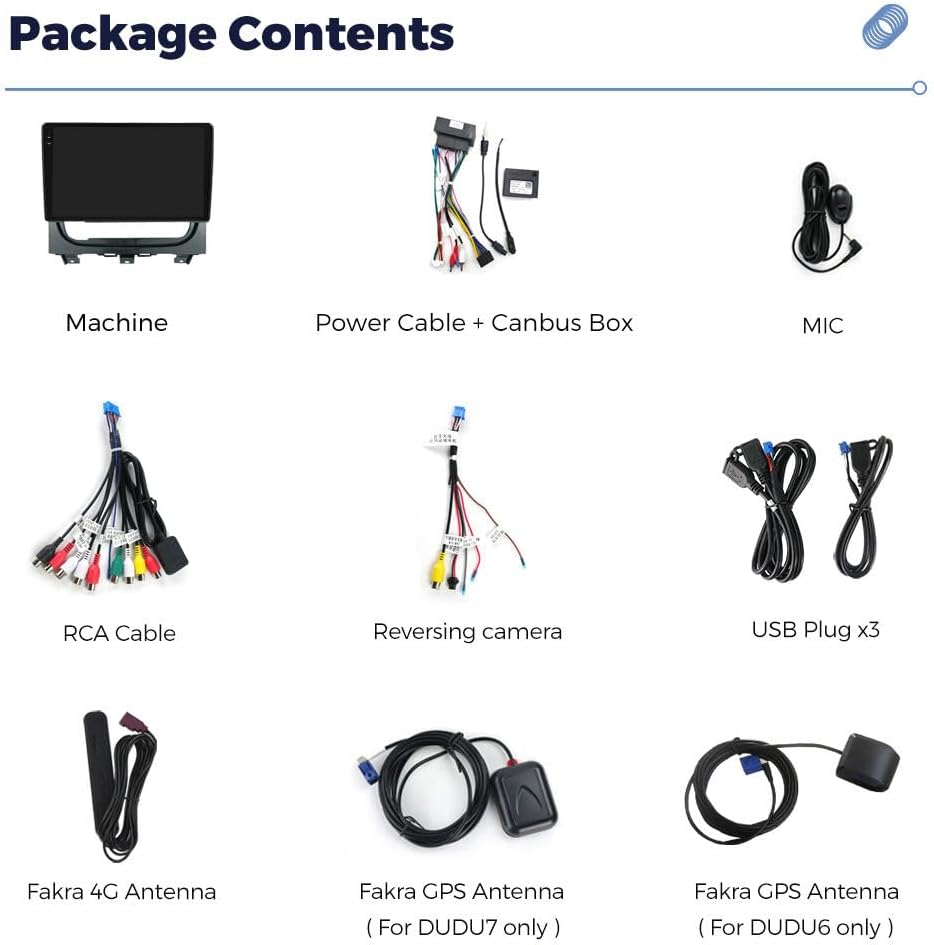
Image: Contents of the DUDUAUTO DUDU7 package.
- Main Head Unit (DUDU7)
- Power Cable + Canbus Box
- Microphone (MIC)
- RCA Cable
- Reversing Camera Cable
- USB Plugs (x3)
- Fakra 4G Antenna
- Fakra GPS Antenna (For DUDU7 only)
3. Setup and Installation
3.1 Vehicle Compatibility
This Android radio is specifically designed for Fiat Strada Idea models manufactured between 2012 and 2016. It supports factory steering wheel controls and OEM rear cameras. Some vehicles may require an additional LVDS box for full functionality with the OEM camera.
3.2 Physical Installation
The DUDU7 head unit replaces the existing car stereo. Professional installation is recommended to ensure proper fitment and wiring. The images below illustrate the appearance of the dashboard before and after the installation of the DUDUAUTO DUDU7 unit.
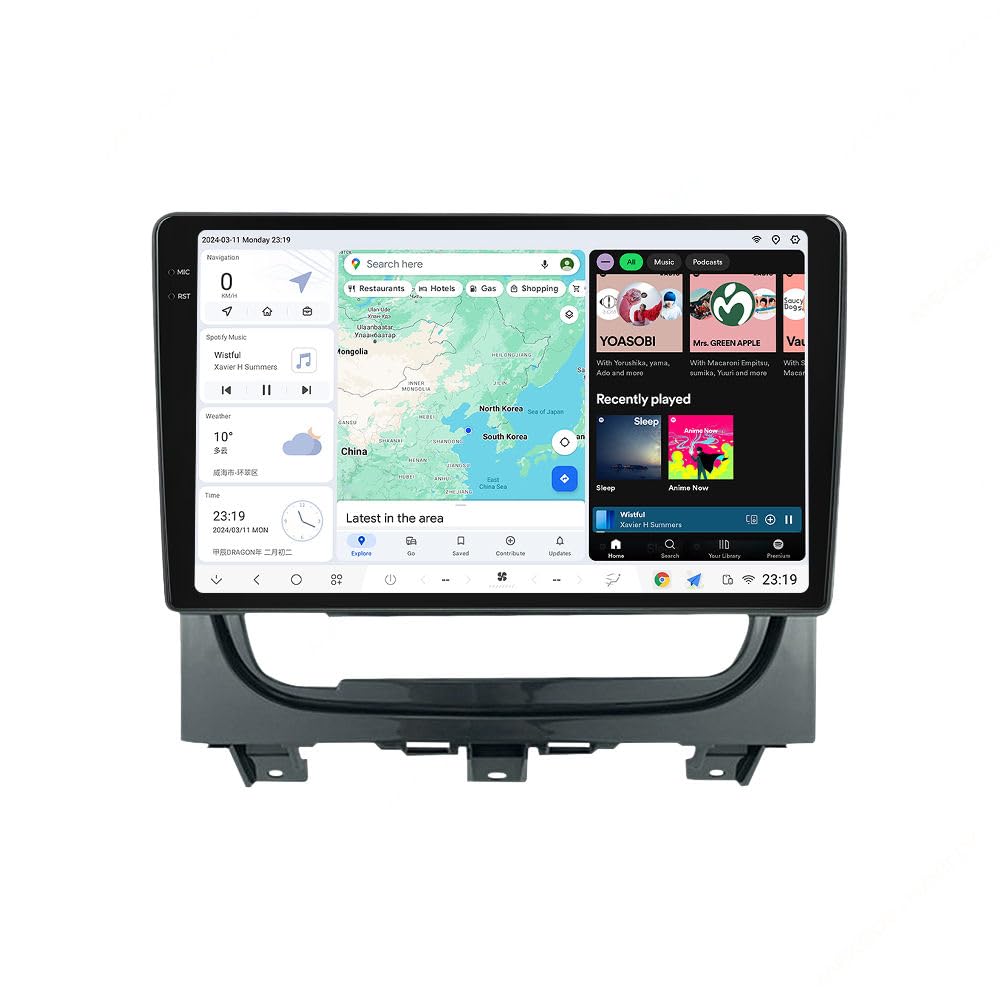
Image: Dashboard appearance before and after DUDUAUTO DUDU7 installation.
3.3 Wiring and Connections
Carefully connect all cables according to your vehicle's wiring diagram and the provided DUDU7 connection points. Ensure all connections are secure to prevent malfunctions.

Image: DUDU7 Rear Panel Connection Diagram.
- Power Cable (G): Connects to the vehicle's power supply via the Canbus box.
- USB Ports (D, E): Connect external USB devices. The unit features USB 3.2 GEN1 (Type-C) and USB 2.0 ports.
- GPS Antenna (6): Connect the Fakra GPS Antenna for navigation functionality.
- 4G Antenna (4): Connect the Fakra 4G Antenna for mobile data access.
- Microphone (0): Connect the external microphone for clear voice communication.
- RCA Cable (A): For audio/video input/output connections.
- Reverse Video Cable (F): Connects to the reversing camera.
- Radio Antenna (8): Connect the vehicle's radio antenna.
- WIFI (7): Internal Wi-Fi module.
- Protocol Serial Use with Can-bus (C): For vehicle data communication.
- 360 Panoramic Device (B): Connection for optional 360-degree panoramic camera system.
4. Operating Instructions
4.1 Basic Operation
The DUDU7 operates on Android 13, providing a familiar and intuitive user interface. Power on the unit using your vehicle's ignition. The touchscreen allows for navigation through menus and applications.
4.2 Wireless CarPlay & Android Auto
Connect your smartphone wirelessly for seamless integration of CarPlay (for iPhone) or Android Auto (for Android phones). This allows access to navigation, music, calls, and messages directly from the head unit's display.
4.3 Bluetooth Connectivity
The unit features a Qualcomm 3031 Bluetooth 5.0 chip, supporting aptX HD protocol for high-quality audio streaming and stable hands-free calling. Pair your device through the Bluetooth settings menu.
4.4 4G LTE & Wi-Fi
Insert a SIM card into the designated slot for 4G internet access. Alternatively, connect to a Wi-Fi hotspot for internet connectivity, enabling online navigation, streaming, and app downloads.
4.5 Audio Features
The DUDU7 incorporates an AKM7739 DSP with Velvet Audio Technology and a TDA7808 Digital AB type power amplifier. It supports Optical + Coaxial and RCA 5.1 Channel Outputs for enhanced audio quality and system expansion.

Image: AKM7739 DSP Velvet Audio Technology components.
4.6 GPS Navigation
Utilize the integrated GPS with Dual Band 6 mode (L1 L5 B1 B2a E1 E5a) for accurate and reliable navigation. Pre-installed maps or online navigation apps can be used.
4.7 DUDU OS Features
The DUDU OS offers various modes and customization options, including dynamic wallpapers, to personalize your user experience.

Image: DUDU OS 3.5 User Interface.

Image: DUDU OS 3.0 Dynamic Wallpaper and Display Modes.
5. Specifications
The following table details the technical specifications of the MekedeTech DUDUAUTO DUDU7 Android Radio.
| Feature | Specification |
|---|---|
| Model Number | DUDU7 |
| Operating System | Android 13 |
| CPU | 8 Core UIS7870 Customized version A76 2.7Ghz 6nm processor |
| Memory (RAM) | 8GB |
| Storage (ROM) | 128GB (UFS 3.1) |
| Display Resolution | 2000x1200 |
| Display Type | OLED, Capacitive Touch Screen |
| GPS | Dual Band 6 mode L1 L5 B1 B2a E1 E5a |
| Microphone | Digital Noise Cancellation Microphone |
| USB Ports | USB 3.2 GEN1*1 (TYPE-C), USB 2.0*3 |
| Power Amplifier | TDA7808 Digital AB type |
| DSP | AKM7739 Velvet Audio Technology |
| Bluetooth Chip | Qualcomm 3031 (Supports aptX HD protocol, BT5.0) |
| Audio Output | Optical + Coaxial, RCA 5.1 Channel Outputs |
| WiFi Type | 802.11a/b/g/n/ac (Support 5G WIFI) |
| Radio IC | TDA7708 |
| Work Voltage | 9V~16V |
| CarPlay/Android Auto | Wired and Wireless support |
| 360 Panorama | Includes 360 panoramic chip by default |
The UFS 3.1 memory provides significantly faster read/write speeds compared to previous generations, enhancing application loading and boot times.

Image: UFS 3.1 Memory Read Speed Comparison.
6. Maintenance
To ensure the longevity and optimal performance of your DUDUAUTO DUDU7 Android Radio, follow these maintenance guidelines:
- Cleaning: Use a soft, dry cloth to clean the screen and exterior. Avoid abrasive cleaners or solvents.
- Software Updates: Periodically check for and install software updates to ensure the system runs efficiently and securely.
- Temperature: Avoid exposing the unit to extreme temperatures, which can affect performance and lifespan.
- Connections: Ensure all cables remain securely connected. Loose connections can lead to intermittent issues.
7. Troubleshooting
If you encounter issues with your DUDUAUTO DUDU7, refer to the following common troubleshooting steps:
- No Power: Check all power connections and ensure the vehicle's ignition is on. Verify fuses if necessary.
- No Sound: Check speaker connections, volume settings, and audio output selections. Ensure no cables are loose.
- Touchscreen Unresponsive: Try restarting the unit. If the issue persists, a factory reset might be required (note: this will erase user data).
- GPS Signal Loss: Ensure the GPS antenna is properly installed and has a clear view of the sky.
- Bluetooth/Wi-Fi Connectivity Issues: Restart the unit and your connected device. Ensure both are within range and not experiencing interference.
- CarPlay/Android Auto Not Connecting: Verify your phone's settings for CarPlay/Android Auto. Ensure the connection is stable (wired or wireless).
For persistent issues, contact customer support.
8. Warranty Information
The MekedeTech DUDUAUTO DUDU7 Android Radio comes with a 1-Year Warranty from the date of purchase. This warranty covers manufacturing defects and malfunctions under normal use. Please retain your proof of purchase for warranty claims. The warranty does not cover damage caused by improper installation, misuse, accidents, or unauthorized modifications.
9. Customer Support
For further assistance, technical support, or warranty inquiries, please visit the official MekedeTech Store or contact their customer service department.
MekedeTech Store: Visit the MekedeTech Store on Amazon
