
1. Introduction
Thank you for choosing the PANAMALAR Wireless Lavalier Microphone K80-Black. This device is designed to provide high-quality audio recording for various applications, including video recording, vlogging, live streaming, and online meetings. It features a compact, plug-and-play design with intelligent noise cancellation, ensuring clear sound capture for both iPhone and Android smartphones.
2. What's in the Box
Carefully unpack your PANAMALAR Wireless Lavalier Microphone and ensure all components are present:
- Charging Box (x1)
- Microphone Transmitter (x2)
- Microphone Receiver (x1)
- Furry Windscreen (x2)
- Magnet Clip (x2)
- Type-C Charging Cable (x1)
- User Manual (x1)

Image: All components included in the PANAMALAR Wireless Lavalier Microphone K80-Black package.
3. Setup Instructions
The PANAMALAR Wireless Lavalier Microphone is designed for simple plug-and-play operation. No additional applications or Bluetooth pairing are required.
3.1 Initial Connection
- Plug in the Receiver: Insert the receiver into the USB Type-C or Lightning port of your smartphone.
- Turn on the Microphone: Press the power button on the microphone transmitter. The indicator light will show its status.
- Automatic Pairing: The microphone and receiver will automatically pair. A solid indicator light on both devices typically signifies a successful connection.

Image: Step-by-step guide for connecting the wireless microphone to a smartphone.
3.2 Smartphone Compatibility Notes
- iPhone/Huawei Phones: Plug and play directly.
- Vivo/Oppo/Other Android Phones: You may need to activate the OTG (On-The-Go) function in your phone's settings for the microphone to be recognized. Refer to your phone's manual for specific instructions on enabling OTG.
- OTG Function: The OTG function may automatically disable after 5-10 minutes of inactivity on some devices. Re-enable if necessary.
- Computer/Camera: This microphone is designed for iPhone and Android smartphones only and is not compatible with computers or dedicated cameras.
4. Operating Instructions
4.1 Attaching the Microphone
The microphone transmitter features a compact design with both a clip and a magnetic attachment for versatile placement.
- Clip-on: Securely clip the microphone to your collar, lapel, or clothing, ensuring the microphone capsule faces towards your mouth for optimal sound capture.
- Magnetic Attachment: Use the provided magnet clip to attach the microphone to clothing without visible clips, offering a discreet option.

Image: Demonstrating the compact and magnetic design for attaching the microphone.
4.2 Noise Reduction
The microphone integrates a 2.4GHz wireless transmission chip and intelligent noise-canceling technology (SNR ≥ 64dB) to filter out unwanted background noise. For enhanced performance in noisy environments, attach the furry windscreen.

Image: Visual representation of the microphone's noise reduction capabilities.
4.3 Transmission Range
The microphone offers a stable wireless transmission range of up to 40 meters (131 feet), allowing for flexible recording in various indoor and outdoor settings without signal loss.

Image: Illustration of the microphone's 40-meter long-distance transmission range.
4.4 Battery Life
Each microphone transmitter provides approximately 4-5 hours of operation on a single charge. The included charging case extends the total usage time to 25-30 hours, ensuring sufficient power for extended recording sessions.
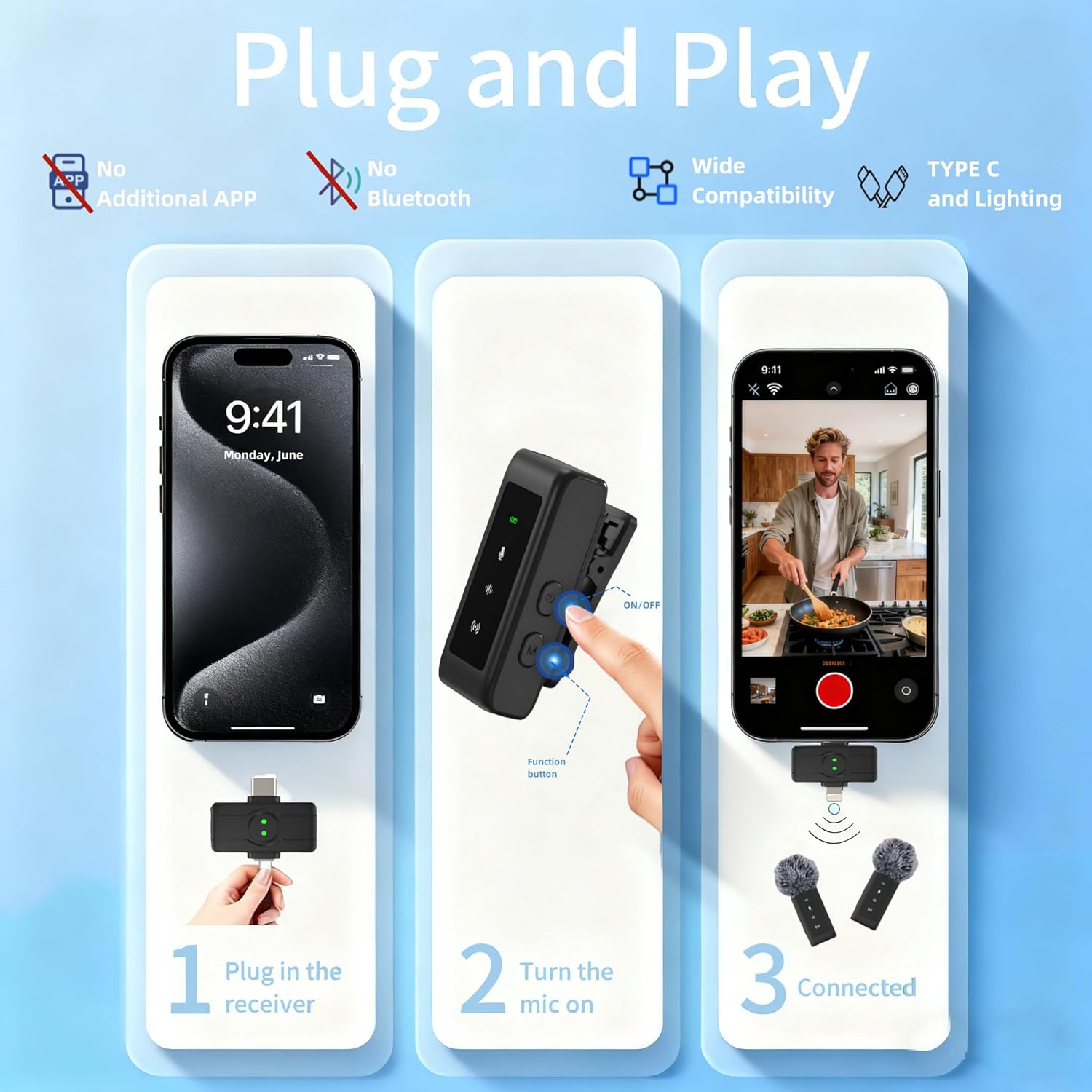
Image: Overview of the microphone and charging case battery life.
4.5 Applications
This wireless lavalier microphone is suitable for a wide range of applications, including:
- Vlogging and YouTube content creation
- Live streaming on platforms like Facebook, Instagram, TikTok
- Interviews
- Online meetings and virtual conferences
- Podcasting and voice-overs

Image: Examples of the microphone's wide application in different recording environments.
5. Maintenance
To ensure the longevity and optimal performance of your PANAMALAR Wireless Lavalier Microphone, follow these maintenance guidelines:
- Cleaning: Use a soft, dry cloth to wipe the microphone transmitters, receiver, and charging case. Avoid using harsh chemicals or abrasive materials.
- Storage: Store the microphone system in its charging case when not in use to protect it from dust, moisture, and physical damage. Keep it in a cool, dry place.
- Charging: Charge the devices regularly, even if not in frequent use, to maintain battery health. Use only the provided Type-C charging cable.
- Furry Windscreen: Clean the furry windscreens gently by hand with mild soap and water if they become dirty. Allow them to air dry completely before reattaching.
6. Troubleshooting
If you encounter issues with your PANAMALAR Wireless Lavalier Microphone, refer to the following troubleshooting tips:
6.1 Microphone Not Connecting/No Sound
- Check Power: Ensure both the microphone transmitter(s) and the receiver are powered on and fully charged.
- Receiver Connection: Verify that the receiver is securely plugged into your smartphone's port.
- Automatic Pairing: Confirm that the devices have paired successfully (indicated by a solid light). If not, try turning them off and on again.
- Android OTG: For Android phones (especially Vivo/Oppo), ensure the OTG function is enabled in your phone's settings.
- Compatibility: Remember the microphone is for smartphones only (iPhone/Android), not computers or cameras.
6.2 Poor Sound Quality/Excessive Noise
- Microphone Placement: Ensure the microphone is clipped correctly and facing towards your mouth.
- Furry Windscreen: Use the furry windscreen in outdoor or windy conditions to minimize environmental noise.
- Distance: While the transmission range is 40m, optimal sound quality is achieved at closer distances. Avoid exceeding the maximum range.
- Interference: Move away from strong electromagnetic interference sources that might affect wireless transmission.
6.3 Charging Issues
- Cable and Adapter: Ensure you are using the provided Type-C charging cable and a compatible USB power adapter.
- Charging Case: Check if the charging case itself has power and is properly charging the transmitters.
If these steps do not resolve your issue, please contact customer support for further assistance.
7. Specifications
| Feature | Specification |
|---|---|
| Model Number | K80-Black |
| Transmission Technology | 2.4GHz Wireless |
| Transmission Range | Up to 40 meters (131 feet) |
| Signal-to-Noise Ratio (SNR) | ≥ 64dB |
| Sound Pressure Level (SPL) | 115dB |
| Audio Sensitivity | 58 Decibels |
| Microphone Battery Life | 4-5 hours (per charge) |
| Charging Case Battery Life | 25-30 hours (additional charge) |
| Connectivity Type | USB Type-C / Lightning |
| Compatible Devices | Smartphones (iPhone, Android) |
| Item Weight | 4.9 ounces |
| Battery Type | Lithium Ion |
8. Customer Support
For any questions, concerns, or technical assistance regarding your PANAMALAR Wireless Lavalier Microphone K80-Black, please do not hesitate to contact our customer service team. We are committed to providing friendly and helpful support.
Please refer to the contact information provided on the product packaging or the official PANAMALAR website for the most up-to-date support channels.