
1. Introduction
The ANCEL BT310 is a versatile battery tester designed for 12V and 24V lead-acid and lithium batteries. It provides comprehensive diagnostics for battery health, cranking systems, and charging systems across various vehicle types.
This manual provides instructions for the proper use and maintenance of your ANCEL BT310 battery tester.
2. Product Features
- Wide Compatibility: Supports 12V & 24V lead-acid (Flooded, AGM, GEL, EFB) and lithium batteries. Compatible with cars, SUVs, light trucks, motorcycles, RVs, ATVs, lawn mowers, and boats.
- 3-in-1 System Diagnosis: Tests battery health (SOC, SOH, voltage, internal resistance), cranking system (voltage, time), and charging system (load, no-load, ripple).
- High Accuracy: Delivers up to 99.98% testing accuracy.
- User-Friendly Interface: Ready to use without charging or complex technical knowledge. Clear backlit LCD display with adjustable contrast.
- Enhanced Safety: Features reverse polarity, short-circuit, overvoltage, and over-temperature protection. Includes a silicone protective case for durability.
- Compact & Portable: Easy to carry and store for on-the-go testing.
- All-Season Reliability: Operates reliably in temperatures from -4°F to 158°F (-20°C to 70°C).
- Multi-Language Support: Available in English, French, Spanish, German, Italian, and Portuguese.
3. What's in the Box
Upon unpacking, please ensure all items are present:
- 1 x ANCEL BT310 Battery Tester
- 1 x User Manual
Note: No charger or adapter is needed for operation.

Image: The ANCEL BT310 battery tester, its connecting cables with clamps, and the included user manual, laid out on a surface.
4. Setup and Connection
- Prepare the Battery: Ensure the vehicle's ignition is off and all accessories are disconnected. Clean the battery terminals if necessary to ensure a good connection.
- Connect the Clamps:
- Connect the red positive (+) clamp to the positive (+) terminal of the battery.
- Connect the black negative (-) clamp to the negative (-) terminal of the battery.
The device will power on automatically once connected correctly. If connected incorrectly, the device will not power on, and built-in protection will prevent damage.

Image: Illustration demonstrating the correct connection of the red clamp to the positive terminal and the black clamp to the negative terminal of a car battery. An incorrect connection is also shown with a red 'X'.
5. Operating Instructions
The ANCEL BT310 offers three primary testing functions: Battery Test, Cranking Test, and Charging Test.
5.1. Battery Test
- From the main menu, use the arrow buttons to select "Battery Test" and press "ENTER".
- Select Battery Type: Use the arrow buttons to choose your battery type (e.g., Flooded, AGM, GEL, EFB, Lithium-Ion) and press "ENTER".

Image: The ANCEL BT310 display showing various battery types for selection, including Flooded, EFB, GEL, AGM, and Lithium-Ion.
- Enter CCA Value: Input the Cold Cranking Amps (CCA) value, typically found on the battery label, using the arrow buttons to adjust the value and "ENTER" to confirm.
- The tester will perform the test and display results such as State of Health (SOH), State of Charge (SOC), voltage, and internal resistance.
- Interpret Results: The display will show one of five clear results:
- GOOD BATTERY: Battery is in good condition.
- GOOD-RECHARGE: Battery is good but needs recharging.
- CHARGE & RETEST: Battery needs charging and retesting to confirm health.
- REPLACE BATTERY: Battery is failing and should be replaced.
- BAD CELL-REPLACE: Battery has a bad cell and must be replaced.
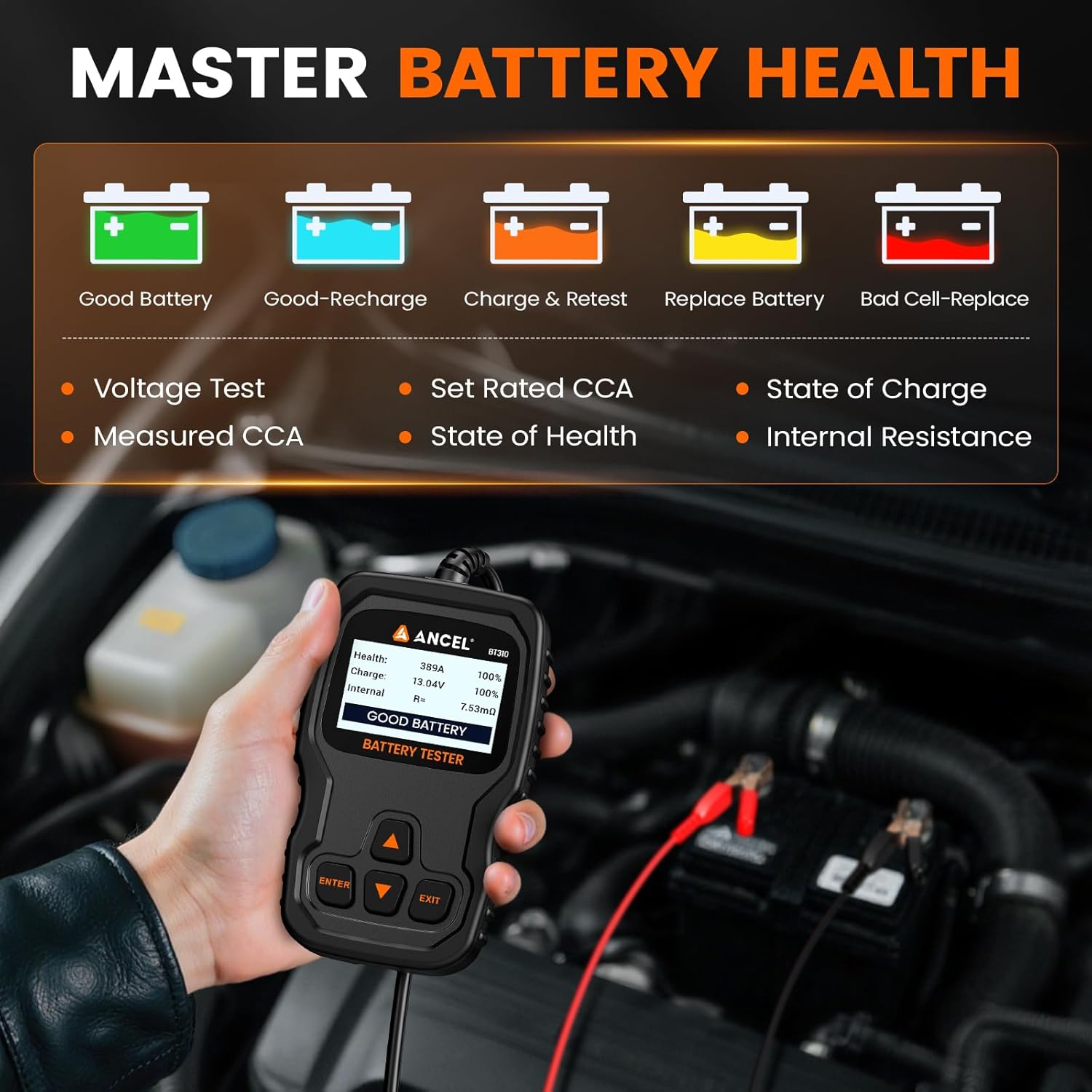
Image: The ANCEL BT310 screen showing a "GOOD BATTERY" result with details on health, charge, and internal resistance. Icons for different result statuses are also shown.
Video: An official ANCEL video demonstrating the battery health test process and result interpretation on the BT310 tester.
5.2. Cranking Test
- From the main menu, select "Cranking Test" and press "ENTER".
- Follow the on-screen prompts to start the vehicle's engine.
- The tester will measure cranking voltage and time.
- The result will indicate if the cranking system is "CRANKING NORMAL" or if there are issues.

Image: The ANCEL BT310 display showing the results of a cranking test, including the time taken and voltage, indicating a "CRANKING NORMAL" status.
5.3. Charging Test
- From the main menu, select "Charging Test" and press "ENTER".
- Follow the on-screen prompts. The tester will assess the charging system under various conditions (load, no-load, ripple).
- The results will indicate the alternator's performance and whether the charging system is "VOLTAGE NORMAL" or if issues are detected.

Image: The ANCEL BT310 display showing the results of a charging system test, including unloaded voltage, loaded voltage, and ripple, indicating a "VOLTAGE NORMAL" status.
6. Maintenance and Care
- Cleaning: Wipe the device with a soft, dry cloth. Avoid using abrasive cleaners or solvents.
- Storage: Store the tester in a dry, cool place away from direct sunlight and extreme temperatures.
- Cable Inspection: Regularly check the cables and clamps for any signs of damage or wear. Replace if necessary.
- Protective Case: Keep the silicone protective case on the device to guard against drops and daily wear.
7. Troubleshooting
| Problem | Possible Cause | Solution |
|---|---|---|
| Device does not power on | Incorrect clamp connection; battery completely dead | Ensure clamps are connected correctly (red to positive, black to negative). Check battery voltage with a multimeter; if extremely low, the tester may not power on. |
| Inaccurate test results | Loose connections; incorrect CCA input; dirty battery terminals | Re-secure clamps. Verify the CCA value entered matches the battery label. Clean battery terminals. |
| "CHARGE & RETEST" result | Battery is discharged but potentially healthy | Fully charge the battery and perform the test again. |
| "REPLACE BATTERY" or "BAD CELL-REPLACE" result | Battery is failing or has a damaged cell | The battery needs to be replaced. |
8. Specifications
| Feature | Specification |
|---|---|
| Model | BT310 |
| Brand | ANCEL |
| Power Source | Battery Powered (from vehicle battery) |
| Operating Voltage | 12V / 24V |
| Min. Operating Voltage | 12 Volts |
| Upper Temperature Rating | 158°F (70°C) |
| Lower Temperature Rating | -4°F (-20°C) |
| Measurement Type | Volts, Amps |
| Supported Battery Types | Flooded, AGM, GEL, EFB, Lithium |
| CCA Range | 100-2000 CCA |
| Certifications | CE, RoHS, UL |
9. Warranty and Support
ANCEL provides reliable technical support and focuses on product quality. For warranty claims, technical assistance, or any inquiries regarding your BT310 battery tester, please refer to the contact information provided in the product packaging or visit the official ANCEL website.
Since 2013, ANCEL has been committed to delivering user-friendly automotive tools.


