
Introduction
This manual provides essential instructions for the safe and efficient use of your unho Motorized Floor TV Stand. Please read thoroughly before assembly and operation to ensure proper installation and functionality.
Safety Information
- Ensure all components are present and undamaged before beginning assembly.
- Do not exceed the maximum weight capacity of 132 lbs (60 kg).
- Verify your TV's VESA mounting hole pattern falls within the supported range of 200x200mm to 600x400mm.
- Always lock the casters when the stand is in a stationary position to prevent accidental movement.
- Keep children and pets away from the motorized mechanism during operation.
- Do not attempt to modify the product or use it for purposes other than its intended design.
- Ensure the power cord is not pinched or damaged during assembly or operation.
Package Contents
Please verify all parts are included before beginning assembly. Refer to the installation video for a visual guide to the components.
- Base Frame with Motorized Column
- Wooden Shelf
- TV Mounting Plate
- TV Mounting Brackets (2)
- Casters (4) with locking mechanism
- Remote Controls (2)
- Power Adapter
- Assembly Hardware (various screws, washers, wrench, hex key)
Specifications
| Feature | Detail |
|---|---|
| Model Number | FRFCAU-Z1876-US |
| TV Size Compatibility | 37 - 77 inches |
| Weight Capacity | Up to 132 lbs (60 kg) |
| VESA Compatibility | 200x200mm to 600x400mm |
| Height Adjustment Range | Approximately 41.3 - 70.8 inches (105 - 180 cm) |
| Material | Heavy-duty cold-rolled steel, Wood-grain MDF |
| Color | Black & Wood |
| Item Weight | 37 pounds |
| Product Dimensions (Overall) | 26 x 15.7 x 65 inches (approximate, adjustable height) |
| Shelf Weight Limit | 20 kg |
Setup and Assembly
Follow these steps carefully to assemble your unho Motorized Floor TV Stand. An installation video is also provided for visual guidance.
Step 1: Attach Casters to the Base Frame
Mount the four casters to the base frame. Ensure the casters are in the locked position during installation for stability. Use the provided screws and tools.
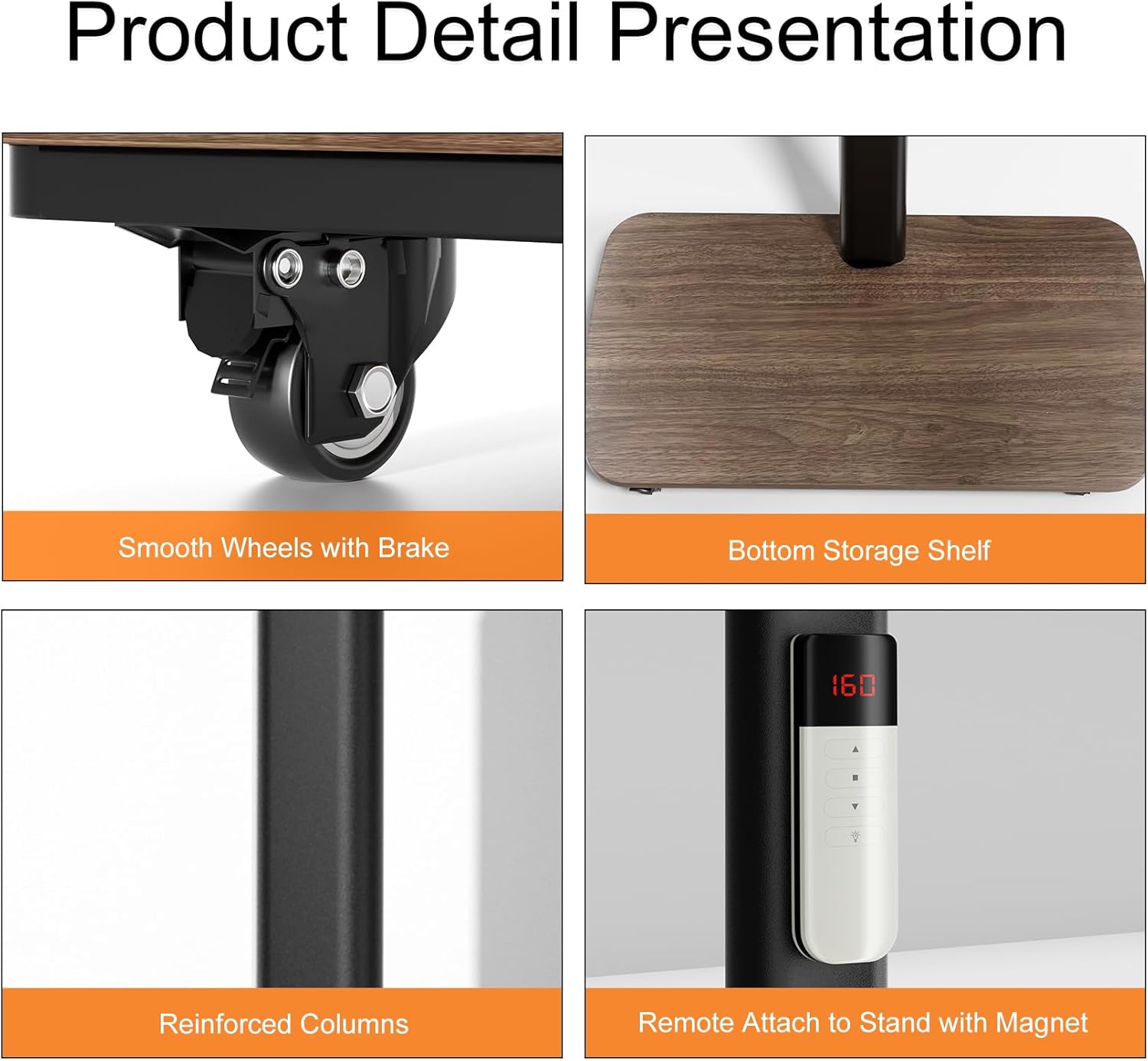
Image: Detail of the smooth-rolling wheels with locking mechanism.
Step 2: Secure the Motorized Column to the Base Frame
Attach the motorized column to the central mounting point on the base frame using the specified screws. Ensure a secure fit.
Step 3: Install the Wooden Shelf
Slide the wooden shelf onto the motorized column. Lower the column if necessary to make installation easier, then secure the shelf to the base frame using screws.
Step 4: Assemble the TV Mounting Plate
Attach the TV mounting plate to the bracket using screws and nuts. Hold the screws in place with a wrench and tighten securely.
Step 5: Attach TV Mounting Plate to Column
Secure the assembled TV mounting plate to the top of the motorized column using screws.
Step 6: Attach Brackets to Your TV
Attach the two TV mounting brackets to the back of your television. Select the appropriate screws and washers that fit your TV's VESA pattern. Ensure the brackets are level and securely fastened.
Step 7: Mount Your TV to the Stand
Carefully lift your TV and hook the attached brackets onto the TV mounting plate on the stand. Ensure both brackets are properly seated.
Step 8: Secure the TV
Once the TV is hung, tighten the safety screws at the bottom of the TV mounting brackets to firmly secure the TV to the stand, preventing accidental dislodgement.
Installation Video Guide:
For a visual step-by-step guide, please watch the official installation video below.

Video: Official unho Motorized Floor TV Stand Installation Guide. This video demonstrates the complete assembly process from unboxing to final TV mounting.
Operating Instructions
Remote Control Functions:
The stand comes with two remote controls for convenient operation. Each remote can be magnetically attached to the stand for easy storage.

Image: Remote control showing buttons for Up, Pause, Down, and Pairing.
- Up Button: Press to raise the TV to a higher position.
- Down Button: Press to lower the TV to a lower position.
- Pause Button: Press to stop the TV at the current height during adjustment.
- Pairing Button: Used for pairing the remote with the stand (refer to troubleshooting if pairing issues occur).
Adjusting TV Height:
Use the Up or Down buttons on the remote control to adjust the TV to your desired viewing height. The motorized system operates smoothly and quietly, with an adjustment range of approximately 41.3 to 70.8 inches (105 to 180 cm).
Image: The TV stand demonstrating its motorized height adjustment feature.
Moving the TV Stand:
Unlock the casters by pressing down on their locking mechanisms. Carefully push the stand to its new location. Once positioned, lock the casters again to ensure stability.
Image: Detail of the caster wheel with its locking mechanism engaged.
Maintenance
- Cleaning: Wipe down the stand with a soft, dry cloth. For stubborn marks, use a slightly damp cloth and mild detergent, then dry thoroughly. Avoid abrasive cleaners.
- Caster Care: Periodically check the casters for any debris (hair, lint) that might impede smooth movement. Clean as necessary.
- Motor Inspection: Ensure the power cable for the motorized lift is not pinched or damaged.
- Fastener Check: Regularly check all screws and bolts to ensure they remain tight, especially after moving the stand or adjusting the TV.
Troubleshooting
| Problem | Possible Cause | Solution |
|---|---|---|
| TV stand does not move up or down. | Power cable disconnected; Remote control battery low; Remote not paired; Motor malfunction. | Check power connections. Replace remote batteries. Re-pair remote (consult manufacturer for specific pairing instructions if needed). Contact customer support if motor issue is suspected. |
| TV stand moves unevenly or makes unusual noises. | Obstruction in the lift mechanism; Loose fasteners; Overload. | Inspect for obstructions and remove. Tighten all assembly screws. Ensure TV weight does not exceed 132 lbs (60 kg). |
| Casters do not roll smoothly. | Casters are locked; Debris caught in wheels. | Unlock casters. Clean any debris from the wheels. |
Warranty and Support
For warranty information or technical support, please refer to the documentation included with your purchase or visit the official unho website. You can also contact unho customer service directly for assistance.
Contact Information:
- Brand: unho
- Website: unho Amazon Store
Product Overview Video
Watch this video for a general overview of the unho Motorized Floor TV Stand's features and design.

Video: General overview of the unho Motorized Floor TV Stand, highlighting its design, motorized lift, and mobility.