
1. Introduction
This manual provides detailed instructions for the safe and effective operation of the ZOYI ZT-XR1 Battery Internal Resistance Tester and Digital Multimeter. The ZT-XR1 is a versatile 2-in-1 device designed for measuring battery internal resistance and voltage, as well as performing various digital multimeter functions. Please read this manual thoroughly before using the device to ensure proper functionality and to prevent damage or injury.
2. Safety Information
Always adhere to the following safety precautions to prevent electric shock, injury, or damage to the device:
- Do not exceed the maximum input voltage ratings specified for each function.
- Ensure test leads are in good condition and properly connected before making measurements.
- Avoid using the device in wet environments or with wet hands.
- Do not attempt to measure voltage or current on circuits with unknown potentials.
- When testing batteries, be aware of potential hazards such as short circuits or chemical exposure. Wear appropriate personal protective equipment.
- Do not open the device casing unless specifically instructed by qualified service personnel.
- Keep the device away from children.
3. Package Contents
Verify that all items listed below are included in your package:
- ZOYI ZT-XR1 Battery Internal Resistance Tester and Digital Multimeter
- Test Leads (for multimeter functions)
- Battery (internal, pre-installed)
- Test Cables (Kelvin clips for internal resistance measurement)
- Cloth Bag for storage
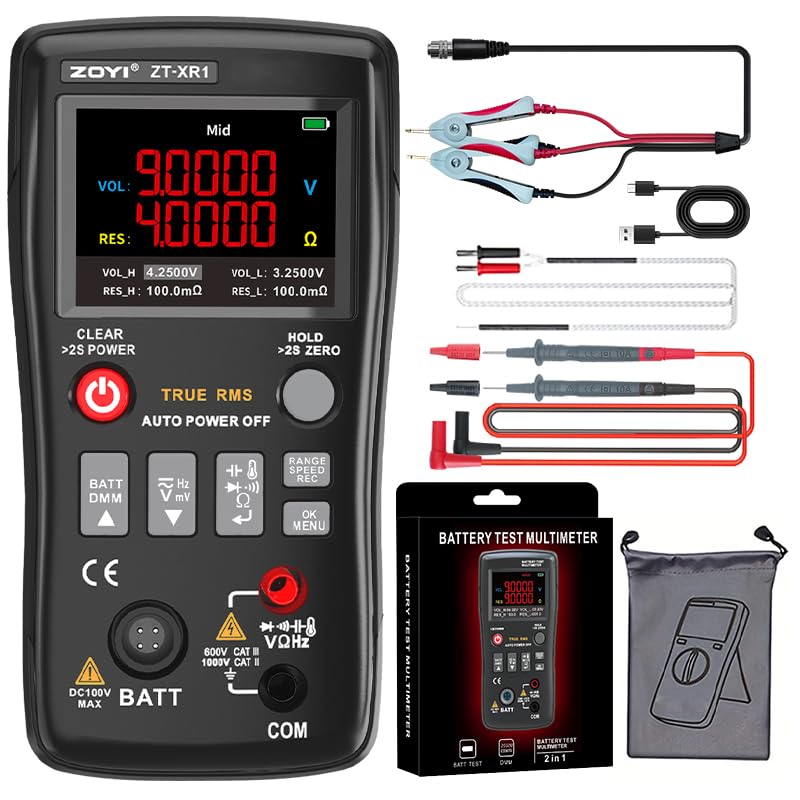
Figure 3.1: ZOYI ZT-XR1 device with its standard accessories, including test leads, Kelvin clips, and a storage bag.
4. Product Overview
The ZOYI ZT-XR1 is a dual-function device serving as both a battery internal resistance tester and a digital multimeter. It is designed for inspection and repair of various battery types, including automotive batteries, and is also applicable for general maintenance of battery-powered devices.
Key Features:
- Battery Internal Resistance Tester: Automatically measures battery internal resistance and voltage values with simultaneous display. Measurement data assists in determining battery quality degradation or continued usability.
- Digital Multimeter: Integrates a 25,000-count digital multimeter featuring AC/DC voltage, resistance, capacitance, frequency, temperature, diode test, and continuity check functions.
- Kelvin Clip Testing: Utilizes 4-wire Kelvin clips to minimize lead and contact resistance, enhancing measurement accuracy for internal resistance.
- Technical Specifications: Resistance range: 0.1mΩ-200Ω (adjustable). Voltage range: 100V (maximum input). Auto-shutdown timer: 5-120 minutes (configurable). Buzzer volume: 0-100% adjustable.
- Industrial Design: Features a TFT color display with enhanced clarity and vibrant visualization. Screen brightness: 10%-100% adjustable. Type-C charging interface for modern power supply solutions.
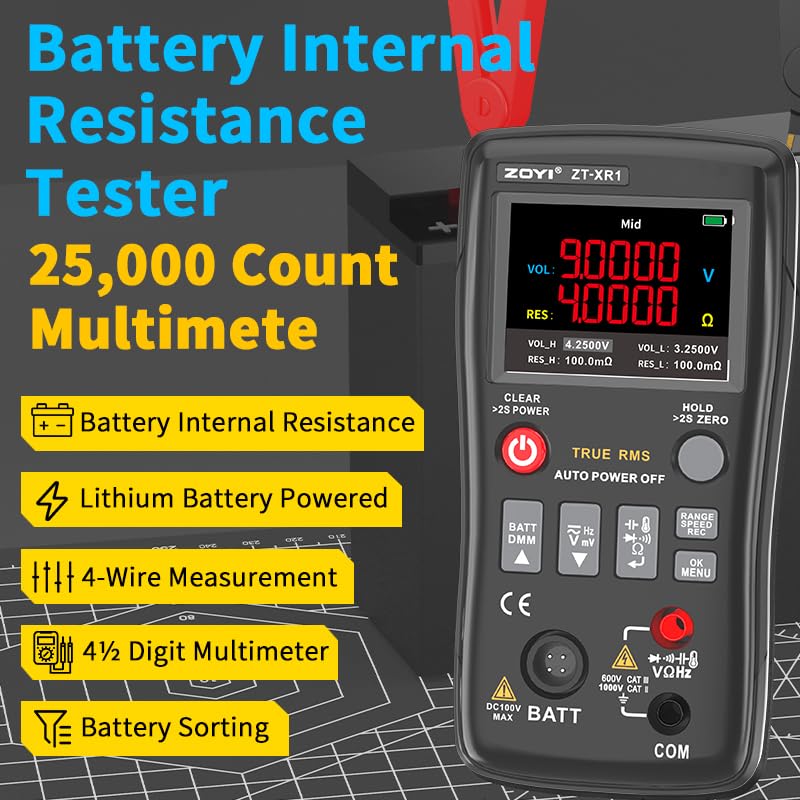
Figure 4.1: The ZOYI ZT-XR1 displaying internal resistance and voltage, highlighting its core battery testing capabilities.
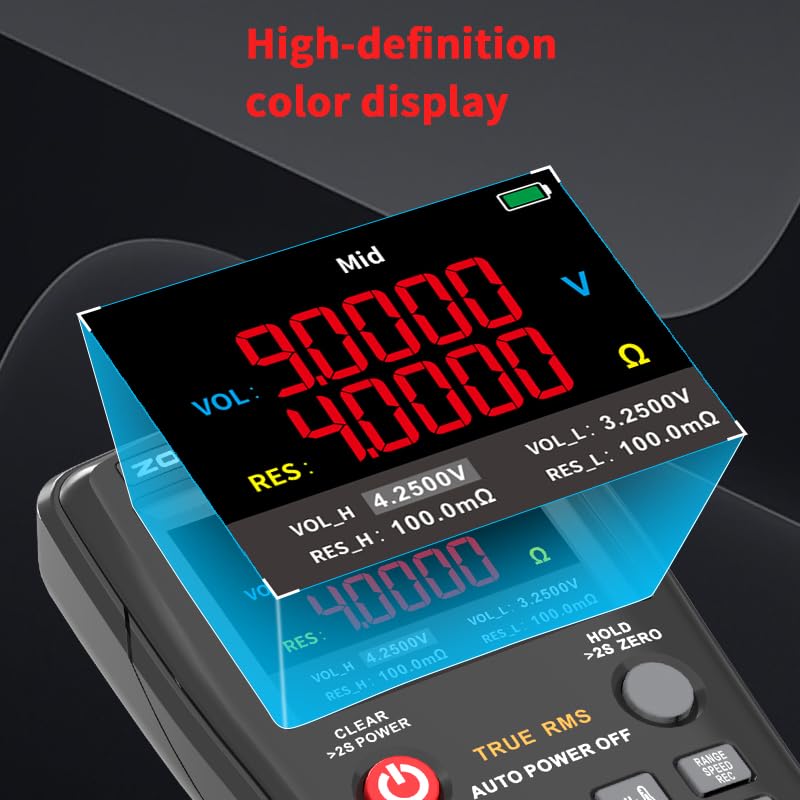
Figure 4.2: A detailed view of the ZT-XR1's high-definition color display, showing clear numerical readings for voltage and resistance.
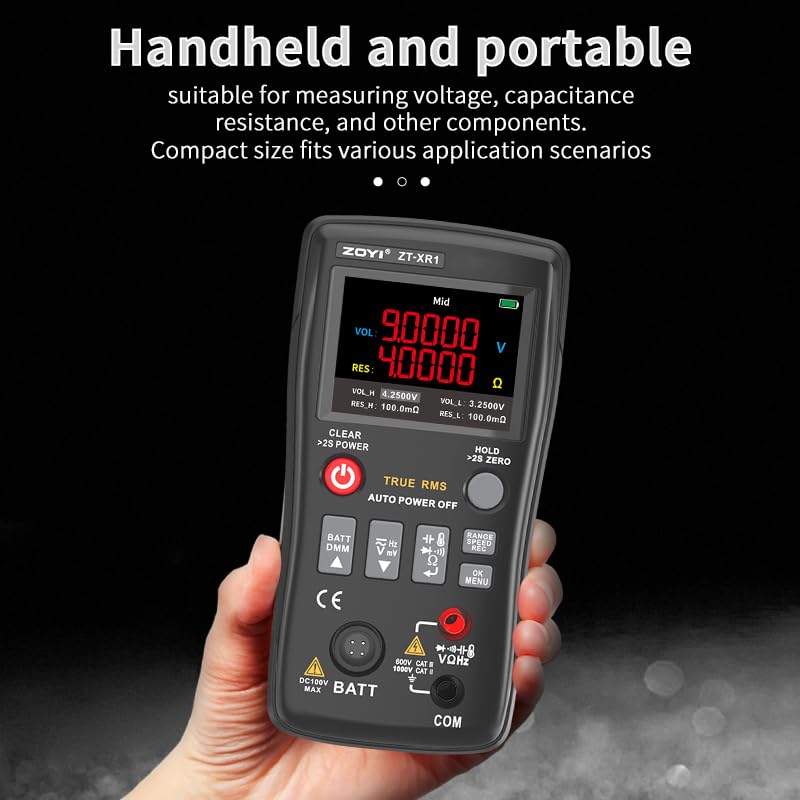
Figure 4.3: The ZT-XR1 held in a hand, illustrating its compact and portable design suitable for various applications.
5. Setup
5.1 Charging the Device
The ZOYI ZT-XR1 is equipped with an internal rechargeable battery. To charge the device, connect a standard USB Type-C cable to the Type-C charging interface on the device and plug the other end into a compatible USB power source (e.g., computer USB port, wall adapter). The charging indicator on the display will show the charging status.
5.2 Power On/Off
To power on the device, press and hold the POWER button until the display illuminates. To power off, press and hold the POWER button again until the display turns off. The device also features an auto-shutdown timer, which can be configured in the settings menu (5-120 minutes).
6. Operating Instructions
6.1 Battery Internal Resistance Measurement
This function allows for precise measurement of a battery's internal resistance and voltage using the provided 4-wire Kelvin clips. This method minimizes measurement errors caused by lead resistance.
- Ensure the device is powered on and in battery test mode (indicated by 'BATT' on the display).
- Connect the 4-wire Kelvin clips to the appropriate terminals on the battery. Ensure a secure and clean connection for accurate readings.
- The device will automatically display the internal resistance (RES) and voltage (VOL) simultaneously.
- Observe the readings to assess battery health. Higher internal resistance typically indicates a degraded battery.
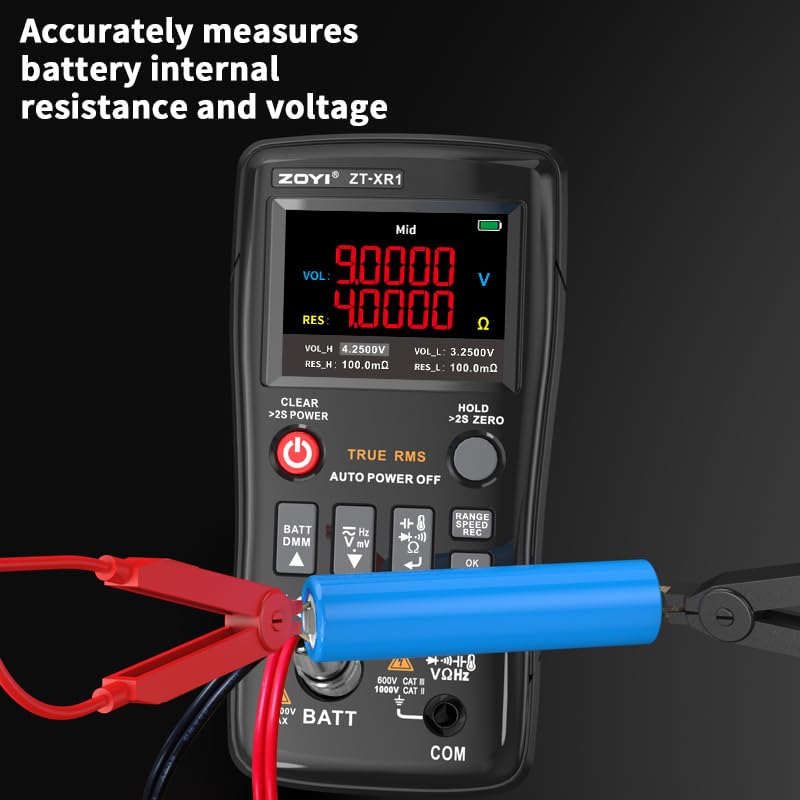
Figure 6.1: The ZT-XR1 connected to a cylindrical battery using Kelvin clips for accurate internal resistance and voltage measurement.
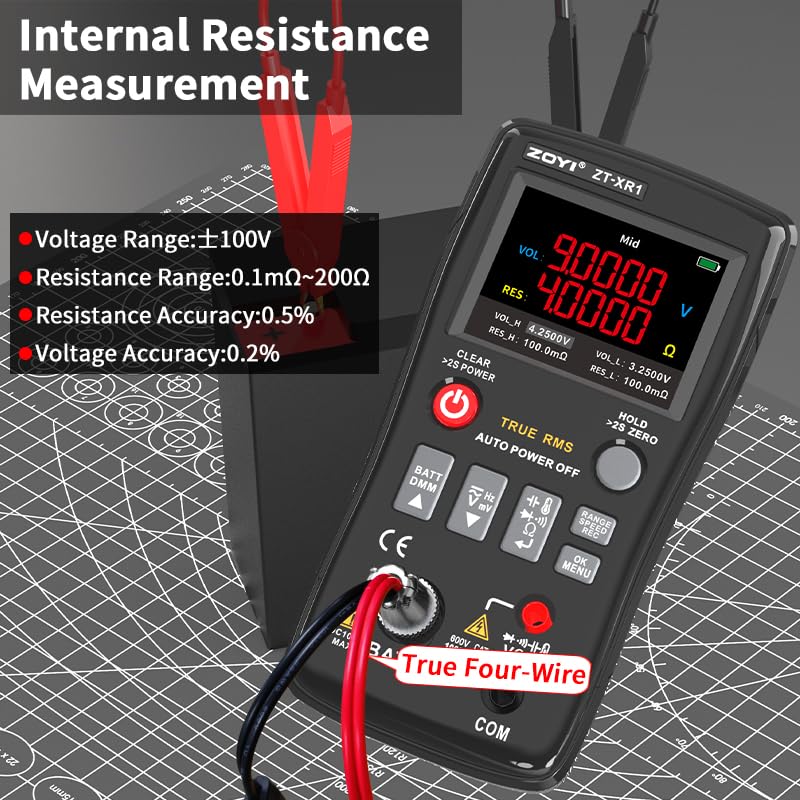
Figure 6.2: The ZT-XR1 showing internal resistance measurement in progress, with details on voltage and resistance ranges and accuracy.
6.2 Digital Multimeter Functions
The ZT-XR1 integrates a comprehensive digital multimeter. Use the function buttons to select the desired measurement mode.
- Voltage (AC/DC): Connect the test leads to the appropriate input jacks and select AC V or DC V mode.
- Resistance (Ω): Connect the test leads to the component and select the resistance mode.
- Capacitance (F): Connect the test leads to the capacitor and select the capacitance mode.
- Frequency (Hz): Connect the test leads to the signal source and select the frequency mode.
- Diode Test: Select diode mode and connect the test leads across the diode.
- Continuity Check: Select continuity mode. The device will emit a buzzer sound if continuity is detected.
Refer to the on-screen prompts and the device's button labels for specific function selection and input jack usage.
6.3 General Operation Tips
- Range Adjustment: The device supports manual voltage and resistance range adjustment. Use the appropriate buttons (e.g., 'RANGE') to cycle through available ranges.
- Data Hold: Press the 'HOLD' button to freeze the current reading on the display. Press again to release.
- Menu Navigation: Use the 'OK/MENU' button to access settings and configuration options.
7. Maintenance
7.1 Cleaning
To clean the device, use a soft, dry cloth. Do not use abrasive cleaners, solvents, or immerse the device in water. Ensure the device is powered off and disconnected from any power source before cleaning.
7.2 Storage
When not in use, store the ZOYI ZT-XR1 in a cool, dry place, away from direct sunlight and extreme temperatures. Use the provided cloth bag to protect the device from dust and scratches. If storing for extended periods, ensure the battery is partially charged (around 50%) to prolong its lifespan.
8. Troubleshooting
If you encounter issues with your ZOYI ZT-XR1, consider the following general troubleshooting steps:
- Device not powering on: Ensure the internal battery is sufficiently charged. Connect the device to a Type-C charger and allow it to charge for some time.
- Inaccurate readings: Check that test leads and Kelvin clips are securely connected and not damaged. Ensure the measurement range is appropriate for the value being measured. Clean contact points on the battery or component.
- Display issues: Adjust screen brightness in the settings menu. If the display remains problematic, contact customer support.
- No continuity sound: Verify that the device is in continuity mode and that the circuit being tested is indeed continuous. Check buzzer volume settings.
For persistent issues, refer to the support section or contact ZOYI customer service.
9. Specifications
The following table details the technical specifications of the ZOYI ZT-XR1:
| Feature | Specification |
|---|---|
| Model Number | ZT-XR1 |
| Product Dimensions | 2.99 x 1.31 x 5.86 inches |
| Item Weight | 16 ounces (1 Pound) |
| Power Source | Battery Powered (1 Nonstandard Battery included) |
| Color | Black |
| AC Voltage Range | 1000.0V/250.00V/25.000V/2.5000V/250.00mV/25.000mV (±(0.05%+3)) |
| DC Voltage Range | 750.0V/250.00V/25.000V/2.5000V/250.00mV/25.000mV (±(0.5%+3)) |
| Resistance Range | 250.00KΩ/25.000KΩ/2.5000KΩ/25.00MΩ/2.500MΩ/250.0MΩ (±(0.5%+3) to ±(5.0%+5)) |
| Internal Resistance Voltage Range | ±100V (Accuracy: 0.2%) |
| Internal Resistance Range | 0.1mΩ~200Ω (Accuracy: 0.5%) |
| Capacitance Range | 999.9μF/99.99μF/9.999μF/999.9nF/99.99nF/9.999mF/99.99mF (±(2.0%+5) to ±(5.0%+5)) |
| Frequency Range | 999.9KHz/99.99KHz/9.999KHz/999.9Hz/99.99Hz (±(0.1%+2)) |
| Diode Test | Yes |
| Continuity Check | Yes |
| Display | 2.4-inch Color Display |
| Charging Interface | Type-C (5V/1A) |
| Battery Type | 2000mAh |
| Functions | Digital Multimeter, Battery Internal Resistance Tester |
| Language | Chinese, English |
| Firmware Upgrade | Yes |
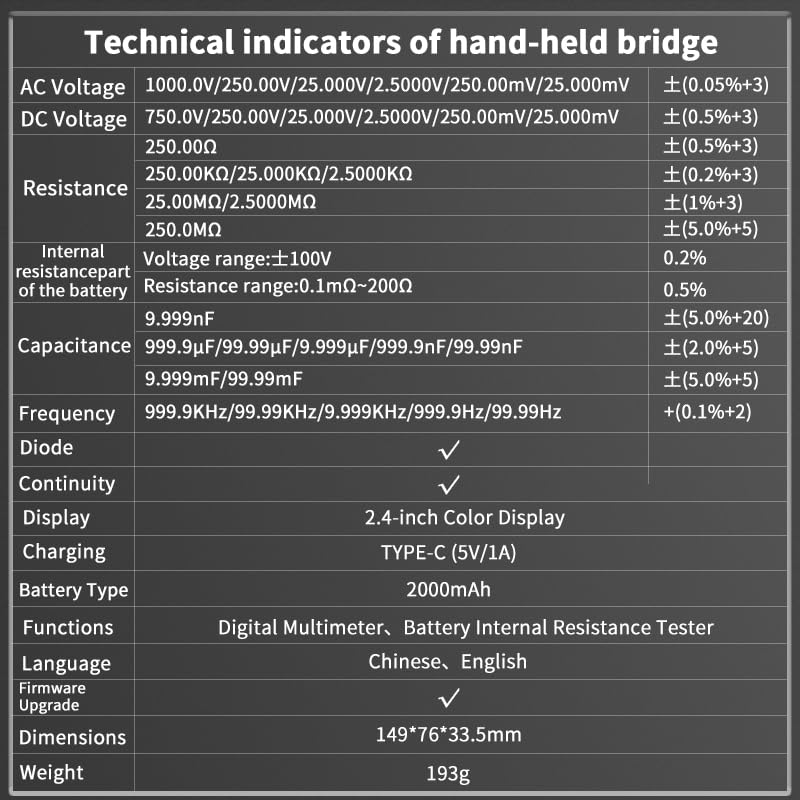
Figure 9.1: Detailed technical specifications of the ZOYI ZT-XR1, including measurement ranges and accuracies.
10. Warranty and Support
ZOYI products are manufactured to high-quality standards. For warranty information, technical support, or service inquiries, please contact ZOYI customer service through their official channels. Keep your purchase receipt as proof of purchase for warranty claims.

