1. Introduction
This manual provides essential information for the safe and effective operation of the HABOTEST HT122 Digital Pen Type Multimeter. The HT122 is a versatile, smart auto-ranging multimeter designed for comprehensive electrical testing, including DC/AC voltage, resistance, capacitance, and diode testing. It features a convenient flashlight and is safety certified to CAT. III 600V standards.
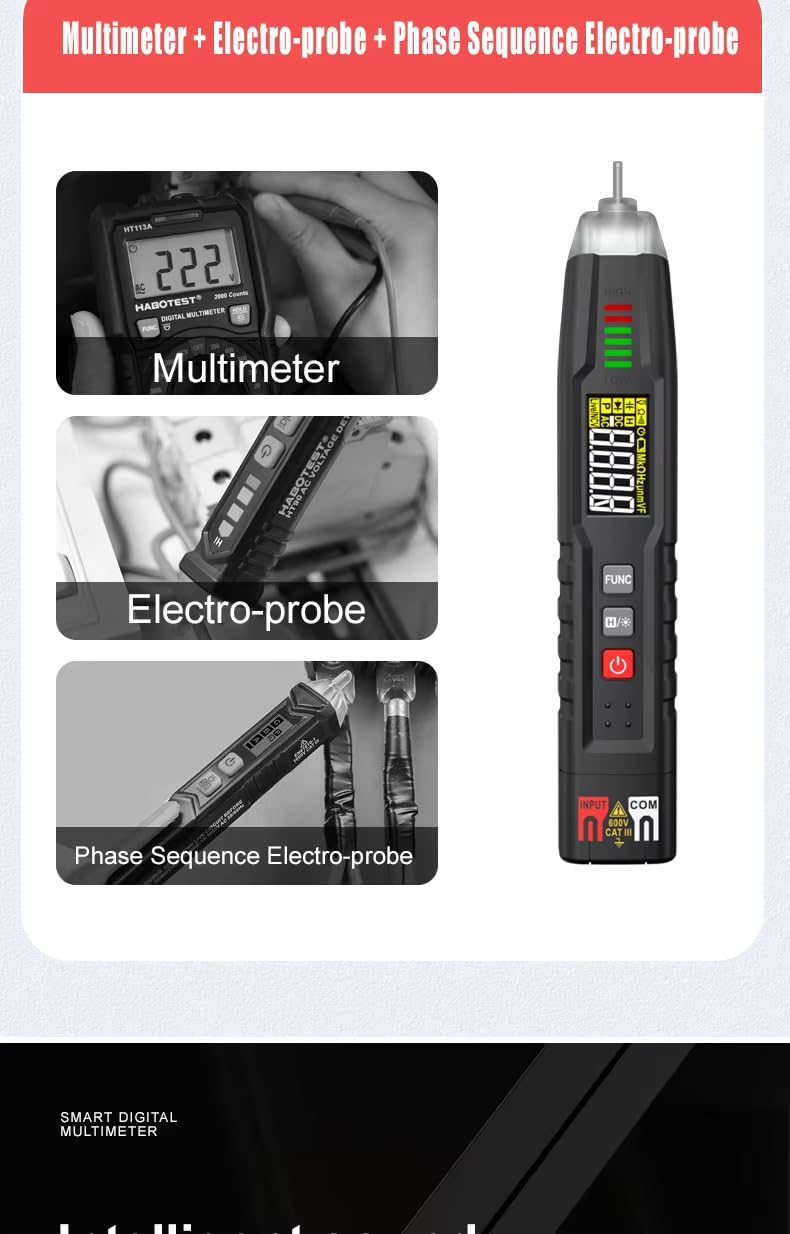
Figure 1: HABOTEST HT122 Multimeter highlighting its multi-functionality.
2. Package Contents
Verify that all items listed below are present in your package:
- 1 x HABOTEST HT122 Digital Pen Type Multimeter
- 1 x User Manual
- 1 x Test Lead
- 2 x AAA 1.5V Batteries (Note: Batteries may not be included in all packages. Please check product description.)
3. Product Overview
Familiarize yourself with the components and controls of your HT122 multimeter.
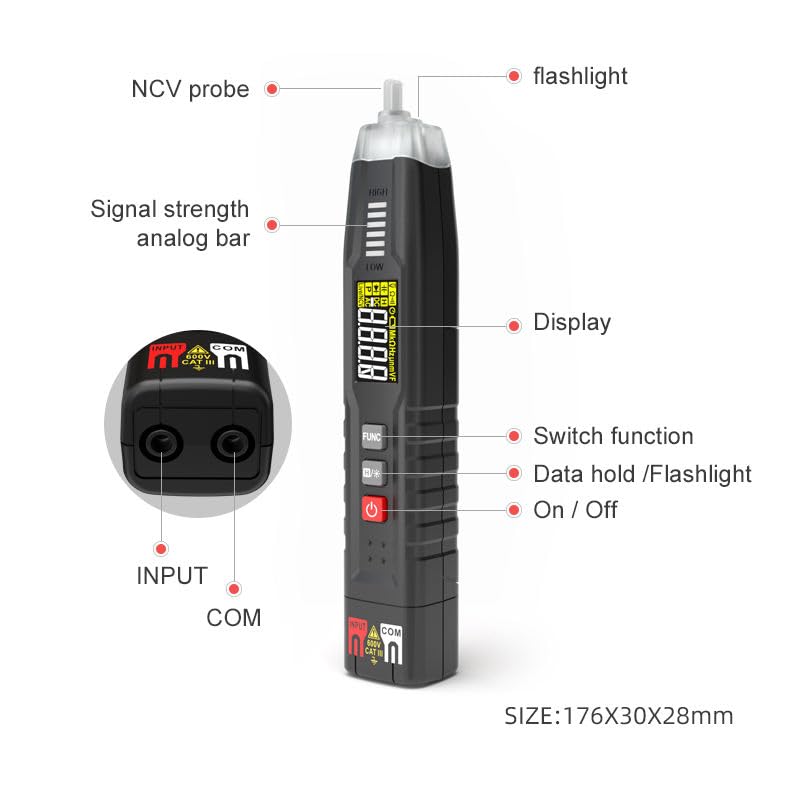
Figure 2: Key components of the HT122 Multimeter.
- NCV Probe: For non-contact voltage detection.
- Flashlight: Illuminates the work area.
- Display: Shows measurement readings and indicators.
- FUNC Button: Switches between measurement functions.
- HOLD / Flashlight Button: Short press to hold data, long press to activate/deactivate flashlight.
- Power Button: Turns the device on/off.
- Input/COM Terminals: For connecting test leads.
4. Setup: Battery Installation
The HT122 requires two AAA 1.5V batteries for operation. Follow these steps to install or replace the batteries:
- Locate the battery compartment cover on the back of the multimeter.
- Use a screwdriver to loosen the screw securing the cover.
- Remove the battery compartment cover.
- Insert two AAA 1.5V batteries, ensuring correct polarity (+/-).
- Replace the battery compartment cover and tighten the screw.
Note: Ensure the device is powered off before installing or replacing batteries.
Video 1: Demonstrates the battery installation process for the multimeter.
5. Operating Instructions
The HABOTEST HT122 features a Smart AUTO mode for automatic recognition of AC/DC voltage, resistance, and continuity, simplifying measurements. You can also manually select specific functions.

Figure 3: Overview of the multimeter's various functions.
5.1 Power On/Off
Press the red power button to turn the multimeter on. Press and hold the power button to turn it off. The device also features an auto power-off function to conserve battery life.
5.2 Smart AUTO Mode
When powered on, the multimeter defaults to Smart AUTO mode. In this mode, the device automatically recognizes the type of measurement (AC/DC voltage, resistance, continuity) and selects the appropriate range.
- Voltage Measurement: Simply contact the positive and negative electrodes of a battery or the live and neutral points of an AC circuit. The multimeter will display the voltage.
- Resistance Measurement: Contact both ends of a resistor with the test leads. The multimeter will automatically recognize and display the resistance value.
- Continuity Test: Touch the test leads to the ends of a wire or component. If continuity is detected, the device will flash a red light and beep.
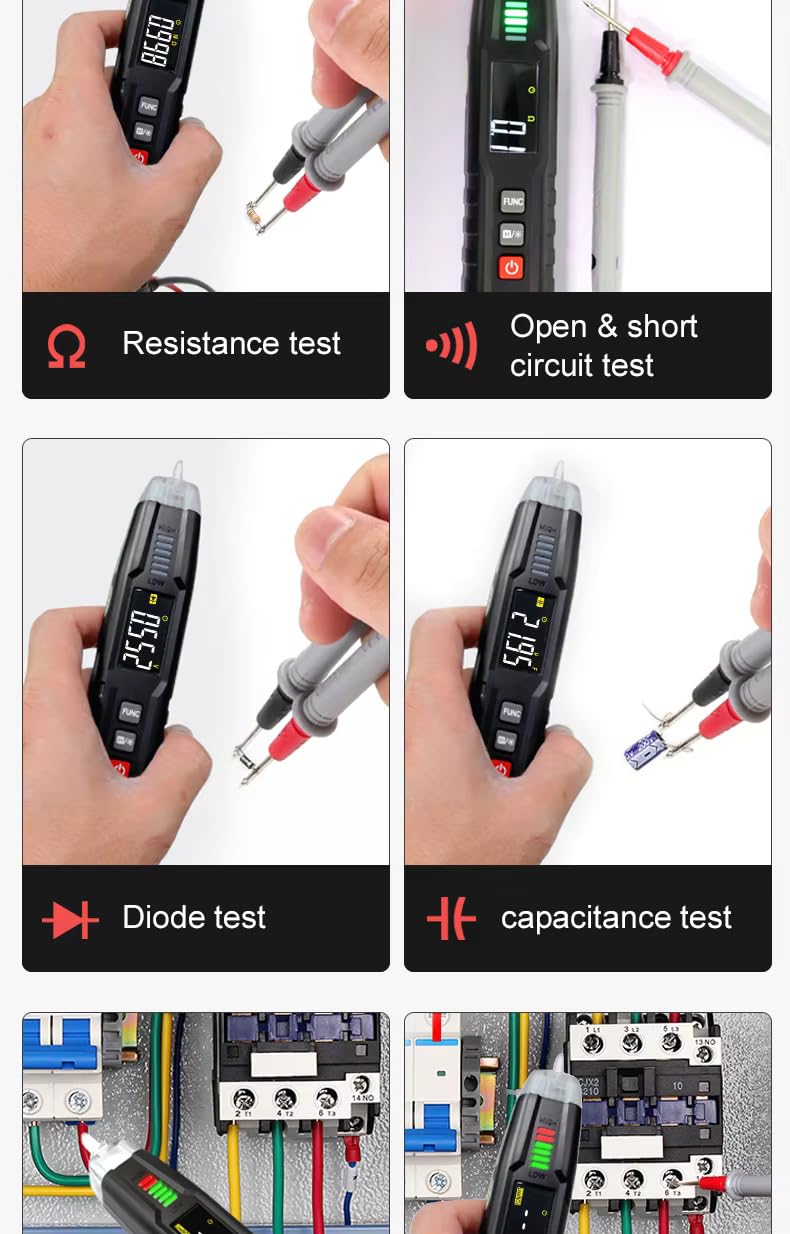
Figure 4: Examples of various tests including resistance, continuity, diode, and capacitance.
5.3 Live Test (FireWire/Zero Line Detection)
To perform a Live Test:
- Press the FUNC button until 'LIVE' mode is selected on the display.
- Insert the probe into the live wire (FireWire) or zero line.
- The device will indicate a live wire with a red light and an audible beep. No sound or light indicates a zero line.

Figure 5: Live Test in action, indicating a live wire.
5.4 Non-Contact Voltage (NCV) Detection
To use NCV mode:
- Press the FUNC button until 'NCV' mode is selected.
- Bring the NCV probe close to the conductor you wish to test.
- If AC voltage is detected, the device will beep and the indicator light will flash red. The frequency of beeps and flashes increases with stronger voltage.
5.5 Breakpoint Position Detection
In NCV mode, the multimeter can also help locate breakpoints in single-stranded wires. Move the NCV probe along the wire; the point where the NCV detection stops indicates a potential breakpoint.
5.6 Flashlight Function
Long press the HOLD / Flashlight button to turn the built-in flashlight on or off. This is useful for working in dimly lit environments.
6. Technical Specifications
The following table outlines the technical specifications of the HABOTEST HT122 Digital Pen Type Multimeter:

Figure 6: Detailed technical specifications.
| Function | Range | Accuracy |
|---|---|---|
| DC Voltage | 4V/40V/400V/600V | ±(0.5%+3) |
| AC Voltage | 4V/40V/400V/600V | ±(0.8%+3) |
| Resistance | 400Ω/40KΩ/400KΩ/4MΩ | ±(1.0%+5) |
| Resistance | 40MΩ | ±(1.5%+10) |
| Capacitance | 40nF/400nF/4uF/40uF/400uF/4mF | ±(3.0%+5) |
| Frequency | 40Hz/400Hz/4kHz/40kHz/400kHz/4MHz | ±(1.0%+3) |
| Counts | 4000 Counts | |
| Auto/Manual Range | Auto | |
| Smart Function | Auto Recognition of AC/DC Voltage, Resistance, Continuity | |
| Live Test | Yes | |
| NCV | Yes | |
| Diode Test | Yes | |
| Continuity | Yes | |
| Three-Phase Sequence Detection | Yes | |
| True RMS | Yes | |
| Low Battery Indication | Yes | |
| Auto Power Off | Yes | |
| Backlight | Yes | |
| Flashlight | Yes | |
| Safety Rating | CAT. III 600V, IEC 61010-1 | |
7. Safety Information
Always adhere to safety precautions when using electrical testing equipment.
- Do not exceed the maximum input values specified for each function.
- Ensure the test leads are in good condition and properly connected before making measurements.
- Do not use the multimeter if it appears damaged or is not operating correctly.
- Always wear appropriate personal protective equipment (PPE), such as safety glasses and insulated gloves, when working with electricity.
- Avoid touching exposed wires or circuit components during measurements.
- Do not attempt to measure voltage in circuits exceeding 600V.
- Replace batteries promptly when the low battery indicator appears to ensure accurate readings.
8. Maintenance
- Cleaning: Wipe the multimeter with a dry, soft cloth. Do not use abrasive cleaners or solvents.
- Storage: Store the device in a cool, dry place away from direct sunlight and extreme temperatures. Remove batteries if the device will not be used for an extended period.
- Calibration: For optimal accuracy, periodic calibration by qualified personnel is recommended.
9. Troubleshooting
If you encounter issues with your HABOTEST HT122 multimeter, consider the following common solutions:
- No Display/Power: Check if the batteries are correctly installed and have sufficient charge. Replace batteries if necessary.
- Inaccurate Readings: Ensure test leads are securely connected. Verify the correct measurement function is selected. Check battery level.
- No Continuity Beep: Confirm the device is in continuity mode. Check if the circuit is truly continuous.
- NCV Not Detecting: Ensure the device is in NCV mode. The NCV function may be less sensitive through thick insulation.
If problems persist, contact customer support for further assistance.
10. Warranty and Support
The HABOTEST HT122 Digital Pen Type Multimeter comes with a standard manufacturer's warranty. Please refer to the warranty card included in your package for specific terms and conditions. For technical support, service, or warranty claims, please contact your retailer or the manufacturer directly using the contact information provided in the product packaging or on the official HABOTEST website.


