
Introduction
Thank you for choosing the Dkian L9 Mini Camera. This portable digital video recorder is designed for versatile use, offering 1080P video recording, night vision, motion detection, and Wi-Fi connectivity. This manual provides essential information for setting up, operating, and maintaining your device to ensure optimal performance.

Image: Overview of the Dkian L9 Mini Camera highlighting its key features such as 1080P HD recording, 1.3-inch screen, 1200mAh battery, 180-degree wide angle lens, clip design, and various modes including photo, video, record, night vision, and motion detection.
Product Overview
Key Features:
- Video Recording Resolution: 1080P Full HD
- Screen Size: 1.3 Inches
- Battery: 1200mAh (approximate, based on image)
- Lens: 180° Rotatable Wide Angle (140° super wide angle)
- Recording Modes: Loop Recording, Night Vision, Motion Detection
- Connectivity: USB, Wi-Fi (Infrared wireless type)
- Storage: Supports TF Card (not included)
- Design: Portable, Lightweight with a convenient clip for wearing
- Additional Features: Microphone Input, Digital Image Stabilization
Components:
The Dkian L9 Mini Camera typically includes the main camera unit, a USB cable for charging and data transfer, and this user manual.
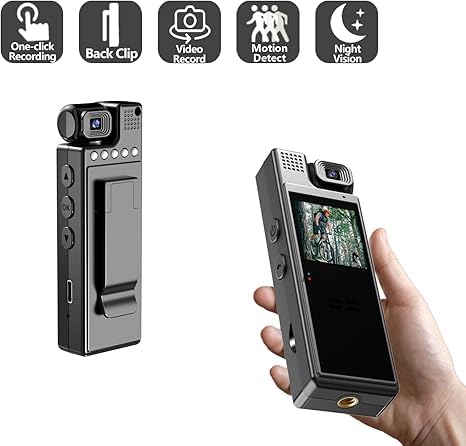
Image: A view of the Dkian L9 Mini Camera from two angles, illustrating its compact size, integrated back clip, and icons representing one-click recording, video recording, motion detection, and night vision capabilities.
Setup
1. Charging the Device:
- Connect the camera to a power source using the provided USB cable.
- The charging indicator light will typically show the charging status (e.g., red for charging, off or green for fully charged).
- Ensure the device is fully charged before first use for optimal battery life.
2. Inserting a TF Card:
- Locate the TF card slot on the camera.
- Gently insert a compatible TF (Micro SD) card into the slot until it clicks into place. Ensure the card is inserted in the correct orientation.
- A TF card is required for recording videos and photos. The card is not included with the camera.
3. Initial Placement:
The camera features a back clip for easy attachment to clothing, bags, or other surfaces. Position the camera to capture your desired field of view.

Image: The Dkian L9 Mini Camera shown clipped onto a shirt pocket, illustrating its compact size and the convenience of its integrated clip for wearable use.
Operating Instructions
1. Power On/Off:
- To power on, press and hold the Power button for a few seconds until the indicator light turns on and the screen activates.
- To power off, press and hold the Power button again until the indicator light turns off and the screen shuts down.
2. Recording Video:
- Once powered on, the camera may enter standby mode or start recording automatically depending on settings.
- Press the Record button (often labeled 'OK' or with a video icon) to start video recording. The indicator light will change to signify recording is in progress.
- Press the Record button again to stop recording.
3. Taking Photos:
- In standby mode, press the Mode button to switch to photo mode.
- Press the Shutter button (often the same as the Record button) to take a photo.
4. Night Vision:
- The camera features night vision capabilities. Refer to the on-screen menu or specific button for activating/deactivating night vision mode.
5. Motion Detection Recording:
- Activate motion detection through the camera's settings menu.
- When enabled, the camera will automatically start recording when motion is detected within its field of view and stop when motion ceases.

Image: The Dkian L9 Mini Camera positioned to capture motion-activated video, demonstrating its use in recording activities such as exercise, with a visual representation of the motion detection area.
6. Loop Recording:
- Loop recording can be enabled in the settings. When the TF card is full, the camera will automatically overwrite the oldest files to continue recording.
7. Rotating the Lens:
- The camera features a 180° rotatable lens. Gently rotate the lens to adjust the shooting angle as needed.
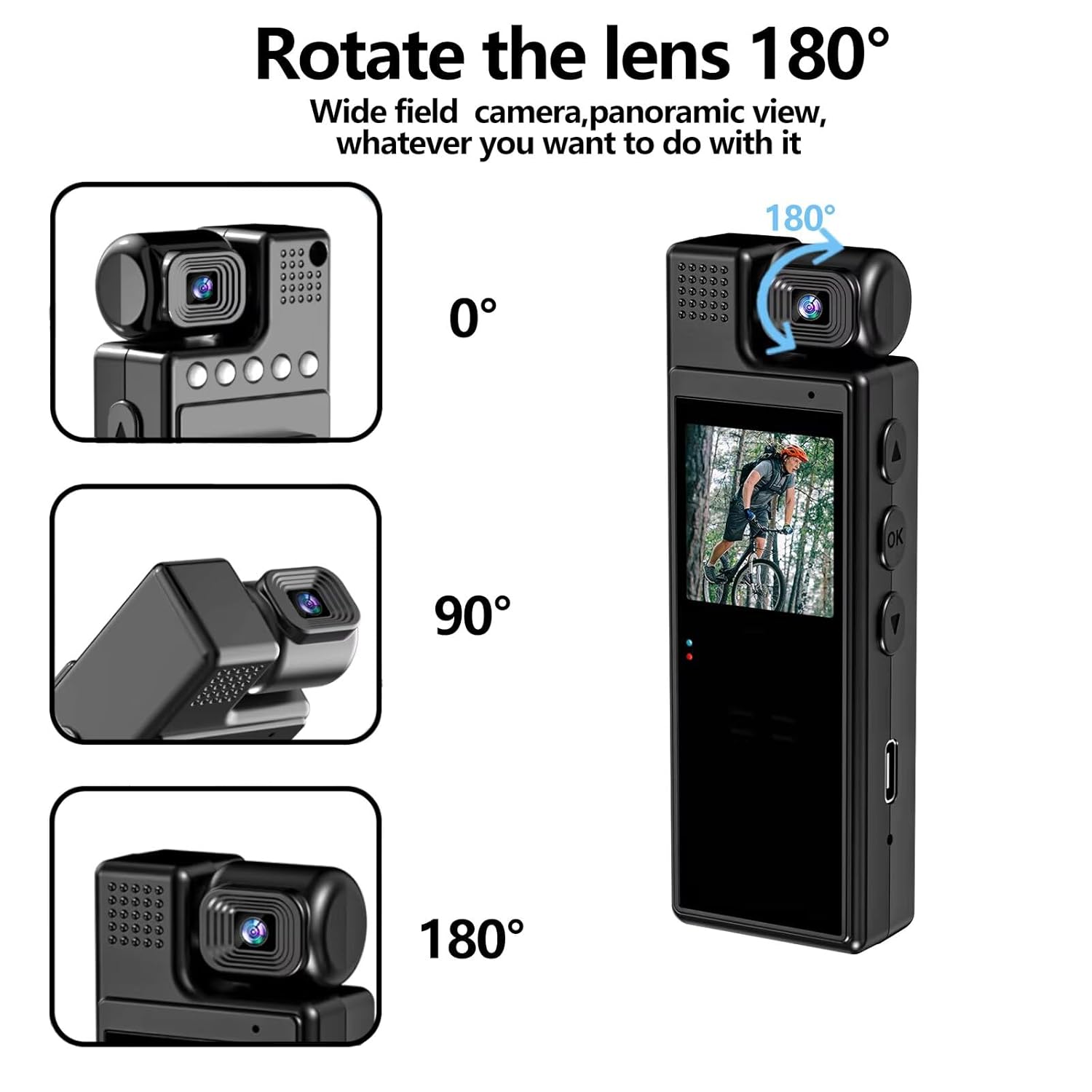
Image: A detailed illustration of the Dkian L9 Mini Camera's 180-degree rotatable lens, showing its flexibility to capture footage from various angles (0°, 90°, and 180° positions).
8. Connecting to Devices (Wi-Fi/USB):
- USB Connection: Connect the camera to a computer using the USB cable to transfer files or use it as a webcam (if supported).
- Wi-Fi Connection: For smartphone or tablet connectivity, download the dedicated app (if available, check product packaging or manufacturer website). Follow the app's instructions to connect to the camera's Wi-Fi network for live view, remote control, and file management.
Maintenance
- Cleaning: Use a soft, dry cloth to clean the camera body. For the lens, use a specialized lens cleaning cloth and solution to avoid scratches.
- Storage: Store the camera in a cool, dry place away from direct sunlight and extreme temperatures.
- Battery Care: Avoid fully discharging the battery frequently. Charge the camera regularly, even if not in use, to maintain battery health.
- Firmware Updates: Check the manufacturer's website periodically for any available firmware updates to improve performance and add features.
Troubleshooting
- Camera not turning on: Ensure the battery is charged. Connect to a power source and try again.
- Cannot record video/take photos: Check if a TF card is inserted correctly and if it has sufficient free space. Format the TF card if necessary (this will erase all data).
- Poor video quality: Ensure the lens is clean. Check lighting conditions. Verify that the camera is set to 1080P recording resolution.
- Wi-Fi connection issues: Ensure the camera's Wi-Fi is enabled. Restart both the camera and your connecting device (smartphone/tablet). Ensure you are within range of the camera's Wi-Fi signal.
- Device freezing/unresponsive: Try performing a soft reset by pressing and holding the power button until it turns off, then restart. If a reset button is available, use a thin object to press it.
Specifications
| Feature | Detail |
|---|---|
| Brand | Dkian |
| Model | FS-20 |
| Product Dimensions | 3 x 2 x 10 cm |
| Item Weight | 52 g |
| Video Capture Resolution | 1080P (Full HD) |
| Screen Size | 1.3 Inches |
| Lens Type | Wide Angle, 180° Rotatable |
| Image Stabilization | Digital |
| Media Type | SD Card (TF Card, not included) |
| Connectivity Technology | USB, Wi-Fi (Infrared Wireless Type) |
| Special Features | Lightweight, Microphone Input, Motion Detection, Night Vision, Loop Recording |
| Compatible Devices | Smartphone, Tablet, Personal Computer, Laptop |
Warranty Information
Warranty details for the Dkian L9 Mini Camera are not provided within the product specifications. Please refer to your purchase documentation or contact the seller directly for information regarding warranty coverage and terms.
Support
For any support problems or product inquiries, please contact our customer support team.
Image: Customer support contact details for Dkian, including the phone number 9819788091 and availability from Monday to Friday, 12 PM to 8 PM.
- Customer Support Number: 9819788091
- Operating Hours: Monday to Friday, 12 PM to 8 PM