
1. Introduction
This user manual provides comprehensive instructions for the installation, operation, and maintenance of your Neideso N900-4CH AI Dash Cam. This advanced 4-channel dash cam features 4K recording, a Driver Monitoring System (DMS), built-in GPS, 5G Wi-Fi connectivity, enhanced night vision, and 24-hour parking surveillance capabilities. Please read this manual thoroughly before using the device to ensure proper functionality and safety.

Image: The Neideso N900-4CH AI Dash Cam, showcasing its main unit, rear camera, and a smartphone displaying the companion app interface.
2. What's in the Box
Verify that all components are present in the package:
- 1 x Neideso N900 Smart Driving DMS Dash Cam
- 1 x Rear Camera
- 1 x 128GB SD Memory Card (pre-inserted)
- 1 x GPS Module
- 1 x 19.6ft Rear Camera Cable
- 1 x 3M Adhesive Mount
- 1 x Car Charger with Type C USB Cable
- 1 x Car Wiring Tool
- 1 x User Manual
- 1 x Electrostatic Film for 3M Mount

Image: A visual representation of all items included in the Neideso N900-4CH Dash Cam package, such as the main unit, rear camera, cables, mounts, and user manual.
3. Setup and Installation
Proper installation is crucial for optimal performance. Please follow these steps carefully:
- Mount Front Camera: Clean the pre-installed location on your windshield. Apply the electrostatic sticker, then attach the 3M adhesive mount. Ensure the AI camera, equipped with DMS, is installed in the center of the windshield for accurate driver monitoring. Allow 12 hours for the adhesive to set before attaching the dash cam.
- Install Rear Camera: Mount the rear camera on the rear windshield.
- Run Rear Camera Cable: Use the provided car wiring tool to conceal the rear camera cable along the vehicle's interior trim (e.g., A-pillar, roof lining) to avoid obstructing the driver's view and prevent hazards.
- Power Up: Connect the car charger to your vehicle's power outlet and the dash cam. The device will power on automatically.
Note: All necessary accessories for installation are included. For detailed visual guidance, refer to the installation diagram below.

Image: A four-step visual guide demonstrating the installation process of the Neideso N900-4CH Dash Cam, including mounting the front and rear cameras, routing cables, and powering the device.
4. Operating Instructions
4.1. 4-Channel 4K Recording
The N900-4CH provides comprehensive 360-degree coverage with its four cameras. The front camera records in 4K (3584x2688P) using a STARVIS 2 IMX675 sensor, while the rear camera and two rotatable side cameras record in 1080P. This multi-channel setup ensures detailed video capture from all angles.

Image: Illustrates the four distinct recording views: front 4K, left 1080P, right 1080P, and rear 1080P, demonstrating the dash cam's comprehensive coverage.
4.2. AI Driver Monitoring System (DMS)
The integrated Driver Monitoring System (DMS) uses AI technology to enhance driving safety. It detects behaviors such as distracted driving, yawning, driver absence, phone calls, and smoking, providing audible warnings. For the system to function, the camera must face the driver, and the vehicle's speed must reach a set value.

Image: A visual representation of the Driver Monitoring System (DMS) in action, showing how it identifies and alerts the driver to signs of fatigue or distraction.
4.3. Built-in GPS and 5G Wi-Fi APP Control
The built-in GPS module accurately records your vehicle's location, speed, and route, providing essential data for incident evidence. With 5G Wi-Fi connectivity, you can connect the dash cam to your smartphone via the dedicated app to view, download (up to 8MB/s), and share recorded videos. The Wi-Fi range is approximately 6-7 meters from the dash cam. Cloud storage and remote monitoring are not supported.

Image: Displays the dash cam's connectivity features, showing how recorded footage and GPS data can be accessed and managed on a smartphone or laptop via 5G Wi-Fi.
4.4. Super Night Vision
Equipped with a front IMX675 sensor and rear IMX307 sensor, along with Dual HDR technology, the dash cam provides clear recordings in low-light conditions. The F/1.6 aperture and 8 infrared LEDs on the left and right cameras enhance light gathering and ensure visibility inside the car at night. Wide Dynamic Range (WDR) automatically adjusts exposure for balanced images, clearly displaying license plates and pedestrians.

Image: A comparison demonstrating the superior night vision capabilities of the Neideso N900-4CH Dash Cam, showing clearer images in dark environments compared to standard cameras.
4.5. 24-Hour Parking Mode
When the vehicle is parked, the dash cam automatically switches to parking mode, providing 24-hour surveillance. It can detect motion within 3-4 meters around the car and initiate recording for 1 minute. This feature requires a separate hardwire kit (not included) for continuous power. Three parking mode options are available: 360° Motion Detection, 180° Motion Detection, and Collision Detection only.

Image: Depicts the various 24-hour parking monitor modes, including 360° motion detection, 180° motion detection, and collision-only detection, highlighting the need for a hardwire kit.
4.6. Voice Control
The dash cam supports English voice commands, allowing hands-free operation. This feature enables you to control functions such as taking photos, starting/stopping video recording, turning audio on/off, turning Wi-Fi on/off, and turning the screen on/off, enhancing driving focus. (Note: Only specific voice commands listed in the menu are supported).
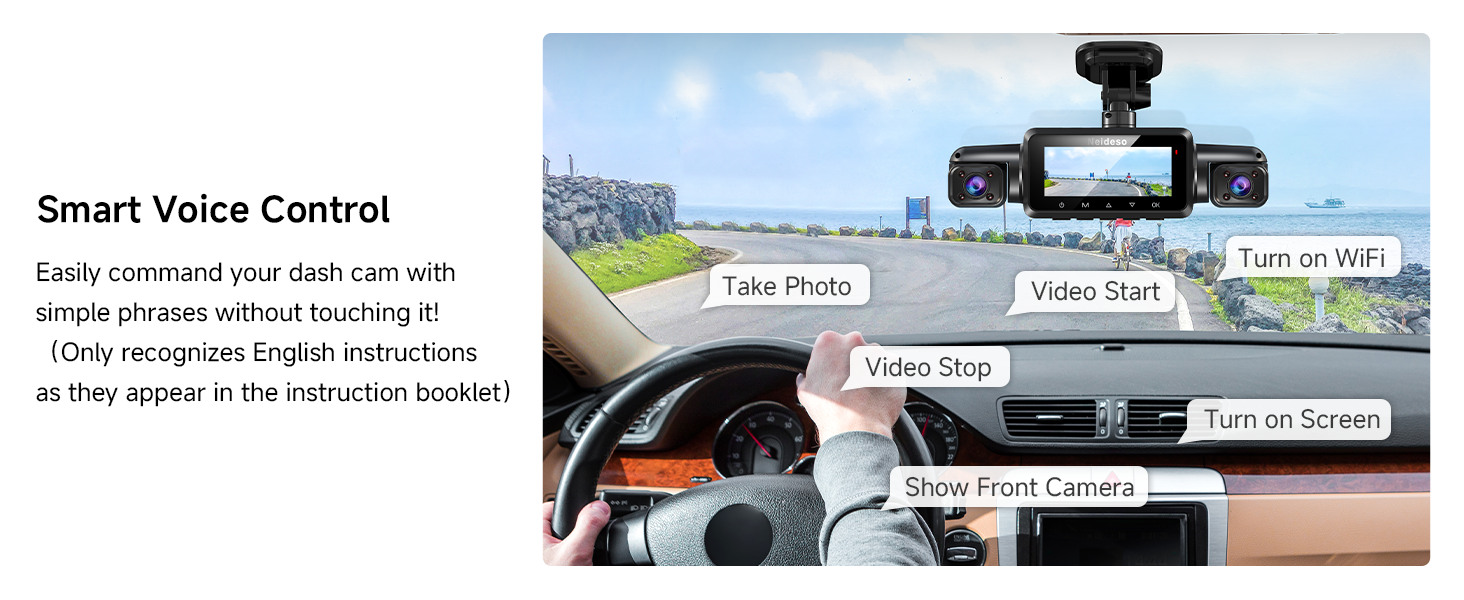
Image: A driver demonstrating the use of voice commands to operate the dash cam, with speech bubbles indicating various commands like "Take photo" and "Video start."
4.7. G-Sensor and Loop Recording
The built-in G-sensor detects sudden impacts or collisions, automatically locking and protecting the current video footage from being overwritten. This ensures critical evidence is preserved in an "Event" folder. Loop recording continuously records video in 3-minute segments, overwriting the oldest files when the 128GB SD card (included) is full. The device supports up to a 512GB SD card.

Image: Illustrates how the G-sensor detects collisions and locks footage, alongside a visual representation of loop recording filling an SD card and overwriting old files.
5. Maintenance
To ensure the longevity and optimal performance of your Neideso N900-4CH Dash Cam, follow these maintenance guidelines:
- Cleaning: Gently wipe the camera lenses and screen with a soft, dry, lint-free cloth. Avoid using abrasive cleaners or solvents.
- SD Card Management: Regularly format the SD card (at least once a month) within the dash cam's settings to prevent data corruption and ensure smooth recording. Back up any important footage before formatting.
- Temperature: The dash cam is designed to operate in temperatures from -20°F to 140°F (-30°C to 60°C) thanks to its super capacitor. However, avoid prolonged exposure to extreme direct sunlight when parked to prevent potential heat-related issues.
- Firmware Updates: Check the official Neideso website or app periodically for firmware updates to improve performance and add new features.

Image: Illustrates the super capacitor technology, highlighting the dash cam's ability to withstand extreme temperatures from -20°F to 140°F.
6. Troubleshooting
If you encounter issues with your dash cam, refer to the following common problems and solutions:
- Device Overheating: While the dash cam is designed for wide temperature ranges, continuous operation in direct, intense sunlight or in a poorly ventilated area can cause it to become warm. If the device feels excessively hot or shuts down, ensure it is not exposed to direct sunlight for extended periods when parked. Check that the ventilation slots are not blocked. If the issue persists, contact support.
- Difficulty with Setup/App Connection: Ensure you are following the installation steps precisely. For app connectivity, verify that your smartphone's Wi-Fi is connected to the dash cam's 5G Wi-Fi network (range 6-7 meters). Temporarily disable any VPNs or security software on your phone that might interfere with local network connections. If problems persist, consult the user manual's detailed app instructions or contact support.
- GPS Not Recording Location/Speed: Ensure the GPS module is correctly connected to the main unit and has a clear view of the sky. GPS signal acquisition may take a few minutes, especially after the first power-on or if the vehicle has been stationary for a long time.
- Video Footage Not Saving/Corrupted: Ensure the SD card is properly inserted and is not full. Regularly format the SD card through the dash cam's menu. If the issue continues, try using a different high-quality SD card (supports up to 512GB).
- Voice Control Not Responding: Ensure you are speaking clearly and using the exact commands listed in the dash cam's menu. Minimize background noise.
7. Specifications
| Feature | Detail |
|---|---|
| Model Name | Neideso N900-4CH AI dash cam |
| Video Capture Resolution | Front: 4K (3584Px2688P); Other cameras: 1080P |
| Image Sensors | Front: STARVIS 2 IMX675; Rear: IMX307 |
| Field of View | 360 Degrees (with 4 channels) |
| Connectivity Technology | 5GHz Wi-Fi, Built-in GPS |
| Special Features | Dual HDR, AI Driver Monitoring System (DMS), Voice Control, 24H Parking Mode (hardwire kit sold separately), Loop Recording, G-Sensor, F1.6 Aperture, 8 IR LEDs |
| Included SD Card | 128GB (supports up to 512GB) |
| Operating Temperature | -20°F to 140°F (-30°C to 60°C) |
| Power Source | Dual Capacitors |
| Product Dimensions | 2.1 x 2.1 x 7.34 inches |
| Item Weight | 7.4 ounces |
8. Warranty and Support
The Neideso N900-4CH AI Dash Cam is backed by an 18-month assurance period and a 100% satisfaction guarantee. For technical support, warranty claims, or any inquiries, please contact Neideso customer service through the official brand store or the contact information provided in your product packaging.
You can visit the Neideso Store on Amazon for more information and support resources.