1. Introduction
Thank you for choosing the TIMU Portable Bluetooth Speaker S11. This manual provides essential information for setting up, operating, and maintaining your speaker. Please read it thoroughly to ensure optimal performance and longevity of your device.

Image: The TIMU S11 Portable Bluetooth Speaker, showcasing its sleek black design and IPX7 waterproof capability with water droplets.
2. Package Contents
Please check the box for the following items:
- 1 x TIMU 30W Portable Bluetooth Speaker S11
- 1 x Type-C Charging Cable
- 1 x User Manual (this document)
- 1 x Nylon Braided Hanging Rope
- 1 x AUX Connecting Cable
3. Product Features Overview
The TIMU S11 speaker is designed for a superior audio experience with robust features:
- 30W Stereo Sound: Powerful audio output capable of filling large spaces.
- Enhanced Bass 3.0: Deep, resonant bass with reduced distortion.
- Bluetooth 5.4: Latest wireless technology for stable and efficient connections.
- 30-Hour Playtime: Extended battery life for prolonged listening enjoyment.
- IPX7 Waterproof: Fully submersible for up to 30 minutes at 1 meter depth.
- 8 Dynamic RGB Modes: Customizable lighting effects to enhance your audio experience.
- TWS Pairing: Connect two S11 speakers for true wireless stereo sound.
- Multiple Input Modes: Supports Bluetooth, AUX, TF Card, and USB-Audio connections.

Image: Visual representation of the TIMU S11 speaker's core features, including power output, battery life, bass enhancement, lighting, connectivity, and water resistance.
4. Controls and Indicators
Familiarize yourself with the speaker's buttons and ports:
- Power Button: Press and hold to power on/off. Short press to play/pause.
- Volume Up (+): Increase volume.
- Volume Down (-): Decrease volume.
- Mode Button (M): Cycle through input modes (Bluetooth, AUX, TF Card, USB-Audio).
- Light Button (Sun icon): Change RGB lighting modes.
- Bass Boost Button (EQ): Activate/deactivate Enhanced Bass 3.0.
- USB-C Port: For charging the speaker.
- AUX Port: For wired audio connection.
- TF Card Slot: For playing music directly from a MicroSD card.
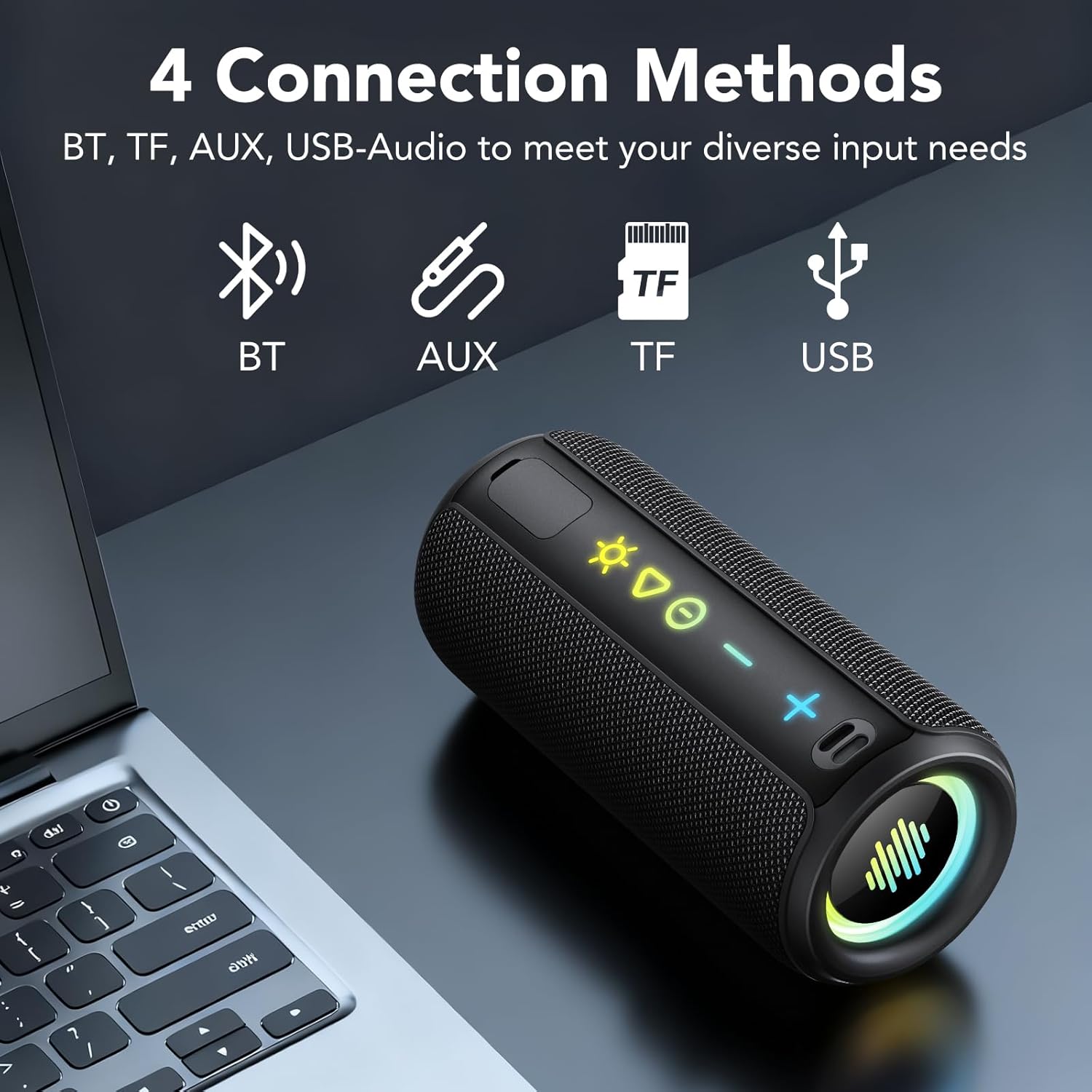
Image: A detailed view of the TIMU S11 speaker's control panel, highlighting the various buttons and input ports for easy identification and use.
5. Setup Instructions
5.1. Charging the Speaker
Before first use, fully charge the speaker. Connect the provided Type-C charging cable to the speaker's USB-C port and the other end to a 5V USB power adapter (not included).
- The charging indicator light will illuminate during charging.
- A full charge takes approximately 3 hours.
- The speaker offers up to 30 hours of playtime at 30% volume with RGB lights off.

Image: The TIMU S11 speaker illustrating its 30-hour playtime and Type-C fast charging feature.
5.2. Powering On/Off
- To Power On: Press and hold the Power button for 2-3 seconds until you hear an audible prompt and the indicator lights activate.
- To Power Off: Press and hold the Power button for 2-3 seconds until you hear an audible prompt and the indicator lights turn off.
5.3. Bluetooth Pairing
- Ensure the speaker is powered on and in Bluetooth mode (indicated by a flashing blue light). If not, press the Mode button to switch to Bluetooth.
- On your device (smartphone, tablet, computer), enable Bluetooth and search for available devices.
- Select "TIMU S11" from the list of devices.
- Once connected, the blue indicator light will stop flashing, and you will hear a confirmation sound.
5.4. True Wireless Stereo (TWS) Pairing
To achieve a stereo sound experience, you can pair two TIMU S11 speakers together:
- Ensure both S11 speakers are powered on and not connected to any other Bluetooth device.
- On one speaker (this will be the primary speaker), double-press the Power button. You will hear a prompt, and the speaker will enter TWS pairing mode.
- The two speakers will automatically search for and connect to each other. Once connected, you will hear a confirmation sound.
- Now, connect your device to the primary speaker via Bluetooth as described in section 5.3. Both speakers will play audio in stereo.
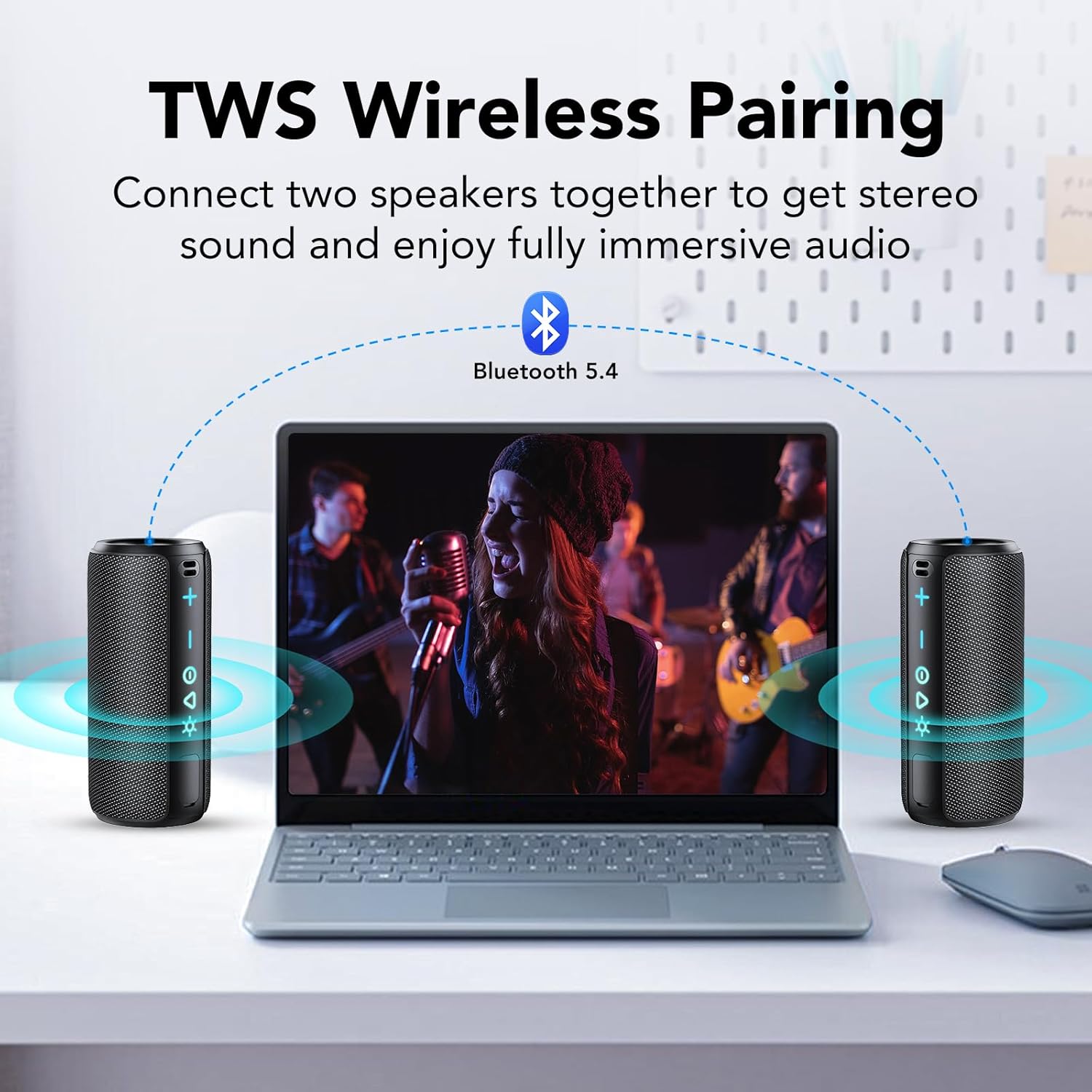
Image: Two TIMU S11 speakers connected wirelessly to a laptop, demonstrating the TWS pairing functionality for enhanced stereo sound.
5.5. Connecting via AUX
Use the provided AUX cable to connect the speaker to devices without Bluetooth capability:
- Connect one end of the 3.5mm AUX cable to the speaker's AUX port.
- Connect the other end to the audio output jack of your device.
- The speaker will automatically switch to AUX mode, or you may need to press the Mode button to select AUX.
5.6. Connecting via TF Card (MicroSD)
Play music directly from a MicroSD card:
- Insert a TF (MicroSD) card with audio files into the TF card slot on the speaker.
- The speaker will automatically detect the card and begin playing music, or you may need to press the Mode button to select TF Card mode.
6. Operating Instructions
6.1. Audio Playback
- Play/Pause: Short press the Power button.
- Next Track: Press and hold the Volume Up (+) button.
- Previous Track: Press and hold the Volume Down (-) button.
6.2. Adjusting Volume
- Increase Volume: Short press the Volume Up (+) button.
- Decrease Volume: Short press the Volume Down (-) button.
6.3. Managing Calls (with Built-in Microphone)
When connected via Bluetooth to a smartphone:
- Answer Call: Short press the Power button.
- End Call: Short press the Power button during a call.
- Reject Call: Press and hold the Power button for 2 seconds.
6.4. RGB Lighting Modes
The speaker features 8 dynamic RGB lighting modes:
- Short press the Light button (Sun icon) to cycle through the different lighting modes.
- Press and hold the Light button to turn the RGB lights off.

Image: The TIMU S11 speaker displaying its colorful RGB lighting effects, highlighting the various modes available.
6.5. Bass Boost Function
Activate the Enhanced Bass 3.0 feature for deeper bass:
- Short press the Bass Boost button (EQ) to toggle the bass enhancement on or off.
7. Maintenance
7.1. Cleaning
- Wipe the speaker with a soft, damp cloth.
- Do not use abrasive cleaners, alcohol, or chemical solvents.
- Ensure all ports are dry before charging or connecting cables.
7.2. Waterproofing Guidelines (IPX7)
The TIMU S11 speaker is IPX7 waterproof, meaning it can be immersed in water up to 1 meter for 30 minutes. To maintain its waterproof integrity:
- Ensure the rubber flap covering the charging and AUX ports is securely closed before exposing the speaker to water.
- Do not expose the speaker to saltwater or other chemicals, as this may damage the seals.
- After exposure to water, especially chlorinated or salty water, rinse the speaker with fresh water and dry it thoroughly before charging.

Image: The TIMU S11 speaker partially submerged in water, visually confirming its IPX7 waterproof capability.
7.3. Battery Care
- Avoid fully discharging the battery frequently.
- Store the speaker in a cool, dry place when not in use for extended periods.
- Charge the speaker at least once every three months to prevent battery degradation.
8. Troubleshooting
| Problem | Possible Cause | Solution |
|---|---|---|
| Speaker does not power on. | Low battery. | Charge the speaker fully. |
| Cannot pair via Bluetooth. | Speaker not in pairing mode; device Bluetooth off; too far from device. | Ensure speaker is in Bluetooth pairing mode (flashing blue light). Turn on device Bluetooth. Move speaker closer to device (within 10 meters). |
| No sound. | Volume too low; incorrect input mode; device not playing. | Increase speaker and device volume. Press Mode button to select correct input. Ensure audio is playing on your device. |
| TWS pairing fails. | Speakers already connected to other devices; incorrect pairing steps. | Disconnect both speakers from any Bluetooth devices. Follow TWS pairing steps carefully (Section 5.4). |
| Sound distortion. | Volume too high; low battery. | Reduce volume. Charge the speaker. |
9. Specifications
| Feature | Detail |
|---|---|
| Model Name | S11 |
| Brand | TIMU |
| Speaker Maximum Output Power | 30 Watts |
| Bluetooth Version | 5.4 |
| Battery Capacity | 4000mAh |
| Playtime | Up to 30 hours (at 30% volume, RGB off) |
| Charging Time | Approximately 3 hours |
| Water Resistance Level | IPX7 |
| Product Dimensions | 2.6"D x 2.6"W x 6.3"H |
| Item Weight | 1.65 pounds |
| Audio Output Mode | Stereo |
| Connectivity Technology | Wireless (Bluetooth), AUX, TF Card, USB-Audio |
| Special Features | Bass Boost, Built-in Microphone, Portable, Lightweight, LED Light, Dustproof, Waterproof, Stereo Pairing |
10. Warranty and Support
TIMU products are designed and manufactured to the highest quality standards. This product comes with a standard manufacturer's warranty. For detailed warranty information, product support, or to register your product, please visit the official TIMU store or contact customer service.
TIMU Store: Visit the TIMU Store on Amazon
For further assistance, please refer to the contact information provided on the TIMU official website or your purchase platform.

Image: The TIMU S11 speaker being used during an outdoor activity, emphasizing its portability and durable design for various environments.


