
Introduction
Thank you for choosing the Tecnock 1:18 Scale Police RC Truck. This manual provides essential information for the safe operation, setup, maintenance, and troubleshooting of your new remote control vehicle. Please read it thoroughly before use and retain it for future reference.
Product Overview
Key Features:
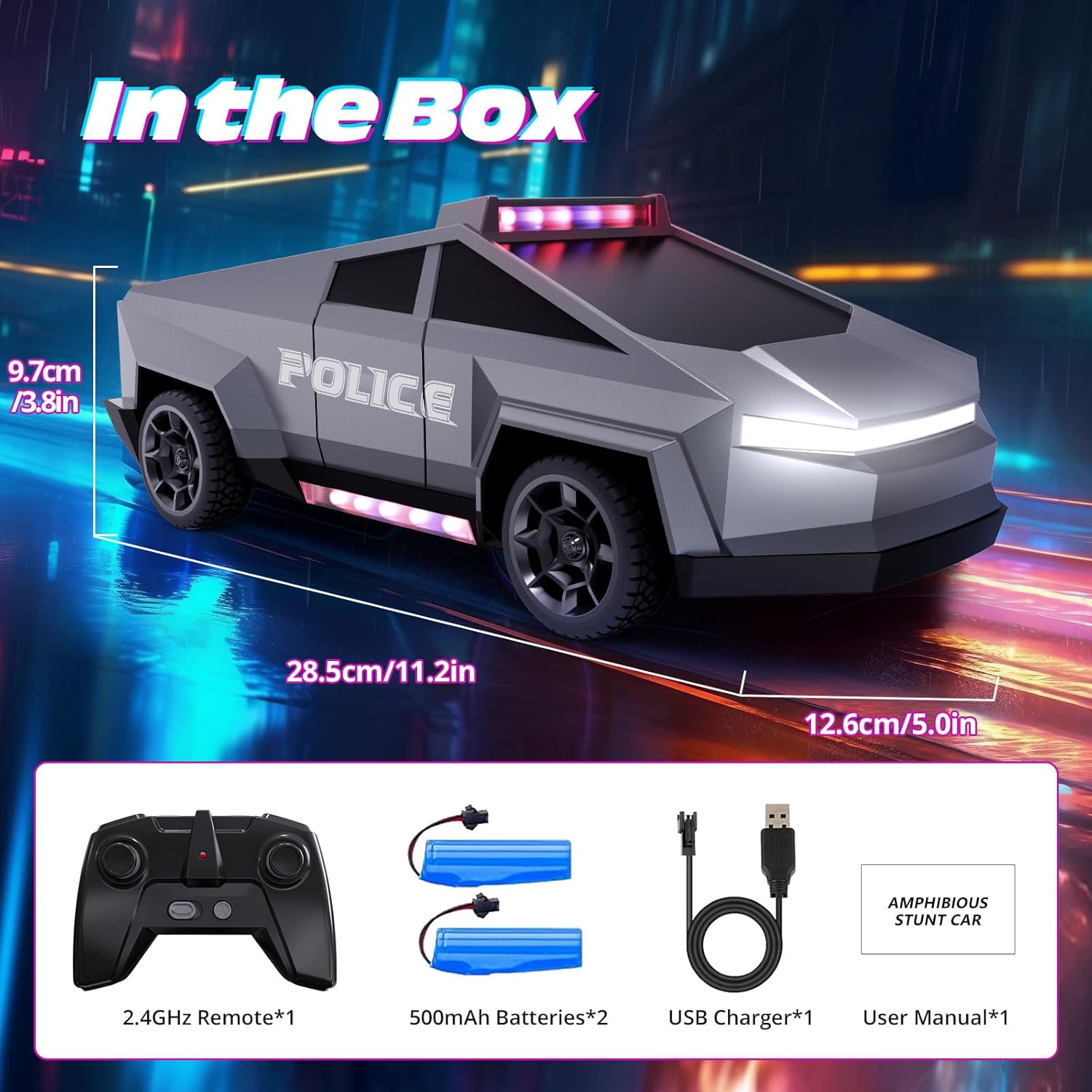
- Realistic Police Design: 1:18 scale police truck with flashing red and blue lights, glowing undercarriage LEDs, and bright front headlights.
- Extended Playtime: Equipped with two 500mAh rechargeable batteries, providing up to 50 minutes of continuous play.
- Easy Remote Control: 2.4GHz technology for stable connection and interference-free operation up to 130 ft.
- All-Terrain Performance: Durable construction and tires suitable for various surfaces including grass, sand, road, and carpet.
What's in the Box:
- 1 x Tecnock 1:18 Scale Police RC Truck
- 1 x 2.4GHz Remote Control
- 2 x 500mAh Rechargeable Batteries (for truck)
- 1 x USB Charger
- 1 x User Manual (this document)
- 2 x AA Batteries (for remote control, included)
Safety Information
- Not suitable for children under 3 years due to small parts.
- Adult supervision is recommended during operation.
- Do not operate near people, pets, or obstacles to prevent injury or damage.
- Avoid operating in wet conditions or near water to prevent electrical damage.
- Do not touch moving parts during operation.
- Always turn off the truck and remote control when not in use.
- Dispose of batteries responsibly according to local regulations.
Setup
1. Battery Installation
For the RC Truck:
- Locate the battery compartment on the underside of the RC truck.
- Open the battery compartment cover.
- Insert one of the provided 500mAh rechargeable batteries, ensuring correct polarity.
- Close the battery compartment cover securely.
For the Remote Control:
- Locate the battery compartment on the back of the remote control.
- Open the battery compartment cover.
- Insert the two provided AA batteries, matching the polarity markings (+/-).
- Close the battery compartment cover securely.
2. Charging the Truck Batteries
The RC truck uses rechargeable 500mAh batteries. Ensure they are fully charged before first use for optimal performance.
- Connect the USB charger to a compatible USB power source (e.g., computer, wall adapter).
- Connect the rechargeable battery to the USB charger.
- The indicator light on the charger will show the charging status (refer to charger instructions for specific light indications).
- Once fully charged, disconnect the battery from the charger and the charger from the power source.
- Repeat for the second battery.
A full charge provides approximately 25 minutes of playtime per battery, totaling up to 50 minutes with both batteries.

Operating Instructions
1. Power On and Pairing
- Ensure the truck's battery is installed and fully charged.
- Turn on the RC truck using the power switch, usually located on the underside or side of the vehicle.
- Turn on the remote control. The indicator light on the remote will flash.
- The remote control and truck will automatically pair. Once paired, the indicator light on the remote will become solid.
- If pairing fails, turn off both devices and repeat the steps.

2. Driving Controls
Use the joysticks on the remote control to maneuver the RC truck:
- Left Joystick (Forward/Backward): Push forward to move the truck forward, pull backward to move it in reverse.
- Right Joystick (Left/Right): Push left to turn the truck left, push right to turn it right.
The 2.4GHz frequency allows multiple RC cars to operate simultaneously without interference.
3. LED Lights
The RC truck features integrated LED lights for enhanced play experience:
- Flashing Police Lights: Red and blue lights on the roof activate automatically when the truck is on.
- Undercarriage LEDs: Lights along the underside of the truck provide a cool glow.
- Front Headlights: Bright white headlights illuminate the path during operation.


Maintenance
- Cleaning: Use a soft, dry cloth to wipe down the truck and remote control. Do not use water or chemical cleaners.
- Storage: Store the RC truck and remote control in a cool, dry place away from direct sunlight when not in use. Remove batteries from both the truck and remote if storing for extended periods to prevent leakage.
- Battery Care: Always fully charge the rechargeable batteries before storage and periodically if not used for a long time to maintain battery health.
Troubleshooting
| Problem | Possible Cause | Solution |
|---|---|---|
| Truck does not respond to remote. |
|
|
| Short playtime. |
|
|
| Truck moves slowly or erratically. |
|
|
Specifications
- Model Number: 9000
- Scale: 1:18
- Product Dimensions: 25.53 x 11.2 x 9.12 cm (10.05 x 4.41 x 3.59 inches)
- Weight: 490 g (1.08 lbs)
- Material: Plastic (ABS)
- Power Source: Battery Powered
- Truck Batteries: 2 x 500mAh Lithium-Ion Polymer (rechargeable, included)
- Remote Control Batteries: 2 x AA batteries (included)
- Operation Mode: Remote Control
- Frequency: 2.4GHz
- Remote Range: Up to 130 ft (approximately 40 meters)
- Recommended Age: 36 months - 5 years (3-5 years)
- Additional Features: LED Lights (flashing police lights, undercarriage glow, front headlights)
Warranty and Support
For warranty information or technical support, please contact Tecnock customer service through the retailer where the product was purchased or visit the official Tecnock website. Please have your model number (9000) and purchase details ready when contacting support.
Tecnock Store Link: Visit Tecnock Store on Amazon