1. Safety Information
Your safety and the safety of others are paramount when operating the FanttikRide K9 Pro Electric Scooter. Please read and understand all safety instructions before use.
- Adult Supervision: Always ensure children use the scooter under direct adult supervision.
- Protective Gear: Riders must wear appropriate protective gear, including a helmet, knee pads, and elbow pads, at all times.
- Braking: Instruct children on the correct use of the rear brake for safe stopping.
- UL2272 Certified: The FanttikRide K9 Pro electric scooter is UL2272 certified, ensuring compliance with electrical safety standards.
- Riding Environment: Use the scooter in safe, open areas away from traffic, pedestrians, and obstacles. Avoid riding on wet, uneven, or slippery surfaces.
- Weight Limit: Do not exceed the maximum weight limit of 88 lbs (40 kg).
2. Product Overview
The FanttikRide K9 Pro is a 3-wheel electric scooter designed for children aged 3-6, offering a blend of safety, fun, and innovative features.
Key Features:
- Rainbow Pulse Lighting: Features RGB rainbow lights with multiple modes, a front headlight, and sparkling wheels for enhanced visibility and enjoyment, especially during evening rides.
- K-AutoPilot (AI Mode): Designed for beginners, this mode adjusts speed based on kicking force, making it easy for young riders to learn. It also offers two fixed speed settings: Gear 1 (3.7 MPH) and Gear 2 (6.2 MPH).
- Power Sight Digital Display: An integrated digital display shows real-time battery power, allowing for easy monitoring and planning of charging times.
- Type-C Fast Charging: Equipped with a universal Type-C port for convenient and fast charging, reaching 80% in 2 hours and full charge in 3 hours.
- 3 Adjustable Heights: The handlebar can be adjusted to 27.41", 29.77", or 32.13" without tools, accommodating growing children.
- Foldable & Portable Design: The scooter can be easily folded for transport and storage, weighing only 8 lbs.
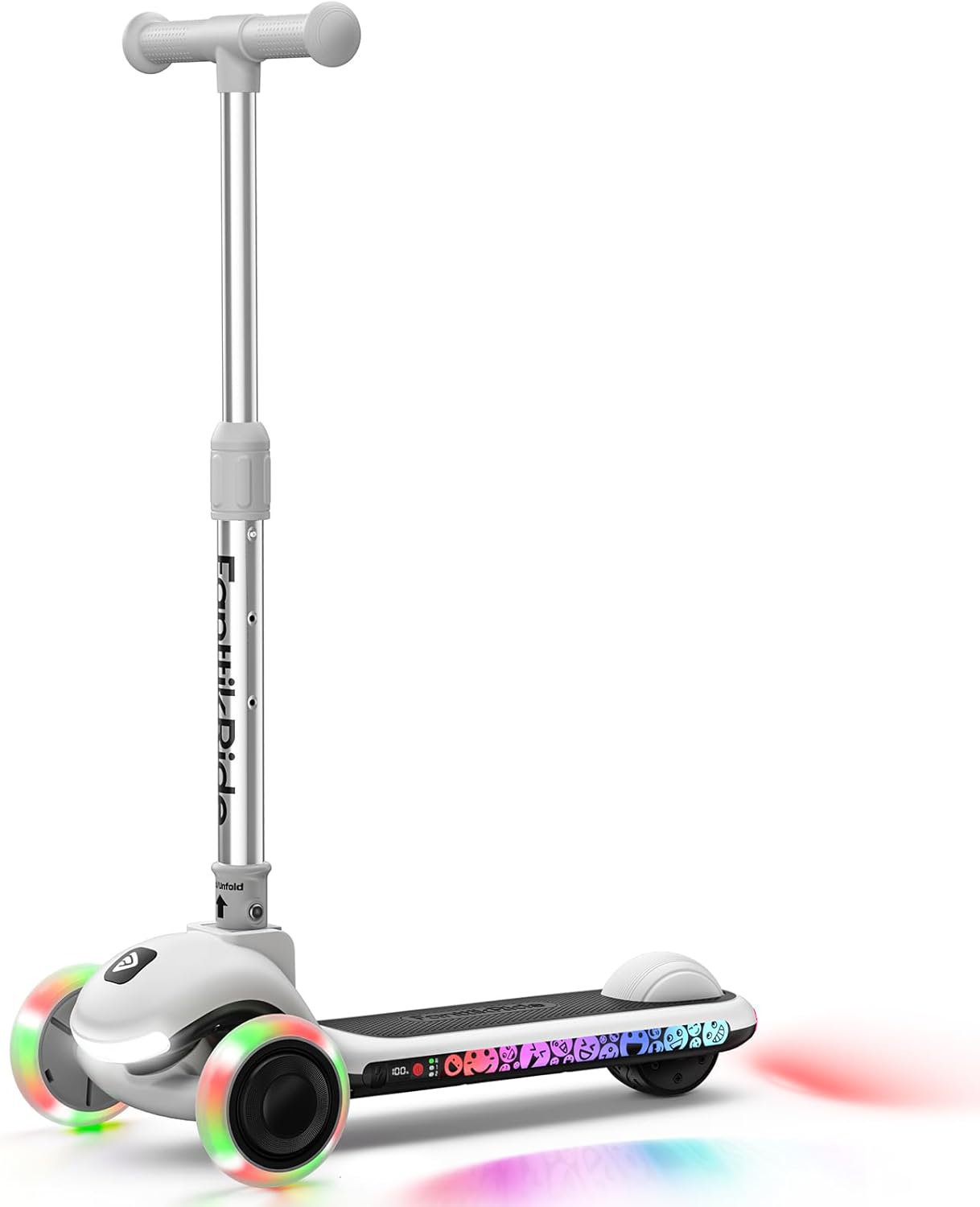
Figure 1: FanttikRide K9 Pro Electric Scooter with illuminated wheels and deck lights.
Video 1: An overview of the K9 Pro 3-Wheel Kids' Electric Scooter, highlighting its features and design.
3. Setup
The FanttikRide K9 Pro Electric Scooter comes largely pre-assembled. Follow these steps to prepare it for use:
3.1 Unfolding the Scooter
- Place the scooter on a flat, stable surface.
- Locate the folding mechanism near the base of the handlebar stem.
- Release the locking mechanism (refer to the diagram in the included Owner's Manual for specific details).
- Gently pull the handlebar stem upwards until it locks securely into the upright position. Ensure it clicks into place.
3.2 Adjusting Handlebar Height
- Locate the height adjustment clamp on the handlebar stem.
- Open the clamp and press the spring-loaded button.
- Adjust the handlebar to one of the three available height settings (27.41", 29.77", or 32.13") that is comfortable for the rider. Ensure the button snaps into a hole.
- Close the clamp firmly to secure the handlebar at the desired height.

Figure 2: The adjustable handlebar of the K9 Pro scooter, showing different height settings.
3.3 Initial Charge
It is recommended to fully charge the scooter before its first use.
- Connect the provided USB Type-C charging cable to the scooter's charging port.
- Connect the other end of the USB cable to a compatible USB power adapter (not included).
- The battery indicator on the digital display will show charging progress. Charge until the display indicates 100%.

Figure 3: The Type-C charging port and illuminated deck of the FanttikRide K9 Pro.
4. Operating Instructions
4.1 Power On/Off
- To turn on the scooter, press and hold the ON/OFF button for 2 seconds.
- To turn off the scooter, press and hold the ON/OFF button for 2 seconds.
4.2 Speed Modes
The K9 Pro offers three speed modes:
- AI Mode (Cruise Control): Ideal for beginners. The scooter's speed adapts to the rider's kicking force, providing a smooth and intuitive ride.
- Gear 1: Maximum speed of approximately 3.7 MPH.
- Gear 2: Maximum speed of approximately 6.2 MPH.
To switch between speed modes, short press the ON/OFF button once while the scooter is on.

Figure 4: Children demonstrating the K-AutoPilot (AI mode) and fixed speed settings.
4.3 Steering
The K9 Pro uses a lean-to-steer mechanism. To turn, simply lean the handlebar in the desired direction. This design helps develop balance and coordination.
4.4 Braking
To slow down or stop, press down on the rear brake with your foot. The rear brake is located on the back wheel cover.
4.5 Lights (Rainbow Pulse)
The scooter features vibrant RGB lights on the deck, a front headlight, and illuminated wheels. Short press the ON/OFF button to cycle through different ambient light modes.
Figure 5: The scooter's deck and wheels illuminated with Rainbow Pulse lights.
4.6 Battery Display
Monitor the battery level using the digital display on the scooter's deck. This helps ensure you have enough charge for your ride.

Figure 6: Close-up of the digital display showing battery percentage on the K9 Pro scooter.
5. Maintenance
Regular maintenance ensures the longevity and safe operation of your scooter.
5.1 Charging
- Always use the provided USB Type-C cable for charging.
- Do not overcharge the battery. Disconnect once fully charged.
- Avoid charging in extreme temperatures.
5.2 Cleaning
- Wipe the scooter with a damp cloth after use. Avoid using harsh chemicals or abrasive cleaners.
- Do not spray water directly onto electrical components.
5.3 Storage
- Store the scooter in a cool, dry place away from direct sunlight and moisture.
- Utilize the foldable design for compact storage when not in use.

Figure 7: The K9 Pro scooter in its folded state, demonstrating its portability.
5.4 Tire and Brake Inspection
- Regularly check the wheels for wear and tear.
- Ensure the rear brake is functioning correctly before each ride.
6. Troubleshooting
If you encounter any issues with your FanttikRide K9 Pro, refer to the following common troubleshooting steps:
- Scooter Not Turning On: Ensure the battery is charged. If the battery is completely depleted, it may take a few minutes of charging before the scooter responds.
- Motor Not Engaging: The electric motor requires a kick-start. Push off with your foot to initiate movement, and the motor will engage once a minimum speed is reached (approximately 1 MPH).
- Short Battery Life: Ensure the scooter is fully charged before use. Battery performance can be affected by riding conditions (e.g., inclines, continuous high speed, rider weight).
- Lights Not Working: Check if the scooter is powered on. Cycle through the light modes by short pressing the ON/OFF button.
- Handlebar Wobbly: Ensure the height adjustment clamp is securely closed and the spring-loaded button is fully engaged in one of the height adjustment holes.
For persistent issues, please contact FanttikRide customer support.
7. Specifications
| Feature | Specification |
|---|---|
| Brand | FanttikRide |
| Model Name | K9 Pro |
| Number of Wheels | 3 |
| Age Range (Recommended) | 3-6 years (Little Kid) |
| Rider Height (Recommended) | 3.3-4.6 ft |
| Weight Limit | 88 lbs (40 kg) |
| Product Dimensions (LxWxH) | 22.6" x 11.8" x 32.13" |
| Adjustable Handle Height | 27.41" / 29.77" / 32.13" |
| Max Speed | 6.2 MPH (Gear 2) |
| Max Distance Range | 3.5 Miles |
| Charging Port | Type-C |
| Certification | UL2272 Certified |
| Frame Material | Aluminum |
| Wheel Material | Polyurethane |
| Brake Style | Rear Braking |
8. Warranty and Support
8.1 Warranty Information
The FanttikRide K9 Pro Electric Scooter comes with a 1-Year Warranty from the date of purchase. This warranty covers manufacturing defects under normal use conditions. Please retain your proof of purchase for warranty claims.
8.2 Customer Support
For any questions, technical assistance, or warranty claims, please contact FanttikRide customer support through the official website or your retailer. Have your model name (K9 Pro) and proof of purchase ready when contacting support.


