
BAOFENG DM-32UV
BAOFENG DM-32UV 10W DMR Radio User Manual
Model: DM-32UV
Introduction
This manual provides detailed instructions for the safe and efficient operation of your BAOFENG DM-32UV 10W DMR Radio. Please read this manual thoroughly before using the device to ensure proper functionality and to understand all features.
The BAOFENG DM-32UV is a high-powered 10W dual-band handheld radio offering both digital DMR (Tier I and II) and traditional analog communication modes. It features integrated GPS and Digital APRS for location tracking, UHF/VHF transmission, and reception across AM, FM, VHF, UHF, and NOAA bands, including weather alerts. With 4000 channels, 250 zones, and 50,000 digital contacts, it provides extensive communication capabilities. The radio also includes a USB-C charging port, 10-hour digital voice recording, and a customizable 2-inch color display.
What's in the Box
Carefully unpack your BAOFENG DM-32UV radio and verify that all items listed below are included:
- BAOFENG DMR Radio x 1
- 2500mAh Battery x 1
- Standard Antenna x 1
- Desktop Charger Base x 1
- USB-C Charger x 1
- Headset x 1
- Radio Case Holder x 1
Video: Unboxing the BAOFENG DM-32UV radio and its included accessories.
Setup Guide
1. Battery Installation
To install the 2500mAh Li-ion battery:
- Align the battery with the grooves on the back of the radio.
- Slide the battery upwards until it clicks into place.
- Ensure the battery is securely fastened.
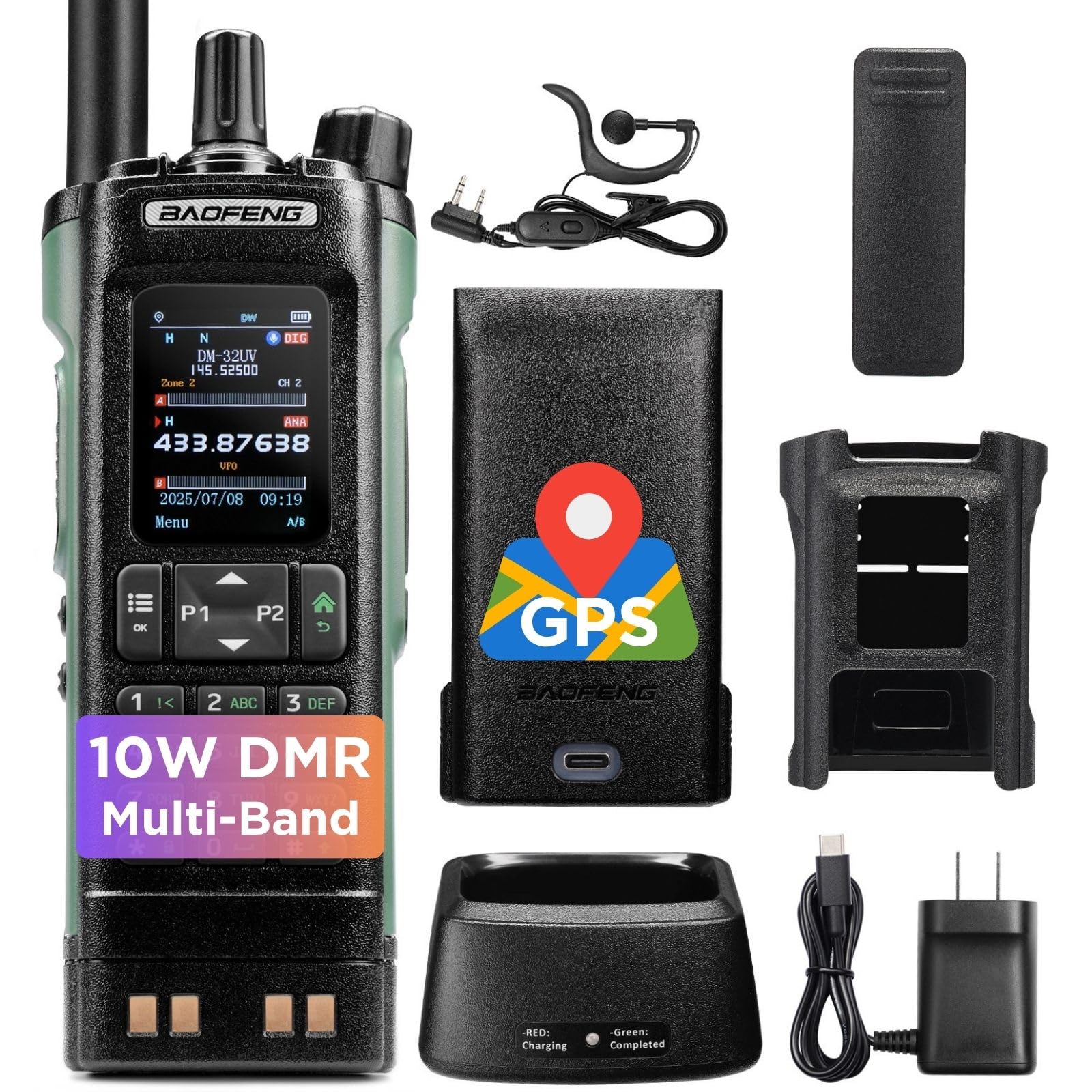
Image: The BAOFENG DM-32UV radio with its battery and antenna attached, ready for use.
2. Antenna Attachment
Screw the standard antenna clockwise onto the antenna connector at the top of the radio until it is finger-tight. Do not overtighten.
3. Charging the Battery
Before first use, fully charge the battery. You have two charging options:
- Desktop Charger Base: Place the radio with the battery installed into the desktop charger base. Ensure the charging contacts align. The indicator light will show charging status.
- USB-C Direct Charging: Connect the USB-C charger cable directly to the USB-C port on the bottom of the radio.

Image: The BAOFENG DM-32UV radio demonstrating both desktop charger base and direct USB-C charging methods.
Operating Instructions
Power On/Off and Volume Control
To power on the radio, rotate the top-right knob clockwise. Continue rotating to adjust the volume. Rotate counter-clockwise until a click is heard to power off.
Mode Switching (DMR / Analog)
The DM-32UV supports both digital DMR and analog modes. The radio will automatically detect the mode based on the channel settings. Ensure your channels are programmed correctly for the desired mode of operation.
Channel Management
The radio supports up to 4,000 programmable channels and 250 zones. Channels can be selected using the keypad or the channel switch knob. Programming channels typically requires software and a programming cable (sold separately).

Image: The BAOFENG DM-32UV radio's display highlighting its capacity for 4,000 channels and 250 zones, aiding in organized communication.
GPS & Digital APRS
The integrated GPS module allows for real-time location tracking. Digital APRS (Automatic Packet Reporting System) functionality enables the transmission of your position data to other users or a central station. This feature is useful for coordination and safety in remote operations.

Image: The BAOFENG DM-32UV radio with a visual representation of GPS and Digital APRS capabilities, showing location pins.
NOAA Weather Alerts
The radio can receive NOAA weather broadcasts and alerts, providing timely warnings for severe weather conditions. This feature is crucial for outdoor activities and emergency preparedness.

Image: The BAOFENG DM-32UV radio screen showing NOAA reception and alert, with icons representing various weather phenomena like tornadoes and tsunamis.
AM Aviation Receiver
The DM-32UV can receive AM aviation band frequencies, allowing monitoring of air traffic communications. This is a receive-only feature.

Image: The BAOFENG DM-32UV radio with an airplane in the background, illustrating its AM Aviation Receiver function.
Digital Audio Recording
The radio supports up to 10 hours of digital voice recording. Refer to the menu system for options to start, stop, and playback recordings.

Image: The BAOFENG DM-32UV radio's display indicating its 10-hour digital audio recording capability.
Customizable Keys and Display
The DM-32UV features four customizable keys (P1, P2, and two side buttons) that can be assigned to frequently used functions. The 2-inch color display allows for personalized font colors to enhance readability.

Image: The BAOFENG DM-32UV radio's 2-inch color display showing various font color customization options.

Image: Close-up of the BAOFENG DM-32UV radio highlighting its four customizable keys (P1, P2, and two side buttons).
Maintenance
- Cleaning: Use a soft, damp cloth to clean the radio's exterior. Do not use harsh chemicals or solvents.
- Battery Care: Avoid overcharging or completely discharging the battery. Store the radio and battery in a cool, dry place when not in use for extended periods.
- Antenna: Ensure the antenna is securely attached. Avoid bending or stressing the antenna.
- Water Resistance: This radio is not water resistant. Protect it from rain, splashes, and immersion in water.
Troubleshooting
| Problem | Possible Cause | Solution |
|---|---|---|
| Radio does not power on. | Battery is low or not installed correctly. | Charge the battery or re-install it securely. |
| No audio or weak signal. | Volume too low, antenna loose, or out of range. | Increase volume, check antenna connection, move closer to other radios or repeater. |
| Cannot transmit. | Incorrect channel settings, battery low, or PTT button malfunction. | Verify channel frequency and settings, charge battery, or contact support if PTT is faulty. |
| Display is hard to see in sunlight. | Screen visibility limitations. | Adjust viewing angle or seek shaded areas. The display does not have a dedicated brightness adjustment. |
| Difficulty programming channels. | Software or cable issues, or complex DMR programming. | Ensure you have the correct programming software and cable. Consult online tutorials or the BAOFENG support resources for detailed programming guides. Manual programming is also an option. |
Specifications
| Feature | Detail |
|---|---|
| Brand | BAOFENG |
| Model Number | DM-32UV |
| Color | Black & Green |
| Number of Channels | 4000 |
| Frequency Range | UHF VHF |
| Talking Range Maximum | 10 Kilometer |
| Water Resistance Level | Not Water Resistant |
| Battery Type | 1 x 9V (included), 2500mAh Li-ion |
| Item Weight | 1 Pound |
| Connectivity Protocol | DMR |
| Special Features | Digital Display, Dual Band, GPS & Digital APRS, Long Range, USB-C Rechargeable, NOAA Alert, AM Aviation Receiver, 10-Hour Digital Audio Recording |
Warranty and Support
The BAOFENG DM-32UV radio comes with an 18-month warranty and lifetime support from the manufacturer. For technical assistance, troubleshooting, or warranty claims, please contact BAOFENG customer service through their official website or the retailer where the product was purchased.
For additional resources, including programming software and firmware updates, please visit the official BAOFENG website.
Related documentsDM-32UV


Ask a question about this manual
Ask about setup, troubleshooting, compatibility, parts, safety, or missing instructions. Manuals+ will review the question and use this page’s manual context to help answer it.