
Introduction
This manual provides instructions for the safe and efficient operation of your Greesum Automatic Self-Cleaning Litter Box. Please read this manual thoroughly before use and retain it for future reference.
The Greesum Smart Electric Litter Box is designed to provide a clean and comfortable environment for your cats while offering convenience through automated cleaning and smart control features. It is suitable for multi-cat households.
Important Safety Information
- For safety, cats should weigh a minimum of 2.6 lbs (1.2 kg) to activate the sensors correctly.
- The device is equipped with gravity sensors and high-precision infrared detectors. These sensors automatically pause operation if a cat is detected near or inside the unit during a cleaning cycle.
- Always ensure the power cord is properly connected and not damaged.
- Do not immerse the main unit in water. Clean with a damp cloth.
- Keep out of reach of small children and pets not intended for use with this device.
- Use only recommended cat litter types: bentonite, mineral, or mixed litters.

Image showing the Greesum Automatic Self-Cleaning Litter Box with a safety shield icon, illustrating the multi-sensor safety system that detects cats and pauses operation.
Product Components
The Greesum Automatic Self-Cleaning Litter Box package includes the following items:
- Main Litter Box Unit
- Waste Bin (15L capacity)
- Power Adapter
- Trash Bags
- Mat
- User Manual (this document)
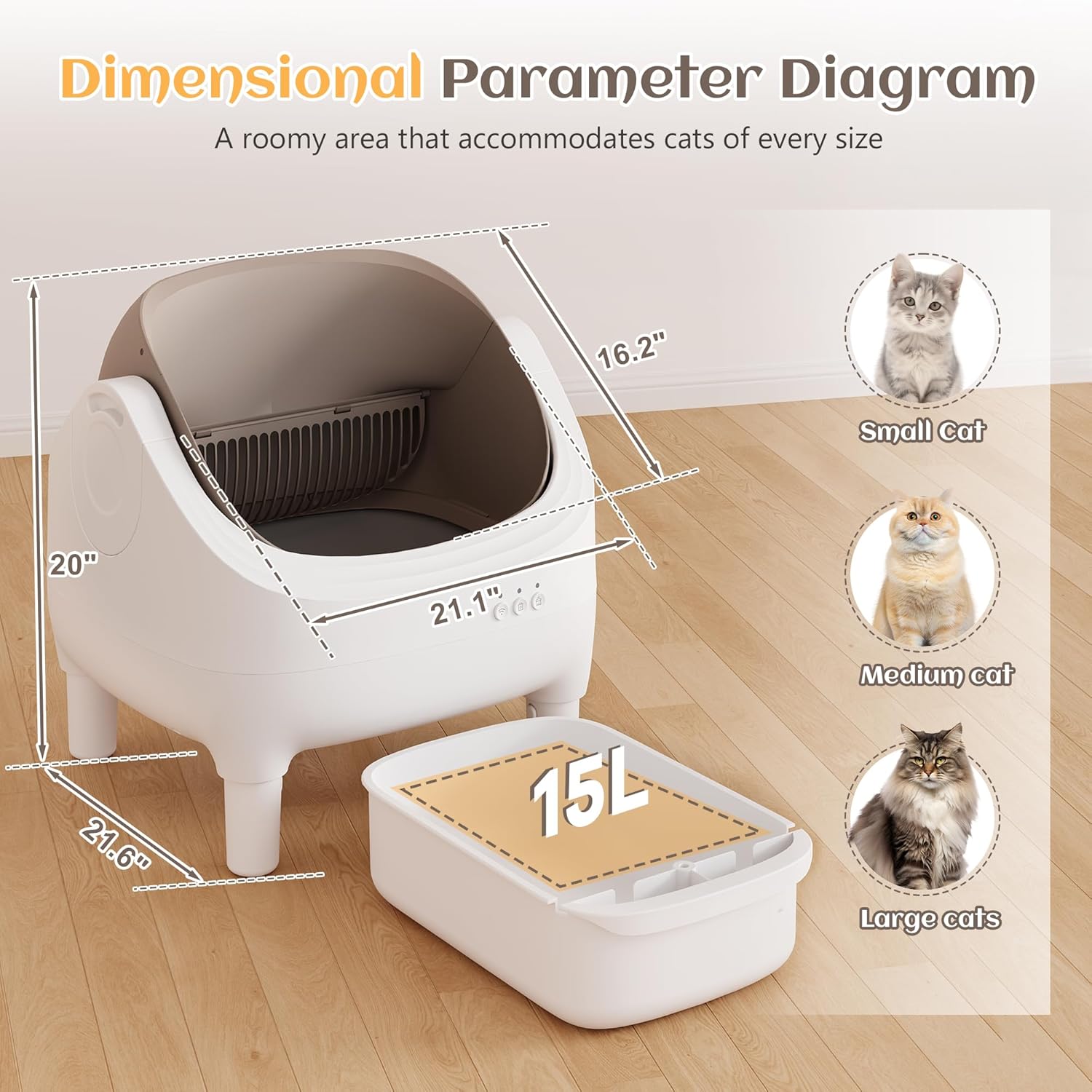
Image of the Greesum Automatic Self-Cleaning Litter Box, showcasing its open-top design and the removable waste bin. The image also includes a cat mat and a roll of trash bags, which are included components.
Setup Instructions
- Unpack: Carefully remove all components from the packaging.
- Placement: Place the litter box on a flat, stable surface in a suitable location, away from direct sunlight or heat sources. Ensure there is enough space around the unit for proper operation and access.
- Install Waste Bin: Slide the 15L waste bin into the designated compartment at the bottom front of the main unit. Ensure it is securely in place.
- Add Litter: Pour your preferred compatible cat litter (bentonite, mineral, or mixed) into the main litter compartment. Do not overfill; ensure the litter level is below the maximum fill line indicated inside the unit.
- Connect Power: Plug the power adapter into the litter box and then into a standard electrical outlet. The unit will perform an initial calibration cycle.
- App Connection (Optional): Download the Greesum Smart App from your device's app store. Follow the in-app instructions to connect your litter box to your 2.4G WiFi network for remote control and monitoring.

Image demonstrating the Greesum Automatic Self-Cleaning Litter Box's compatibility with various litter types, including Tofu, Bentonite, Spherical, and Crushed cat litter. This illustrates the step of adding litter.
Operating Instructions
Automatic Cleaning Cycle
The litter box is designed to automatically detect when your cat has used the unit and left. After a preset delay (typically a few minutes to allow the litter to clump), it will initiate a cleaning cycle. The internal rake system will sift through the litter, depositing waste into the sealed waste bin.
Manual Cleaning
You can initiate a cleaning cycle manually by pressing the designated button on the unit or through the Greesum Smart App.
Smart App Control
The Greesum Smart App provides enhanced control and monitoring features:
- Remote Cleaning: Start a cleaning cycle from anywhere.
- Schedule Cleaning: Set custom cleaning schedules.
- Usage Data: Track your cat's litter box usage patterns.
- Full-Bin Alerts: Receive notifications when the waste bin needs emptying.
- Health Monitoring: Monitor pet health data in real-time.
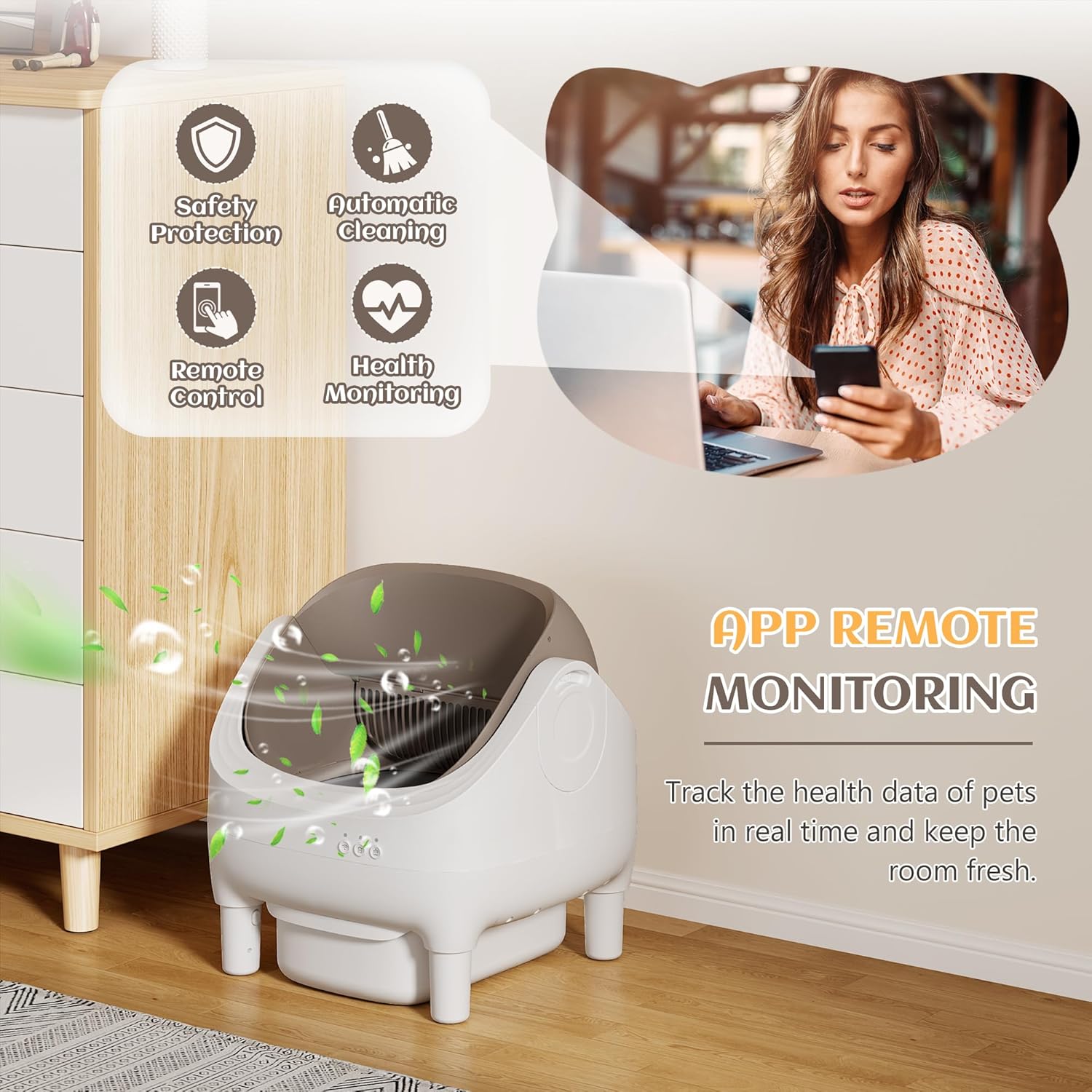
Image showing a user interacting with the Greesum Smart App on a smartphone, with the Greesum Automatic Self-Cleaning Litter Box in the background. This highlights the remote monitoring and control features.

Image illustrating the automatic self-cleaning mechanism of the Greesum litter box, with a rake sifting through litter and depositing waste into the bin. This demonstrates the core operating function.
Maintenance
Emptying the Waste Bin
When the waste bin is full (indicated by an app alert or visual inspection), carefully slide it out from the front of the unit. Dispose of the used trash bag and replace it with a new one. Slide the clean bin back into place.
Cleaning the Unit
- Exterior: Wipe the exterior surfaces of the litter box with a damp cloth and mild, pet-safe detergent if necessary. Avoid abrasive cleaners.
- Interior: Periodically, empty all litter from the main compartment. The open-top design facilitates easy access for cleaning. Wipe down the interior surfaces, including the rake mechanism, with a damp cloth. Ensure all parts are dry before adding fresh litter.
- Sensors: Gently wipe the sensor areas with a dry, soft cloth to ensure they remain free of dust or debris, which could affect their accuracy.
Litter Replacement
Regularly check the litter level and replenish as needed. It is recommended to completely replace all litter and thoroughly clean the unit every 2-4 weeks, depending on usage and the number of cats.
Troubleshooting
Unit Not Cleaning Automatically
- Check Cat Weight: Ensure your cat meets the minimum weight requirement of 2.6 lbs (1.2 kg).
- Sensor Obstruction: Clean the infrared and gravity sensors to ensure they are free from dust or litter.
- Litter Level: Verify the litter level is not too high or too low.
- Power: Confirm the unit is properly plugged in and receiving power.
Odor Issues
- Waste Bin: Ensure the waste bin is properly sealed and emptied regularly.
- Litter Type: Use high-quality, odor-controlling cat litter.
- Cleaning Frequency: Increase the frequency of full litter changes and unit cleaning.
App Connectivity Problems
- WiFi: Ensure your home WiFi network is 2.4G and stable.
- Router Proximity: Move the litter box closer to your WiFi router if connection is weak.
- App Update: Ensure the Greesum Smart App is updated to the latest version.
- Re-pair: Try re-pairing the device with the app following the initial setup instructions.
Unusual Noises
- Obstruction: Check for any foreign objects or excessive litter buildup obstructing the rake mechanism.
- Level Surface: Ensure the unit is on a flat, stable surface.
Specifications
| Feature | Detail |
|---|---|
| Model Number | GS-SCLB25-0843-8-0724 |
| Product Dimensions (L x W x H) | 55.1 cm x 55.1 cm x 50.8 cm (21.7 in x 21.7 in x 20 in) |
| Item Weight | 7.8 kg (17.2 lbs) |
| Waste Bin Capacity | 15 Liters |
| Material | Plastic |
| Connectivity | 2.4G WiFi (for Smart App) |
| Minimum Cat Weight | 1.2 kg (2.6 lbs) |
| Included Components | Litter box, Waste Bin, Power Adapter, Trash Bags, Mat |

Diagram illustrating the dimensions of the Greesum Automatic Self-Cleaning Litter Box, including height, width, and depth, along with the 15L waste bin capacity. It also shows examples of small, medium, and large cats for scale.
Warranty and Support
For warranty information and customer support, please refer to the contact details provided on the Greesum official website or your purchase documentation. Keep your proof of purchase for warranty claims.