
Greesum GS-SCLB25-0843-4-0724
Greesum Automatic Self-Cleaning Litter Box User Manual
Model: GS-SCLB25-0843-4-0724
Introduction
This manual provides comprehensive instructions for the setup, operation, and maintenance of your Greesum Automatic Self-Cleaning Litter Box. Please read this manual thoroughly before using the product to ensure proper function and safety.
The Greesum Smart Electric Litter Box is designed to provide a clean and comfortable environment for your cats while simplifying litter box maintenance for you. It features advanced sensor technology, smart app control, and an open-top design for ease of use and safety.
Safety Information
Important Safety Precautions:
- Ensure the litter box is placed on a stable, level surface.
- Do not immerse the main unit in water or other liquids.
- Keep children and pets away from the device during cleaning cycles.
- For safety, cats should weigh a minimum of 2.6 lbs (1.2 kg) to activate sensors correctly.
- Unplug the device before cleaning or performing any maintenance.
- Use only the provided power adapter.

Image: The Greesum Automatic Self-Cleaning Litter Box highlighting its multi-sensor safety system, which includes gravity sensors and infrared detectors to ensure safe operation by pausing when a cat is detected.
The device is equipped with multiple groups of infrared sensors and weight sensors to accurately detect the presence and activity of cats. The self-cleaning process will automatically pause if a cat approaches or enters the litter box, resuming only after the cat has left the area.
Package Contents
- Greesum Automatic Self-Cleaning Litter Box Main Unit
- Waste Bin
- Power Adapter
- Trash Bags (starter pack)
- Litter Mat
- User Manual (this document)
Setup Instructions
- Unpack the Device: Carefully remove all components from the packaging.
- Position the Litter Box: Place the main unit on a firm, level surface in a suitable location, away from direct sunlight or heat sources. Ensure there is enough space around the unit for easy access and ventilation.
- Install the Waste Bin: Slide the waste bin into the designated compartment at the bottom front of the main unit until it clicks into place. Line the waste bin with a trash bag.
- Add Cat Litter: Pour clumping cat litter into the litter compartment. The Greesum litter box is compatible with various types of clumping litter, including bentonite, mineral, and mixed litters. Fill to the indicated maximum fill line, typically about 3-4 inches deep.
- Connect Power: Plug the power adapter into the power port on the back of the unit, then plug the adapter into a wall outlet. The device will perform an initial calibration cycle.
- Place Litter Mat: Position the included litter mat in front of the litter box to help catch any stray litter.

Image: Illustration demonstrating the Greesum Automatic Self-Cleaning Litter Box's compatibility with different cat litter materials, including Tofu, Bentonite, Spherical, and Crushed litters.
App Connection (Optional)
- Download the App: Search for the "Greesum Smart" app (or similar, based on common smart home device naming conventions) on your smartphone's app store (iOS or Android).
- Create Account: Open the app and follow the on-screen instructions to create a new user account or log in if you already have one.
- Add Device: In the app, select "Add Device" or the "+" icon. Follow the app's instructions to connect your litter box to your home's 2.4G WiFi network. You may need to put the litter box into pairing mode (refer to the app for specific instructions, usually involving pressing and holding a button on the unit).
- Complete Setup: Once connected, you can name your device and access its features through the app.

Image: A visual representation of the Greesum Automatic Self-Cleaning Litter Box's smart app remote monitoring capabilities, showing icons for safety protection, automatic cleaning, remote control, and health monitoring.
Operating Instructions
Automatic Cleaning Cycle
The Greesum Automatic Self-Cleaning Litter Box is designed to automatically detect when your cat has used the litter box and left. After a preset delay (typically a few minutes to allow litter to clump), the internal mechanism will rotate, sifting the clean litter and depositing waste into the sealed waste bin below.

Image: A diagram illustrating the automatic self-cleaning process of the Greesum litter box, where the internal grate sifts through the litter, separating waste into the collection bin.
Manual Cleaning (via App or Device)
- App Control: Use the Greesum Smart app to initiate a cleaning cycle manually at any time. The app also allows you to set cleaning schedules and monitor the device status.
- Device Control: The litter box may have physical buttons for manual cleaning or other functions. Refer to the device's control panel for specific button functions (e.g., a "Clean" button).
Waste Bin Full Alert
The device will notify you via the app when the 15L waste bin is full and requires emptying. This feature helps maintain odor control and ensures continuous operation.
Maintenance
Emptying the Waste Bin
- When the app indicates the waste bin is full, or you notice it needs emptying, unplug the device from the power outlet.
- Carefully pull out the waste bin from the front of the unit.
- Tie off the trash bag and dispose of it according to local regulations.
- Clean the waste bin with mild soap and water if necessary, then dry thoroughly.
- Insert a new trash bag and slide the waste bin back into the unit.
- Plug the device back in.
Cleaning the Main Unit
- Unplug the device before cleaning.
- Wipe down the exterior surfaces with a damp cloth and mild, pet-safe cleaner. Avoid harsh chemicals.
- Periodically, the interior of the litter compartment may need cleaning. Remove all litter, then wipe down the interior with a damp cloth. Ensure all parts are completely dry before adding new litter and plugging the unit back in.
- Do not spray water directly onto the electronic components.
Troubleshooting
| Problem | Possible Cause | Solution |
|---|---|---|
| Device not powering on | Power adapter not connected; power outlet issue | Ensure power adapter is securely plugged into the unit and a working outlet. Try a different outlet. |
| Cleaning cycle not starting automatically | Cat still in or near the litter box; sensors obstructed; litter level too high/low | Ensure cat has left the area. Check sensors for obstructions. Adjust litter level. Perform a manual clean via app or button. |
| Odor not contained | Waste bin full; waste bin not sealed properly; poor quality litter | Empty waste bin. Ensure waste bin is fully inserted and sealed. Use high-quality clumping litter. Clean the unit thoroughly. |
| App not connecting to device | Incorrect WiFi password; 5G WiFi network; device not in pairing mode | Ensure you are using a 2.4G WiFi network. Re-enter WiFi password. Follow app instructions to put device into pairing mode. Restart router and device. |
| Litter not sifting properly | Litter too wet/sticky; too much litter; mechanism obstructed | Ensure litter is dry and clumping effectively. Do not overfill litter. Check for any foreign objects obstructing the sifting mechanism. |
If you encounter issues not listed here, please contact Greesum customer support.
Specifications
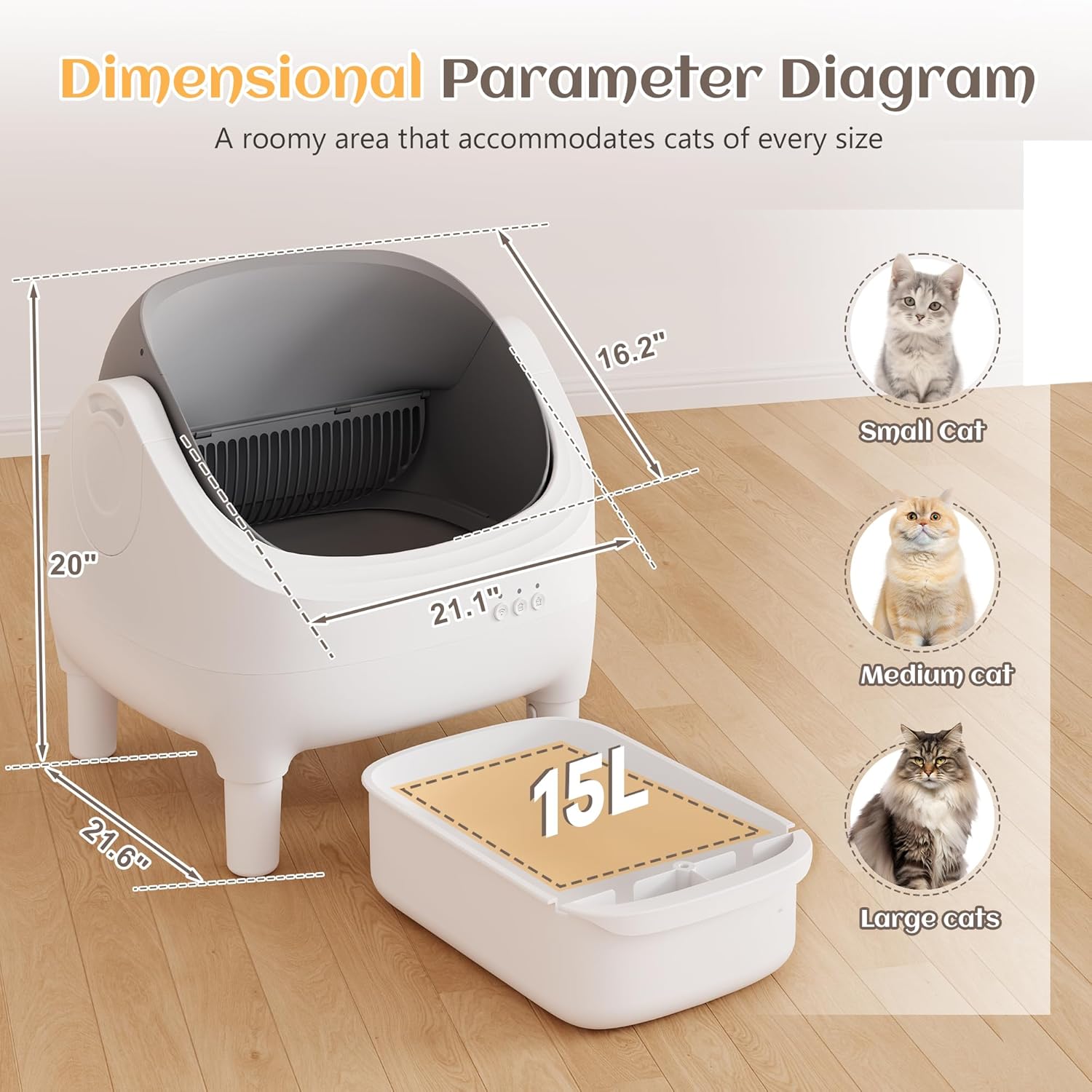
Image: A dimensional parameter diagram of the Greesum Automatic Self-Cleaning Litter Box, showing its overall dimensions (21.6"L x 21.1"W x 20"H) and the 15L waste bin capacity, alongside illustrations of small, medium, and large cats for scale.
| Feature | Detail |
|---|---|
| Model Number | GS-SCLB25-0843-4-0724 |
| Brand | Greesum |
| Product Dimensions (L x W x H) | 21.7" x 21.7" x 20" |
| Item Weight | 17.2 Pounds |
| Material | Plastic |
| Waste Bin Capacity | 15 Liters |
| Litter Compatibility | Bentonite, Mineral, Mixed Clumping Litters |
| Connectivity | 2.4G WiFi (for App Control) |
| Safety Features | Infrared and Gravity Sensors for automatic pause |
| Minimum Cat Weight | 2.6 lbs (1.2 kg) |
| Included Components | Litter box, Waste Bin, Trash Bags, Litter Mat |
| UPC | 760606909298 |
Warranty and Support
For warranty information and technical support, please refer to the warranty card included with your product or visit the official Greesum website. You can also contact Greesum customer service directly for assistance with product issues or inquiries.
Greesum Customer Service: Visit the Greesum Store on Amazon
Ask a question about this manual
Ask about setup, troubleshooting, compatibility, parts, safety, or missing instructions. Manuals+ will review the question and use this page’s manual context to help answer it.