
1. Introduction
This manual provides detailed instructions for the safe and correct installation and operation of your Maclean MC-806 N Ultra-Thin TV Wall Mount. This wall mount is designed for Samsung Neo QLED, QLED, Crystal UHD, and The Frame televisions ranging from 43 to 85 inches, with a maximum weight capacity of 60 kg and VESA compatibility from 150x100mm to 1200x800mm. Please read all instructions carefully before beginning installation.

This image illustrates the compatibility of the Maclean MC-806 N wall mount, supporting TVs from 43 to 85 inches, with a maximum VESA pattern of 1200x800mm and a maximum load capacity of 60 kg.
2. Safety Information
- Read all instructions: Ensure you understand all assembly and installation instructions before use. If you have any doubts, consult a qualified professional.
- Weight Capacity: Do not exceed the maximum weight capacity of 60 kg (132 lbs). Overloading can result in serious injury or property damage.
- TV Size: This mount is suitable for TVs between 43 and 85 inches.
- Wall Type: Ensure the wall structure can safely support the combined weight of the mount and your television. This mount is designed for solid concrete walls, brick walls, or wood stud walls. Do not install on drywall alone.
- Tools: Use appropriate tools for installation. Wear safety glasses and other protective gear as needed.
- Children: Keep children away from the installation area during assembly. Small parts may be a choking hazard.
- Periodic Check: Periodically check that the mount is secure and all fasteners are tight.
3. Package Contents
Verify that all components are present and undamaged before installation. If any parts are missing or damaged, contact your retailer for assistance.

This image displays all included mounting hardware, such as screws, wall anchors, spacers, and a measuring template, necessary for installation.
Included Hardware:
- Wall Plates (2x)
- TV Brackets (2x)
- Wall Anchors (for concrete/brick)
- Lag Bolts (for wood studs/concrete)
- Various TV Screws (M4, M6, M8)
- Spacers
- Washers
- Leveling Template
4. Specifications
| Feature | Specification |
|---|---|
| Model Number | MC-806 N |
| Brand | Maclean |
| Compatible TV Sizes | 43 - 85 inches |
| Maximum Load Capacity | 60 kg (132 lbs) |
| VESA Compatibility | 150x100mm to 1200x800mm |
| Tilt Angle | ±3 degrees |
| Wall Distance (No Gap) | 7.5 mm (3 mm for Frame series) |
| Material | Powder-coated steel, plastic |
| Color | Black |

A technical drawing providing precise dimensions of the Maclean MC-806 N wall mount components, including width, height, and wall clearance (7.5mm).
5. Installation Guide
Follow these steps carefully to ensure a secure and correct installation.
Step 1: Prepare the Wall and TV
- Identify the desired mounting location on your wall. Ensure there are no hidden electrical wires or plumbing.
- For wood stud installation, locate the center of the studs. For concrete/brick, ensure the wall is solid.
- Lay your TV face down on a soft, clean surface to prevent screen damage.
Step 2: Attach TV Brackets
- Identify the VESA mounting holes on the back of your TV.
- Select the appropriate screws (M4, M6, or M8) and spacers that fit your TV's mounting holes.
- Attach the two TV brackets to the back of your TV using the selected screws and washers. Ensure they are securely tightened but do not overtighten. The brackets should be oriented so the hooks face downwards.
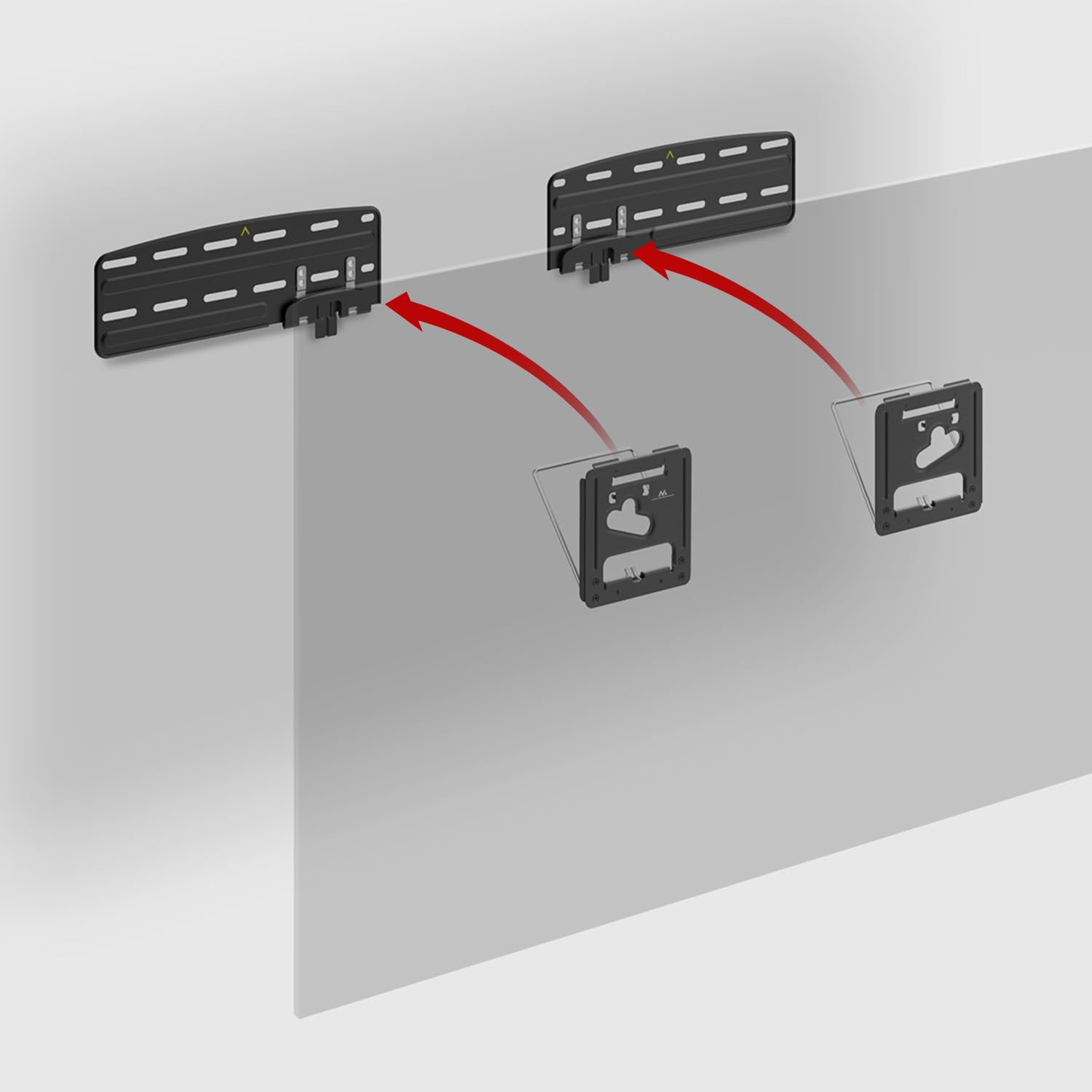
This diagram illustrates how the TV mounting brackets securely engage with the wall-mounted plates, ensuring a stable connection.
Step 3: Mark Wall Mounting Points
- Hold the wall plates against the wall at your desired TV height. Use a level to ensure they are perfectly horizontal.
- Mark the drill hole locations through the wall plates onto the wall.
Step 4: Install Wall Brackets
- Drill pilot holes at the marked locations. The drill bit size will depend on your wall type and the chosen anchors/lag bolts.
- For concrete/brick walls, insert the plastic wall anchors into the drilled holes.
- Position the wall plates over the holes and secure them to the wall using the lag bolts. Tighten all bolts firmly.
Step 5: Mount the TV
- With assistance, carefully lift the TV and align the hooks on the TV brackets with the top edge of the wall plates.
- Gently lower the TV until the hooks engage with the wall plates. Ensure both sides are securely seated.
- Push the bottom of the TV towards the wall until the 'No Gap' mechanism engages, securing the TV close to the wall.

This image highlights the 'No Gap' design of the Maclean MC-806 N wall mount, showing how the TV sits very close to the wall for a sleek, integrated appearance.
Step 6: Adjust Tilt (Optional)
- The mount allows for a slight tilt adjustment of ±3 degrees.
- To adjust the tilt, gently push or pull the top or bottom of the TV to achieve the desired viewing angle. The mechanism is designed to hold the position.

This image shows the adjustable tilt feature of the Maclean MC-806 N wall mount, allowing for a precise angle adjustment of up to ±3 degrees for optimal viewing.
6. Operation
Once installed, the Maclean MC-806 N wall mount offers a fixed, ultra-thin profile with a subtle tilt adjustment. To adjust the tilt, simply apply gentle pressure to the top or bottom edge of your television. The mount's design allows for minor angular adjustments of up to 3 degrees in either direction to optimize your viewing experience. No tools are required for this adjustment.
7. Maintenance
- Cleaning: Wipe the mount with a soft, dry cloth. Do not use abrasive cleaners or solvents.
- Periodic Checks: Every few months, inspect the mount and all fasteners to ensure they remain tight and secure. Check for any signs of wear or damage.
- Cable Management: Ensure TV cables are routed safely and do not interfere with the mount's structure or TV stability.
8. Troubleshooting
- TV is not level: Ensure the wall plates were installed perfectly level. If not, you may need to slightly loosen the wall plate bolts, adjust, and re-tighten. The ±3 degree tilt adjustment can also help compensate for minor leveling issues.
- TV does not sit flush against the wall: Verify that all cables are not pinched or obstructing the TV from sitting fully against the wall. Ensure the 'No Gap' mechanism is properly engaged.
- Difficulty attaching TV to wall plates: Ensure the TV brackets are correctly oriented and the hooks are aligned with the wall plates. You may need assistance to guide the TV into place.
- Mount feels unstable: Immediately remove the TV. Re-check all wall and TV fasteners. Ensure the wall type is appropriate for the mount and that anchors/bolts are correctly installed. Consult a professional if unsure.
9. Warranty and Support
This Maclean MC-806 N TV Wall Mount comes with a manufacturer's warranty. For specific warranty terms, duration, and support inquiries, please refer to the documentation provided with your purchase or contact your retailer. Keep your proof of purchase for warranty claims.