
Introduction
Thank you for choosing the SVBONY SVGo3 4K60FPS Action Camera. This manual provides essential information for setting up, operating, and maintaining your camera to ensure optimal performance and longevity. Please read this manual thoroughly before using your device.
What's in the Box
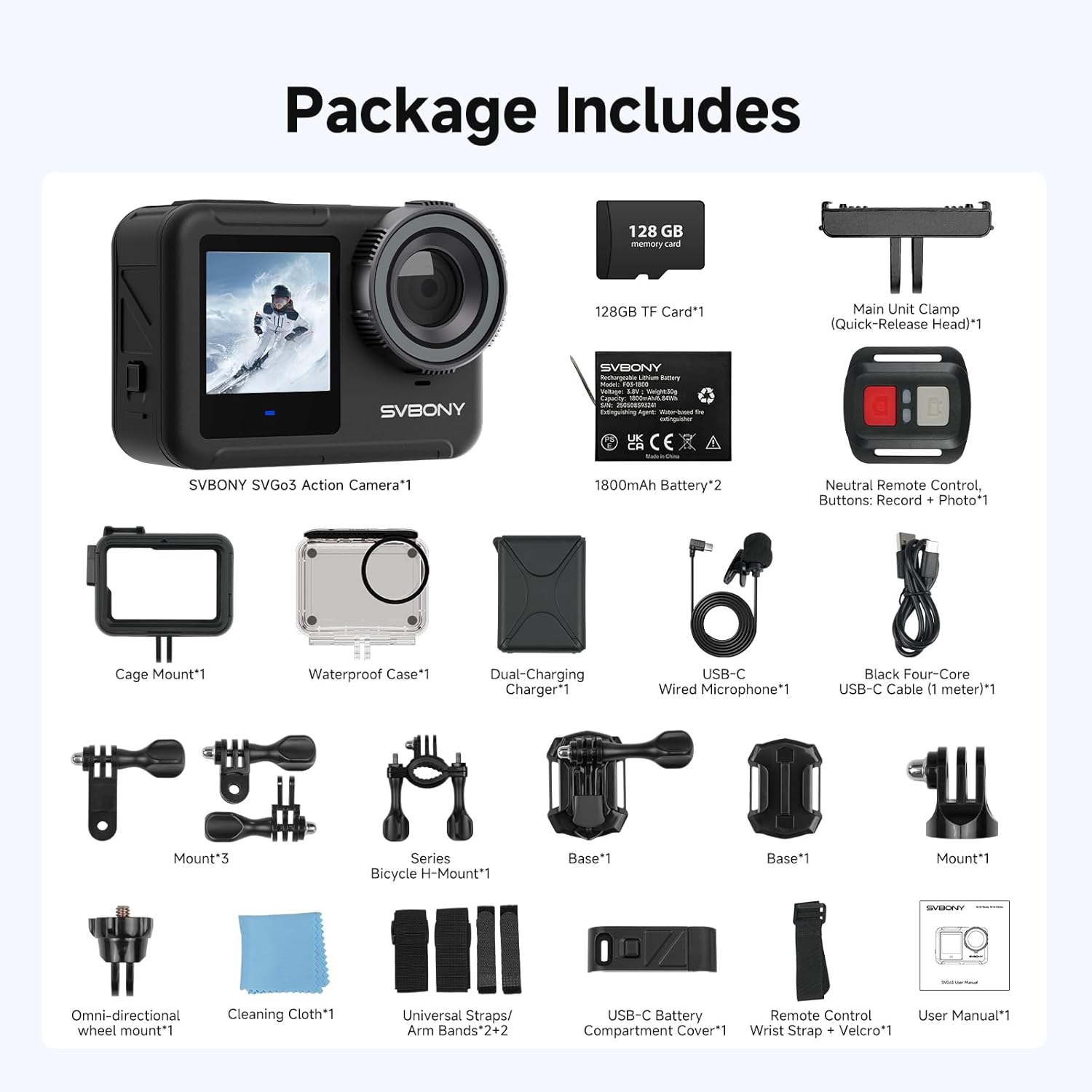
The SVBONY SVGo3 Action Camera package includes the following items:
- SVBONY SVGo3 Action Camera x1
- Wired Microphone x1
- Remote Control x1
- 1800mAh Batteries x2
- 128GB microSD Card x1
- Dual-Charging Charger x1
- USB-C Cable (1 meter) x1
- Waterproof Case x1
- Cage Mount x1
- Main Unit Clamp (Quick-Release Head) x1
- Mounts x4 (various styles)
- Series Bicycle H-Mount x1
- Omni-directional Wheel Mount x1
- Universal Straps/Arm Bands x2
- USB-C Battery Compartment Cover x1
- Remote Control Wrist Strap + Velcro x1
- Cleaning Cloth x1
- User Manual x1

Product Features
Ultra HD 4K/60fps Video Recording
The SVGo3 records video in stunning 4K resolution at 60 frames per second, providing smooth and detailed footage. This high frame rate allows for seamless slow-motion playback without compromising video quality.

Built-in Waterproof Design
The camera is waterproof up to 40 feet (12 meters) without any additional housing, making it suitable for swimming and snorkeling. For deeper dives, the included waterproof case extends protection down to 100 feet (30 meters).

Extended Battery Life
Equipped with two 1800mAh batteries, the SVGo3 provides up to 150 minutes of continuous 4K/30fps recording per battery. With external Type-C power support, it can handle prolonged shooting sessions.

Magnetic Quick Release Mount
The innovative magnetic quick-release mount allows for rapid attachment and detachment, enabling quick transitions between different mounting locations like helmets, handlebars, or chest harnesses. The self-locking design ensures secure attachment.
Enhanced Audio Capabilities
The camera features a built-in microphone and includes a wired microphone for improved audio quality. It also supports wireless microphones via its Type-C port, and its design helps reduce wind noise.

6-axis EIS Image Stabilization
Built-in advanced six-axis Electronic Image Stabilization (EIS) effectively minimizes camera shake, ensuring stable, smooth, and clear footage even during dynamic activities like biking, skiing, or snorkeling.

Dual-Screen Design
The SVGo3 features a 2.35-inch rear touchscreen for intuitive operation and playback, along with a 1.4-inch front color selfie screen, ideal for vlogging and self-portraits.

Low-Light Performance
Equipped with a 1/2.7-inch sensor and 1.5µm large pixels, the camera captures more ambient light, enhancing performance in low-light conditions and for night vision, especially useful for underwater environments.

Wireless Connectivity & Remote Control
With built-in 5G/2.4G dual-band Wi-Fi, you can connect the camera to your iOS or Android device for instant sharing and control. The included remote control (not waterproof) offers convenient operation from a distance.

Storage Expansion
The camera comes with a 128GB microSD card and supports expansion up to 256GB, providing ample storage for your high-resolution videos and photos.
Setup
1. Charging the Batteries
- Insert the two 1800mAh batteries into the dual-charging charger.
- Connect the USB-C cable to the charger and a power source (e.g., USB wall adapter, computer).
- The indicator lights on the charger will show the charging status. Once fully charged, remove the batteries.
2. Inserting the microSD Card
- Locate the microSD card slot on the side of the camera.
- Gently insert the included 128GB microSD card (or another compatible card up to 256GB) into the slot until it clicks into place. Ensure the card is inserted in the correct orientation.
3. Mounting the Camera
The SVGo3 offers versatile mounting options:
- Magnetic Quick Release: Attach the main unit clamp to a desired surface (e.g., helmet, handlebar) using the appropriate mount. The camera can then be quickly snapped onto the magnetic quick-release head.
- Waterproof Case: For underwater activities beyond 40 feet, place the camera inside the waterproof case and secure it. The case can then be attached to various mounts.
- Cage Mount: Use the cage mount for added protection and accessory attachment (e.g., external microphone) when not requiring full waterproofing.
Operating the Camera
1. Power On/Off
- To power on: Press and hold the Power button (usually on the top or side) for a few seconds until the screen lights up.
- To power off: Press and hold the Power button again until the screen turns off.
2. Basic Recording & Photo Modes
- Switching Modes: Swipe left or right on the rear touchscreen to navigate between video, photo, and other modes.
- Start/Stop Recording: In video mode, press the Shutter/Record button (usually on top) to start recording. Press it again to stop.
- Take Photo: In photo mode, press the Shutter/Record button to capture a photo.
3. Using Dual Screens
- The rear 2.35-inch touchscreen is for primary control, settings, and playback.
- The front 1.4-inch color screen is ideal for framing yourself during vlogging or selfies. The view automatically switches when the camera detects a front-facing subject or can be manually toggled via settings.
4. Using the Remote Control
- Ensure the remote control is paired with the camera (refer to the camera's settings menu for pairing instructions).
- Use the dedicated buttons on the remote to start/stop recording or take photos from a distance.
5. Connecting to the Mobile App (Wi-Fi)
- Download the official SVBONY app from your device's app store.
- Enable Wi-Fi on your SVGo3 camera via the settings menu.
- On your mobile device, connect to the camera's Wi-Fi network (SSID and password usually displayed on the camera screen).
- Open the SVBONY app to control the camera, view live footage, and transfer files.
Maintenance
- Cleaning: Use the provided cleaning cloth to wipe the lens and screens. For stubborn smudges, use a lens cleaning solution designed for optics.
- Waterproof Care: After using the camera in saltwater, rinse it thoroughly with fresh water and allow it to air dry. Inspect the waterproof seals and O-rings regularly for any damage or debris.
- Battery Care: Store batteries in a cool, dry place. Avoid fully discharging batteries for extended periods.
- Storage: When not in use, store the camera and accessories in a protective case to prevent damage.
Troubleshooting
- Camera not turning on: Ensure batteries are fully charged and correctly inserted.
- Recording issues: Check if the microSD card is inserted correctly and has sufficient free space. Ensure the card is formatted to the camera's specifications.
- Wi-Fi connectivity problems: Make sure the camera's Wi-Fi is enabled and you are connecting to the correct network on your mobile device. Try restarting both devices.
- Unstable footage: Verify that 6-axis EIS is enabled in the camera settings.
- Poor audio quality: Check if the wired microphone is securely connected. Ensure there are no obstructions blocking the built-in microphone.
Specifications
| Feature | Detail |
|---|---|
| Brand Name | SVBONY |
| Item Model Number | SVGo3 |
| Item Weight | 6.2 ounces |
| Product Dimensions | 71 x 29 x 50 inches |
| Batteries | 2 A batteries required (included) |
| Photo Sensor Technology | CMOS |
| Video Capture Resolution | 4K |
| Maximum Focal Length | 3.25 Millimeters |
| Flash Memory Type | Micro SD |
| Video Capture Format | MP4 |
| Supported Audio Format | MP3, AAC |
| Screen Size | 2.35 Inches (rear), 1.4 Inches (front) |
| Connectivity Technology | Wi-Fi |
| Special Features | Built-in Waterproof Body, Dual-screen design, Long Battery Life, Magnetic quick-release, 6-axis EIS |
Warranty and Support
For warranty information and technical support, please refer to the official SVBONY website or contact their customer service directly. Keep your purchase receipt as proof of purchase for warranty claims.