
1. Important Safety Information
Before operating your VIPCOO ES1-48V 20.8Ah Electric Scooter, please read this manual thoroughly and understand all safety warnings and instructions. Failure to follow these instructions may result in serious injury or property damage.
- Always wear a helmet and appropriate safety gear (knee pads, elbow pads, wrist guards) when riding.
- Do not ride in wet conditions, heavy rain, or through puddles.
- Avoid riding on uneven surfaces, loose gravel, or steep inclines beyond the scooter's specified capabilities.
- Ensure all screws and quick-release mechanisms are securely tightened before each ride.
- Do not exceed the maximum load capacity of 330 pounds.
- Familiarize yourself with local laws and regulations regarding electric scooter usage.
- Always maintain a safe distance from other vehicles and pedestrians.
- Perform regular maintenance checks as outlined in this manual.
2. What's in the Box
Upon receiving your VIPCOO ES1-48V 20.8Ah Electric Scooter, carefully unpack all components and verify against the packing list. The package typically includes:
- VIPCOO ES1-48V 20.8Ah Electric Scooter (main unit)
- User Manual
- Toolkit (Allen wrenches)
- Charger and Power Cable
- Rear Mud Guard (rear segment)

Figure 2.1: VIPCOO ES1 Electric Scooter and included accessories.
For a visual guide on unboxing and identifying components, please refer to the installation video below (0:00 - 0:03).
Video 2.1: Product Installation Instructions (includes unboxing segment).
3. Setup and Assembly
Follow these steps to assemble your electric scooter. Refer to the provided installation video for detailed visual instructions.
3.1 Display Installation
- Locate the Allen wrench for the display mounting screws in the toolkit.
- Remove the two display mounting screws and set them aside. Be cautious of spring washers.
- Confirm the display orientation: button panel on the left, thumb throttle on the right, with the logo side edge down when facing the handlebar.
- Align the display screw holes with the display bracket holes.
- Reinsert and tighten the display mounting screws.
Refer to Video 2.1: Product Installation Instructions (0:03 - 0:34) for visual guidance.
3.2 Kickstand Installation
- Position the scooter on a soft surface to avoid scratches.
- Unfold the kickstand.
- Locate the appropriate Allen wrench for the kickstand base fixing bolts.
- Remove the two kickstand base fixing bolts and set them aside.
- Install the kickstand base in the correct direction.
- Align the holes on the kickstand with the holes on the kickstand base.
- Reinsert and securely tighten the kickstand base mounting screws.
- Adjust the kickstand support plate angle by loosening the support plate mounting screw and the adjusting screw, setting to a comfortable angle, then retightening.
- If the kickstand touches the battery compartment when folded, rotate the kickstand length adjustment screw counter-clockwise slightly until it no longer contacts the battery compartment.
Refer to Video 2.1: Product Installation Instructions (0:35 - 1:21) for visual guidance.
3.3 Handlebar Assembly and Adjustment
- Ensure the kickstand is fully folded before placement.
- Push the folding safety latch.
- Grip the handlebars with one hand and unfold the stem. Ensure full deployment and engagement of the folding safety latch.
- Securely deploy the kickstand to support the scooter.
- Locate the Allen wrench for the stem cap screw.
- Remove the stem cap screw and set aside the stem cap.
- Use the appropriate Allen wrench for the handlebars clamp screws. Loosen the two clamp screws to allow handlebar adjustment.
- Align the handlebar clamp with the steering stem and secure it at the stopper slot to prevent over-rotation.
- Rotate the handlebar to ensure vertical alignment with the front wheel and ensure the display faces the scooter.
- Tighten the two handlebar clamp screws.
- Reinstall the stem cap onto the steering stem and secure it with the original screw. Tighten the screw.
Refer to Video 2.1: Product Installation Instructions (1:22 - 2:14) for visual guidance.
3.4 Brake, Throttle, and Keypad Angle Adjustment
If the installation angle of the brake, finger throttle, or keypad is uncomfortable, you can adjust it:
- Locate the appropriate Allen wrench for the respective clamp screw (brake mounting screws, finger throttle mounting screws, keypad mounting screw).
- Loosen the screw.
- Adjust the component to a comfortable angle.
- Tighten the screw.
Refer to Video 2.1: Product Installation Instructions (2:15 - 2:50) for visual guidance.
3.5 Rear Mud Guard Installation
- Locate the Allen wrench for the rear segment mounting screws of the rear mud guard.
- Remove the four screws along with their washers and set them aside.
- Locate the rear wheel mud guard (rear segment) from the included accessories.
- Install the mud guard in the correct orientation.
- Align the two mounting holes on the mud guard with the two holes on the rear mud guard bracket.
- Place the washer on the innermost side.
- Align the washer's hole with both the mud guard and bracket mounting holes.
- Tighten the screws into their corresponding holes.
- Repeat for the other side if applicable.
Refer to Video 2.1: Product Installation Instructions (2:51 - 3:27) for visual guidance.
4. Operating Instructions
Familiarize yourself with the scooter's controls and display functions.
4.1 Initial Battery Charge and Tire Pressure Check
- Battery Charging: Fully charge the battery before the first use. The charging port is located on the side of the deck. The charger indicator light is red during charging and green when fully charged.
- Tire Pressure: The tire pressure of each wheel must be checked prior to initial use. It is recommended to inflate the tire pressure to 35 PSI. If your inflator lacks a pressure gauge, you can manually check by squeezing the tire with maximum force; tires inflated to 35 PSI should feel extremely firm and barely compressible.

Figure 4.1: Off-road pneumatic tire for enhanced grip and comfort.
Refer to Video 2.1: Product Installation Instructions (3:33 - 4:04) for visual guidance on charging and tire pressure.
4.2 Keypad Functions and Display Information

Figure 4.2: Smart LCD display with cruise control, battery life, speed mode, mileage, and coded lock.
The keypad on the left handlebar controls various functions:
- Light Switch: Toggles the scooter's lighting (headlight, ambient lights).
- Horn: Activates the horn.
- On/Off (Power Button): Powers the scooter on/off, confirms password.
- Mode (M Button): Toggles between single drive and dual drive modes.
- + (Plus) / - (Minus) Buttons: Toggle the vehicle's drive modes (ECO, STD, TURBO) and adjust settings in background mode.
- Turn Signals: Move the lever left or right to activate the corresponding turn signal.
The display shows information such as Riding Mode, Assist, Distance, Battery Remain, Current Voltage, Turn Signals, Brake, Locked, Light's on, Cruise control, Engineer Mode (for engineer only), Driving mode, Speed, and MAX/AVG.
Refer to Video 2.1: Product Installation Instructions (4:05 - 5:30) for visual guidance on keypad functions and display information.
4.3 Power On/Off and Password Setup
- Power On: Press and hold the power button to power up. The display will show the power-up password (default: 000). Select digits using the + and - buttons, then short press the power button to confirm each digit. After selecting all three digits, double press the power button to confirm.
- Change Password: While in power-on mode, long press the power button to enter password setup. First, enter the original password. Use the + and - buttons to change the password digits, then press the power button to confirm each digit. After all three digits are set, double click the power button to confirm.
Refer to Video 2.1: Product Installation Instructions (4:09 - 4:57) for visual guidance.
4.4 Background Mode Settings
Long press the M key in power-on mode to enter background mode. Here you can adjust various settings:
- P01 (Speed Unit): Sets the speed unit (km/h or mph). Toggle by pressing the + and - buttons.
- P05 (Cruise Control): Configures cruise control settings (01 enables, 00 disables). When enabled, the scooter will maintain the speed prior to throttle release. Applying the brake automatically cancels cruise control.
- P06 (Zero Speed Start): Toggles the zero speed start function (01 enables, 00 disables). If the scooter is in power-on mode and does not respond when the throttle lever is moved while stationary, first check if this feature is enabled. If enabled, the scooter will not start from a standstill by throttle alone. Deactivate this mode to engage the throttle from a standstill.
- P08 (Standby Time): Sets scooter standby time (00 means no shutdown, 01 to 30 represent 1 minute to 30 minutes respectively). The longest standby time is 30 minutes except for the no shutdown setting.
- P09 (Password Required): Setting for whether a password is required to start up the vehicle (01 enables, 00 disables).
- P99 (Factory Reset): To perform a factory reset, press and hold the + key until 99 changes to double hyphens, indicating a successful factory reset. After a successful reset, the screen will return to the normal information interface.
Refer to Video 2.1: Product Installation Instructions (5:31 - 6:43) for visual guidance.
5. Folding and Unfolding
The VIPCOO ES1-48V 20.8Ah Electric Scooter features a convenient folding mechanism for portability and storage.
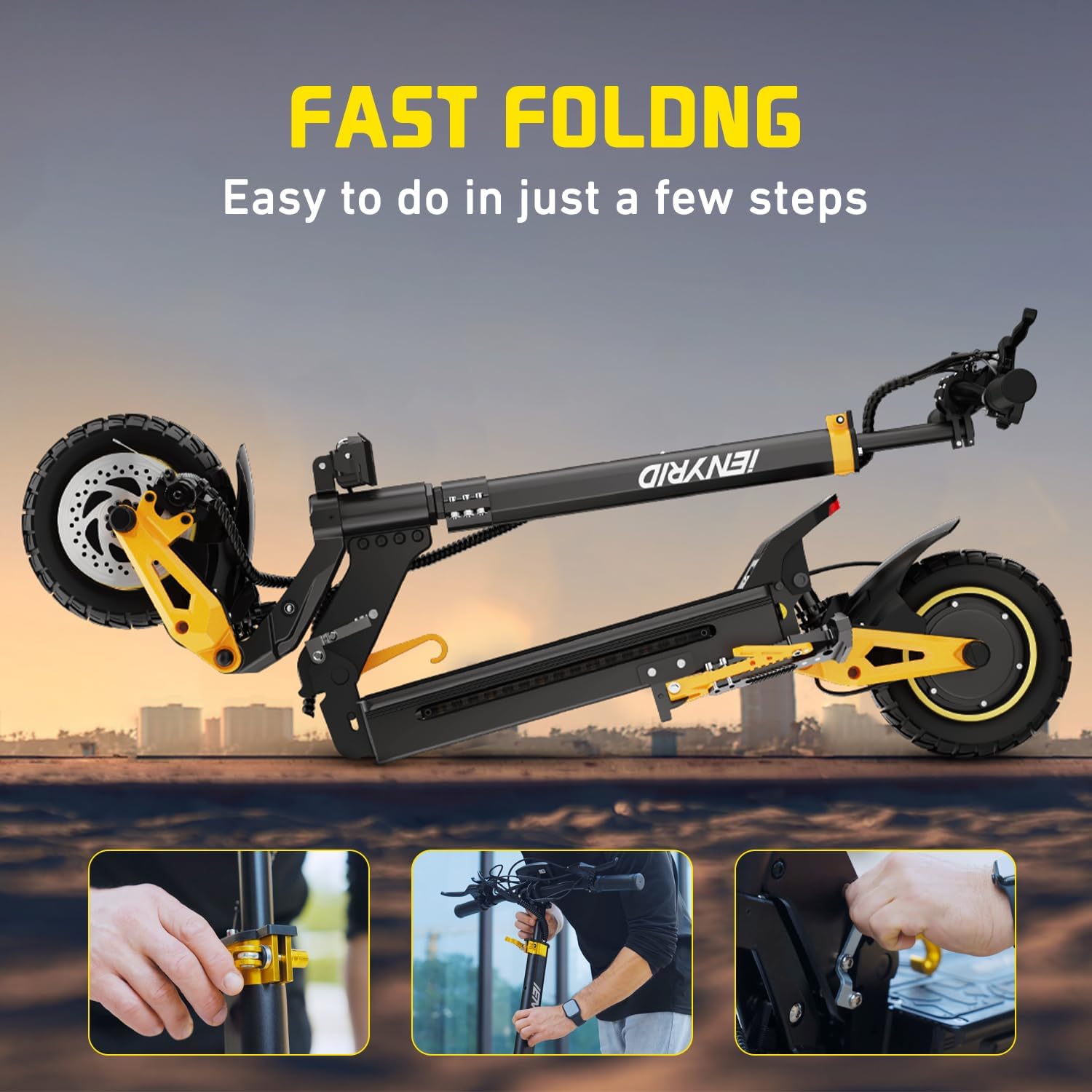
Figure 5.1: Fast folding mechanism for easy transport and storage.
5.1 How to Fold the Scooter
- Pull the hook of the folding lock latch.
- Hold the stem with one hand.
- Unlock the folding safety latch.
- Fold the scooter. Folding is complete when the safety latch engages in the detent position. At this point, the scooter's folding parts will be in the locked position.
Refer to Video 2.1: Product Installation Instructions (6:56 - 7:14) for visual guidance.
5.2 How to Unfold the Scooter
- First, unlock the folding safety latch.
- Unfold the scooter. Unfolding is complete when the safety latch engages in the detent position.
- Push the folding lock latch to secure the stem.
Refer to Video 2.1: Product Installation Instructions (7:15 - 7:30) for visual guidance.

Figure 5.2: The folding and lifting structure design allows for easy portability up stairs.
6. Maintenance
Regular maintenance ensures the longevity and safe operation of your scooter.
- Battery Care: Do not remove the battery. If the device is unused for extended periods, perform a full charge-discharge cycle monthly (charge to 100% → use up the battery to 0% → recharge to 100%). This helps prolong battery lifespan and maintain stable performance.
- Tire Pressure: Regularly check and maintain tire pressure at 35 PSI for optimal performance and safety.
- Brakes: Inspect brake levers and cables regularly. Ensure the dual braking system provides strong and stable braking force.
- Fasteners: Periodically check all screws and bolts for tightness. Tighten any loose fasteners.
- Cleaning: Clean the scooter with a damp cloth. Avoid using high-pressure water jets or harsh chemicals.
- Storage: Store the scooter in a cool, dry place away from direct sunlight and extreme temperatures.
7. Troubleshooting
This section addresses common issues you might encounter with your scooter.
- Scooter does not power on: Ensure the battery is charged. Check all cable connections.
- Throttle not responding from a standstill: Check P06 setting in background mode. If P06 is set to 01 (enabled), the scooter will not start from a standstill by throttle alone. Deactivate this mode (set to 00) if you prefer throttle-only start.
- Reduced range or power: Check tire pressure. Ensure battery is fully charged. Riding conditions (terrain, rider weight, temperature) can affect performance.
- Brakes feel loose: Inspect brake cables and pads. Adjust brake lever angle if necessary (refer to Section 3.4).
- Uncomfortable handlebar/control angle: Adjust the angle of the handlebars, brake levers, throttle, or keypad as described in Section 3.3 and 3.4.
If you experience issues not covered here, please contact customer support.
8. Specifications
| Feature | Specification |
|---|---|
| Brand | VIPCOO |
| Model Name | iE-ES1 |
| Style | ES1-48V 20.8Ah |
| Motor Power | Dual 1200W Brushless DC Motors (2400W total) |
| Max Speed | Up to 38 Mph |
| Max Range | Up to 40 Miles |
| Max Load | 330 Pounds |
| Max Slope | 35° |
| Tires | 10 Inch Off-road Pneumatic Tires |
| Suspension | Dual Spring Front and Rear Suspension System |
| Braking System | Dual Braking System (Front and Rear Disc Brake) |
| Lighting System | 360° Advanced Lighting System (Headlight, Turn Signals, Ambient Lights, Tail Light) |
| Deck Width | 7.5 inches |
| Frame Material | High Strength Aluminum Alloy |
| Item Weight | 66 Pounds |
| Charging Time | 6 Hours |
| Special Features | Digital Display, Foldable, Wide Platform |

Figure 8.1: Scooter dimensions and recommended rider height/weight.
9. Warranty and Support
VIPCOO is committed to providing excellent customer service and product support.
- Warranty: The ES1 electric scooter comes with a limited warranty. We provide 180 days of whole car maintenance for product issues.
- Customer Support: If you encounter any problems during use, please contact us. Our customer service team is available 7*24 hours to assist you.

Figure 9.1: Dedicated customer support for VIPCOO products.
