
1. Introduction
This manual provides detailed instructions for the G-TiDE Smartwatch Elegance S6 PRO. It covers setup, operation, maintenance, and troubleshooting to ensure optimal use of your device. The G-TiDE Elegance S6 PRO combines sophisticated design with advanced functionalities, offering a vibrant and clear display for notifications, calls, and health monitoring.
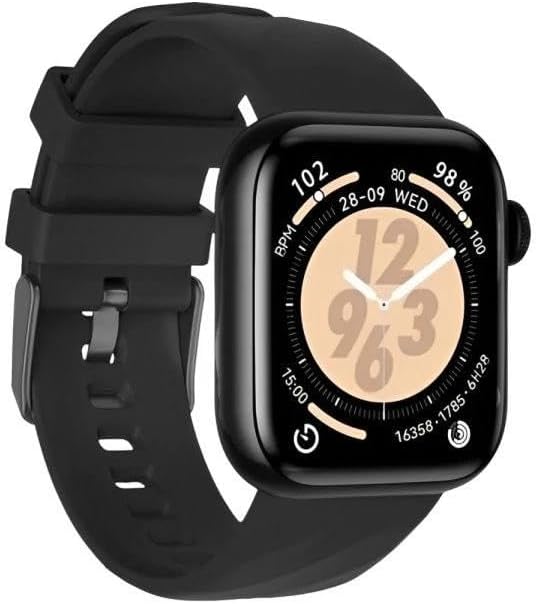
Figure 1.1: G-TiDE Smartwatch Elegance S6 PRO. This image displays the black G-TiDE Smartwatch Elegance S6 PRO on a white background, showcasing its square watch face with a digital clock, date, and various health metrics like heart rate and battery percentage. The watch features a black silicone strap.
2. Package Contents
- 1 x G-TiDE Smartwatch Elegance S6 PRO
- 1 x Interchangeable Strap
- 1 x Charging Cable
- 1 x User Manual (this document)
3. Setup
3.1 Charging the Smartwatch
- Connect the magnetic charging cable to the charging points on the back of the smartwatch.
- Plug the USB end of the cable into a standard USB power adapter (5V/1A recommended) or a computer's USB port.
- The watch screen will display a charging indicator. Ensure the watch is fully charged before first use. A full charge typically takes approximately 2 hours.
3.2 App Installation
To unlock the full functionality of your G-TiDE Smartwatch, download and install the Da Fit application on your smartphone.
- For iOS devices: Search for "Da Fit" in the Apple App Store. Requires iOS 9.0 or superior.
- For Android devices: Search for "Da Fit" in the Google Play Store. Requires Android 4.4 or superior.
Alternatively, scan the QR code provided in the quick start guide (if applicable) or on the watch screen to download the app.
3.3 Device Pairing
- Ensure your smartwatch is charged and powered on.
- Enable Bluetooth on your smartphone.
- Open the Da Fit app.
- Follow the in-app instructions to add a new device. The app will search for available devices.
- Select "S6 PRO" or the corresponding device name from the list to pair.
- Confirm the pairing request on both your smartphone and the smartwatch if prompted.
- For Bluetooth call functionality, you may need to pair the watch a second time through your phone's Bluetooth settings (look for "S6 PRO_CALL" or similar).

Figure 3.1: Smartwatch Display. This image provides a close-up of the G-TiDE Smartwatch Elegance S6 PRO's AMOLED display, showing a digital time (10:09) and a dynamic grid-like background. It also indicates battery percentage and heart rate.
4. Operating Instructions
4.1 Basic Navigation
- Touch Screen: Swipe left, right, up, or down to navigate through menus and features. Tap to select an option.
- Side Button: Press to return to the home screen or wake the device. Long press to power on/off.
4.2 Bluetooth Calling
Once successfully paired for calls (refer to Section 3.3), you can make and receive calls directly from your smartwatch.
- Making Calls: Access the dial pad or contact list on the watch to initiate a call.
- Receiving Calls: When a call comes in, the watch will display the caller ID. Tap to answer or reject the call.
4.3 Health Monitoring
The G-TiDE Elegance S6 PRO offers comprehensive health tracking features. Access these functions via the watch menu or the Da Fit app.
- Heart Rate Monitoring: Measures your heart rate throughout the day.
- Blood Oxygen (SpO2) Monitoring: Tracks your blood oxygen saturation levels.
- Blood Pressure Monitoring: Provides estimates of your blood pressure.
- Sleep Tracking: Monitors your sleep patterns, including deep sleep, light sleep, and wake times.
Note: The health monitoring data provided by this device is for reference only and should not be used for medical diagnosis or treatment. Consult a medical professional for health-related concerns.
4.4 Sports Modes
The smartwatch supports over 100 sports modes. Select your desired activity from the sports menu to track your workout data, including steps, distance, calories burned, and heart rate during exercise.
4.5 Notifications
Once paired with the Da Fit app and notification permissions are granted, your smartwatch will display notifications from your smartphone, including calls, messages, and app alerts.
5. Maintenance
5.1 Cleaning
- Wipe the watch screen and body with a soft, lint-free cloth.
- For stubborn stains, dampen the cloth slightly with water. Avoid using harsh chemicals or abrasive materials.
- Clean the charging contacts regularly to ensure proper charging.
5.2 Water Resistance (IP68)
The G-TiDE Elegance S6 PRO is rated IP68 for water resistance. This means it is protected against dust ingress and can withstand immersion in water up to 1.5 meters for up to 30 minutes.
- It is suitable for daily use, such as hand washing, rain, and shallow swimming.
- Avoid using the watch in hot water, saunas, or steam rooms, as steam can penetrate the seals.
- Do not press buttons underwater.
- After exposure to water, dry the watch thoroughly before charging.
6. Troubleshooting
- Watch not turning on: Ensure the watch is fully charged. Connect it to the charger for at least 10 minutes.
- Unable to pair with smartphone:
- Ensure Bluetooth is enabled on your phone.
- Make sure the watch is within range of your phone.
- Restart both your phone and the smartwatch.
- Check if the Da Fit app has necessary permissions.
- If previously paired, try unpairing and re-pairing the device.
- Inaccurate health data: Ensure the watch is worn snugly on your wrist, about one finger's width from the wrist bone. Avoid excessive movement during measurements.
- Notifications not received:
- Verify that notification permissions are enabled in the Da Fit app and your phone's settings.
- Ensure the watch is connected via Bluetooth.
- Check if "Do Not Disturb" mode is active on either the watch or phone.
- Short battery life:
- Reduce screen brightness.
- Disable continuous heart rate monitoring if not needed.
- Limit frequent screen wake-ups.
7. Specifications
| Feature | Specification |
|---|---|
| Model | S6 PRO |
| Display | 1.95 inch AMOLED, 390*450 resolution |
| Wireless Version | Bluetooth 5.2 + 3.0 |
| Memory | 128 MB |
| Battery Capacity | 260 mAh |
| Battery Life | Up to 7 days (typical usage) |
| Water Resistance | IP68 |
| Thickness | 13.5 mm |
| Compatibility | iOS 9.0 or superior, Android 4.4 or superior |
| App | Da Fit |
8. Warranty and Support
For warranty information and customer support, please refer to the warranty card included with your product or visit the official G-TiDE website. Keep your purchase receipt as proof of purchase.
For further assistance, you may also contact the seller directly through the platform where the product was purchased.


