
WholeFire WF1585
WholeFire LED Flashlight WF1585 User Manual
Model: WF1585 | Brand: WholeFire
Introduction
Thank you for choosing the WholeFire LED Flashlight WF1585. This powerful and versatile flashlight is designed for various indoor and outdoor activities, offering exceptional brightness, multiple lighting modes, and a durable, waterproof construction. Please read this manual carefully to ensure proper use and maintenance of your device.
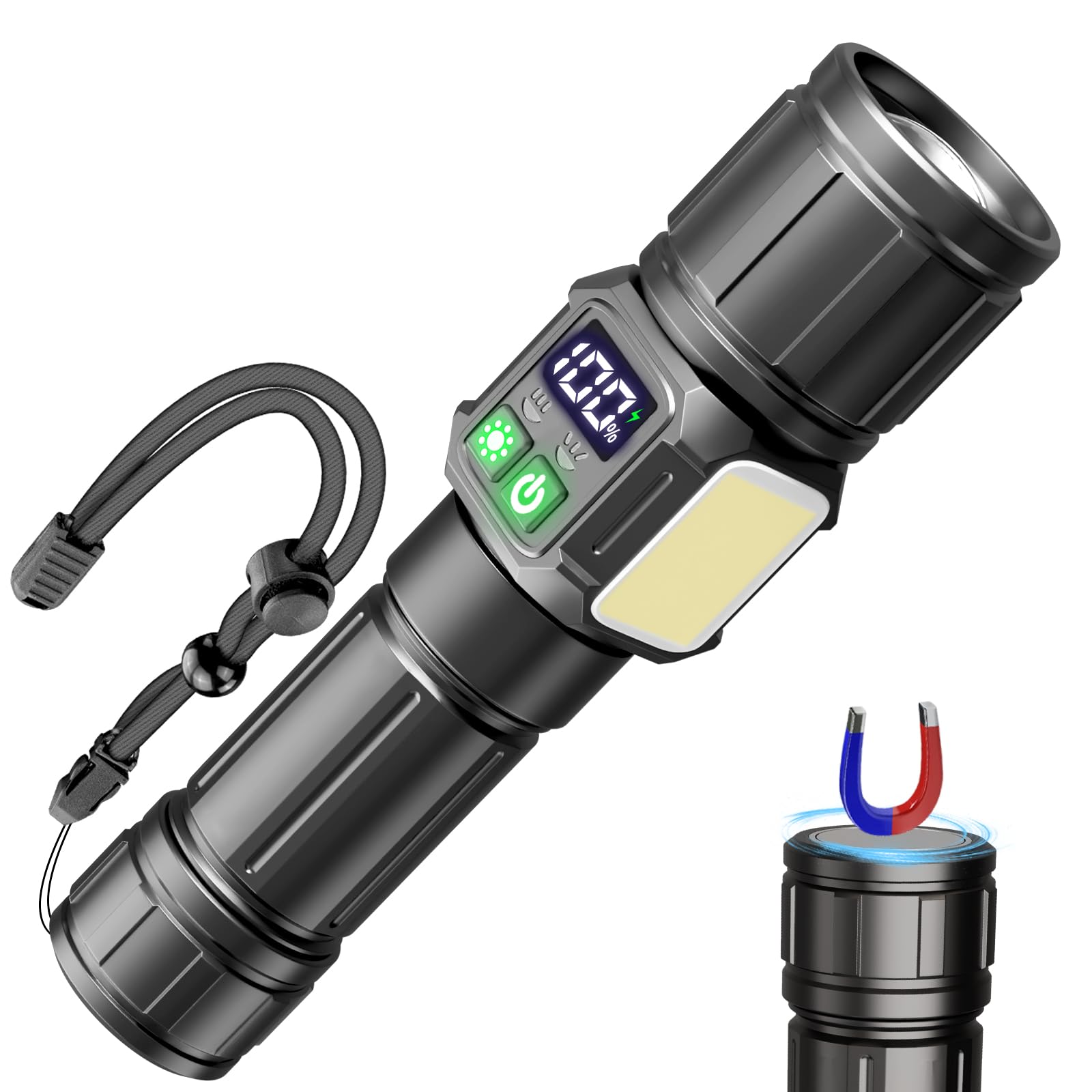
Image: The WholeFire LED Flashlight WF1585, showcasing its compact design and powerful main light.
Setup and Initial Use
1. Battery Installation (if applicable)
The WholeFire WF1585 flashlight requires one Lithium-ion battery (not included). To install the battery:
- Unscrew the tail cap of the flashlight.
- Insert the Lithium-ion battery with the positive (+) end facing towards the flashlight head.
- Screw the tail cap back on securely.
2. Initial Charging
Before first use, fully charge the flashlight. The device features a multi-way charging system.
- Connect the included USB cable to the flashlight's charging port.
- Connect the other end of the USB cable to a USB power source (e.g., USB socket, laptop, car charger).
- The LCD power display will show the charging progress. Charge until it reaches 100%.

Image: The flashlight connected to a power strip via USB for charging, demonstrating its multi-way charging capability.

Image: A close-up of the flashlight's LCD power display, showing the battery percentage.
Operating Instructions
1. Power On/Off
Press the power button located on the side of the flashlight to turn it on or off.
2. Switching Lighting Modes
The WF1585 features 9 distinct lighting modes, divided into main light and COB side light functions.
- Main Light Modes (5 modes): Press the power button repeatedly to cycle through High, Medium, Low, Strobe, and SOS.
- COB Side Light Modes (4 modes): To activate the COB side light, press the dedicated COB button. Press repeatedly to cycle through Warm Strong, Warm Soft, Red Light, and Red Strobe.

Image: Visual representation of the 9 lighting modes, including main beam (High, Medium, Low, Strobe, SOS) and COB side light (Yellow Strong, Yellow Weak, Red Light, Red Flash).
3. Adjustable Focus (Zoom Function)
The flashlight head can be extended or retracted to adjust the beam from a focused spotlight to a wide floodlight.
- Spotlight: Extend the flashlight head forward for a concentrated, long-distance beam.
- Floodlight: Retract the flashlight head backward for a broad, wide-angle illumination.

Image: Demonstrates the adjustable focus feature, showing the flashlight beam as a tight spotlight and a wide floodlight in outdoor settings.
4. Magnetic Base Function
The tail cap of the flashlight is equipped with a strong magnet, allowing it to be securely attached to any ferrous metal surface for hands-free operation.

Image: The flashlight attached to a metal surface using its magnetic base, with a visual representation of magnetic force.
Maintenance
1. Cleaning
- Wipe the flashlight body with a soft, damp cloth.
- Do not use abrasive cleaners or solvents, as these may damage the finish.
- Keep the lens clean for optimal light output. Use a lens cleaning cloth if necessary.
2. Storage
- Store the flashlight in a cool, dry place away from direct sunlight.
- If storing for extended periods, ensure the battery is partially charged (around 50%) to prolong battery life. Recharge every 3-6 months.
3. Water Resistance
The WF1585 has an IPX65 waterproof rating, meaning it is protected against low-pressure water jets from any direction. It can be used in rain or wet conditions but cannot be immersed in water for long periods.

Image: The flashlight shown in a rainy outdoor environment, illustrating its waterproof capability.
Troubleshooting
| Problem | Possible Cause | Solution |
|---|---|---|
| Flashlight does not turn on. |
|
|
| Light is dim or flickers. |
|
|
| Flashlight does not charge. |
|
|
Product Specifications
| Model Number | WF1585 |
| Brand | WholeFire |
| Light Source Type | LED |
| Brightness (White Light) | 10,000 Lumens (Max) |
| Number of Lighting Modes | 9 (5 Main Light, 4 COB Side Light) |
| Battery Type | Lithium-ion (1 required, not included) |
| Power Source | Battery Powered, USB Rechargeable |
| Material | Aerospace-grade Aluminum Alloy |
| Waterproof Rating | IPX65 (Resistant to water jets, not immersion) |
| Dimensions (L x W x H) | 17 x 4.2 x 3.5 cm (6.7 x 1.65 x 1.38 inches) |
| Weight | 225 Grams (0.5 lbs) |
| Special Features | High Lumens, Adjustable Focus, Adjustable Light Mode, High Power, Weather Resistant, Magnetic Base, LCD Power Display |
| Components Included | 1 Flashlight, USB Cable |
Warranty Information
Specific warranty details for the WholeFire LED Flashlight WF1585 are not provided in this manual. Please refer to the product packaging or contact your retailer or the manufacturer directly for warranty terms and conditions.
Customer Support
If you encounter any issues or have questions regarding your WholeFire LED Flashlight WF1585, please contact the seller or manufacturer for assistance. Keep your purchase receipt or order number handy when contacting support.
Ask a question about this manual
Ask about setup, troubleshooting, compatibility, parts, safety, or missing instructions. Manuals+ will review the question and use this page’s manual context to help answer it.