
XTRONS PX64GPFLGS
XTRONS Android 14 Car Stereo Multimedia Player
User Instruction Manual
1. Introduction
This manual provides detailed instructions for the installation, operation, and maintenance of your XTRONS Android 14 Car Stereo Multimedia Player. Please read this manual thoroughly before using the product to ensure proper functionality and to prevent damage.
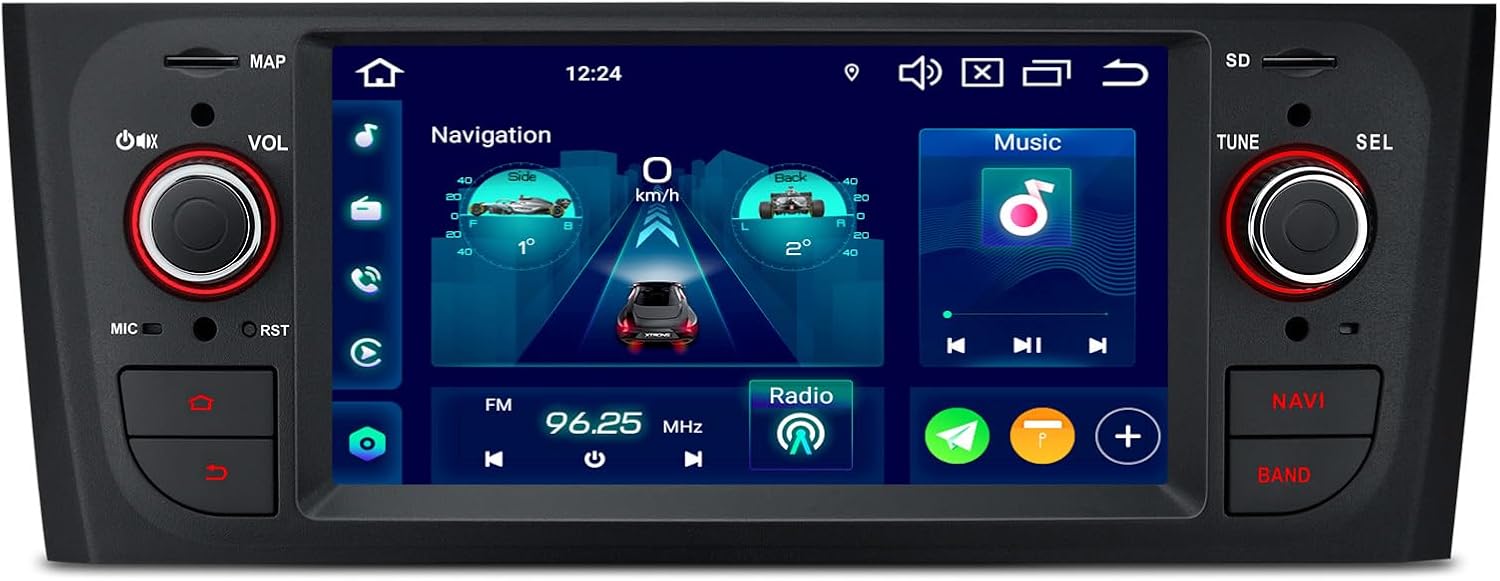
Image: Front view of the XTRONS Android 14 Car Stereo Multimedia Player, showcasing its 6.1-inch IPS touchscreen display and physical control knobs.
1.1 Applicable Models & Years
This unit is designed for specific Fiat models:
- Fiat Grande Punto (199/310): 2005-2009
- Fiat Linea (323): 2007-2011
Note: This unit does NOT fit Fiat Punto Evo models.

Image: Comparison showing the car's dashboard before and after installation, along with a critical note on checking the vehicle's center console for compatibility. An incompatible console is marked with an 'X'.
Important Compatibility Note: Before installation, please verify that your vehicle's center console matches the compatible configurations shown in the image. If your console is similar to the incompatible example, this unit will not fit your car.
2. Product Features
The XTRONS Android 14 Car Stereo is equipped with advanced features to enhance your in-car entertainment and navigation experience:

Image: Infographic highlighting key features such as Octa-core processor, 4GB RAM + 64GB ROM, IPS screen, Global 4G LTE, Built-in AKM DSP, Wireless CarPlay, Wireless Android Auto, 2K Video Playback, and AHD Camera support.
- 6.1-inch Premium HD IPS Screen: Features an 800*480 resolution G+G high-resolution touch screen display. IPS technology ensures clear and detailed visuals with wide viewing angles, minimizing color shifts or distortions.
- Latest Android 14 with Octa Core: Powered by Android 14 and an Octa-core processor with 4GB RAM and 64GB ROM, providing a stable, responsive, and mature operating system for various applications.
- Built-in Wireless CarPlay & Android Auto: Seamlessly connect your smartphone wirelessly via Bluetooth for CarPlay and both wired/wireless for Android Auto. Access GPS, calls, music, Google Assistant, and Siri directly from the head unit.
- Global 4G LTE Connectivity: Insert a Micro-SIM card for independent 4G mobile broadband connection with download speeds up to 300Mbps, supporting 99% of global carriers.
- Dual Band Wi-Fi: Supports both 2.4GHz and 5GHz bands for faster, more stable, and flexible network connections, reducing interference.
- Built-in DSP (Digital Signal Processor): Enhances audio experience with advanced sound processing capabilities.
- Optimized CANbus Decoding: Ensures original vehicle features like steering wheel control and ACC control function perfectly after installation.
- Split Screen Functionality: Run two applications simultaneously side-by-side, for example, navigation on one side and music on the other.
- 2K Video Support: Equipped with the latest video decoder chipset to support 2K format video playback.
- OFF-ROAD Inclinometer Function: Built-in high-precision gyroscope sensors accurately display current ride height, roll, and pitch angles, enhancing safety for off-road use.
3. Package Contents
Please check the package contents upon unboxing to ensure all components are present:
- 1 × Radio Cable Adapter
- 1 × Radio Antenna Cable
- 1 × 4G Antenna
- 1 × GPS Antenna
- 1 × SIM Card Slot Cable
- 1 × ISO Wiring Harness
- 1 × CANbus Cable
- 2 × USB Cable
- 1 × Camera Cable
- 1 × Microphone
- 1 × CANbus Box
- 2 × Tool Kits
- 1 × User Manual
4. Installation Guide
Proper installation is crucial for the optimal performance of your car stereo. It is recommended that installation be performed by a qualified professional.
4.1 Pre-Installation Checks
- Verify vehicle compatibility as described in Section 1.1.
- Ensure all package contents are present and undamaged.
- Disconnect the vehicle's battery negative terminal before starting installation to prevent electrical shorts.
4.2 Wiring Connections
Connect the provided cables to their respective ports on the head unit and to the vehicle's wiring harness. Refer to the wiring diagram in the included physical user manual for detailed pin assignments.
- ISO Wiring Harness: Connects the main power and speaker wires.
- CANbus Cable & Box: Essential for integrating with the vehicle's CANbus system, enabling steering wheel controls and ACC detection.
- Radio Cable Adapter & Antenna Cable: For radio signal reception.
- 4G Antenna & GPS Antenna: For network connectivity and navigation. Position these antennas in locations with clear signal reception.
- SIM Card Slot Cable: For inserting your Micro-SIM card for 4G connectivity.
- USB Cables: For connecting external USB devices, such as flash drives or for wired Android Auto.
- Camera Cable: For connecting a backup camera (if applicable, sold separately).
- Microphone: For hands-free calling and voice commands. Position it in a clear location for optimal voice pickup.
After all connections are made, carefully mount the head unit into the dashboard opening. Reconnect the vehicle's battery and test the unit's functionality.
5. Basic Operation
5.1 Power On/Off
The unit will typically power on automatically when the vehicle's ignition is turned on. To manually power off or restart, refer to the physical buttons or on-screen controls.
5.2 Touch Screen Interface

Image: Close-up of the 6.1-inch IPS touch screen displaying a video, highlighting its 800x480 pixel resolution and 2K video support.
Navigate the system using the responsive touch screen. Tap icons to open applications, swipe to scroll, and use pinch-to-zoom gestures where supported (e.g., in navigation apps).
5.3 Bluetooth 5.0 Connectivity

Image: Screen display showing Bluetooth interface with options for hands-free calls, phone synchronization, Bluetooth music playback, and recent call log. A phone is shown connected via Bluetooth.
Pair your smartphone via Bluetooth for hands-free calling and audio streaming. Go to the Bluetooth settings on the head unit, enable Bluetooth on your phone, search for the head unit, and pair. Bluetooth 5.0 ensures a stable and high-quality audio transmission.
5.4 Smartphone Connection (CarPlay & Android Auto)
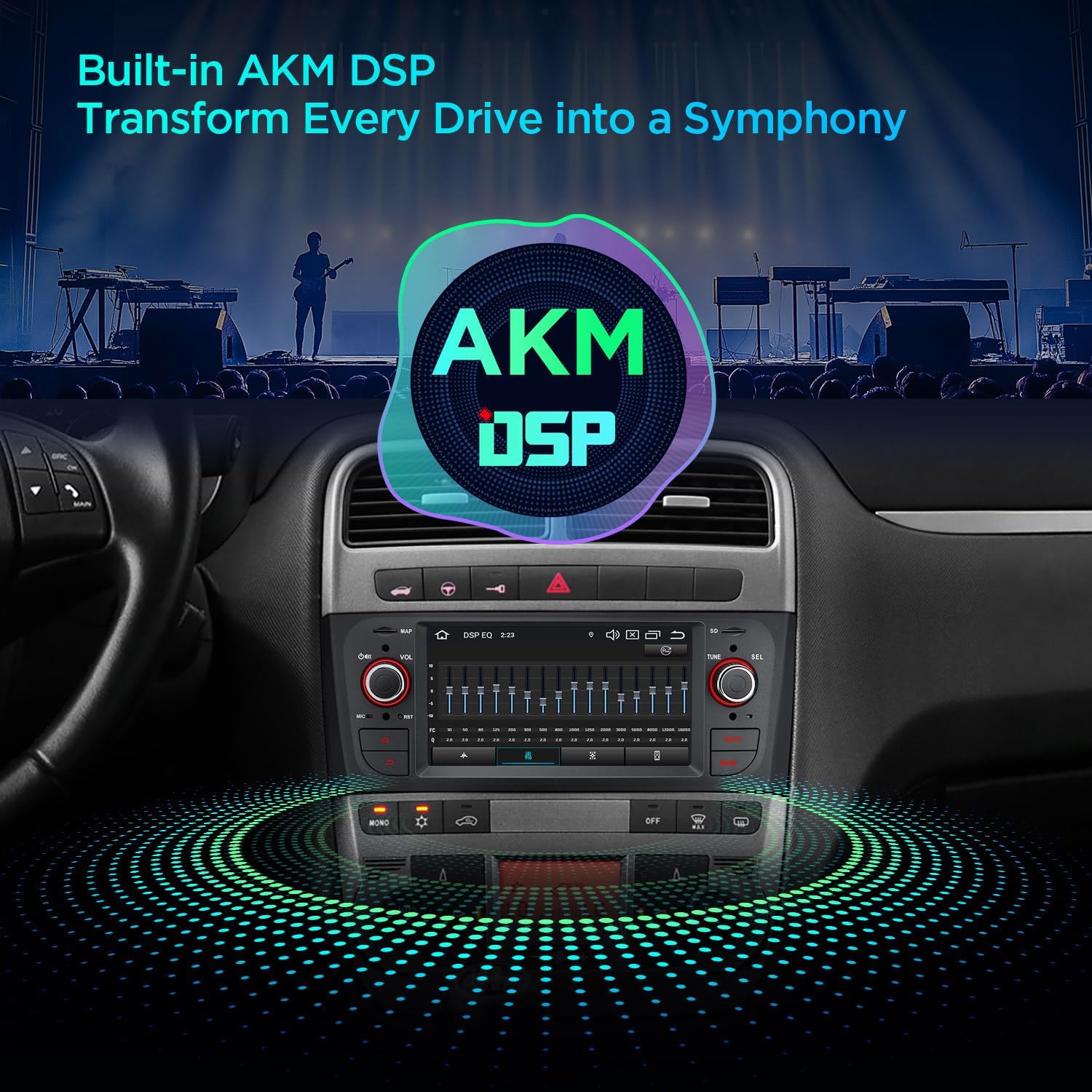
Image: Display showing options for CarPlay (wireless via Bluetooth), Android Auto (wireless via Bluetooth or wired via USB), and Screen Mirroring (wireless via WiFi). A smartphone is shown connected to the head unit.
- Wireless CarPlay: Connect your iPhone wirelessly via Bluetooth to access CarPlay features like navigation, music, messages, and calls.
- Wired & Wireless Android Auto: Connect your Android phone wirelessly via Bluetooth or using a USB cable to use Android Auto for navigation, music, and voice commands.
- Screen Mirroring: Wirelessly mirror your smartphone's screen to the head unit via Wi-Fi for displaying content.
5.5 4G LTE & Wi-Fi Connectivity
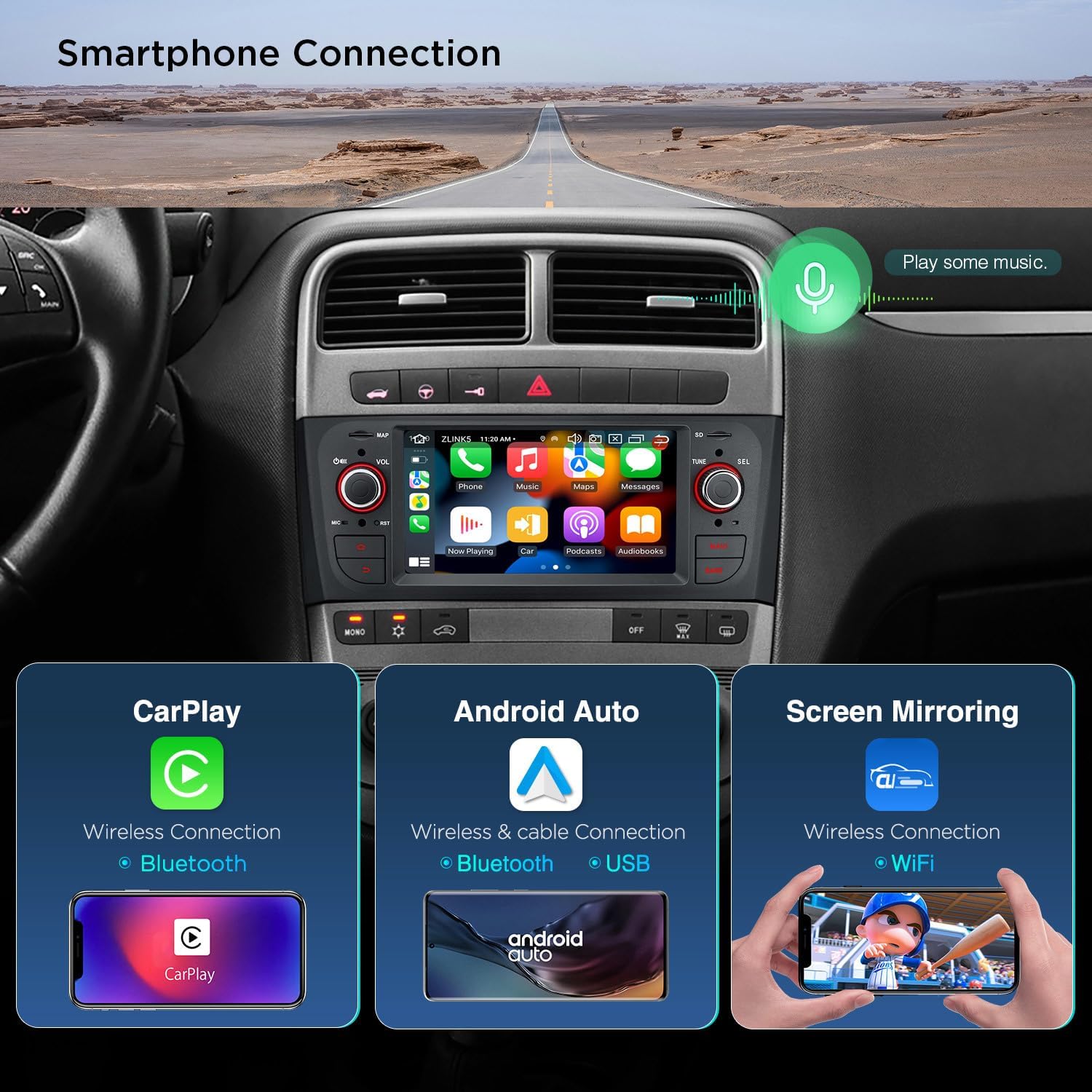
Image: Displays showing the 4G LTE modem with SIM card slot, independent 4G network capability, easy 4G sharing, and dual-band Wi-Fi (2.4GHz and 5GHz) for flexible connectivity. A laptop and phone are shown connected to the unit's network.
Insert a Micro-SIM card into the provided slot for 4G LTE mobile data. The unit also supports dual-band Wi-Fi (2.4GHz and 5GHz) for connecting to external Wi-Fi networks or for sharing its own network via USB tethering.
5.6 Built-in DSP (Digital Signal Processor)

Image: Graphic illustrating the AKM DSP feature, with the head unit's screen showing an equalizer interface, indicating advanced audio tuning capabilities.
Access the DSP settings through the system menu to fine-tune your audio experience. Adjust equalizer settings, balance, fader, and other audio parameters to optimize sound quality.
5.7 OFF-ROAD Inclinometer Function

Image: Screen display showing the inclinometer interface with real-time readouts for pitch and roll angles, along with compass and altitude information. Examples of off-road vehicles are shown in the background.
For off-road enthusiasts, the built-in high-precision gyroscope sensors provide real-time display of the vehicle's current ride height, roll, and pitch angles. This feature enhances driving safety and awareness in challenging terrains.
6. Specifications
| Feature | Description |
|---|---|
| Model | PX64GPFLGS |
| Operating System | Android 14 |
| Processor | Octa Core 2.2GHz |
| RAM | 4GB |
| ROM | 64GB |
| Screen Size | 6.1 inches |
| Screen Resolution | 800x480 pixels |
| Screen Type | IPS Touch Screen (G+G) |
| Bluetooth Version | 5.0 |
| Wi-Fi | Dual Band (2.4GHz & 5GHz) |
| 4G LTE | Global support, Micro-SIM slot |
| DSP | Built-in AKM DSP |
| Video Playback | Supports 2K video format |
| Manufacturer | XTRONS |
| ASIN | B0FKGQVSCT |
7. Troubleshooting
If you encounter issues with your XTRONS car stereo, refer to the following common troubleshooting steps:
| Problem | Possible Cause / Solution |
|---|---|
| Unit does not power on. | Check power connections (ACC, B+, GND). Ensure vehicle's ignition is on. Verify fuses. |
| No sound from speakers. | Check speaker wiring connections. Verify volume level and mute settings. Ensure correct audio source is selected. |
| Bluetooth connection issues. | Ensure Bluetooth is enabled on both the unit and your phone. Delete previous pairings and re-pair. Move phone closer to the unit. |
| GPS signal weak or lost. | Ensure GPS antenna is properly connected and placed in a location with a clear view of the sky. |
| Touch screen unresponsive. | Restart the unit. If issue persists, a factory reset might be necessary (note: this will erase user data). |
For more complex issues, please contact XTRONS customer support.
8. Care and Maintenance
- Screen Cleaning: Use a soft, lint-free cloth to gently wipe the screen. For stubborn smudges, slightly dampen the cloth with water or a screen-safe cleaner. Avoid harsh chemicals or abrasive materials.
- General Cleaning: Keep the unit's exterior free from dust and debris using a soft, dry cloth.
- Temperature: Avoid exposing the unit to extreme temperatures, direct sunlight for prolonged periods, or high humidity.
- Software Updates: Periodically check the XTRONS official website or contact support for available software updates to ensure optimal performance and access to new features.
9. Warranty and Support
XTRONS products are designed for reliability and performance. For warranty information, please refer to the warranty card included with your product or visit the official XTRONS website. For technical support, product inquiries, or service requests, please contact XTRONS customer service through their official channels.
You can visit the XTRONS Store on Amazon for more information and support resources.
Protection plans are also available for extended coverage:
- 2-Year Protection Plan
- 3-Year Protection Plan
- Complete Protect (monthly plan)
These plans offer additional peace of mind beyond the standard manufacturer's warranty.
Related documentsPX64GPFLGS

Ask a question about this manual
Ask about setup, troubleshooting, compatibility, parts, safety, or missing instructions. Manuals+ will review the question and use this page’s manual context to help answer it.