
Introduction
This manual provides essential information for the safe and efficient use of your OPPO Reno14 F 5G smartphone. Please read this guide thoroughly before operating your device to ensure optimal performance and longevity. Keep this manual for future reference.
What's in the Box
Verify that all items are present in the product packaging:
- OPPO Reno14 F 5G Smartphone
- USB Cable
- SIM Tray Ejector
- Screen Protector (pre-applied or included)
Note: The charger may be sold separately in some regions.
Product Overview
Familiarize yourself with the physical components and design of your OPPO Reno14 F 5G.
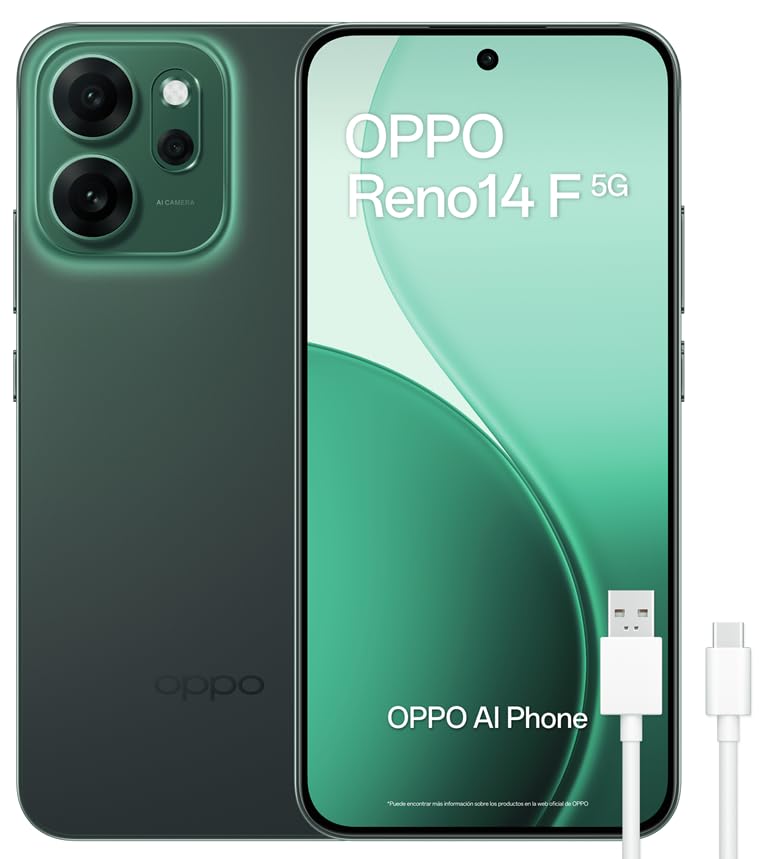
Figure 1: Front view of the OPPO Reno14 F 5G smartphone, showcasing the display and front camera.

Figure 2: Back view of the OPPO Reno14 F 5G smartphone, highlighting the triple camera module.

Figure 3: Side and front view with key dimensions: 158.12mm height, 74.97mm width, 7.78mm thickness, and 6.57-inch display size. Weight is 187g.
Physical Features:
- Display: 6.57-inch AMOLED screen with 120Hz refresh rate.
- Camera Module: Triple rear camera system (50MP main, 8MP ultra-wide, 2MP macro) and a 32MP front camera.
- Ports: USB Type-C port for charging and data transfer.
- SIM Tray: Dual SIM card slot.
- Biometric Security: Fingerprint recognition.
- Durability: IP69 water and dust resistance, MIL-STD-810H compliant for shock resistance.
Setup
1. SIM Card Installation
- Locate the SIM card tray on the side of your device.
- Insert the SIM tray ejector tool into the small hole next to the tray and press firmly until the tray pops out.
- Place your Nano-SIM card(s) into the tray with the gold contacts facing down. Ensure proper orientation. This device supports Dual SIM.
- Carefully reinsert the tray into the phone.
2. Initial Power On and Setup
- Press and hold the Power button until the OPPO logo appears.
- Follow the on-screen instructions to select your language, connect to Wi-Fi, and set up your Google account.
- Configure security features such as fingerprint recognition and screen lock.
3. Charging the Device
Connect the USB cable to the phone's USB Type-C port and the other end to a compatible 45W SUPERVOOC charger (sold separately) or a standard USB power adapter. The device supports fast charging.

Figure 4: Illustration of the 6000mAh battery and 45W SUPERVOOC fast charging capability. A full charge takes approximately 79 minutes. 10 minutes of charging provides up to 12.8 hours of call time.
Operating Your Device
Display and Navigation
- The 6.57-inch AMOLED display offers vibrant colors and a smooth 120Hz refresh rate for fluid scrolling and gaming.
- Navigate using gestures or traditional navigation buttons, configurable in Settings.
- The display features a brightness of 1400 nits and FHD+ resolution (2372 x 1080 pixels).
Camera Features
The OPPO Reno14 F 5G is equipped with an advanced camera system for high-quality photography and videography.

Figure 5: Details of the Ultra-Sharp Camera System: 50MP Main Camera with OIS, 32MP Selfie Camera with AF, 8MP Ultra Wide Angle, and 2MP Monochrome Camera.
- Rear Cameras: 50MP main sensor with Optical Image Stabilization (OIS), 8MP ultra-wide-angle lens, and 2MP macro lens.
- Front Camera: 32MP for clear selfies.
- Video Recording: Supports 1080p and 4K video recording at various frame rates (30fps, 60fps, 120fps).
AI Photography Features
Leverage the device's Artificial Intelligence capabilities to enhance your photos.
- Livephoto Pro: Captures multiple frames to ensure you get the best moment, even in challenging lighting conditions.
- AI Flash Photo: Optimizes flash usage for natural-looking photos in low-light environments.
- AI Editor 2.0: Includes features like AI Erase 2.0 to remove unwanted objects or people from photos, and AI Perfect Photo to correct issues like blinking.
- AI Super Toolbox: Provides AI-powered translation, summarization, and subtitling functionalities.

Figure 6: Livephoto Pro captures multiple frames, allowing selection of the best moment from a sequence of photos.

Figure 7: AI Editor 2.0 demonstrates AI Erase 2.0 for object removal and AI Perfect Photo for correcting facial expressions like blinking.
Performance
The device is powered by a Snapdragon 6 Gen 1 processor, ensuring smooth operation for apps, games, and multitasking.

Figure 8: Illustration of the Snapdragon 6 Gen 1 processor, highlighting performance improvements for CPU and GPU, alongside 8GB RAM and 256GB ROM.
- Processor: Snapdragon 6 Gen 1 with a CPU speed of 2.2 GHz.
- Memory: 8GB RAM (expandable) and 256GB internal storage.
- Operating System: Android 15.
- Connectivity: 5G mobile technology, Bluetooth, NFC, USB, and Wi-Fi.
Maintenance
- Cleaning: Use a soft, lint-free cloth to clean the screen and body. Avoid harsh chemicals.
- Water and Dust Resistance: The device is IP69 rated, meaning it is highly resistant to dust and water. However, avoid intentional submersion or exposure to high-pressure water jets.
- Durability: The device is MIL-STD-810H compliant, offering enhanced resistance to drops and impacts.
- Software Updates: Regularly check for and install system updates to ensure optimal performance and security.
- Battery Care: To prolong battery life, avoid extreme temperatures and do not let the battery fully discharge frequently. The 6000mAh battery is optimized for up to 4 years of lifespan.
Troubleshooting
This section addresses common issues you might encounter with your device.
| Problem | Possible Solution |
|---|---|
| Device does not power on. | Ensure the battery is charged. Connect to a charger for at least 10 minutes, then try powering on again. |
| Screen is unresponsive. | Perform a forced restart by holding the Power button and Volume Up button simultaneously for about 10 seconds. |
| Poor battery life. | Check background app usage, reduce screen brightness, disable unnecessary features like GPS or Bluetooth when not in use. |
| Cannot connect to Wi-Fi. | Restart your router and the phone. Forget the Wi-Fi network in settings and reconnect. |
| Camera not working. | Restart the device. Clear the cache and data of the Camera app in Settings > Apps. |
If issues persist, contact OPPO customer support or visit an authorized service center.
Specifications
| Feature | Detail |
|---|---|
| Model Name | Reno14 F 5G |
| Operating System | Android 15 |
| Processor | Snapdragon 6 Gen 1 (2.2 GHz CPU speed) |
| RAM | 8 GB |
| Internal Storage | 256 GB |
| Display Size | 6.57 inches |
| Display Type | AMOLED |
| Display Resolution | 2372 x 1080 Pixels (FHD+) |
| Refresh Rate | 120 Hz |
| Rear Camera | 50 MP (Main), 8 MP (Ultra Wide), 2 MP (Macro) |
| Front Camera | 32 MP |
| Battery Capacity | 6000 mAh |
| Charging | 45W SUPERVOOC Fast Charging |
| SIM Card Slots | Dual SIM |
| Connectivity | 5G, Bluetooth, NFC, USB Type-C, Wi-Fi |
| Water Resistance | IP69 Rated |
| Durability | MIL-STD-810H Compliant |
| Dimensions | 18.5 x 9.9 x 4.3 cm (package); 158.12 x 74.97 x 7.78 mm (device) |
| Weight | 320 g (package); 187 g (device) |
| Biometric Security | Fingerprint Recognition |
Safety Information
For detailed safety guidelines and regulatory compliance, please refer to the official safety information document:
Download Safety Information (PDF)
Always use original or certified accessories to avoid damage to the device and ensure user safety.
Warranty and Support
Your OPPO Reno14 F 5G comes with a three-year manufacturer's warranty. For warranty claims or technical support, please contact OPPO customer service or visit their official website.
Keep your proof of purchase for warranty validation.


