
1. Introduction and Overview
Thank you for purchasing the Panasonic LAMDASH ES-L381W-N 3-Blade Electric Shaver. This shaver is designed for a powerful and close shave, featuring a high-speed linear motor and a flexible 3D head. Please read this manual thoroughly before use to ensure safe and correct operation.
Key Features:
- Linear Motor Drive: Provides approximately 13,000 strokes per minute for a powerful and consistent shave.
- New 3-Blade System: Equipped with an under-chin trimmer blade to effectively cut long, stubborn beards.
- Close-Contact 3D Head: The shaver head moves in three dimensions (front-back, left-right, up-down) to follow facial contours for a close shave.
- Automatic Cleaning and Charging System: Simplifies daily maintenance by cleaning, drying, and charging the shaver with a single switch.
- Wet/Dry Shaving: Designed for both dry shaving and comfortable wet shaving with foam or gel, even in the shower.
- Water-Through Cleaning: Allows for easy rinsing of beard clippings without removing the outer foil.
- Sharp Trimmer: Integrated trimmer for pre-cutting long hairs and detailing sideburns.

Image: Panasonic LAMDASH ES-L381W-N Shaver with its automatic cleaning and charging stand. The shaver is designed for both wet and dry use.
2. Safety Information
To prevent injury to the user and others, and to avoid property damage, please observe the following safety precautions.
- Do not use if the outer foil is damaged: This may cause skin injury.
- Keep out of reach of children: This product is not intended for use by children.
- Use only the specified AC adapter: Using an incorrect adapter may cause fire or electric shock.
- Do not immerse the AC adapter or automatic cleaning and charging system in water: These components are not waterproof.
- Do not disassemble, repair, or modify the product: Contact an authorized service center for repairs.
- Do not use in environments with flammable gases: This could lead to an explosion or fire.
- Unplug the AC adapter before cleaning the automatic cleaning and charging system.
3. Package Contents
Please check that all the following items are included in your package:
- Panasonic LAMDASH ES-L381W-N Shaver (Main Unit)
- Automatic Cleaning and Charging System
- AC Adapter
- Pouch
- Dedicated Cleaning Agent (1 pack)
- Dedicated Oil
- Cleaning Brush

Image: All included accessories: the shaver, automatic cleaning and charging system, AC adapter, pouch, cleaning agent, oil, and cleaning brush.
4. Setup
4.1 Initial Charging
- Insert the shaver into the automatic cleaning and charging system.
- Connect the AC adapter to the cleaning system and then plug it into a power outlet.
- The charging indicator will illuminate. A full charge takes approximately 1 hour.
- Alternatively, you can connect the AC adapter directly to the shaver for charging without the cleaning system.
Ensure the shaver is fully charged before its first use for optimal battery life.
4.2 Attaching/Detaching Outer Foil and Inner Blades
The outer foil and inner blades are pre-installed. To remove for cleaning or replacement:
- To remove the outer foil: Press the outer foil release buttons on the sides of the shaver head and lift the outer foil unit.
- To remove inner blades: Gently pull the inner blades upwards from their housing.
- To attach: Align the inner blades with their respective positions and press down until they click. Then, align the outer foil unit and press down until it clicks securely into place.
5. Operating Instructions
5.1 Basic Shaving
Press the power button to turn the shaver on. Hold the shaver at a right angle (90 degrees) to your skin and move it slowly against the direction of your beard growth. The 3D head will adapt to your facial contours.
Dry Shaving:
For best results, shave before washing your face. Ensure your skin is dry.
Wet Shaving:
Apply shaving foam or gel to your face. The shaver is waterproof (IPX7 standard) and can be used in the shower. After shaving, rinse the shaver thoroughly.
5.2 Using the Sharp Trimmer
Slide the trimmer switch upwards to engage the sharp trimmer. Use it to pre-cut long beard hairs, trim sideburns, or shape your mustache. After use, slide the switch back down to retract the trimmer.
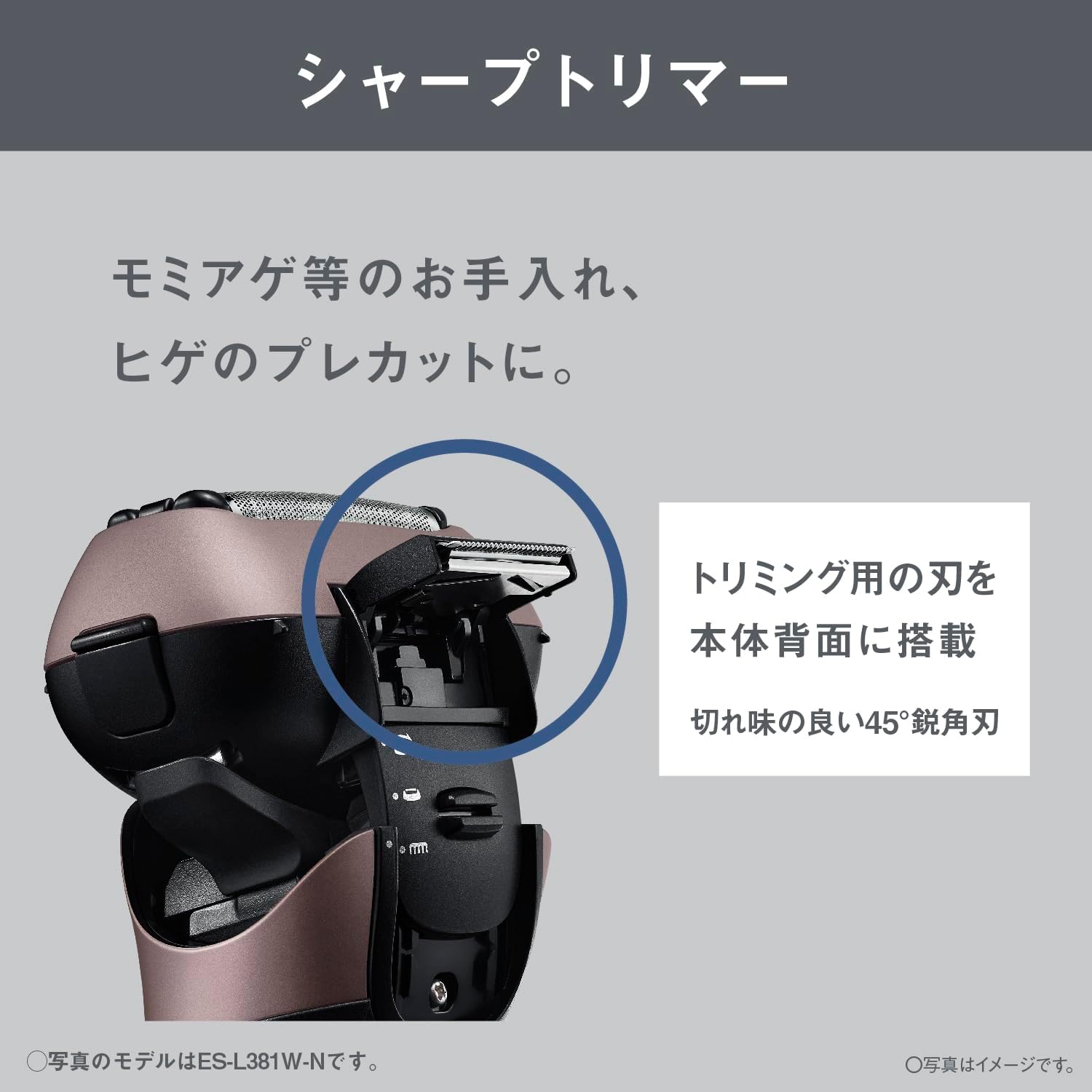
Image: The sharp trimmer located on the back of the shaver, used for detailing and pre-cutting.
6. Maintenance
6.1 Cleaning with Automatic Cleaning and Charging System
The automatic cleaning and charging system provides convenient cleaning, drying, and charging.
- Ensure the cleaning agent is correctly installed in the system.
- Place the shaver into the system.
- Press the start button on the cleaning system. It will automatically clean, dry, and charge the shaver.

Image: The automatic cleaning and charging system in operation, showing the shaver being cleaned and dried.
6.2 Water-Through Cleaning (Manual)
For quick cleaning, you can rinse the shaver directly under running water.
- Turn on the shaver.
- Hold the shaver head under running water to rinse away beard clippings.
- Turn off the shaver and gently shake off excess water.
- Allow the shaver to air dry completely before storing.
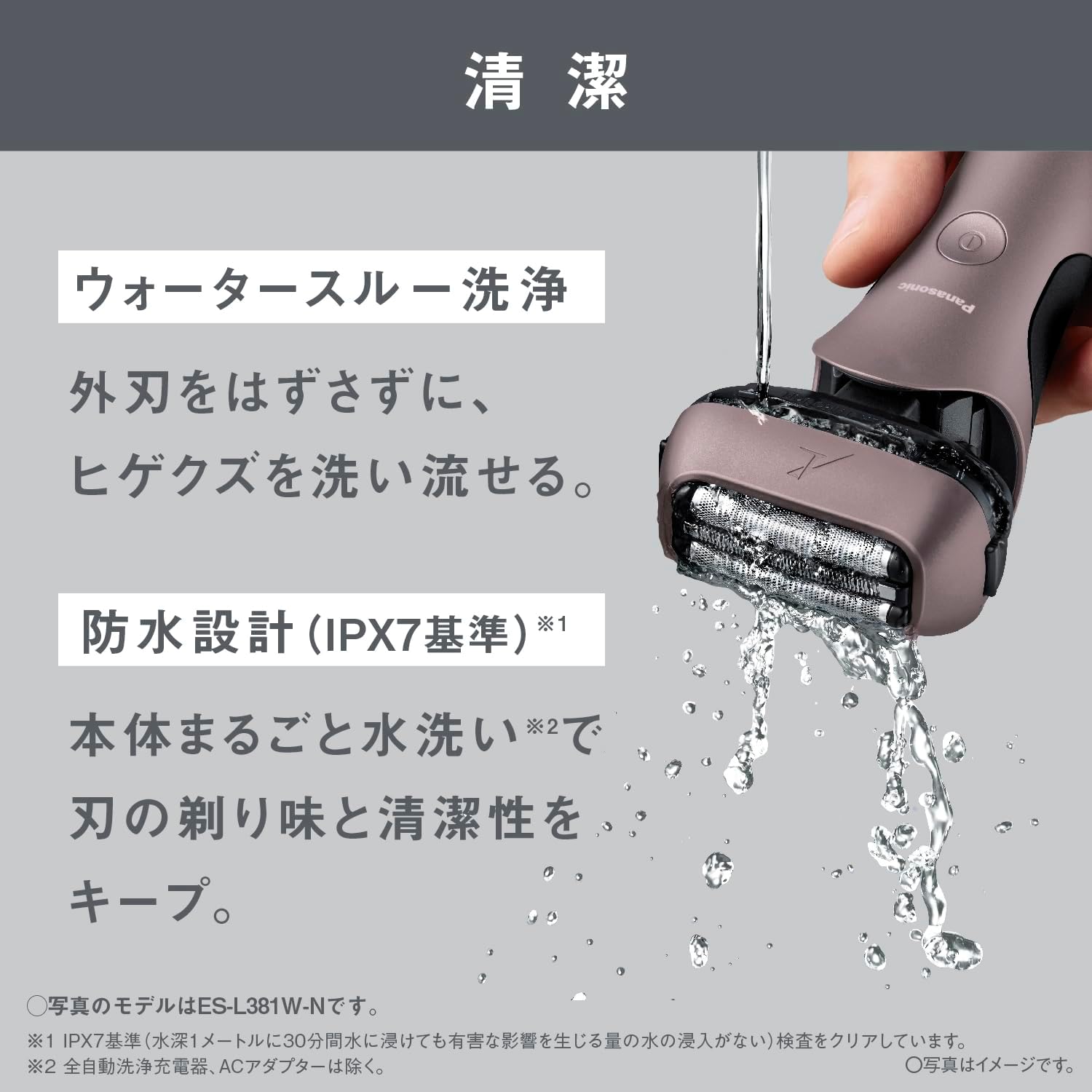
Image: The shaver being rinsed under running water, demonstrating the water-through cleaning feature.
6.3 Oiling Blades
Regularly apply a drop of the dedicated oil to the outer foil and inner blades to maintain smooth operation and cutting performance. Do this after cleaning and drying the shaver.
6.4 Replacing Blades
For optimal shaving performance, it is recommended to replace the outer foil and inner blades periodically.
- Outer Foil: Replace approximately every 1 year.
- Inner Blades: Replace approximately every 2 years.
Replacement parts can be purchased from authorized Panasonic retailers or service centers. Refer to section 4.2 for instructions on attaching/detaching blades.
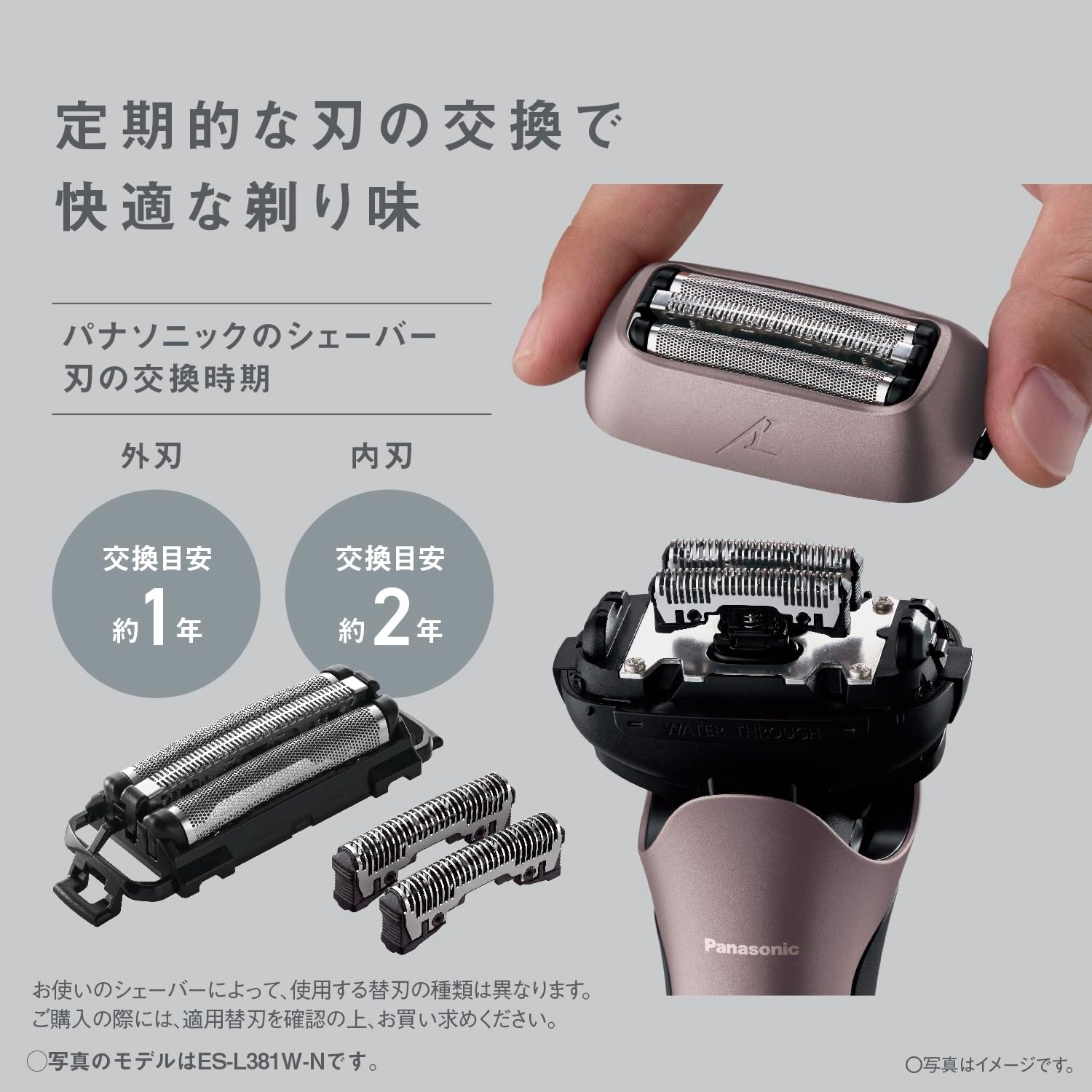
Image: A visual guide showing the recommended replacement intervals for the outer foil (approx. 1 year) and inner blades (approx. 2 years).
7. Troubleshooting
If you experience issues with your shaver, please refer to the following common problems and solutions:
| Problem | Possible Cause | Solution |
|---|---|---|
| Shaver does not turn on. | Battery is depleted. | Charge the shaver for at least 1 hour. |
| Poor shaving performance. | Blades are dull or dirty. | Clean the shaver thoroughly. Apply oil to the blades. Consider replacing the outer foil and/or inner blades if they are old. |
| Shaver makes unusual noise. | Foreign object caught in blades or shaver head. | Turn off the shaver, remove the outer foil, and check for any obstructions. Clean thoroughly. |
| Automatic cleaning system not working. | No cleaning agent, system not plugged in, or shaver not properly seated. | Ensure cleaning agent is present. Check power connection. Re-seat the shaver correctly in the system. |
If the problem persists after trying these solutions, please contact Panasonic customer support or an authorized service center.
8. Specifications
| Feature | Specification |
|---|---|
| Model Number | ES-L381W-N |
| Power Source | Rechargeable (Lithium-ion battery) |
| Charging Time | Approx. 1 hour (rapid charge) |
| Motor Type | Linear Motor |
| Motor Speed | Approx. 13,000 strokes/minute |
| Blade System | 3-Blade System with Under-Chin Trimmer Blade |
| Head Type | Close-Contact 3D Head |
| Dimensions (H x W x D) | Approx. 16.8 x 7.2 x 5.2 cm (main unit, excluding cap) |
| Weight | Approx. 185g (main unit, excluding cap) |
| Waterproof Rating | IPX7 Standard (main unit washable) |
| Country of Origin | Main Unit: Japan; Automatic Cleaning System, AC Adapter: China |
| Included Accessories | Automatic Cleaning and Charging System, AC Adapter, Pouch, Dedicated Cleaning Agent (1 pack), Dedicated Oil, Cleaning Brush |
9. Warranty and Support
9.1 Manufacturer's Warranty
This Panasonic LAMDASH ES-L381W-N shaver comes with a 12-month manufacturer's warranty from the date of purchase. Please retain your proof of purchase for warranty claims. The warranty covers defects in materials and workmanship under normal use.
The warranty does not cover damage caused by misuse, accident, unauthorized repair, or normal wear and tear of consumable parts like blades.
9.2 Customer Support
For product inquiries, technical assistance, or warranty service, please contact Panasonic customer support in your region. You can find contact information on the official Panasonic website or in the documentation provided with your product.
When contacting support, please have your model number (ES-L381W-N) and proof of purchase readily available.