
CMF by Nothing Headphone Pro Instruction Manual
Model: B175
1. Product Overview
The CMF by Nothing Headphone Pro is a wireless over-ear headset designed for an immersive audio experience. It features Active Noise Canceling (ANC), Hi-Res LDAC audio, and customizable sound profiles.
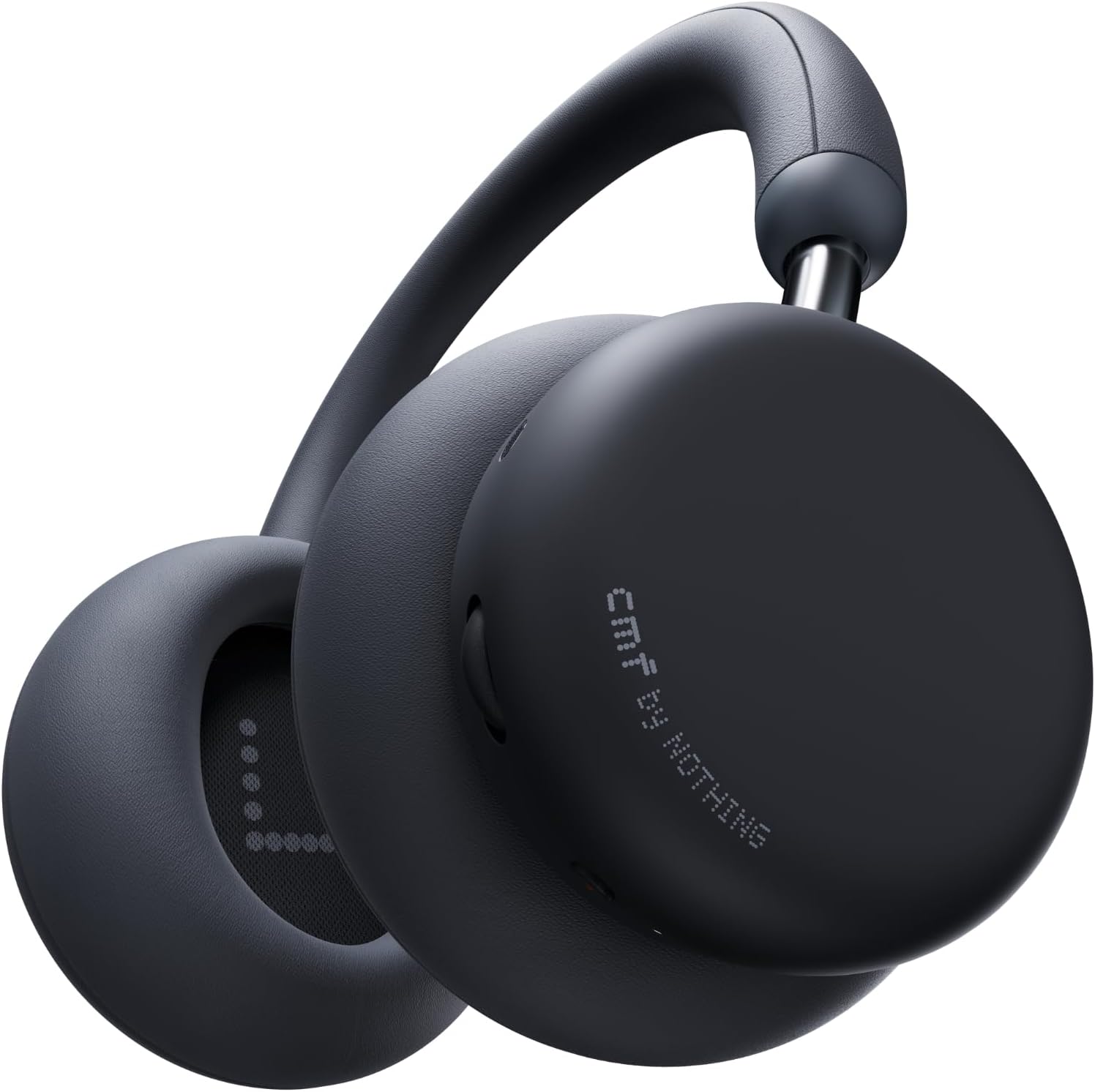
Image 1.1: CMF by Nothing Headphone Pro in Dark Grey. This image shows the headphones from a slight angle, highlighting the earcups and headband design.
2. What's in the Box
- CMF Headphone Pro × 1
- Carry pouch × 1
- 3.5mm audio cable (1.2M) × 1
- Quick Start Guide × 1
- Note: No USB-C charging cable is included.

Image 2.1: Unboxing contents of the CMF Headphone Pro. The image displays the headphones, carry pouch, 3.5mm audio cable, and quick start guide laid out.
3. Setup
3.1 Charging the Headphones
Before first use, fully charge your CMF Headphone Pro. The headphones support fast charging.
- A 5-minute charge provides approximately 4 hours of listening time.
- A full charge takes under 2 hours.
- The headphones offer up to 100 hours of playback, or 50 hours with Active Noise Cancellation (ANC) enabled.
3.2 Bluetooth Pairing
- Ensure the headphones are powered off.
- Press and hold the power button until the indicator light flashes, indicating pairing mode.
- On your device (smartphone, tablet, laptop), go to Bluetooth settings and select "CMF Headphone Pro" from the list of available devices.
- Once connected, the indicator light will stop flashing.
The headphones support Bluetooth 5.4 for stable connectivity up to 10 meters.
3.3 Nothing X App Installation
For full customization and features, download the Nothing X app from your device's app store (available for Android and iOS).
- The app allows for custom EQ settings, Personal Sound Profile, ANC strength adjustment, button remapping, and firmware updates.
- Dual device connection is supported, allowing seamless switching between your laptop and phone.
4. Operating Instructions
4.1 Physical Controls
The CMF Headphone Pro features intuitive physical controls:
- Roller: Scroll to change volume. Press to pause or play music. Long-press to switch between noise control modes.
- Energy Slider: Slide up for brighter highs, and down for deeper lows (Bass/Treble control).
- Button: Customizable launch button. Can be set to open ChatGPT, toggle Spatial Audio, or open voice notes on Essential Space (features may vary by device/OS).

Image 4.1: Detailed view of the physical controls on the CMF Headphone Pro, including the roller, energy slider, and customizable button.
4.2 Noise Control Modes
The headphones offer three noise control modes:
- Active Noise Cancellation (ANC): Reduces external ambient sounds by up to 40dB, allowing for focused listening.
- Transparency Mode: Allows you to hear your surroundings while still enjoying your audio, useful for awareness.
- Off: Disables both ANC and Transparency modes.
Switch between modes using the roller button or through the Nothing X app.
4.3 Sound Customization
- Custom EQ: Adjust bass, mids, and treble levels via the Nothing X app to suit your preferences.
- Personal Sound Profile: Utilize Audiodo technology through the app to create a personalized sound profile based on your hearing. This profile is stored directly on the headphones.
- Spatial Audio: Experience immersive soundscapes with Cinema and Concert modes. These modes optimize soundstage width, depth, and clarity.
4.4 Making Calls
The CMF Headphone Pro is equipped with microphones for clear call quality. Use the physical buttons to answer or end calls.
5. Maintenance
5.1 Cleaning
Wipe the headphones with a soft, dry cloth. Avoid using harsh chemicals or abrasive materials.
5.2 Ear Cushion Replacement
The ear cushions are interchangeable. To replace, gently twist the ear cup to detach it and then attach the new cushion with a simple twist motion.

Image 5.1: CMF Headphone Pro showcasing various color combinations with interchangeable ear cushions.
6. Troubleshooting
- No Power: Ensure the headphones are fully charged.
- Cannot Pair: Make sure the headphones are in pairing mode and within range of your device. Try restarting both devices.
- Sound Issues: Check volume levels on both the headphones and your device. Ensure the audio source is playing correctly. Adjust EQ settings in the Nothing X app.
- For further assistance, refer to the Quick Start Guide included in the box or the Nothing X app for detailed support.
7. Specifications
| Feature | Detail |
|---|---|
| Model Name | CMF Headphone Pro (B175) |
| Connectivity | Bluetooth 5.4, LDAC, 3.5 mm Jack |
| Noise Control | Active Noise Cancellation (up to 40dB) |
| Battery Life | Up to 100 hours (ANC off), 50 hours (ANC on) |
| Charging | Fast Charging (5 min for 4 hrs playback) |
| Audio Driver Size | 40 Millimeters (Custom Driver) |
| Weight | 283 Grams (approx. 10 ounces) |
| Material | Faux Leather, Plastic |
| Water Resistance | Water Resistant |
8. Official Product Video
Video 8.1: Official product video showcasing the CMF Headphone Pro. This video highlights key features and design elements of the headphones.
9. Warranty and Support
For warranty information and customer support, please refer to the Quick Start Guide included in the box or visit the official CMF by Nothing website.
You can also find additional support and resources through the Nothing X app.


