
Introduction
Thank you for choosing the JOC TGK-2021UR FM Radio. This device offers clear and loud audio output, featuring an FM radio, MP3 playback from USB and TF cards, and convenient solar charging. To ensure proper operation and longevity of your radio, please read this manual carefully before use.
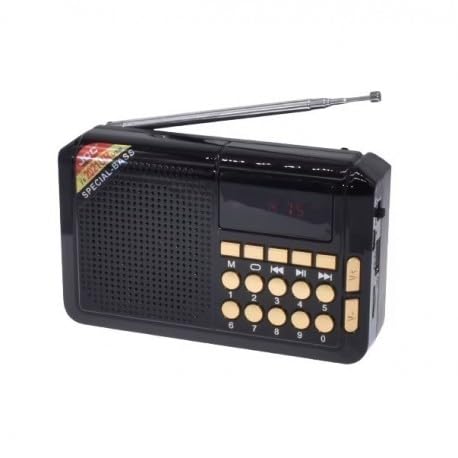
Figure 1: JOC TGK-2021UR Radio Product Box
The image shows the retail packaging for the JOC TGK-2021UR radio, highlighting its key features like FM radio, MP3 player, and solar charging capabilities.
Safety Information
- Do not expose the device to extreme temperatures, direct sunlight for prolonged periods (beyond charging), or high humidity.
- Avoid dropping or subjecting the device to strong impacts.
- Keep out of reach of children.
- Do not attempt to disassemble or repair the device yourself. Contact qualified service personnel.
- Dispose of batteries and electronic components responsibly according to local regulations.
Package Contents
Please check the package for the following items:
- JOC TGK-2021UR FM Radio
- Power Adapter (USB Cable)
Setup
1. Initial Charging
Before first use, it is recommended to fully charge the radio. You have two charging options:
- USB Charging: Connect the provided USB cable to the radio's charging port and to a standard 5V USB power source (e.g., computer, USB wall adapter).
- Solar Charging: Place the radio with its solar panel (located on the back) facing direct sunlight. An LED indicator light will show when solar charging is active. For optimal solar charging, ensure the panel is directly exposed to the sun.
2. Antenna Extension
For optimal FM radio reception, extend the telescopic antenna fully.
3. Inserting Storage Media
To play MP3 files, insert a TF card into the TF card slot or a USB flash drive into the USB port.

Figure 2: Back View of the Radio
This image displays the back of the JOC TGK-2021UR radio, showing the integrated solar charging panel and the telescopic antenna in an extended position.
Operating Instructions
1. Power On/Off
Press and hold the power button to turn the radio on or off.
2. FM Radio Operation
- Automatic Station Search: Continuously press the power button to initiate an automatic search for FM radio stations. The radio will scan and save available stations.
- Manual Tuning/Station Selection: Use the designated tuning buttons (often labeled with arrows or 'next/previous') to manually select saved stations or fine-tune frequencies.
3. MP3 Playback (USB/TF Card)
If a TF card or USB drive with MP3 files is inserted, the radio will automatically switch to MP3 playback mode or you may need to press a 'Mode' button. Use the playback control buttons (play/pause, next/previous track) to manage your music.
4. Volume Control
Adjust the volume using the dedicated volume control buttons or knob.

Figure 3: Front View of the Radio
This image shows the front panel of the JOC TGK-2021UR radio, detailing the speaker grille, digital display, and various control buttons for power, tuning, volume, and playback.
Maintenance
- Clean the radio with a soft, dry cloth. Do not use liquid cleaners or abrasive materials.
- Keep the solar panel clean and free of dust for efficient charging.
- When not in use for extended periods, store the radio in a cool, dry place.
- Periodically charge the battery to maintain its health, even if not in regular use.
Troubleshooting
| Problem | Possible Cause | Solution |
|---|---|---|
| No power | Battery is depleted | Charge the radio using USB or solar power. |
| No sound | Volume is too low or muted | Increase the volume. |
| Poor FM reception | Antenna not extended or weak signal | Extend the telescopic antenna fully. Try repositioning the radio. |
| MP3 not playing | No TF card/USB inserted or unsupported file format | Ensure TF card/USB is properly inserted and contains MP3 files. |
Specifications
| Feature | Detail |
|---|---|
| Brand | JOC |
| Model Number | TGK-2021UR |
| Color | Black |
| Special Feature | Solar Charging |
| Product Dimensions (L x W x H) | 48mm x 136mm x 86mm |
| Tuner Technology | FM Waves |
| Power Source | Battery Powered, Solar Powered |
| Supported Radio Bands | FM (87.5-108 MHz) |
| Included Components | Power Adapter (USB Cable) |
| Compatible Devices | MP3 Player, USB |
| Electric Voltage | 5 Volts (USB Charging) |
| Operating Power | 3 Watts |
| Battery Capacity | 2000 mAh |
| Playback Time | Up to 4 hours (depending on volume level) |
Warranty Information
The warranty description for this product is listed as 'Not Applicable'. Please refer to your point of purchase for any return or exchange policies.
Support
For further assistance or inquiries, please contact the retailer where you purchased this product. Keep your purchase receipt as proof of purchase.


