
Introduction
This manual provides detailed instructions for the setup, operation, maintenance, and troubleshooting of your Hisense AX5140Q 5.1.4 channel sound bar system. Please read this manual thoroughly before using the product to ensure proper and safe operation.

Image: The Hisense AX5140Q sound bar system, including the main sound bar unit, wireless subwoofer, and two wireless rear speakers.
Package Contents
Verify that all items listed below are included in your package:
- Hisense AX5140Q Sound Bar
- Wireless Subwoofer
- Two Wireless Rear Speakers
- Power Cable(s)
- Quick Start Guide & User Manual (QSG&UM)
- Remote Control (with 2 AAA batteries)
Product Overview and Dimensions
The Hisense AX5140Q system consists of a sound bar, a wireless subwoofer, and two wireless rear speakers. Understanding the dimensions can assist with placement.
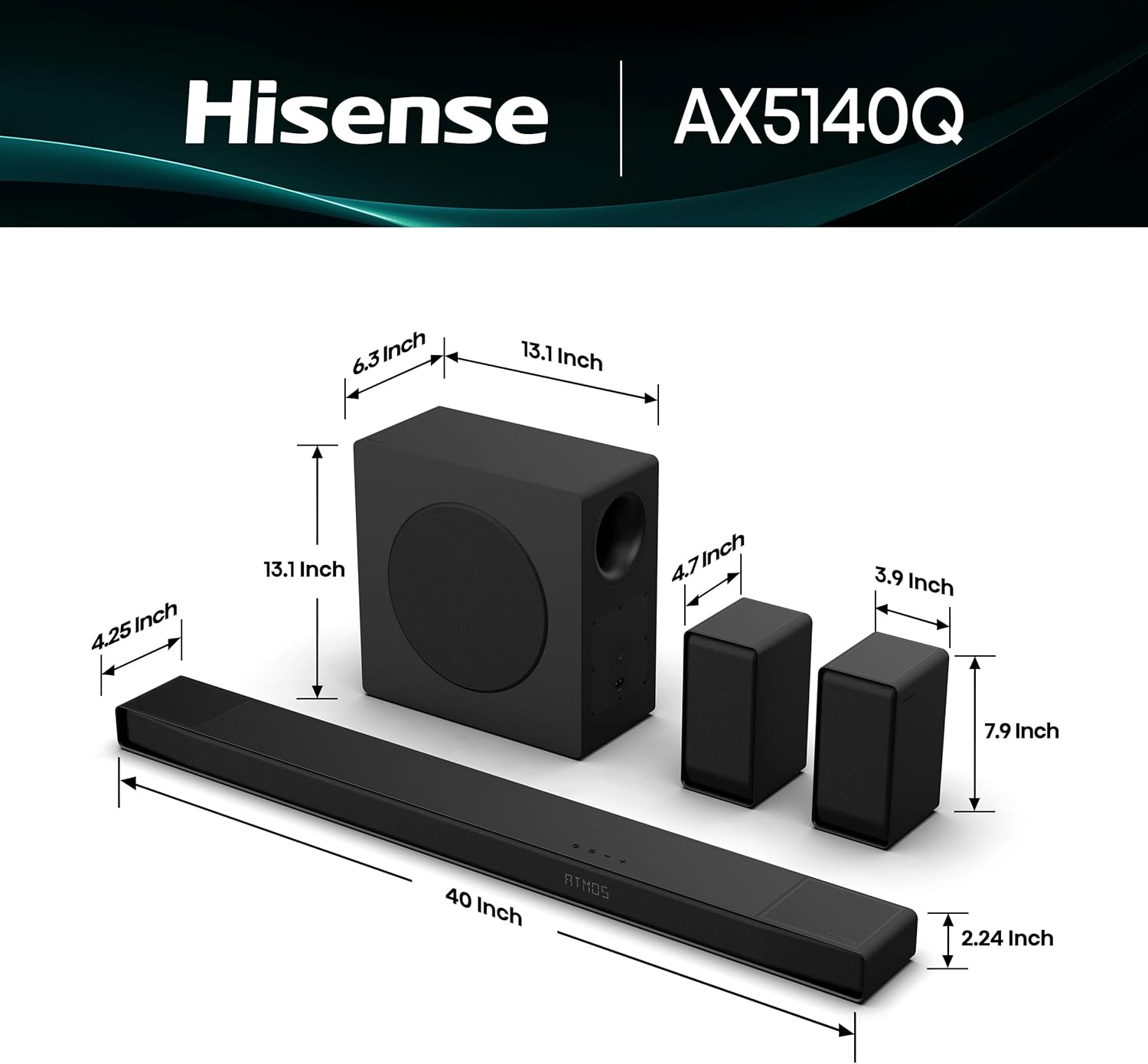
Image: Diagram showing the dimensions of the sound bar (40" W x 4.25" H x 2.24" D), subwoofer (13.1" W x 13.1" H x 6.3" D), and rear speakers (4.7" W x 7.9" H x 3.9" D).
Setup
1. Placement
- Sound Bar: Place the sound bar centrally below your television. Ensure it is not obstructed.
- Subwoofer: Position the wireless subwoofer in a location that provides optimal bass response. It connects wirelessly to the sound bar.
- Rear Speakers: Place the two wireless rear speakers behind your primary listening position, ideally to the left and right, for an immersive surround sound experience. Each rear speaker requires its own power cable.
2. Connections
The sound bar offers multiple connectivity options. Choose the method that best suits your television and other devices.
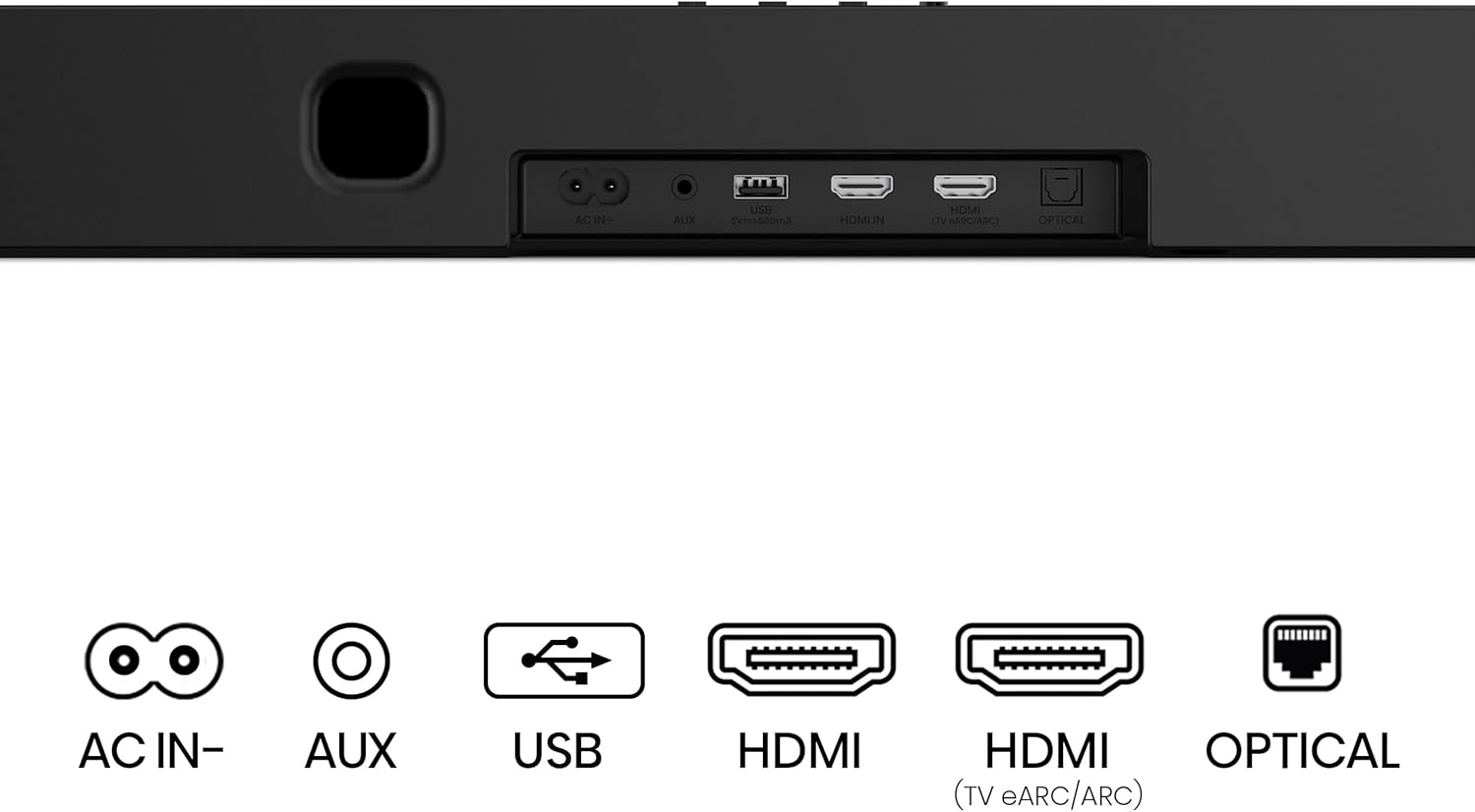
Image: Close-up view of the Hisense AX5140Q sound bar's rear panel, showing ports for AC IN, AUX, USB, HDMI IN, HDMI (TV eARC/ARC), and OPTICAL.
- HDMI eARC/ARC (Recommended): Connect an HDMI cable from the HDMI (eARC/ARC) port on the sound bar to the HDMI ARC/eARC port on your television. This allows for high-quality audio transmission and control via your TV remote.
- Optical: Connect an optical cable from the OPTICAL port on the sound bar to the optical output on your television.
- AUX: Use a 3.5mm audio cable to connect to devices with an analog audio output.
- USB: For playing audio files directly from a USB storage device.
- Bluetooth 5.3: For wireless audio streaming from compatible devices.
3. Power On and Initial Pairing
- Connect the power cables to the sound bar, subwoofer, and both rear speakers, then plug them into power outlets.
- The sound bar, subwoofer, and rear speakers should automatically pair. If pairing does not occur, refer to the "Troubleshooting" section for manual pairing instructions.
- Insert the included AAA batteries into the remote control.
Operating Instructions
1. Basic Operation
- Power: Press the power button on the remote or sound bar to turn the system on/off.
- Volume: Use the volume up/down buttons on the remote to adjust the master volume.
- Input Selection: Press the "Source" or "Input" button on the remote to cycle through available inputs (HDMI, Optical, AUX, USB, Bluetooth).
2. Audio Modes and Enhancements

Image: Visual representation of the Hisense AX5140Q sound bar's AI EQ Mode, showing icons for different sound presets like Movie, Music, News, Night, Sport, and Game.
- EQ Modes: The system features seven equalization presets to optimize sound for different content:
- Movie
- Music
- News
- Night
- Sport
- Game
- AI EQ Mode (automatically adjusts sound)
- Dolby Atmos & DTS:X: The sound bar supports Dolby Atmos and DTS:X technologies, providing an immersive, multi-dimensional audio experience with sound seemingly flowing from all directions. Ensure your source content and connected devices support these formats for optimal performance.
- 4K HDR Pass-Through: The sound bar supports 4K HDR video pass-through, ensuring that video quality is maintained when connected via HDMI.
3. Advanced Features
Hi-Concerto (Unified Audio Harmony)

Image: Diagram illustrating the Hi-Concerto feature, where the sound bar and a compatible Hisense TV work together for unified audio harmony, creating a surround sound experience.
When paired with select Hisense TV models, Hi-Concerto allows the TV and sound bar to work in tandem, creating a unified audio experience without additional cables or hardware. This feature enhances the overall soundstage.
Room Fitting Tuning (AI Room Calibration)

Image: Graphic depicting the Room Fitting Tuning feature, showing sound waves optimizing for a specific room layout, aiming to make every seat the "best seat."
This feature, available with select Hisense TV models, uses AI technology to optimize the sound output to match your specific room environment, delivering a tailored sound experience for precise sound quality.
EzPlay 3.0 (One Remote Control)

Image: Illustration of EzPlay 3.0, showing a Hisense TV remote controlling the sound bar and displaying wireless speaker connection status on the TV screen.
With EzPlay 3.0, you can easily control your Hisense Soundbar's sound modes through your Hisense TV remote. Real-time wireless speaker status is displayed on your TV for seamless control. This feature works with select Hisense TV models.
Game Pro Mode

Image: Scene depicting a person gaming with the Hisense AX5140Q sound bar system, highlighting the Game Pro mode for enhanced dynamic sounds in gaming.
Engage Game Pro mode to immerse yourself in dynamic sounds that enhance every move, battle, and victory, optimizing your gaming audio experience.
Maintenance
- Cleaning: Use a soft, dry cloth to clean the surfaces of the sound bar, subwoofer, and speakers. Do not use liquid cleaners or abrasive materials.
- Ventilation: Ensure that all components have adequate ventilation to prevent overheating. Do not block any vents.
- Power: Disconnect the power cable from the wall outlet if the unit will not be used for an extended period.
Troubleshooting
If you encounter issues with your Hisense AX5140Q sound bar system, refer to the following common problems and solutions:
| Problem | Possible Cause / Solution |
|---|---|
| No Sound |
|
| Wireless Subwoofer/Rear Speakers Not Connecting |
|
| Sound Delay/Latency |
|
| DTS Audio is Quiet or Muffled |
|
| Bluetooth Connection Issues |
|
Specifications
| Feature | Detail |
|---|---|
| Model Name | AX5140Q |
| Speaker Type | Sound Bar with Wireless Subwoofer and Rear Speakers |
| Surround Sound Channel Configuration | 5.1.4 Channels |
| Speaker Maximum Output Power | 600 Watts |
| Product Dimensions (Sound Bar) | 40" W x 4.25" H x 2.24" D |
| Item Weight | 20.1 Pounds (Total System) |
| Connectivity Technology | Bluetooth 5.3, HDMI (eARC/ARC), Optical, AUX, USB |
| Special Features | Dolby Atmos, DTS:X, EzPlay, Hi-Concerto, Room Fitting Tuning, 4K HDR Pass-Through, 7 EQ Modes |
| Control Method | Remote Control |
| Included Components | Soundbar, Power Cable, QSG&UM, Remote Control (with batteries) |
| Power Input | 120 Volts |
| UPC | 888143023632 |
Warranty and Support
For warranty information and technical support, please refer to the warranty card included with your product or visit the official Hisense support website. Keep your proof of purchase for warranty claims.
Hisense Support: www.hisense-usa.com/support


