
1. Product Overview
The Moultrie All-in-One 30 Lb Hanging Deer Feeder is designed for convenient and efficient game feeding. It features a collapsible hopper for easy transport and storage, Bluetooth control via the Moultrie App, and integration with Edge 3 Series cameras for remote cellular access. The broadcast spin plate provides 360-degree feed coverage, with programmable feed events.
Key Features:
- Bluetooth Connectivity: Control feed times and duration from up to 300 feet using the Moultrie Connect Bluetooth and the free Moultrie App.
- Edge 3 Series Camera Integration: Pair with an Edge 3 Series camera for full remote cellular control from any location, without a subscription.
- Collapsible Design: The 30 lb hopper folds down for compact transport and storage, making it ideal for hard-to-reach locations.
- 360° Feed Coverage: The broadcast spin plate disperses feed in a full circle.
- Programmable Feed Events: Set up to four feed events per day, each lasting from 1 to 20 seconds.
- Battery Powered: Operates on four AA batteries for standard use or eight for extended runtime. Features a removable battery tray for quick swaps.
2. Safety Information
Please read and understand all safety instructions before operating the Moultrie All-in-One 30 Lb Hanging Deer Feeder. Failure to follow these instructions may result in injury or damage to the product.
- Always ensure the feeder is securely hung from a sturdy branch or support structure capable of holding the feeder's weight when full (up to 30 lbs of feed plus unit weight).
- Keep hands and loose clothing clear of the spin plate mechanism during operation to prevent injury.
- Use only the specified AA batteries. Do not mix old and new batteries, or different types of batteries.
- Dispose of used batteries properly according to local regulations.
- Do not attempt to modify the feeder or its components. Unauthorized modifications may void the warranty and pose safety risks.
- Keep out of reach of children and pets when not in use or during maintenance.
- When filling the feeder, ensure the lid is securely fastened to prevent moisture intrusion and spillage.
3. Package Contents
Verify that all items are present in your package:
- 1x Collapsible 30 Lb Hopper
- 1x All-in-One Feeder Kit (includes feed motor and timer)
- 1x Metal Hanging Handle
- Instruction Manual
4. Setup
4.1 Unpacking and Assembly
The feeder is designed for easy assembly and portability. It arrives in a collapsed state for compact transport.
- Remove the feeder from its packaging.
- Twist the lid counter-clockwise to unlock and remove it.
- Gently pull the hopper sections upwards to extend the feeder to its full height. Ensure all sections are securely locked into place.
- Attach the metal hanging handle to the designated slots on the top rim of the hopper.
- Insert the All-in-One Feeder Kit into the bottom of the hopper. Twist to secure it in place.

Figure 1: The Moultrie All-in-One 30 Lb Hanging Deer Feeder in its fully extended state, ready for use.
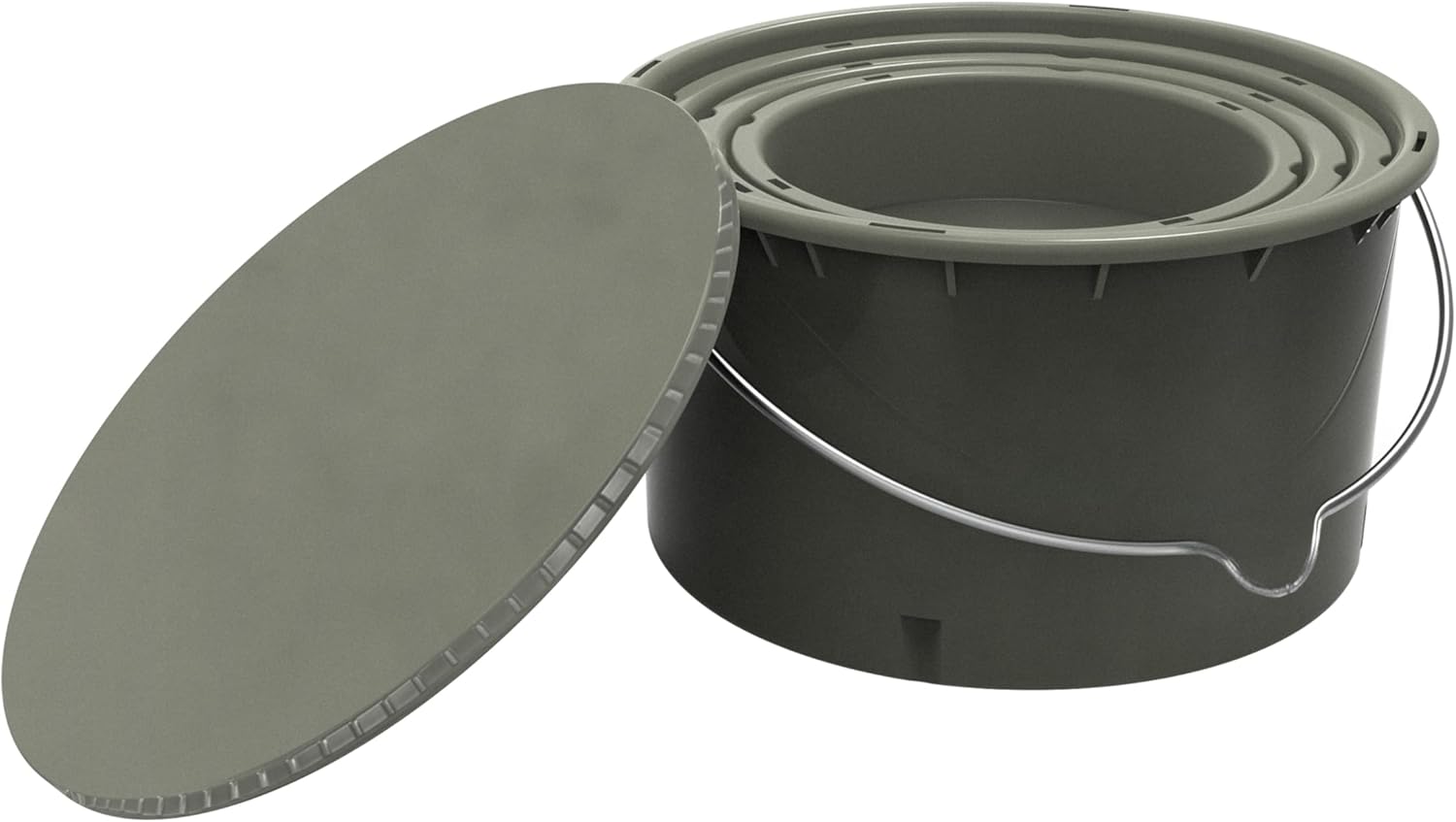
Figure 2: The feeder shown in its compact, collapsed state for easy transport and storage.
4.2 Battery Installation
The feeder requires four or eight AA batteries (not included).
- Locate the removable battery tray on the All-in-One Feeder Kit.
- Slide out the battery tray.
- Insert four or eight fresh AA batteries, ensuring correct polarity (+/-).
- Slide the battery tray back into the feeder kit until it clicks securely into place.
4.3 Hanging the Feeder
Choose a sturdy tree branch or other robust structure to hang the feeder. Ensure the hanging point is strong enough to support the feeder's weight when full.
- Use a rope, strap, or cord to securely hang the feeder by its metal handle.
- Ensure the feeder hangs level and is at a height that allows for optimal feed dispersal and prevents access by unwanted animals if desired.

Figure 3: A user demonstrating the process of hanging the feeder from a tree branch.
5. Operation
5.1 Filling the Feeder
The feeder has a 30 lb capacity for corn or similar feed.
- Twist the lid counter-clockwise to unlock and remove it.
- Pour the desired feed into the hopper.
- Replace the lid and twist clockwise to securely lock it in place.
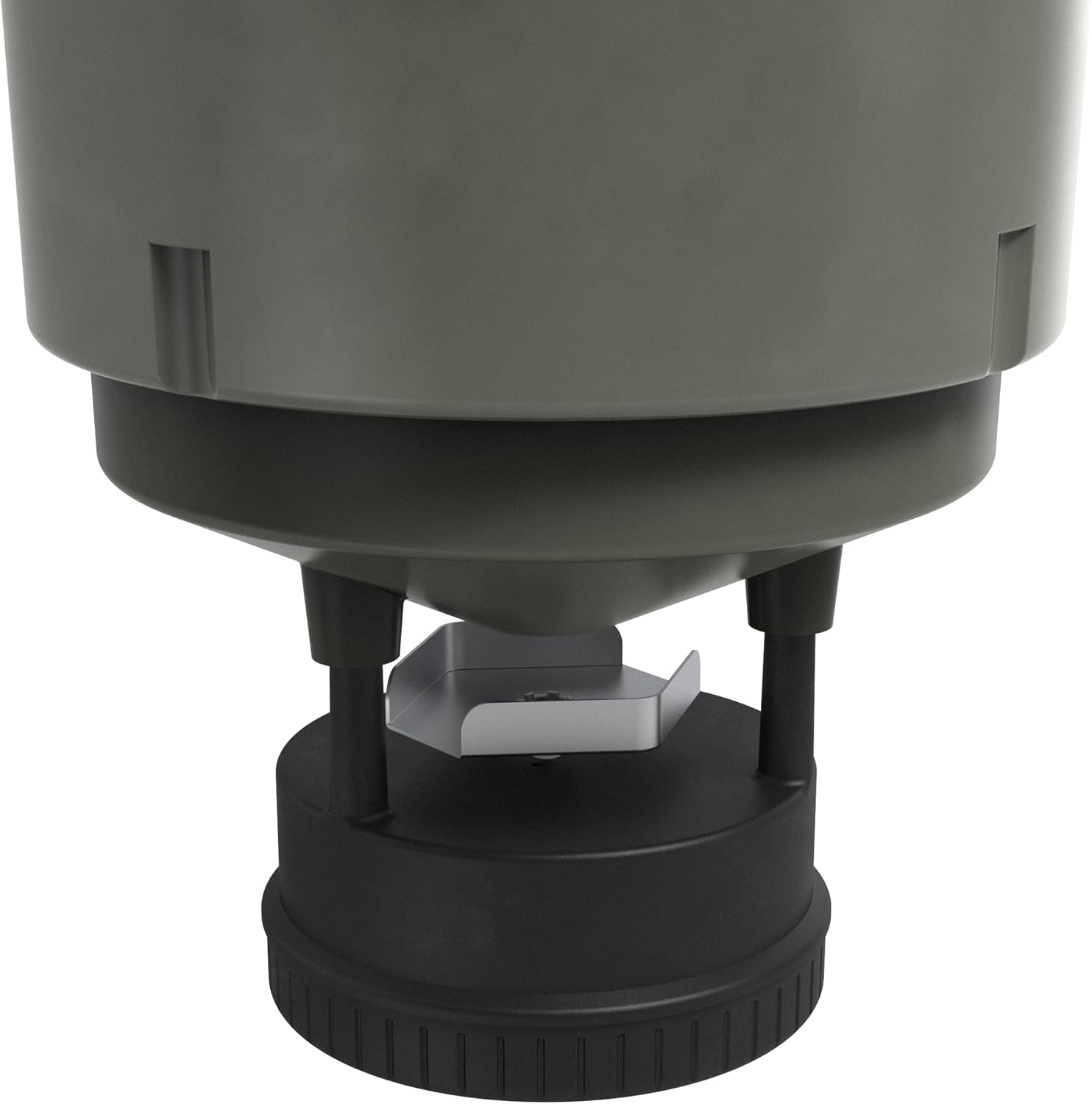
Figure 4: A detailed view of the spin plate mechanism at the base of the feeder, responsible for feed dispersal.
5.2 Programming Feed Schedules
The feeder can be programmed manually or via the Moultrie App.
5.2.1 Manual Programming
The All-in-One Feeder Kit includes a removable timer for manual programming. Refer to the detailed instructions included with the feeder kit for specific button functions.
5.2.2 Moultrie Connect App Programming (Bluetooth)
Download the free Moultrie App to your smartphone. Ensure Bluetooth is enabled on your device.
- Open the Moultrie App and follow the on-screen instructions to pair your feeder via Bluetooth.
- Once connected, you can adjust feed times, duration (1-20 seconds), and frequency (up to 4 events per day) from up to 300 feet away.
- The app also allows for on-demand feeding and monitoring of estimated feed levels.
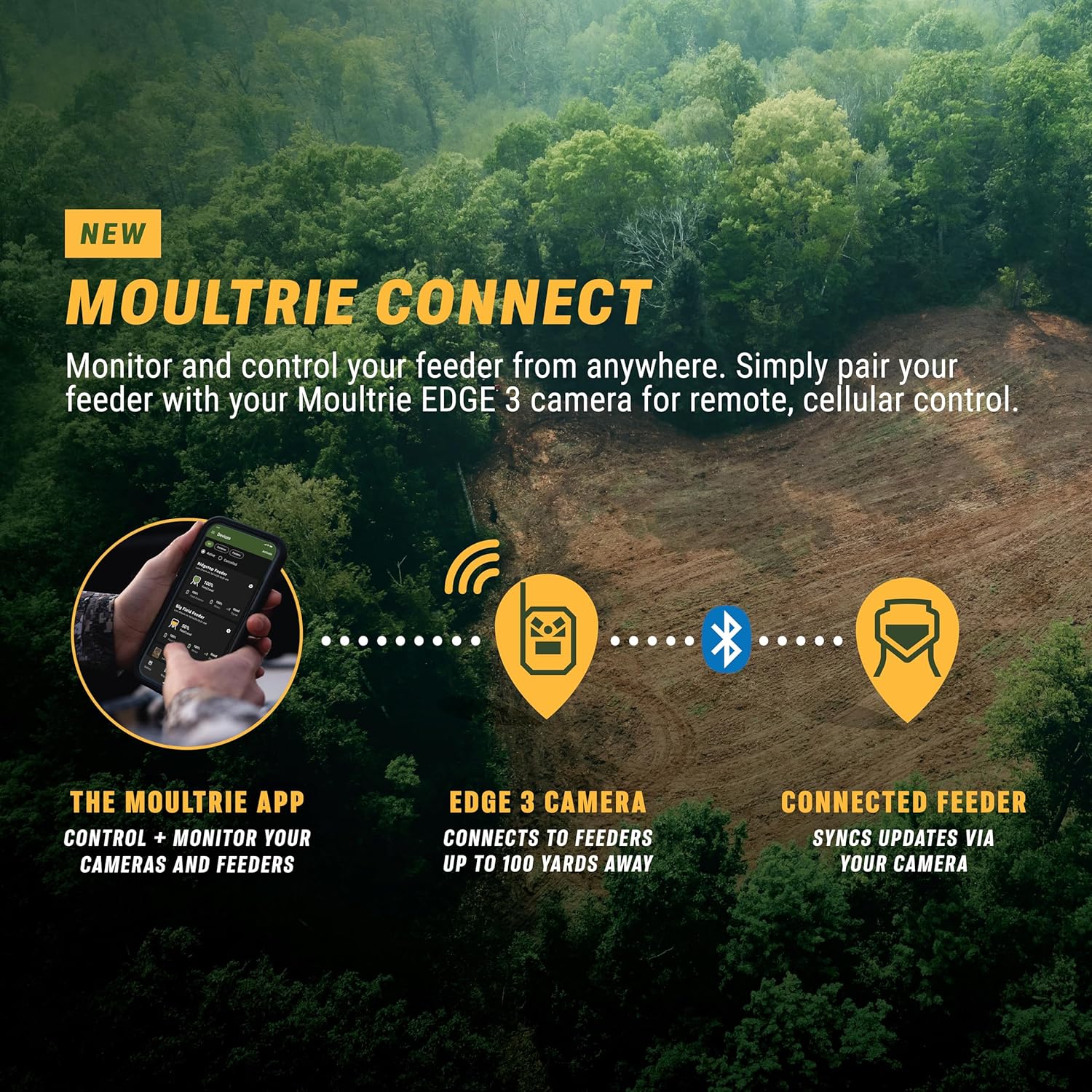
Figure 5: The Moultrie Connect app displaying options for controlling and monitoring your feeder via Bluetooth.
5.2.3 Cellular Control with Edge 3 Series Camera
For remote control from any location, pair your feeder with a Moultrie Edge 3 Series camera. The Edge 3 camera acts as a hub, transferring data and commands via cellular network.
- Ensure your Edge 3 Series camera is set up and connected to the Moultrie App.
- Within the Moultrie App, link your feeder to the Edge 3 camera.
- The feeder will automatically transfer Bluetooth connection to the Edge 3 camera when you are out of direct Bluetooth range, allowing for remote management.
Video 1: This video provides an overview of the Moultrie Connect system, demonstrating how the feeder integrates with the Moultrie App and Edge 3 cameras for remote control and monitoring.
Video 2: This video showcases the Moultrie 30lb All-in-One Feeder, highlighting its collapsible design, ease of setup, and the functionality of its removable timer for programming feed schedules.
6. Maintenance
6.1 Cleaning
Regular cleaning ensures optimal performance and longevity of your feeder.
- Empty any remaining feed from the hopper.
- Wipe down the interior and exterior of the hopper with a damp cloth. Avoid harsh chemicals.
- Clean the spin plate and motor housing to remove any debris or feed residue that could impede operation.
- Ensure all components are dry before refilling or storing.
6.2 Battery Replacement
Replace batteries when the low battery indicator appears on the timer or in the Moultrie App, or if the feeder stops operating as expected.
- Follow the battery installation steps (Section 4.2).
- Always replace all batteries at once with new ones.
7. Troubleshooting
| Problem | Possible Cause | Solution |
|---|---|---|
| Feeder not dispensing feed. | Low batteries, feed jammed, incorrect programming. | Check and replace batteries. Clear any obstructions from the spin plate. Verify feed schedule in the app or manually. |
| Bluetooth connectivity issues. | Out of range, Bluetooth disabled, app issues. | Ensure you are within 300 feet of the feeder. Check if Bluetooth is enabled on your device. Restart the Moultrie App. |
| Cellular control not working. | Edge 3 camera not connected, poor cellular signal. | Verify the Edge 3 camera is properly set up and connected to the app. Check cellular signal strength at the feeder location. |
| Feed getting stuck in the hopper. | Moisture in feed, feed type too large/clumpy. | Ensure feed is dry. Consider using a funnel insert if necessary (user modification). Use appropriate feed type. |
8. Specifications
- Brand: Moultrie
- Model: MFG-15100
- Capacity: 30 Pounds
- Material: Plastic
- Color: Black
- Power Source: Battery Powered (4 or 8 AA batteries)
- Mounting Type: Hanging Mount
- Feed Coverage: 360°
- Programmable Feed Events: Up to 4 per day, 1-20 seconds each
- Connectivity: Moultrie Connect Bluetooth, Edge 3 Cellular Integration
- Item Dimensions (L x W x H): 13.05"L x 12.65"W x 7.6"H (collapsed)
- Item Weight: 5.49 Pounds
9. Warranty & Support
This Moultrie All-in-One 30 Lb Hanging Deer Feeder comes with a 1 Year Manufacturer Warranty.
For technical assistance, warranty claims, or additional support, please contact Moultrie Customer Service:
- Website: Visit the official Moultrie website for support resources, FAQs, and contact information.
- Phone: Refer to the contact details provided on the Moultrie website or in your product packaging.
Please have your model number (MFG-15100) and proof of purchase available when contacting support.

