
Introduction
This manual provides essential information for the safe and efficient operation of your GROWNEER 310CFM Inline Exhaust Fan. This fan is designed to deliver 310 CFM of airflow, effectively removing moisture, odors, and stale air from various residential spaces. It features dual air intakes for multi-room ventilation, a 5-speed wireless remote control with memory and ECO mode, and flexible installation options.
Safety Information
Read all instructions before installation and use.
- Ensure the power supply is disconnected before installation, maintenance, or cleaning.
- Installation should be performed by a qualified electrician in accordance with local electrical codes.
- Do not use this fan with any solid-state speed control device unless specifically designed for it.
- This fan is for general ventilating use only. Do not use to exhaust hazardous or explosive materials and vapors.
- To prevent motor damage and noisy/unbalanced impellers, keep drywall spray, construction dust, etc., off the power unit.
- Duct work must be installed with a minimum number of turns and bends to ensure proper airflow.
- Always ensure proper grounding.
Package Contents
Verify that all components are present before beginning installation.
- Inline Exhaust Fan Unit
- Wireless Remote Control
- Mounting Flanges (2)
- Lifting Slings / Wire Ropes (4)
- Mounting Brackets (for frame installation)
- Screws and Fasteners
- User Manual

Image: All components included in the GROWNEER Inline Exhaust Fan package, laid out for inspection.
Specifications
| Feature | Specification |
|---|---|
| Brand | GROWNEER |
| Model Name | Ventilation Fans |
| Item Model Number | AX253702001 |
| Air Flow Capacity | 310 Cubic Feet Per Minute (CFM) |
| Noise Level | 50 Decibels |
| Power Source | AC |
| Voltage | 120 Volts |
| Wattage | 55 watts |
| Number of Power Levels | 5 |
| Control Method | Remote, Touch |
| Product Dimensions | 16"D x 18"W x 10"H |
| Item Weight | 18.56 pounds |
| Installation Type | Multiple (Wire Rope, Frame, Direct Beam) |
| Motor Type | Brushless |
| Indoor/Outdoor Usage | Indoor |
| Special Features | Dust Resistant, Quiet Operation, Remote Controlled |

Image: Diagram showing the dimensions of the GROWNEER Inline Exhaust Fan unit.
Setup and Installation
The GROWNEER Inline Exhaust Fan offers three flexible installation methods to suit various spatial requirements. Always ensure the power is off before starting installation.
Electrical Connection
Connect the N/L/E wires to their corresponding colors from your power supply. Ensure all connections are secure and insulated.
Video: This video demonstrates the electrical wiring connection for the GROWNEER Inline Exhaust Fan, showing how to connect the N/L/E wires to their corresponding colors.
Installation Options
Choose the installation method that best fits your environment:
-
Wire Rope Hoisting Installation:
Attach the provided mounting brackets to the fan unit using screws. Thread the adjustable load-bearing wires through the brackets. Secure the other end of the wires to a sturdy ceiling structure, adjusting the length as needed to suspend the fan.
-
Frame Installation:
Assemble the adjustable frame and secure it to a stable surface or within a cabinet structure. Mount the fan unit onto the frame using the designated attachment points.
-
Direct Beam Mount:
For direct mounting to wooden beams or similar structures, use the provided brackets and screws to firmly attach the fan unit. Ensure the mounting surface can support the fan's weight.
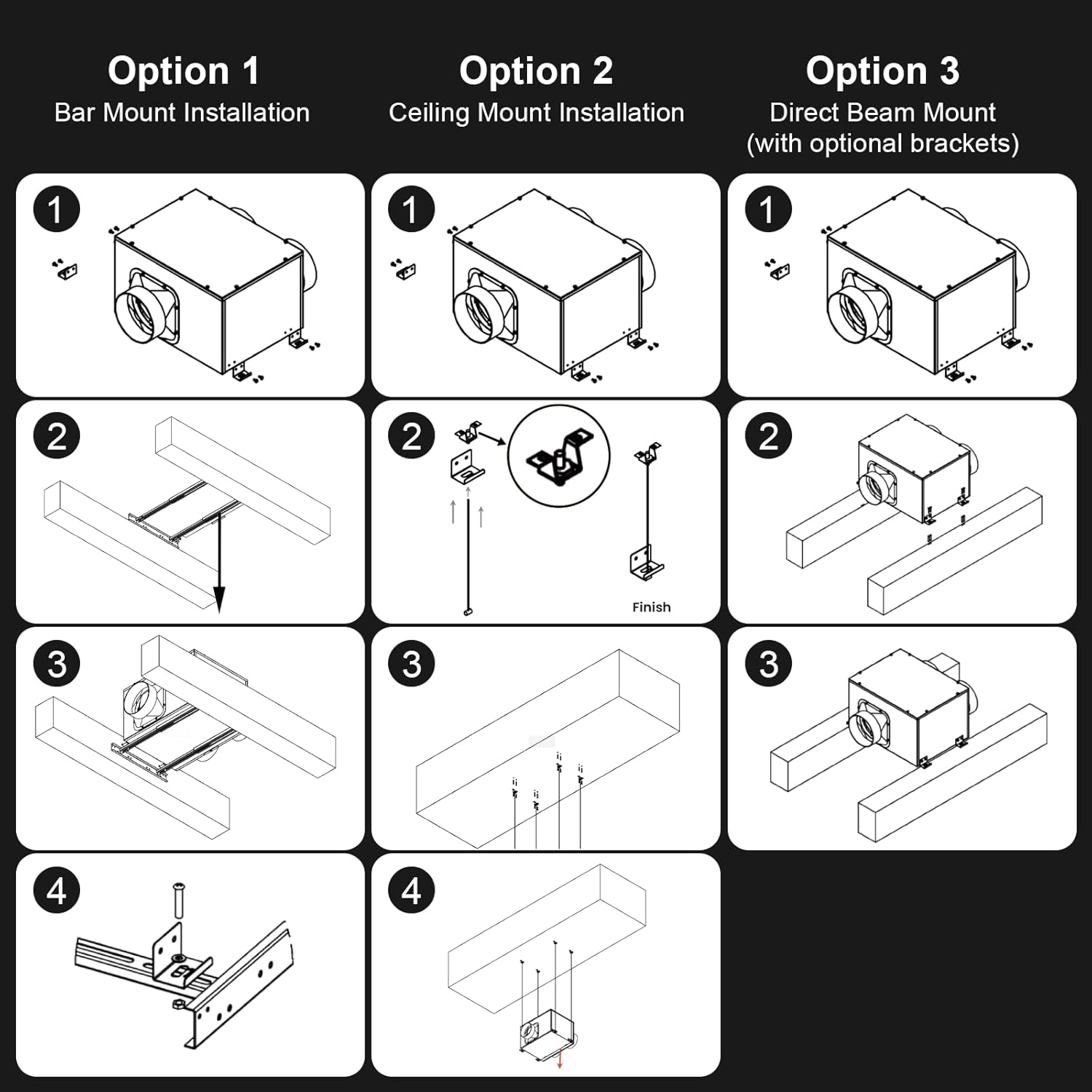
Image: Visual guide illustrating the three primary installation methods for the exhaust fan.
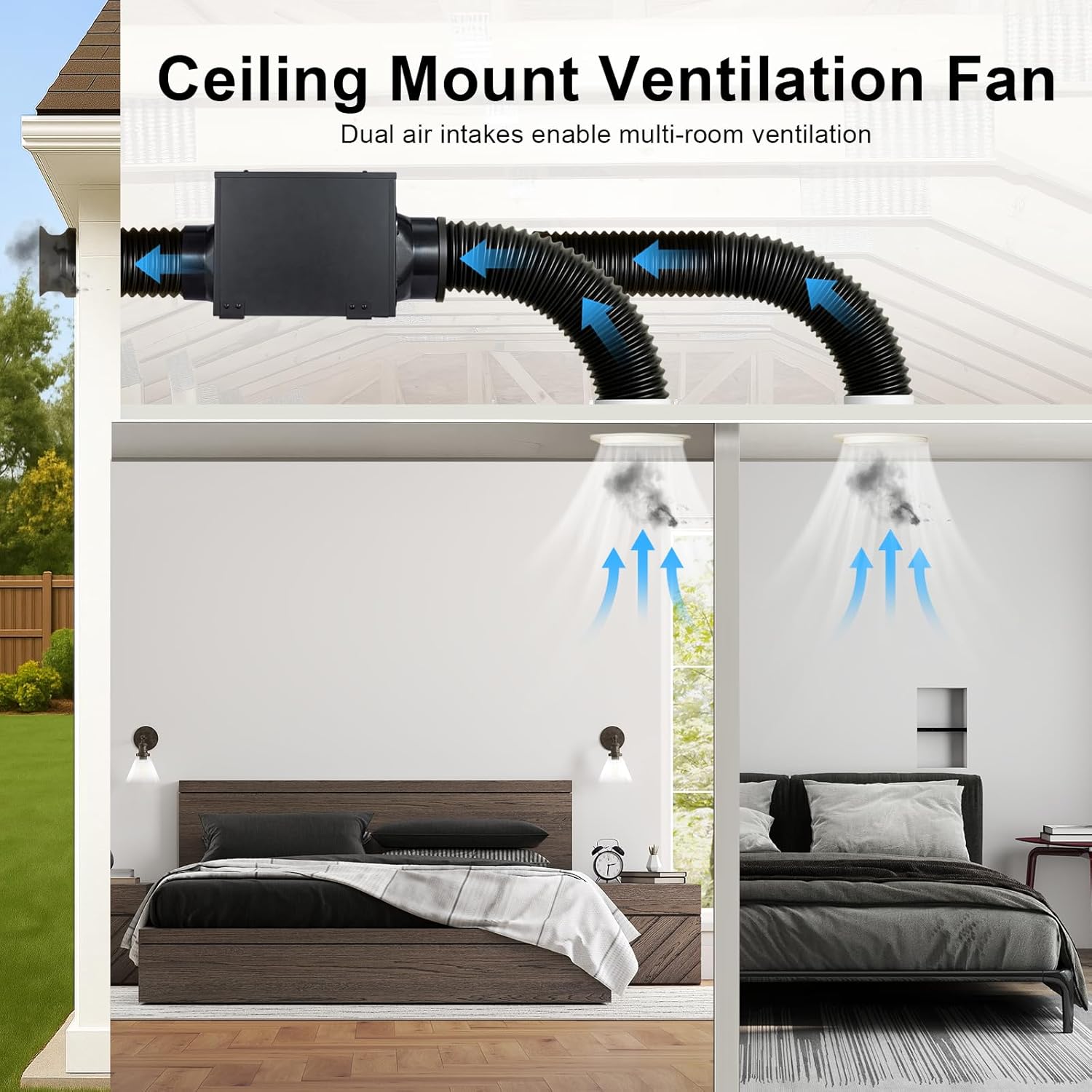
Image: The fan's dual air intakes allow for ventilation across multiple rooms, improving air quality throughout the home.
Operating Instructions
The GROWNEER Inline Exhaust Fan is controlled via a wireless remote control, offering convenience and flexibility.
- Power On/Off: Press the power button on the remote to turn the fan on or off.
- Speed Adjustment: Use the '+' and '-' buttons to cycle through the 5 available fan speeds. The fan will remember the last speed setting used (memory function).
- ECO Mode: Activate ECO energy-saving mode for optimized power consumption.
- Placement: The remote control can be wall-mounted for easy access.
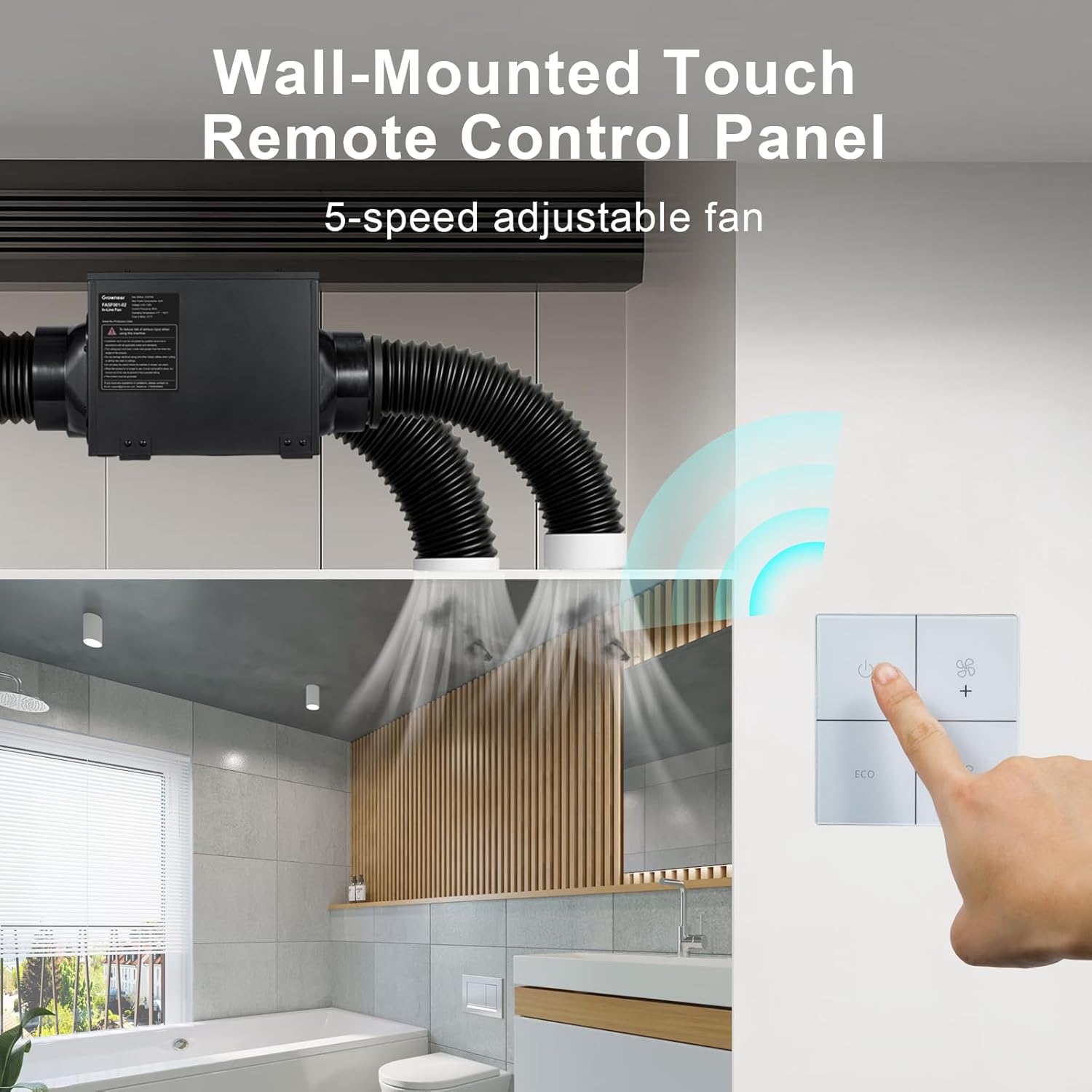
Image: The wall-mounted touch remote control panel for adjusting fan settings.
Maintenance
Regular maintenance ensures optimal performance and longevity of your exhaust fan.
- Cleaning: Periodically clean the fan grilles and the exterior of the unit with a soft, damp cloth. Do not use abrasive cleaners or solvents.
- Ductwork Inspection: Annually inspect the ductwork for any blockages, leaks, or damage that could impede airflow.
- Motor: The brushless DC motor is designed for long-term, maintenance-free operation. No lubrication is required.
- Power Disconnection: Always disconnect power to the unit before performing any cleaning or maintenance.
Troubleshooting
If you encounter issues with your GROWNEER Inline Exhaust Fan, refer to the following common problems and solutions:
| Problem | Possible Cause | Solution |
|---|---|---|
| Fan does not turn on | No power supply; Remote control battery low; Wiring issue | Check circuit breaker; Replace remote battery; Verify electrical connections |
| Low airflow | Ductwork obstruction; Incorrect fan speed; Leaks in ductwork | Inspect and clear ducts; Increase fan speed; Seal any duct leaks |
| Excessive noise | Loose mounting; Obstruction in fan blades; Motor issue | Ensure fan is securely mounted; Check for debris in fan; Contact customer support if motor noise persists |
| Remote control not responding | Battery low or dead; Remote out of range; Interference | Replace remote battery; Move closer to the fan; Reduce potential interference sources |
Warranty and Support
For warranty information or technical support, please contact GROWNEER customer service. Keep your purchase receipt as proof of purchase.
Visit the GROWNEER Store for more information and contact options.