1. Introduction
Thank you for choosing the PLANNTONNEO Modern LED Coffee Table. This manual provides essential information for the safe assembly, operation, and maintenance of your new coffee table. Please read all instructions carefully before use and retain this manual for future reference.
2. Safety Information
- Always assemble the product on a soft, clean surface to prevent scratches.
- Ensure all connections for electrical components (LED lights, charging ports) are secure before plugging into a power source.
- Keep liquids away from electrical components to prevent damage or electric shock.
- Do not overload the table with excessive weight.
- Keep small parts and packaging materials away from children to prevent choking hazards.
- Use only the provided hardware and tools for assembly unless otherwise specified.
3. Package Contents
Before beginning assembly, verify that all parts and hardware are present. Refer to the assembly video for a detailed visual guide to all components.

Image: All components and hardware for the coffee table laid out on a floor.
4. Setup and Assembly Instructions
Assembly typically requires two people. Follow the steps below and refer to the provided videos for visual guidance.
4.1 Preparation
Place the packaging box according to the arrow direction. Carefully cut the tape with a utility knife to avoid scratching panels. Sort panels by type and usage order.
4.2 Assembly Steps
For detailed step-by-step assembly, please watch the following seller-provided installation videos:
Video: Detailed assembly guide for the Modern High Glossy LED Coffee Table. (Source: FUzanni)
Video: Quick overview of the Modern LED Coffee Table with 2 Drawers. (Source: AMZ-planntonneo)
After assembly, peel off any plastic protective film from the product surfaces.
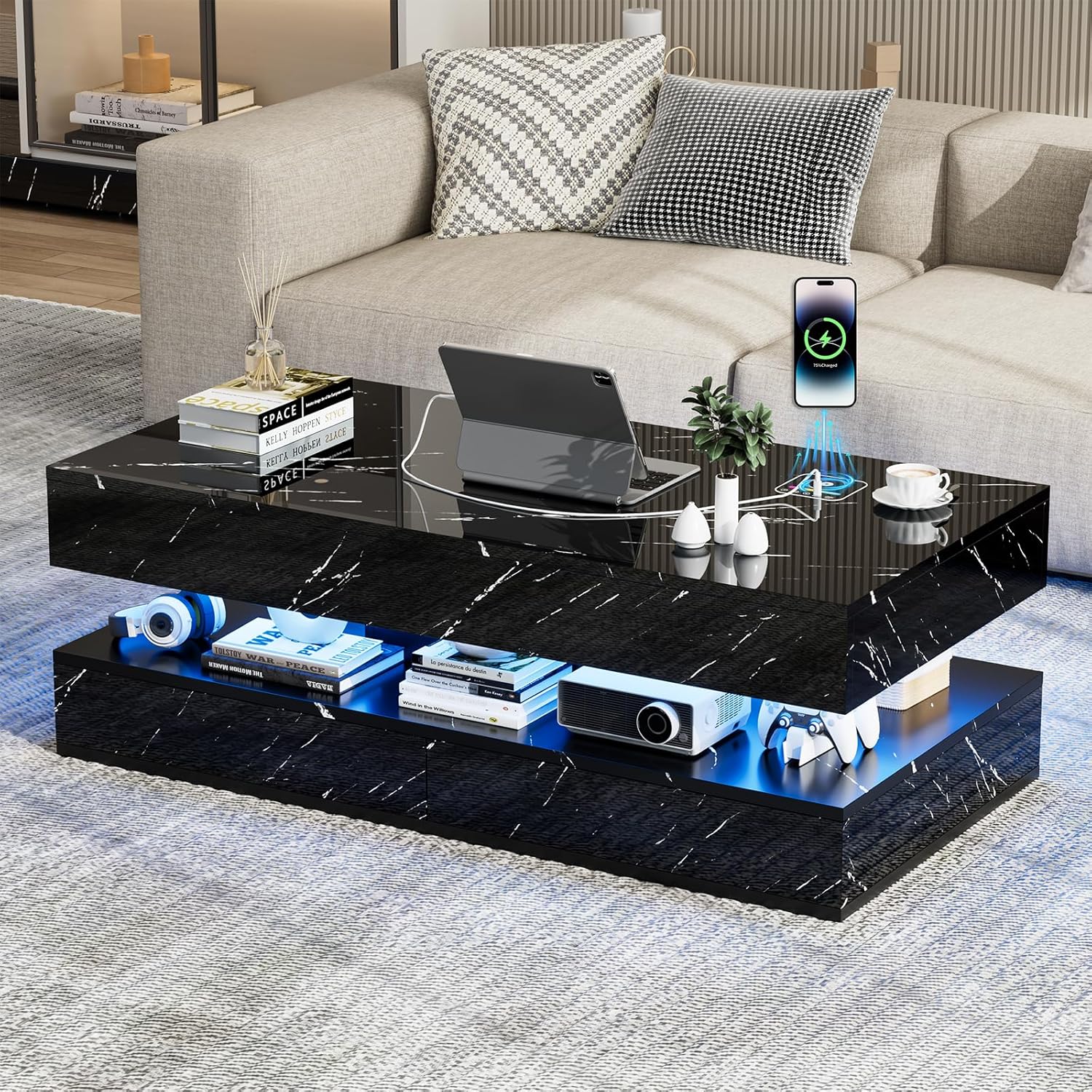
Image: The fully assembled coffee table in a living room setting.
5. Operating Instructions
5.1 LED Lighting
Your coffee table features built-in LED lights with 24 color options, 3 flash modes, and adjustable brightness. Use the included remote control or integrated touch controls to customize the lighting to your preference.

Image: Close-up of the coffee table's top surface showing the wireless charging pad and LED control interface.
5.2 Charging Features
The table is equipped with 2 USB ports, 1 Type-C port, and wireless charging capabilities. Simply place your compatible device on the wireless charging pad or connect it to the appropriate port for convenient power.
5.3 Bluetooth Speaker
The integrated Bluetooth speaker allows you to play audio wirelessly from your devices. Refer to the speaker's specific instructions for pairing and operation.
6. Maintenance
- Clean the high-gloss marble surface with a soft, damp cloth. Avoid abrasive cleaners or harsh chemicals that may damage the finish.
- Regularly check all screws and connections to ensure they remain tight.
- Keep the table away from direct sunlight and extreme temperatures to prevent warping or discoloration.
7. Troubleshooting
- LED Lights Not Working: Check if the power adapter is securely connected to both the table and a working power outlet. Ensure the remote control batteries are functional.
- Charging Ports Not Functioning: Verify the table is powered on. Try a different cable or device to rule out compatibility issues.
- Wireless Charging Not Working: Ensure your device is compatible with wireless charging and is placed correctly on the charging pad. Remove any thick phone cases that might interfere.
- Speaker Issues: Ensure the speaker is paired correctly via Bluetooth. Check the volume levels on both the table and your connected device.
8. Specifications
| Feature | Detail |
|---|---|
| Brand | PLANNTONNEO |
| Product Dimensions | 23.6"D x 47.2"W x 16.1"H |
| Color | Black |
| Top Material Type | Engineered Wood |
| Shape | Rectangular |
| Style Name | Modern |
| LED Lights | 24 Color Options, 3 Flash Modes, Adjustable Brightness |
| Charging Features | 2 USB ports, 1 Type-C port, Wireless Charging |
| Storage | Double-tier design, Large Storage Space, 2 Drawers |
Image: Diagram showing the dimensions of the coffee table and its components.
9. Warranty and Support
For warranty information or any questions regarding assembly, operation, or maintenance, please contact PLANNTONNEO customer support. Refer to your purchase documentation for specific contact details.