1. Safety Instructions
Please read all instructions carefully before assembly and use. Keep this manual for future reference.
- Ensure all parts are present and undamaged before assembly. Do not use if any parts are missing or broken.
- Assemble the unit on a soft, clean surface to prevent scratches.
- Do not overtighten screws during assembly to avoid damaging the material.
- Keep small parts away from children to prevent choking hazards.
- Do not stand or sit on the cabinet.
- Distribute weight evenly in drawers to maintain stability.
- Always lock the casters when the cabinet is in a stationary position to prevent accidental movement.
- Maximum load capacity: Top surface 33 lb (15 kg), small drawers 11 lb (5 kg) each, large drawer 22 lb (10 kg). Do not exceed these limits.
2. Package Contents
Verify that all components listed below are included in your package. If any parts are missing or damaged, please contact customer support.

Image: Exploded view of the VASAGLE UOFC065WB02S Mobile File Cabinet components, showing labeled parts (A-P) and an instruction manual. This image illustrates the various pieces included in the package for assembly.
Refer to the included assembly manual for a detailed list of parts and hardware.
3. Assembly Instructions
Follow these steps carefully to assemble your mobile file cabinet. It is recommended to have a second person assist with certain steps for easier assembly.
3.1 Preparation
- Unpack all components and lay them out on a clean, soft surface.
- Identify each part using the labels (A, B, C, etc.) and the hardware according to the assembly manual.
- Ensure you have the necessary tools. While some basic tools may be provided, a screwdriver (and potentially a drill for pre-drilling, if specified in the manual) might be helpful.
3.2 Step-by-Step Assembly
- Assemble the Cabinet Frame: Connect the side panels (C, D) to the top (A) and bottom (B) panels using the provided fasteners. Ensure all connections are secure.
- Install Drawer Glides: Attach the drawer glides to the inner sides of the cabinet frame according to the manual's diagrams. Pay attention to the orientation of the glides.
- Assemble Drawers: For each drawer, connect the front, back, and side panels (e.g., H, I, J, K for small drawers; L, M, N, O, P for the large drawer) and insert the bottom panel (G). Attach the handles (black pulls) to the drawer fronts.
- Insert Drawers: Carefully slide the assembled drawers onto their respective glides within the cabinet frame.
- Attach Casters: Securely attach the four casters to the bottom of the cabinet. Ensure the two casters with brakes are positioned at the front for easy access.

Image: The fully assembled VASAGLE Mobile File Cabinet in a modern office environment, positioned next to a desk. This image shows the cabinet's final appearance and its integration into a workspace.
4. Operating Instructions
4.1 Drawer Usage
The cabinet features two small drawers and one large bottom drawer.
- Small Drawers: Ideal for office supplies such as pens, staplers, notebooks, and other small items. Each small drawer has a maximum load capacity of 11 lb (5 kg).
- Large Bottom Drawer: Designed for filing documents. It includes an adjustable hanging rail. This drawer has a maximum load capacity of 22 lb (10 kg).

Image: A detailed view of the three drawers. The top two smaller drawers are shown holding office supplies, while the large bottom drawer is filled with hanging file folders. Text indicates "3 Drawers in 2 Sizes" and "Max file capacity 120 pcs".

Image: A close-up shot of a drawer handle, highlighting its ergonomic, easy-grip design for comfortable opening and closing.

Image: A close-up view of an open drawer, illustrating the silent gliding mechanism designed for smooth and quiet operation.
4.2 Adjustable Hanging Rail
The large bottom drawer features an adjustable rail to accommodate different file folder sizes.
- To adjust, simply remove the rail from its current position and reinsert it into the alternative holes provided on the drawer sides.
- The rail can be set for A4-sized documents (approximately 13 inches / 33 cm width) or Letter-sized documents (approximately 12.2 inches / 31 cm width).

Image: A diagram illustrating the adjustable hanging rail feature. It shows a hand inserting the rail into different holes to switch between A4 (13 inches / 33 cm) and Letter (12.2 inches / 31 cm) file folder sizes.
4.3 Mobility and Stability
The cabinet is equipped with four casters for easy movement. Two of these casters include locking mechanisms for stability.
- Moving the Cabinet: Unlock the two front casters by flipping their levers upwards. Gently push or pull the cabinet to its desired location.
- Securing the Cabinet: Once in position, lock the two front casters by flipping their levers downwards. This will prevent the cabinet from rolling accidentally.

Image: A visual representation of the casters. One image shows a caster with its brake engaged (locked position), and another shows a swivel caster without a brake, indicating smooth movement. Text highlights "2 Casters with Brakes" and "2 Swivel Casters".
5. Maintenance
- Cleaning: Wipe the cabinet surfaces with a soft, damp cloth. Avoid using harsh chemicals or abrasive cleaners, as these can damage the finish.
- Dusting: Regularly dust the cabinet to prevent buildup.
- Hardware Check: Periodically check all screws and fasteners to ensure they remain tight. Retighten if necessary, but do not overtighten.
- Caster Care: Keep casters free of debris (hair, dust, etc.) to ensure smooth rolling.
- Avoid Moisture: Do not expose the cabinet to excessive moisture or direct sunlight, which can cause warping or discoloration.
6. Troubleshooting
| Problem | Possible Cause | Solution |
|---|---|---|
| Cabinet is wobbly or unstable. | Loose fasteners; uneven floor. | Check and tighten all screws. Ensure the cabinet is on a level surface. |
| Drawers do not slide smoothly. | Drawer glides are misaligned or dirty; drawer is overloaded. | Ensure glides are correctly installed and clean. Reduce weight in the drawer. |
| Casters do not roll freely. | Debris caught in casters; casters are locked. | Clean any debris from the caster wheels. Unlock the casters if they are engaged. |
| Parts missing during assembly. | Packaging error. | Contact customer support with your purchase details and the specific missing parts. |
7. Specifications
| Feature | Detail |
|---|---|
| Model Number | UOFC065WB02S |
| Brand | VASAGLE |
| Color | Cloud White |
| Product Dimensions | 15.7"D x 16.1"W x 26.9"H (39.9 x 40.9 x 68.3 cm) |
| Item Weight | 14.9 kg (32.8 lbs) |
| Material | Particleboard, Steel, PP Plastic, MDF (Medium Density Fiberboard) |
| Maximum Load Capacity (Top) | 33 lb (15 kg) |
| Maximum Load Capacity (Small Drawers) | 11 lb (5 kg) each |
| Maximum Load Capacity (Large Drawer) | 22 lb (10 kg) |
| File Compatibility | A4, Letter Sized Documents |
| Special Features | Mobile with locking casters, adjustable hanging rail, sturdy build |
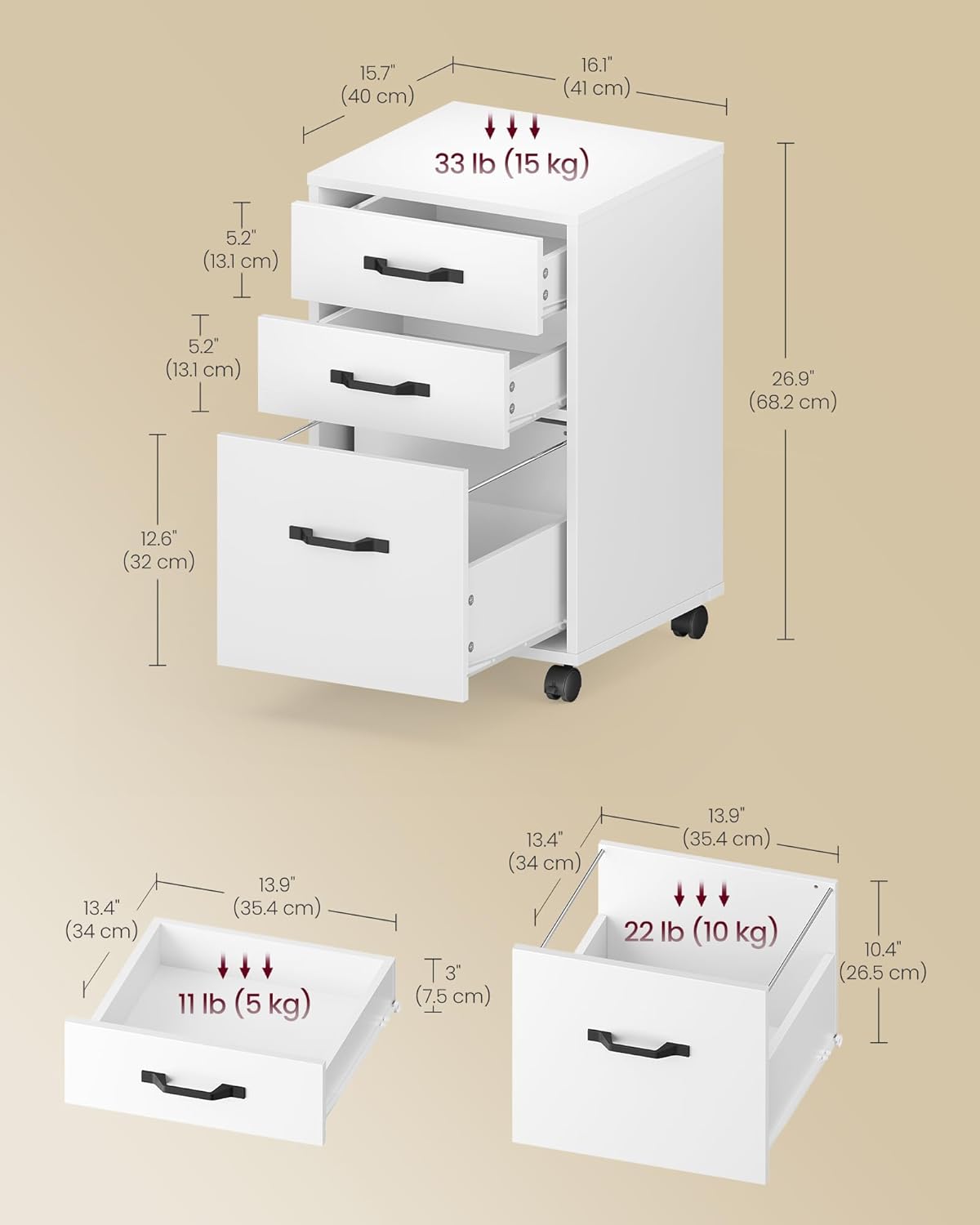
Image: A detailed diagram illustrating the overall dimensions of the cabinet (15.7"D x 16.1"W x 26.9"H) and the internal dimensions and maximum load capacities for the top surface (33 lb), small drawers (11 lb each), and large drawer (22 lb).

Image: A cross-section view demonstrating the reinforced particleboard construction, indicating the multi-layered material used for durability and strength.
8. Warranty and Support
For warranty information, product support, or to report missing/damaged parts, please contact VASAGLE customer service. Refer to your purchase documentation for specific contact details or visit the official VASAGLE website.
Please have your model number (UOFC065WB02S) and purchase date ready when contacting support.


