
1. Introduction
This manual provides essential information for the safe and efficient operation of your Sovol SV08 Max 3D Printer. The SV08 Max is a large-format CoreXY 3D printer designed for high-speed and high-precision printing, featuring a build volume of 500x500x500 mm. It incorporates an eddy current sensor for precise bed leveling, industrial linear guides for stability, a high-temperature hotend, and an integrated HD camera for remote monitoring.
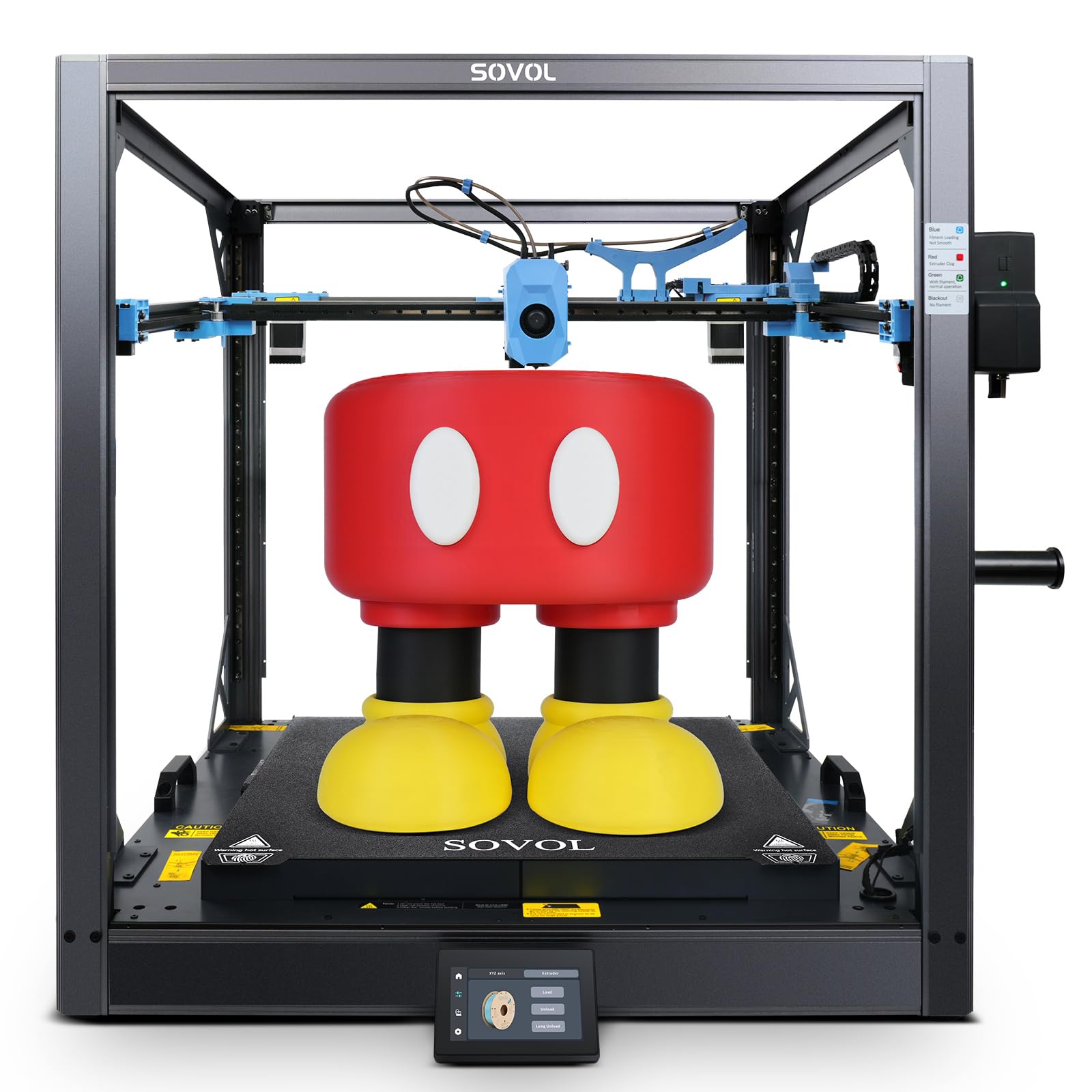
Figure 1: Sovol SV08 Max 3D Printer, showing its overall structure.
2. Setup
Careful setup is crucial for optimal performance. Please follow these general steps:
- Unboxing: Carefully remove all components from the packaging. Inspect for any shipping damage.
- Assembly: Assemble the printer according to the included quick start guide or detailed assembly instructions (if provided separately). Ensure all connections are secure. The package includes the SV08 Max 3D printer.
- Power Connection: Connect the power cable to the printer and a suitable power outlet. Ensure the correct voltage setting is selected if applicable.
- Initial Calibration: Power on the printer. The SV08 Max features an advanced eddy current sensor for automatic bed leveling. This system performs a high-precision, non-contact scan of the print bed to detect surface irregularities and ensure a perfectly flat printing surface. This process typically takes approximately 80 seconds.

Figure 2: Illustration of the eddy current sensor performing rapid, high-precision bed leveling.
3. Operating Instructions
This section covers the basic steps for operating your 3D printer.
3.1 Filament Loading
The SV08 Max is equipped with an auxiliary filament feeding system that ensures smooth filament transport and includes detection for tangles and clogs. To load filament:
- Place the filament spool on the designated holder.
- Feed the filament into the auxiliary feeding box. The system will actively monitor the filament flow.
- Guide the filament into the hotend until it is properly seated.
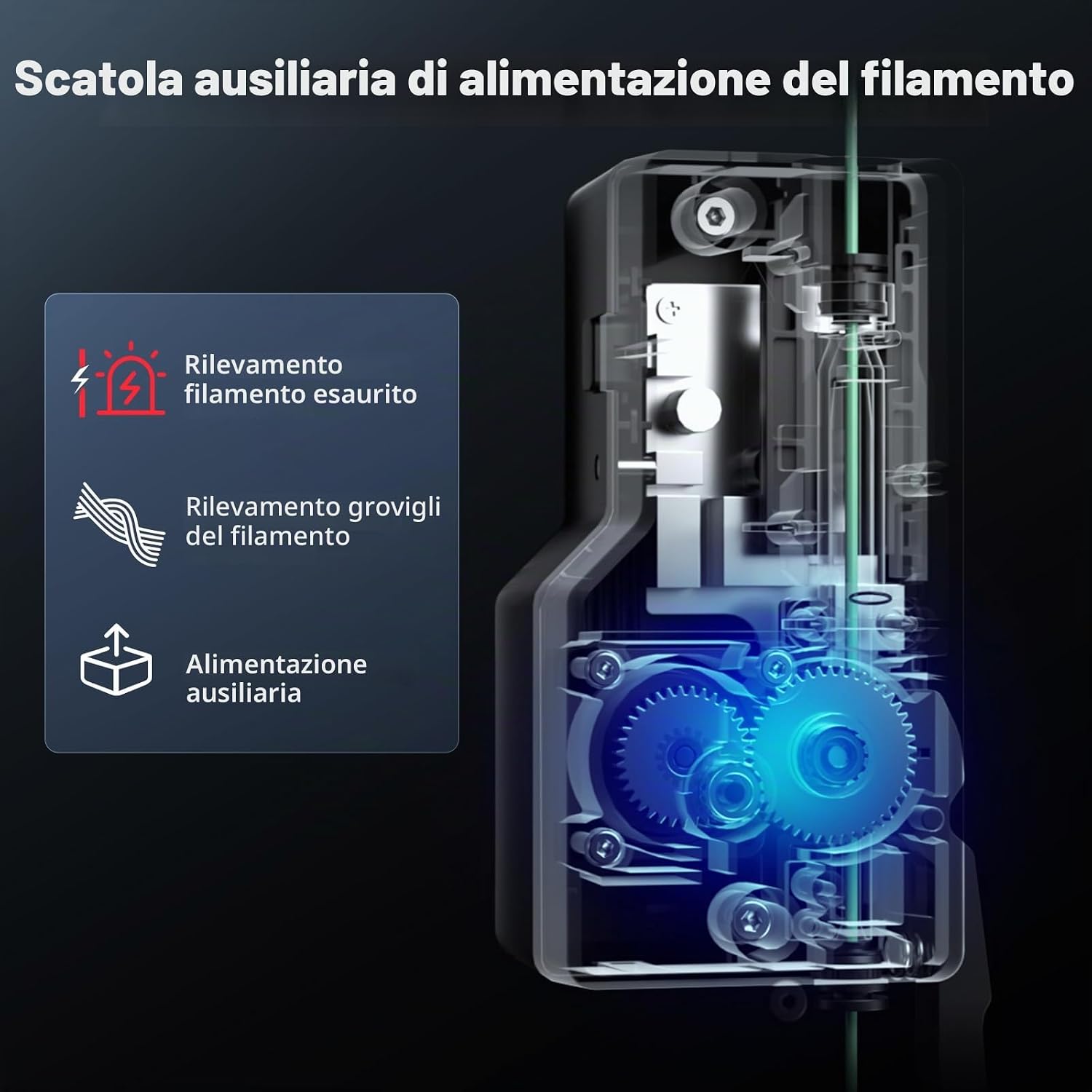
Figure 3: The auxiliary filament feeding box, illustrating its filament run-out and tangle detection capabilities.
3.2 Printing Process
The SV08 Max features a CoreXY motion system, enabling high-speed printing up to 700 mm/s with an acceleration of 40,000 mm/s². Its high-flow nozzle supports a volume flow of up to 50 mm³/s.
- Prepare your 3D model: Use a compatible slicer software to convert your 3D model into G-code.
- Transfer G-code: Transfer the G-code file to the printer via USB or network connection.
- Start Printing: Select the file from the printer's interface and initiate the print.

Figure 4: Visual representation of the SV08 Max's high-speed printing capabilities, reaching up to 700mm/s.
3.3 Filament Compatibility and Hotend
The high-temperature hotend supports a maximum temperature of 300 °C, allowing for a wide range of filament types including PLA, TPU, PETG, ABS, ASA, PC, PA, and carbon fiber reinforced variants (e.g., PLA-CF, PETG-CF). The printer comes with two standard 0.4 mm nozzles. Optional 0.6 mm and 0.8 mm nozzles are available separately for different print quality and speed requirements.

Figure 5: The high-temperature hotend, capable of reaching up to 300°C for diverse material compatibility.

Figure 6: Examples of different filament types (PETG, PA, PC, PLA, ASA, ABS, TPU) that can be printed with the SV08 Max.
3.4 Heated Print Bed
The SV08 Max features an 8 mm thick aluminum heated bed with 1300 W of power. This ensures rapid and uniform heating across the entire 500 x 500 mm surface, minimizing thermal deformation and ensuring optimal print adhesion, especially for large models.

Figure 7: The powerful 1300W heated bed, illustrating its rapid and uniform heating capabilities.
3.5 Remote Monitoring
An integrated 1280 x 720 HD camera allows for convenient remote monitoring of print jobs. This enables live streaming, time-lapse recording, and integration with cloud-based services like Obico for advanced control and intelligent print defect detection.
4. Maintenance
Regular maintenance ensures the longevity and consistent performance of your SV08 Max 3D printer.
- Cleaning: Regularly clean the print bed, nozzle, and internal components to prevent debris buildup. Use appropriate cleaning tools and solutions.
- Linear Guides: The industrial linear guides provide smooth, low-vibration movement. Periodically inspect and lubricate them according to manufacturer recommendations to maintain optimal performance and prevent wear.
- Hotend and Nozzle: Inspect the hotend and nozzle for clogs or wear. Replace nozzles as needed.
- Cooling System: The extruder is equipped with three powerful fans for efficient heat dissipation and rapid cooling of extruded material. Ensure these fans are free from dust and obstructions to maintain effective cooling.

Figure 8: Diagram illustrating the efficient cooling system of the extruder, featuring three fans for optimal heat management.
5. Troubleshooting
This section addresses common issues you might encounter during operation.
- Poor First Layer Adhesion:
- Ensure the print bed is clean and free of oils or residues.
- Verify that the automatic bed leveling process completed successfully. The eddy current sensor is designed to ensure a perfectly leveled bed.
- Adjust Z-offset if necessary.
- Filament Clogging or Jamming:
- Check the hotend temperature to ensure it is appropriate for the filament type.
- Inspect the nozzle for blockages.
- Verify that the auxiliary filament feeding system is operating correctly and has not detected a tangle or run-out.
- Print Quality Issues (e.g., layer shifts, ringing):
- Ensure the printer is placed on a stable surface.
- Check that the industrial linear guides are clean and properly lubricated.
- Review your slicer settings for appropriate print speed and acceleration.
- Printer Not Responding:
- Power cycle the printer.
- Check all cable connections.
6. Specifications
| Feature | Detail |
|---|---|
| Brand | Sovol |
| Model | SV08 Max |
| Product Dimensions | 82 x 80 x 35 cm |
| Item Weight | 39.5 kg |
| Build Volume | 500 x 500 x 500 mm |
| Max Print Speed | 700 mm/s |
| Max Acceleration | 40,000 mm/s² |
| Max Hotend Temperature | 300 °C |
| Hotbed Power | 1300 W |
| Hotbed Material | 8 mm thick aluminum |
| Nozzle Diameter | 0.4 mm (standard), 0.6 mm, 0.8 mm (optional) |
| Filament Compatibility | PLA, PETG, TPU, ABS, ASA, PC, PA, Carbon Fiber variants |
| Bed Leveling | Eddy Current Sensor (automatic) |
| Motion System | CoreXY with Industrial Linear Guides |
| Camera | Integrated HD 1280 x 720 |
| Connectivity | USB |
| Compatible Operating Systems | Windows 10, macOS, Linux |
| Included Components | SV08 Max 3D Printer |
7. Warranty Information
For detailed warranty terms and conditions, please refer to the official Sovol website or the warranty card included with your product. Warranty coverage typically includes manufacturing defects for a specified period from the date of purchase. Keep your proof of purchase for warranty claims.
8. Customer Support
If you encounter any issues or have questions not covered in this manual, please contact Sovol customer support. You can usually find contact information on the official Sovol website or through the retailer where you purchased the product. Please have your model number (SV08 Max) and purchase details ready when contacting support.

