
Introduction
The Aune N7D DAC Edition is a compact Class-A fully-discrete headphone amplifier and USB DAC, designed to deliver high-fidelity audio. It features twin JFET input, a fully-balanced four-channel R2R electronic volume control, dual-level Class A current adjustment, dual gain settings, and an independent Class-A preamp function. This manual provides essential information for setting up, operating, maintaining, and troubleshooting your N7D device.
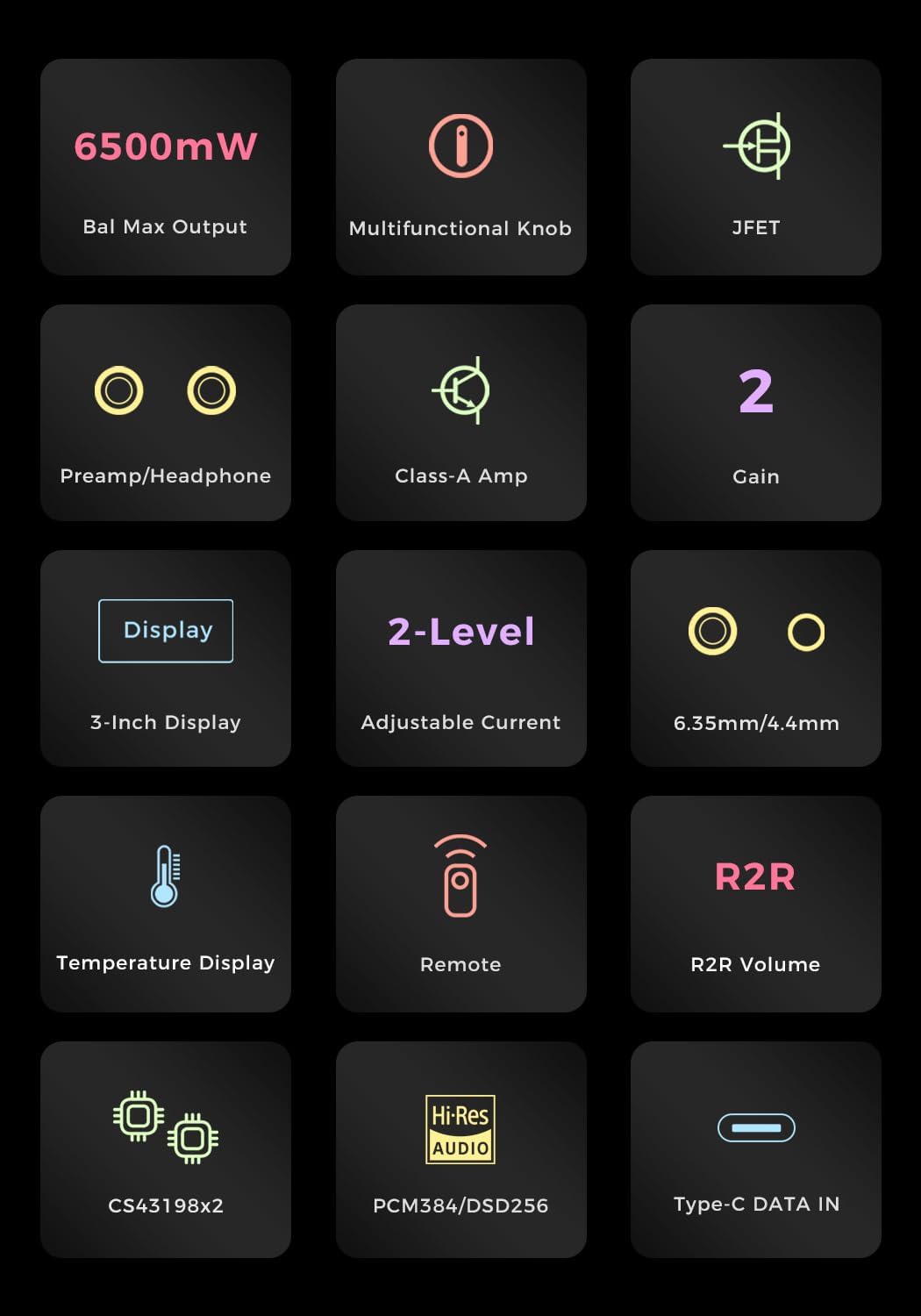
Image: The Aune N7D DAC Edition Headphone Amplifier shown with a pair of high-fidelity headphones, highlighting its primary use case.
Setup
Unboxing and Initial Inspection
Carefully remove the Aune N7D from its packaging. Inspect the device for any signs of damage. Ensure all components are present. The package typically includes the N7D unit and a power cable.
Connecting to Power
Connect the provided power cable to the AC input on the rear panel of the N7D. Plug the other end into a suitable power outlet (AC 100-240V). Ensure the power switch on the rear panel is in the OFF position before connecting to power.
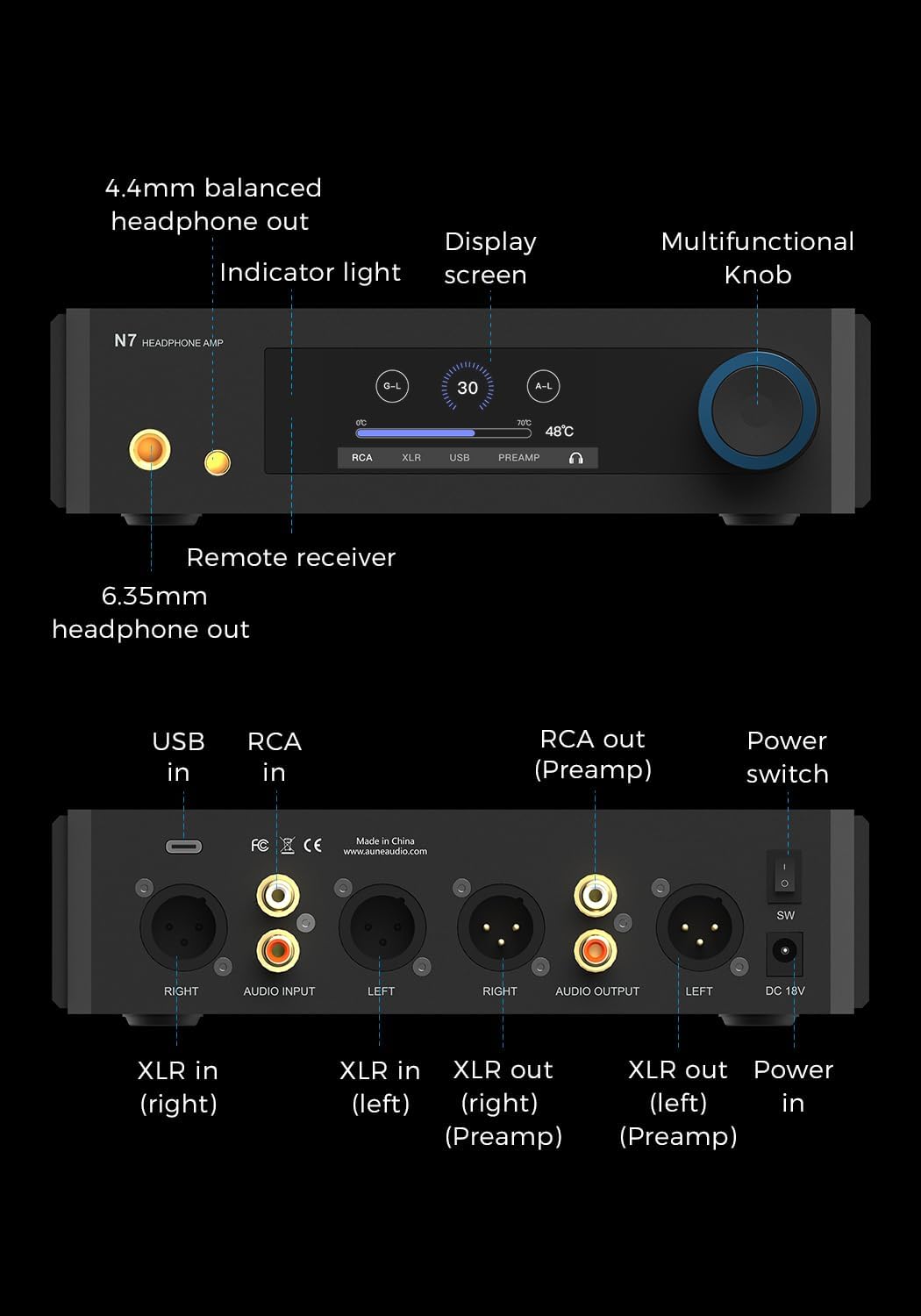
Image: Detailed view of the Aune N7D's rear panel, illustrating the power input, USB-C, RCA, and XLR input/output connections.
Audio Connections
The N7D offers multiple input and output options:
- USB-C Input: Connect to a computer, smartphone, or tablet for digital audio playback (PCM 384kHz, DSD256).
- RCA/XLR Analog Input: Connect to an external DAC for amplification.
- Headphone Outputs: Use the 6.35mm or 4.4mm balanced headphone jacks on the front panel for headphones.
- RCA/XLR Preamp Outputs: Connect to active speakers or a power amplifier.
Ensure all cables are securely connected to prevent signal loss or interference.
Operating Instructions
Powering On/Off
Flip the power switch on the rear panel to the ON position. The front display will illuminate. To power off, flip the switch back to the OFF position.
Front Panel Controls

Image: Close-up of the Aune N7D's front panel, featuring the 3-inch display, multifunctional knob, and 6.35mm/4.4mm headphone outputs.
- Multifunctional Knob: This knob controls volume, input selection, gain settings, and headphone amp/preamp switching. Rotate to adjust volume. Press to cycle through input options or access settings.
- 3-Inch Display: Shows current volume, input source (RCA, XLR, USB, PREAMP), gain level (G-L for Low, G-H for High), Class-A current setting (50mA/100mA), and device temperature.
- Remote Receiver: Located on the front panel, it receives signals from the included remote control for convenient wireless operation.
Gain Settings
The N7D offers two gain settings to match various headphone sensitivities:
- Low Gain (G-L): Ideal for sensitive In-Ear Monitors (IEMs), providing controlled power.
- High Gain (G-H): Delivers up to 6.5W output for demanding full-size headphones.
Adjust the gain via the multifunctional knob or remote control as indicated on the display.

Image: The Aune N7D with headphones, demonstrating its dual-gain settings for optimal performance with various audio devices.
Class-A Current Adjustment
The N7D features a dual-level Class-A bias current adjustment for the output stage, ensuring true Class-A operation. This can be adjusted to 50mA or 100mA, affecting the tonality and warmth of the audio output.

Image: The Aune N7D's display showing the Class-A current adjustment feature, offering two shades of warm sound.
Maintenance
- Cleaning: Use a soft, dry cloth to clean the exterior of the device. Avoid using liquid cleaners or solvents, as they may damage the finish or internal components.
- Ventilation: Ensure the N7D has adequate ventilation. Do not block the ventilation holes on the chassis.
- Storage: When not in use for extended periods, store the device in a cool, dry place away from direct sunlight and extreme temperatures.
Troubleshooting
No Power
- Check if the power cable is securely connected to both the N7D and the power outlet.
- Ensure the power switch on the rear panel is in the ON position.
- Try a different power outlet to rule out an issue with the current outlet.
No Sound Output
- Verify that the correct input source is selected on the N7D's display.
- Check all audio cables (USB, RCA, XLR, headphone) for secure connections.
- Ensure the volume level is not set to minimum or muted.
- Confirm that your headphones or active speakers are properly connected and functioning.
Distorted or Poor Sound Quality
- Check the quality of your audio source and cables. Try a different source or cables.
- Ensure the gain setting is appropriate for your headphones. Too high a gain for sensitive headphones can cause distortion.
- Verify that the Class-A current setting is suitable for your preference and equipment.
Remote Control Not Responding
- Ensure there are no obstructions between the remote and the N7D's remote receiver.
- Check and replace the batteries in the remote control if necessary.
Specifications
| Feature | Detail |
|---|---|
| Model Name | N7 D |
| Item Weight | 4.36 pounds |
| Product Dimensions | 14 x 11 x 2.76 inches (35.56 x 27.94 x 7.01 cm) |
| Color | Black |
| Power Source | USB Powered (also AC input) |
| Connector Types | 3.5mm Jack, 6.35mm Jack, RCA, USB, XLR |
| DAC Chips | Dual CS43198 |
| PCM Support | Up to 384kHz |
| DSD Support | Up to DSD256 |
| Headphone Output | Up to 6.5W (High Gain) |
| Volume Control | R2R Electronic Volume Chip (JRC) |
| Input Stage | Twin JFET |
Warranty and Support
For warranty information and technical support, please refer to the official Aune website or contact your authorized Aune dealer. Keep your purchase receipt as proof of purchase for warranty claims.


