
1. Introduction
This manual provides detailed instructions for the setup, operation, and maintenance of your Oakcastle SB80 Split Soundbar. Please read this manual thoroughly before using the product to ensure proper function and to maximize your audio experience. Keep this manual for future reference.
2. Safety Information
- Do not expose this appliance to dripping or splashing liquids.
- Do not place objects filled with liquids, such as vases, on the appliance.
- Ensure proper ventilation. Do not block any ventilation openings.
- Do not install near any heat sources such as radiators, heat registers, stoves, or other apparatus (including amplifiers) that produce heat.
- Protect the power cord from being walked on or pinched, particularly at plugs, convenience receptacles, and the point where they exit from the appliance.
- Only use attachments/accessories specified by the manufacturer.
- Unplug this appliance during lightning storms or when unused for long periods of time.
- Refer all servicing to qualified service personnel. Servicing is required when the apparatus has been damaged in any way, such as power-supply cord or plug is damaged, liquid has been spilled or objects have fallen into the apparatus, the apparatus has been exposed to rain or moisture, does not operate normally, or has been dropped.
3. Package Contents
Carefully unpack your Oakcastle SB80 Soundbar and ensure all items listed below are present and in good condition.

Image 3.1: The Oakcastle SB80 Soundbar and its complete set of accessories, including cables, remote, and bases, as packaged.
- Oakcastle SB80 Soundbar (main unit)
- Remote Control
- 2 x Pedestal Bases (for split configuration)
- Wall Mounting Kit
- 2 x RCA Cables
- Optical Cable
- AUX Cable
- User Guide
- Power Adapter (UK/EU specific)
4. Product Overview
The Oakcastle SB80 is a versatile 2.2 channel split soundbar designed to enhance your audio experience. It features 120W peak power output, multiple connectivity options, and a unique dual design allowing it to function as a single soundbar or two separate tower speakers.
4.1. Main Unit Features
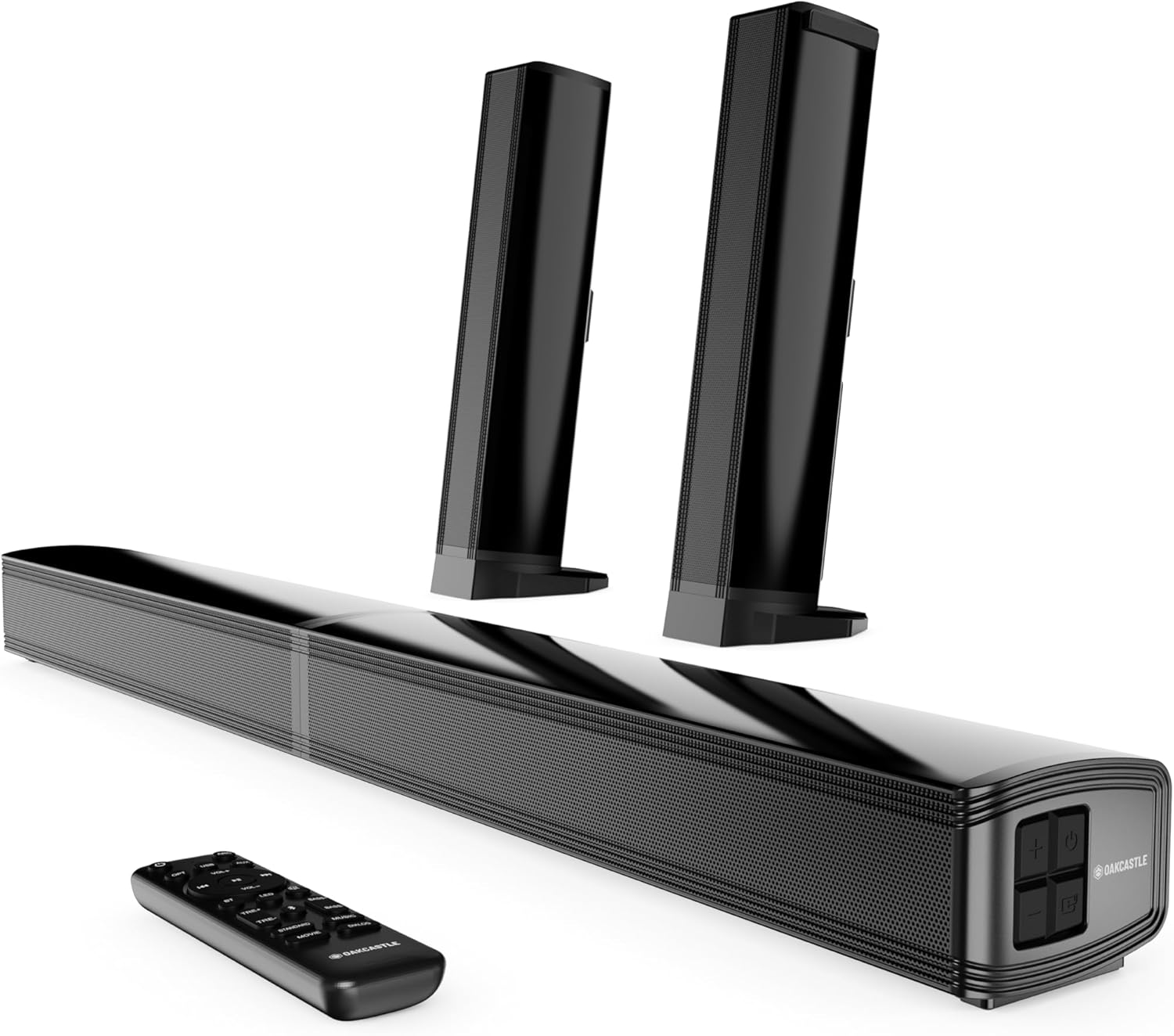
Image 4.1: The Oakcastle SB80 Soundbar showcasing its ability to be used as a single bar or split into two vertical speakers, accompanied by its remote control.
- Dual Design: Can be used as a single horizontal soundbar or split into two vertical tower speakers.
- Audio Output: 120 Watts peak power, 2.2 channel stereo sound.
- Drivers: Features full-range high-fidelity drivers and dynamic bass drivers for rich sound.
- Connectivity: Bluetooth 5.3, HDMI ARC, Optical, AUX, USB.
- Control: Integrated buttons on the unit and a full-function remote control.
4.2. Rear Panel Connections
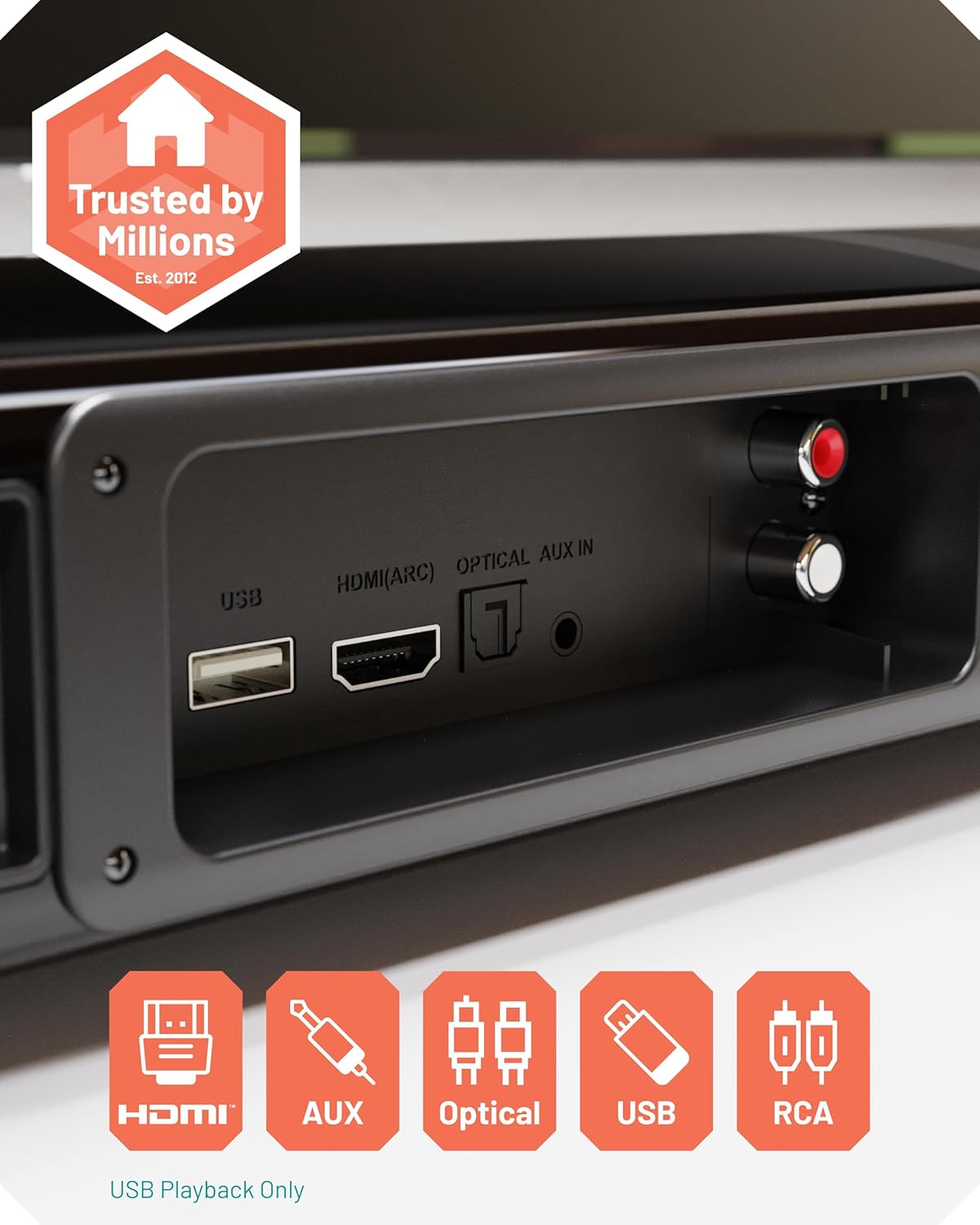
Image 4.2: A close-up view of the rear connection panel of the soundbar, highlighting the various input ports available for connecting external devices.
- USB Port: For USB media playback only.
- HDMI (ARC) Port: Connect to your TV's HDMI ARC port for high-quality audio and TV remote control integration.
- OPTICAL IN Port: Connect to your TV or other devices using an optical cable for digital audio.
- AUX IN Port: Connect to devices with a 3.5mm audio output.
- RCA IN Ports: Connect to devices with RCA audio output (red/white).
4.3. Remote Control
The included remote control allows for convenient operation of all soundbar functions from a distance. Ensure batteries are correctly inserted.

Image 4.3: The soundbar's main unit with its remote control, emphasizing the internal speaker components.
- Power Button: Turns the soundbar on or off.
- Input Selection: Cycles through HDMI, Optical, AUX, Bluetooth, USB inputs.
- Volume Control: Adjusts the master volume.
- Mute Button: Mutes or unmutes the audio.
- EQ Modes: Selects between different equalizer presets (e.g., Music, Movie, News, 3D).
- Bass/Treble Control: Adjusts bass and treble levels.
5. Setup
5.1. Choosing Your Configuration
The Oakcastle SB80 offers two primary configurations: a single horizontal soundbar or two separate vertical tower speakers.

Image 5.1: The soundbar in its split configuration, with each speaker placed vertically on a surface, demonstrating its flexible design.
- Single Soundbar: Connect the two halves of the soundbar together to form a single horizontal unit. Place it on a flat surface below your TV or mount it on the wall.
- Split Speakers: Separate the two halves of the soundbar. Attach each half to a pedestal base. Place the two speakers vertically on either side of your TV for a wider stereo soundstage.
5.2. Wall Mounting
A wall mounting kit is included for installing the soundbar in its single configuration on a wall. Ensure the wall material can support the weight of the soundbar and use appropriate tools and fasteners. Consult a professional if unsure.
5.3. Connecting to Your Devices
Choose the appropriate connection method based on your TV or audio source.
- HDMI ARC (Recommended):
- Connect one end of an HDMI cable to the HDMI (ARC) port on the soundbar.
- Connect the other end to the HDMI ARC port on your TV.
- This connection allows for high-quality digital audio and often enables control of the soundbar's volume using your TV remote.
- Optical:
- Connect one end of the optical cable to the OPTICAL IN port on the soundbar.
- Connect the other end to the Optical Digital Audio Out port on your TV or audio source.
- AUX:
- Connect one end of the 3.5mm AUX cable to the AUX IN port on the soundbar.
- Connect the other end to the 3.5mm audio output (headphone jack) on your TV, smartphone, or other audio device.
- RCA:
- Connect the RCA cables to the RCA IN ports on the soundbar (red to red, white to white).
- Connect the other ends to the corresponding RCA audio output ports on your TV or audio source.
- Power Connection:
- Connect the power adapter to the DC IN port on the soundbar.
- Plug the power adapter into a wall outlet.
6. Operating Instructions
6.1. Power On/Off
Press the Power button on the soundbar or the remote control to turn the unit on or off.
6.2. Selecting Input Mode
Press the 'Input' or 'Source' button on the soundbar or remote control repeatedly to cycle through the available input modes: HDMI ARC, Optical, AUX, Bluetooth, and USB. The current input mode will be indicated on the soundbar's display.
6.3. Bluetooth Pairing
- Turn on the soundbar and select Bluetooth mode using the 'Input' button. The soundbar will enter pairing mode, indicated by a flashing Bluetooth indicator.
- On your Bluetooth-enabled device (e.g., smartphone, tablet), go to the Bluetooth settings and search for available devices.
- Select "Oakcastle SB80" from the list.
- Once paired, the Bluetooth indicator on the soundbar will stop flashing and remain solid. You can now play audio from your device through the soundbar.
- To disconnect, turn off Bluetooth on your device or select a different input mode on the soundbar.

Image 6.1: The soundbar positioned below a television, illustrating its seamless integration into a home entertainment setup and its Bluetooth connectivity feature.
6.4. USB Playback
Insert a USB flash drive containing audio files into the USB port on the soundbar. Select USB mode using the 'Input' button. The soundbar will automatically begin playing compatible audio files. Use the remote control to navigate tracks and adjust playback.
6.5. Audio Adjustment
- Volume: Use the Volume Up/Down buttons on the soundbar or remote control.
- EQ Modes: Press the 'EQ' button on the remote to cycle through preset equalizer modes (e.g., Music, Movie, News, 3D Sound Mode) to optimize audio for different content.
- Bass/Treble: Use the dedicated Bass and Treble buttons on the remote control to fine-tune the low and high frequencies.
7. Maintenance
- Cleaning: Use a soft, dry cloth to clean the surface of the soundbar. Do not use liquid cleaners or abrasive materials.
- Storage: If storing the soundbar for an extended period, disconnect it from power and store it in a cool, dry place.
- Ventilation: Ensure the ventilation openings are clear of dust and debris to prevent overheating.
8. Troubleshooting
| Problem | Possible Cause | Solution |
|---|---|---|
| No power | Power cord not connected; Power outlet not active. | Ensure power cord is securely connected. Try a different power outlet. |
| No sound | Incorrect input mode selected; Volume too low; Muted; Incorrect cable connection. | Select the correct input mode. Increase volume. Unmute the soundbar. Check all cable connections. |
| Bluetooth not connecting | Soundbar not in pairing mode; Device too far; Device already connected to another unit. | Ensure soundbar is in Bluetooth pairing mode. Move device closer. Disconnect from other Bluetooth devices. |
| Remote control not working | Batteries depleted; Obstruction between remote and soundbar; Remote not pointed correctly. | Replace batteries. Remove any obstructions. Point remote directly at the soundbar's sensor. |
| Distorted sound | Volume too high; Poor audio source quality; Incorrect EQ settings. | Reduce volume. Try a different audio source. Adjust EQ settings. |
9. Specifications

Image 9.1: An internal perspective of the soundbar's speaker drivers, illustrating its 120W power output and 2.2 channel audio configuration.
| Model Name | SB80 |
| Brand | Oakcastle |
| Speaker Type | Soundbar (Split Design) |
| Max Output Power | 120 Watts |
| Audio Output Mode | Stereo (2.2 Channel Surround Sound Configuration) |
| Wireless Communication Technology | Bluetooth 5.3 |
| Connectivity | Bluetooth, HDMI (ARC), Optical, AUX, USB |
| Control Method | Remote Control, On-unit buttons |
| Mounting Type | Wall Mountable |
| Power Source | Corded Electric |
| Product Dimensions (Single Bar) | 38.8 x 7.2 x 5.4 cm (L x W x H) |
| Weight | 2.91 Kilograms |
| Compatible Devices | Home Cinema, Game Console, MP3 Player, Smartphone, Television |
10. Warranty and Support
For warranty information or technical support, please refer to the warranty card included with your product or visit the official Oakcastle website. If you encounter any issues not covered in this manual, please contact Oakcastle customer service for assistance.
Online Support: www.oakcastle.co.uk/support (Example link, please verify actual support URL)


