
1. Introduction
This manual provides essential instructions for the safe and efficient operation of your ASHATA Portable Multiband AM/FM/WB Radio. Please read this manual thoroughly before using the device and retain it for future reference. This radio is designed for reliable reception across multiple frequency bands, making it suitable for everyday listening and emergency situations.
2. Safety Information
- Do not expose the radio to extreme temperatures, direct sunlight, or high humidity.
- Avoid dropping the device or subjecting it to strong impacts.
- Do not attempt to disassemble or modify the radio. This will void the warranty and may cause damage.
- Use only specified battery types (2 x AA dry batteries). Ensure correct polarity when inserting batteries.
- Remove batteries if the radio will not be used for an extended period to prevent leakage.
- Keep the device away from water and other liquids.
- Dispose of batteries and the device according to local regulations.
3. Package Contents
Please check the package for the following items:
- 1 x ASHATA Portable Multiband Radio
- 1 x User Manual (this document)
Note: AA batteries are not included and must be purchased separately.
4. Product Overview
The ASHATA Portable Multiband Radio features a compact design with a clear display and intuitive controls. It supports FM, AM, and Weather Band (WB) frequencies, equipped with a 16.5-inch telescopic antenna for enhanced signal reception and a 3.5mm headphone jack for private listening.

Figure 4.1: Front View of the Radio. This image displays the front of the ASHATA portable radio, highlighting the digital display, control buttons for power, band selection, time setting, alert/scan, and volume, as well as the integrated speaker grille. A wrist strap is visible on the left side, and the telescopic antenna is extended upwards.

Figure 4.2: Front View with Retracted Antenna. This image shows the ASHATA portable radio from the front, similar to Figure 4.1, but with the telescopic antenna fully retracted. The display shows 'PM 1:43', and the control buttons and speaker are clearly visible.
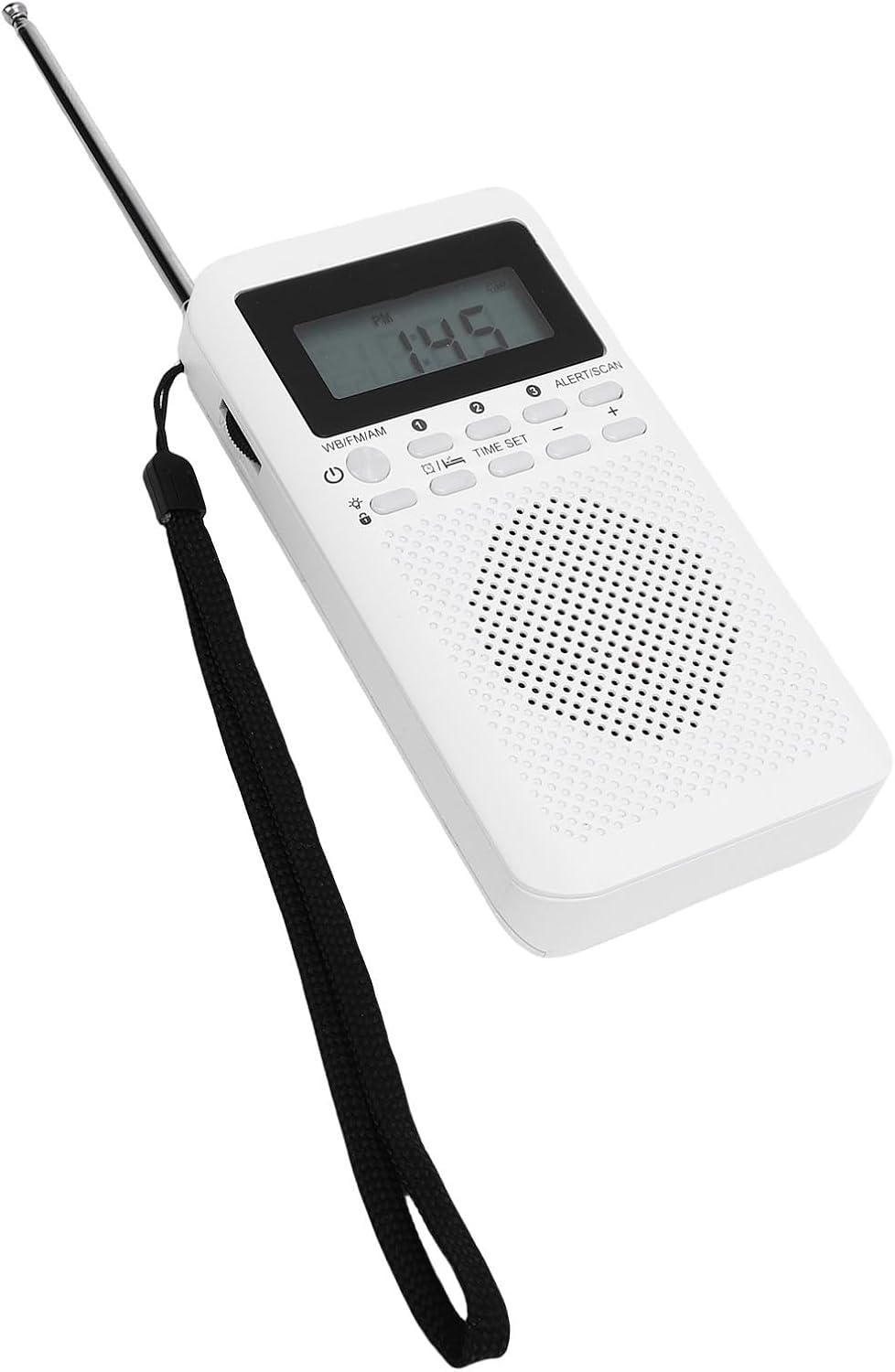
Figure 4.3: Back View of the Radio. This image presents the rear side of the ASHATA portable radio. It clearly shows the battery compartment cover at the bottom and a product label near the top, detailing model information, frequency ranges, sensitivity, output, battery type, and manufacturing origin.

Figure 4.4: Side View with Extended Antenna. This image captures a side view of the ASHATA portable radio, with its telescopic antenna fully extended. The 3.5mm headphone jack is visible on the side, indicating connectivity options for private listening.
Key Features:
- Multi-band Reception: Supports FM (87-108MHz), AM (520-1710KHz), and WB (162.400-162.550MHz) frequencies.
- Clear Sound: Equipped with built-in magnetic stereo speakers for bright and clear audio.
- Headphone Jack: Includes a 3.5mm audio interface for private listening.
- Telescopic Antenna: A 16.5-inch, 6-section, 360-degree rotatable telescopic antenna ensures strong signal reception.
- Easy Operation: Features dedicated AM, FM, WB switch and a large channel tuner for simple use.
- Portable Design: Compact and lightweight, ideal for outdoor use and emergency kits.
5. Setup
5.1 Battery Installation
- Locate the battery compartment cover on the back of the radio (refer to Figure 4.3).
- Slide or lift the cover to open the compartment.
- Insert two (2) AA dry batteries, ensuring the correct polarity (+/-) as indicated inside the compartment.
- Close the battery compartment cover securely.
Important: Always use fresh batteries and replace both batteries at the same time. Do not mix old and new batteries or different types of batteries.
5.2 Antenna Extension
For optimal reception, especially for FM and WB bands, fully extend the telescopic antenna. The antenna can be rotated 360 degrees to find the best signal direction.
- Gently pull the telescopic antenna upwards until it is fully extended.
- Rotate the antenna to achieve the clearest reception.
- When not in use, retract the antenna to prevent damage.
6. Operating Instructions
6.1 Power On/Off
- To turn the radio ON, press the power button (usually marked with a circle and a vertical line).
- To turn the radio OFF, press the power button again.
6.2 Selecting a Frequency Band
The radio supports three frequency bands: FM, AM, and WB (Weather Band).
- Locate the WB/FM/AM switch on the radio's control panel.
- Slide the switch to select your desired band:
- FM: For local music and talk radio stations (87-108MHz).
- AM: For long-distance broadcasts and news (520-1710KHz).
- WB: For weather alerts and information (162.400-162.550MHz).
6.3 Tuning to a Station
Use the large channel tuner knob to scan for stations within the selected band.
- Once a band is selected, slowly rotate the tuning knob to search for stations.
- The frequency will be displayed on the screen.
- Adjust the antenna position for better reception if needed.
6.4 Volume Control
Adjust the volume using the dedicated volume control buttons, typically marked with '+' and '-' symbols.
- Press the '+' button to increase the volume.
- Press the '-' button to decrease the volume.
6.5 Using Headphones
For private listening, connect standard 3.5mm headphones to the headphone jack located on the side of the radio.
- Insert the 3.5mm plug of your headphones into the headphone jack.
- The internal speaker will automatically mute when headphones are connected.
- Adjust the volume to a comfortable level to protect your hearing.
6.6 Time Setting and Alert Function
The radio may include functions for setting the time and an alert/scan feature. Refer to the specific buttons labeled "TIME SET" and "ALERT/SCAN" on your device.
- Time Set: Press the "TIME SET" button to enter time adjustment mode. Use the '+' and '-' buttons to set the hour and minute, then press "TIME SET" again to confirm.
- Alert/Scan: This button may initiate an automatic scan for available stations or activate a weather alert function. Consult the on-screen indicators for specific functionality.
7. Maintenance
7.1 Cleaning
- Wipe the radio with a soft, dry cloth.
- Do not use abrasive cleaners, solvents, or strong chemicals, as these may damage the surface.
- Avoid getting moisture into any openings.
7.2 Battery Care
- If the radio will not be used for an extended period, remove the batteries to prevent leakage and corrosion.
- Replace batteries promptly when the low battery indicator appears on the display or when performance degrades.
8. Troubleshooting
| Problem | Possible Cause | Solution |
|---|---|---|
| No power / Radio does not turn on. |
|
|
| Poor reception / Static sound. |
|
|
| No sound from speaker. |
|
|
If the problem persists after trying these solutions, please refer to the Support section.
9. Specifications
| Feature | Detail |
|---|---|
| Model Number | ASHATA2tiwy8zqgg |
| Receiving Frequency |
|
| Sound Interface | 3.5mm Headphone Jack |
| Battery Type | 2 x AA Dry Batteries (500mAh) |
| Antenna Size | 41.9 cm (16.5 inches) |
| Product Dimensions (L x W x H) | 14 x 11 x 3 cm |
| Product Weight | 158 g |
| Manufacturer | ASHATA |
10. Warranty Information
This ASHATA product is covered by a manufacturer's warranty for 90 days from the date of sale. This warranty covers defects in materials and workmanship under normal use. It does not cover damage caused by misuse, accident, unauthorized modification, or improper installation.
Please retain your proof of purchase for warranty claims.
11. Support
If you encounter any issues or have questions regarding your ASHATA Portable Multiband Radio that are not addressed in this manual, please contact ASHATA customer support.
For the most up-to-date support information, please visit the official ASHATA website or refer to the contact details provided with your purchase.