
1. Introduction
Thank you for choosing the Aninerel 2000W 12V Hybrid Solar Inverter. This device is designed to convert DC power into 220V/230V AC power and features a 60A MPPT solar charge controller. It is suitable for various applications including RVs, camping boats, and home emergencies, powering devices such as stoves, rice cookers, lamps, televisions, and fans. This manual provides essential information for safe installation, operation, and maintenance of your inverter.

Figure 1.1: The Aninerel 2000W 12V Hybrid Solar Inverter with its included WiFi module.

Figure 1.2: The 2kW Solar Inverter is suitable for various applications such as solar systems, RV travel, boat/marine use, and off-grid setups.
2. Safety Instructions
Please read all instructions and warnings carefully before installation and operation. Failure to follow these instructions may result in electric shock, fire, or severe injury.
- Ensure all wiring is performed by qualified personnel.
- Do not operate the inverter without a battery connected. A 12V battery must be connected to start the inverter.
- Keep the inverter away from water, moisture, and flammable materials.
- Ensure proper ventilation around the inverter to prevent overheating.
- Do not disassemble or attempt to repair the inverter yourself. Contact qualified service personnel.
- Verify correct polarity when connecting batteries and solar panels.
3. Product Overview
The Aninerel Hybrid Solar Inverter integrates a pure sine wave inverter, an MPPT solar charge controller, and a battery charger into one compact unit. It is designed for reliable power conversion and management.
Key Features:
- Pure Sine Wave Output: Provides clean and stable AC power suitable for sensitive electronics.
- Integrated 60A MPPT Solar Charge Controller: Maximizes power harvest from solar panels.
- Wide PV Input Voltage Range: Supports up to 160V DC maximum open circuit voltage.
- Battery Compatibility: Suitable for 12V Lithium, LiFePO4, AGM/SLA, GEL, and Lead-Acid batteries.
- Removable Dust Cover: Designed for harsh environments.
- WiFi Module Included: For remote monitoring and control.
- Multiple Charging Modes: Solar priority, AC priority, and combined charging.
- Comprehensive Protection: Overcharge, overload, overcurrent, overvoltage, short circuit, overheat, overspeed, and undervoltage protection.

Figure 3.1: Key specifications and features of the 2000W Hybrid Inverter.
Component Identification:

Figure 3.2: Front and rear panel components of the inverter.
- LCD Display: Shows system data and operating status.
- Status Indicator: LED for operational status.
- Charging Indicator: LED for charging status.
- Fault Indicator: LED for error conditions.
- Function Buttons: For navigating menus and settings.
- RS485 Communication Port: For external communication.
- RS232 Communication Port: For external communication.
- Power On/Off Switch: Main power control.
- Battery Input: Terminals for battery connection.
- Grounding: Grounding terminal.
- AC Input: Terminals for AC grid input.
- AC Output: Terminals for AC load output.
- PV Input: Terminals for solar panel input.
4. Setup
Proper installation is crucial for the safe and efficient operation of your inverter. Ensure all connections are secure and follow local electrical codes.
4.1 Mounting the Inverter
- Mount the inverter vertically on a solid surface.
- Ensure adequate clearance around the inverter for proper airflow and cooling.
- Avoid mounting in direct sunlight or areas with high humidity.
4.2 Wiring Connections
All wiring should be done with the inverter turned off and disconnected from all power sources.

Figure 4.1: Overview of solar system connection for the inverter.
- Battery Connection:
- The inverter requires a 12V battery connection to operate. It does not support operation without a battery.
- Connect the positive (+) and negative (-) terminals of your 12V battery to the corresponding battery input terminals on the inverter.
- Ensure correct polarity to prevent damage.
- PV (Solar Panel) Connection:
- Connect your solar panel array to the PV input terminals.
- Ensure the total open circuit voltage of the solar array does not exceed 160V DC.
- The MPPT voltage range is 30V-160V DC.
- AC Input (Utility Grid/Generator) Connection:
- Connect the AC input from your utility grid or generator to the AC input terminals.
- The maximum AC input voltage is 220V/230V AC.
- AC Output (Load) Connection:
- Connect your household appliances or loads to the AC output terminals.
- The inverter provides 2000W of continuous AC output power.
- Grounding: Connect the grounding terminal to a reliable earth ground.

Figure 4.2: Battery connection diagram. This ANJ-2000W-12V-WIFI model supports a 12-volt DC system and is recommended for use with batteries of at least 100 Ampere-hours. A 24-volt system is not supported.
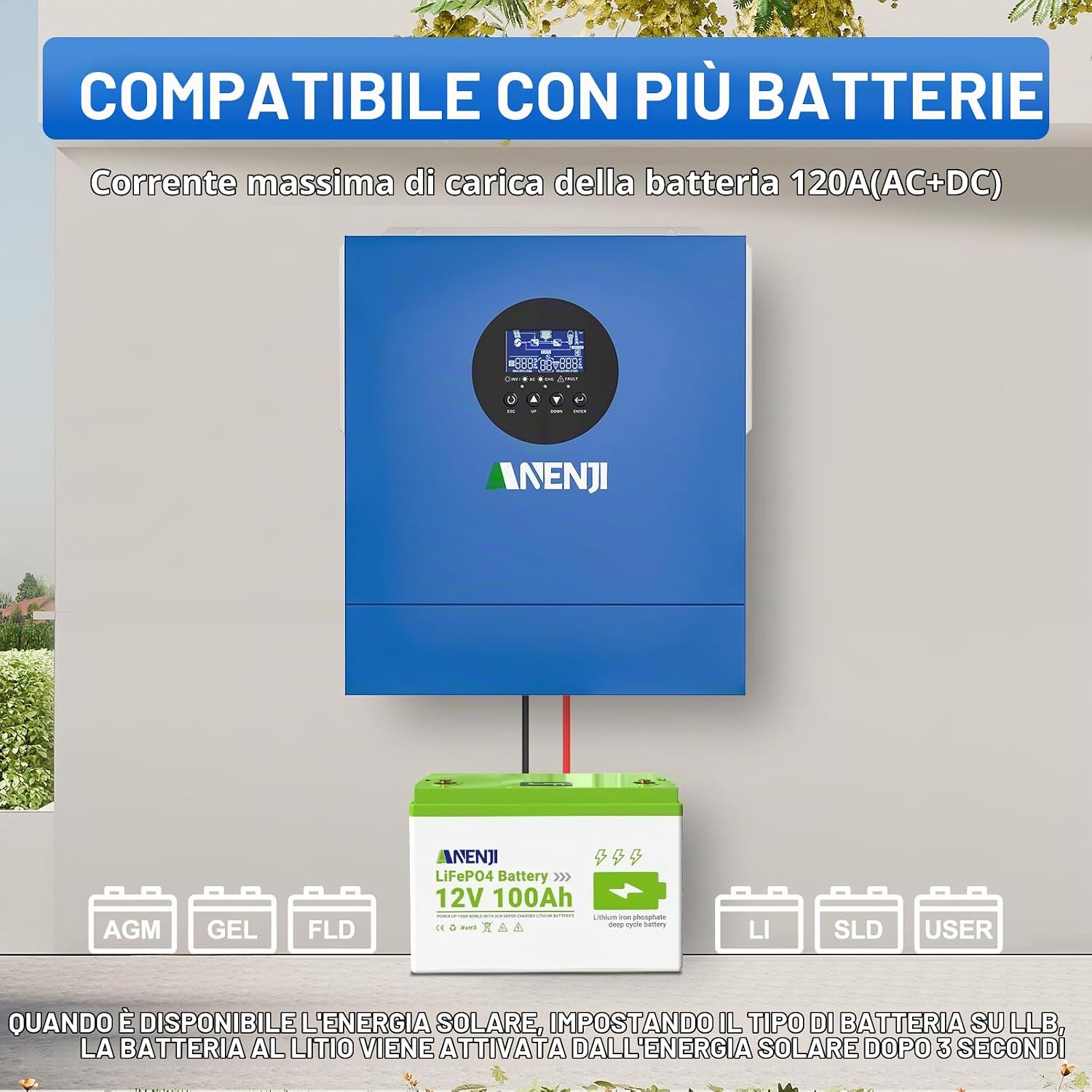
Figure 4.3: The inverter is compatible with various 12V battery types, including LiFePO4, AGM, GEL, and Lead-Acid. When solar power is available, setting the battery type to LI will activate the lithium battery after 3 seconds.
4.3 WiFi Module Setup
The inverter comes with a WiFi module for remote monitoring. Search for the 'Smart ESS' app on Google Play to monitor the inverter's status in real-time. Registration may be required.

Figure 4.4: The included WiFi transmitter allows for remote monitoring of the hybrid inverter via a smartphone app.
5. Operating Modes
The inverter offers various operating modes to optimize power usage and battery charging based on your preferences and available power sources.
5.1 Output Power Priority
The home load power supply mode can be configured via the inverter settings [01].

Figure 5.1: Overview of charging and load priority settings.
- UTL (Utility Priority - Default): The inverter prioritizes power from the utility grid to supply the loads. If the utility power is unavailable, the loads will be powered by solar and battery energy.
- SOL (Solar Priority): Solar energy provides power to the loads as the first priority. If solar energy is not sufficient to power all connected loads, battery energy will supply the loads at the same time. Utility provides power to the loads only when solar energy is not available or battery voltage drops below a warning level.
- SBU (Solar-Battery-Utility Priority): Solar energy provides power to the loads as the first priority. If solar energy is not sufficient, the battery will supply the loads. Utility power is used only when the battery voltage drops to a low-level warning voltage or the setting point in program 12.
![Inverter display showing 'Utility first (Default)' for output power priority setting [01].](https://m.media-amazon.com/images/S/aplus-media-library-service-media/8c11d80d-c6eb-4b69-ad62-c5a8105efa9d.__CR0,0,1464,600_PT0_SX1464_V1___.jpg)
Figure 5.2: Utility First (Default) output priority setting.
![Inverter display showing 'Solar first' for output power priority setting [01].](https://m.media-amazon.com/images/S/aplus-media-library-service-media/97f8adfb-612b-427c-93a5-e1d5a5c6d647.__CR0,0,1464,600_PT0_SX1464_V1___.jpg)
Figure 5.3: Solar First output priority setting.
![Inverter display showing 'SBU priority' for output power priority setting [01].](https://m.media-amazon.com/images/S/aplus-media-library-service-media/2f8e6146-b5c4-41bc-8b12-a1884416c072.__CR0,0,1464,600_PT0_SX1464_V1___.jpg)
Figure 5.4: SBU Priority output setting.
5.2 Charger Power Priority
Three battery charging modes can be configured through inverter settings [16].
- Solar Priority: Solar energy will charge batteries as the first priority. Utility will charge the battery only when solar energy is not available.
- Solar and AC Input (Default): The inverter will charge the battery bank from both solar and AC power at the same time.
- Solar Only: Solar energy will be the only charger source, regardless of whether utility power is available or not.
![Inverter display showing 'Solar first' for charger power priority setting [16].](https://m.media-amazon.com/images/S/aplus-media-library-service-media/71de8358-a4b3-480a-8d3f-25a5f5d7ee08.__CR0,0,1464,600_PT0_SX1464_V1___.jpg)
Figure 5.5: Solar Priority charger setting.
![Inverter display showing 'Only Solar' for charger power priority setting [16].](https://m.media-amazon.com/images/S/aplus-media-library-service-media/c104bd71-6250-4722-94d3-446350784d3b.__CR0,0,1464,600_PT0_SX1464_V1___.jpg)
Figure 5.6: Solar Only charger setting.
6. Maintenance
Regular maintenance ensures the longevity and optimal performance of your inverter.
- Cleaning: Periodically clean the exterior of the inverter with a dry cloth. Ensure ventilation openings are free from dust and debris.
- Connections Check: Regularly inspect all electrical connections (battery, PV, AC input/output) for tightness and signs of corrosion.
- Battery Inspection: Check battery terminals for corrosion and ensure battery fluid levels (if applicable) are correct.
- Environment: Ensure the operating environment remains within specified temperature and humidity ranges.
7. Troubleshooting
The inverter's LCD display will show error codes if a problem occurs. Refer to the table below for common error codes and their solutions. For issues not listed or if problems persist, contact customer support.
Common Error Codes:
| Error Code | Description | Possible Solution |
|---|---|---|
| 01 | Fan Fault | Check for obstructions in the fan, ensure proper ventilation. |
| 02 | Over-temperature | Reduce load, ensure adequate ventilation, check ambient temperature. |
| 03 | Battery Over-voltage | Check battery voltage, ensure correct battery type setting. |
| 04 | Battery Under-voltage | Charge battery, check battery connections, inspect battery health. |
| 05 | Output Short Circuit | Disconnect all loads, check wiring for short circuits. |
| 06 | Overload | Reduce connected load to within inverter's capacity. |

Figure 7.1: The inverter includes multiple protection features to ensure safe operation and extend battery life.
8. Specifications
Detailed technical specifications for the Aninerel 2000W 12V Hybrid Solar Inverter.
| Parameter | Value |
|---|---|
| Brand | Aninerel |
| Model Name | ANJ-2000W-12V-WIFI |
| Rated Power | 2000 Watts |
| Peak Power | 2000 Watts |
| Output Waveform | Pure Sine Wave |
| Input Voltage (DC) | 12 Volts |
| Output Voltage (AC) | 230 Volts (AC) |
| Max. PV Array Power | 900 W |
| Max. PV Array Open Circuit Voltage | 160 V DC |
| PV Array MPPT Voltage Range | 30 V - 160 V DC |
| Max. Solar Input Current | 30 A |
| Max. Solar Charge Current | 60 A |
| Max. AC Charge Current | 80 A |
| Max. Charge Current (PV+AC) | 120 A |
| Battery Capacity (Recommended) | 100 Ampere/hours (12V) |
| Display Type | LCD |
| Dimensions (L x W x H) | 37L x 17W x 47H cm |
| Certifications | CE |
9. Warranty Information
The Aninerel 2000W 12V Hybrid Solar Inverter comes with a 1 Year Warranty Against Manufacturer Defects. Please retain your proof of purchase for warranty claims. This warranty covers defects in materials and workmanship under normal use. It does not cover damage caused by improper installation, misuse, accidents, unauthorized modifications, or natural disasters.
10. Support
For technical assistance, troubleshooting, or warranty inquiries, please contact Aninerel customer support.

Figure 10.1: Aninerel customer support contact details.
- Email: amazon-sale@anenji.com
- Phone: +86 188 0375 9233
- Support Hours (PDT): 9 AM - 6 PM


