
1. Product Overview
The LEXXSON Retrofit Kit Decoder (Model RM-BZBK03) is designed to integrate Wireless CarPlay and Android Auto functionalities into compatible Mercedes Benz vehicles. This system enhances your in-car experience by providing seamless smartphone connectivity, navigation, and media playback through your vehicle's original display and controls.
Compatibility: This kit is specifically designed for Mercedes Benz A/B/C/E/CLA/GLK/ML/SLD models manufactured between 2012 and 2015, equipped with the NTG 4.5 system and a Harman Becker interface.
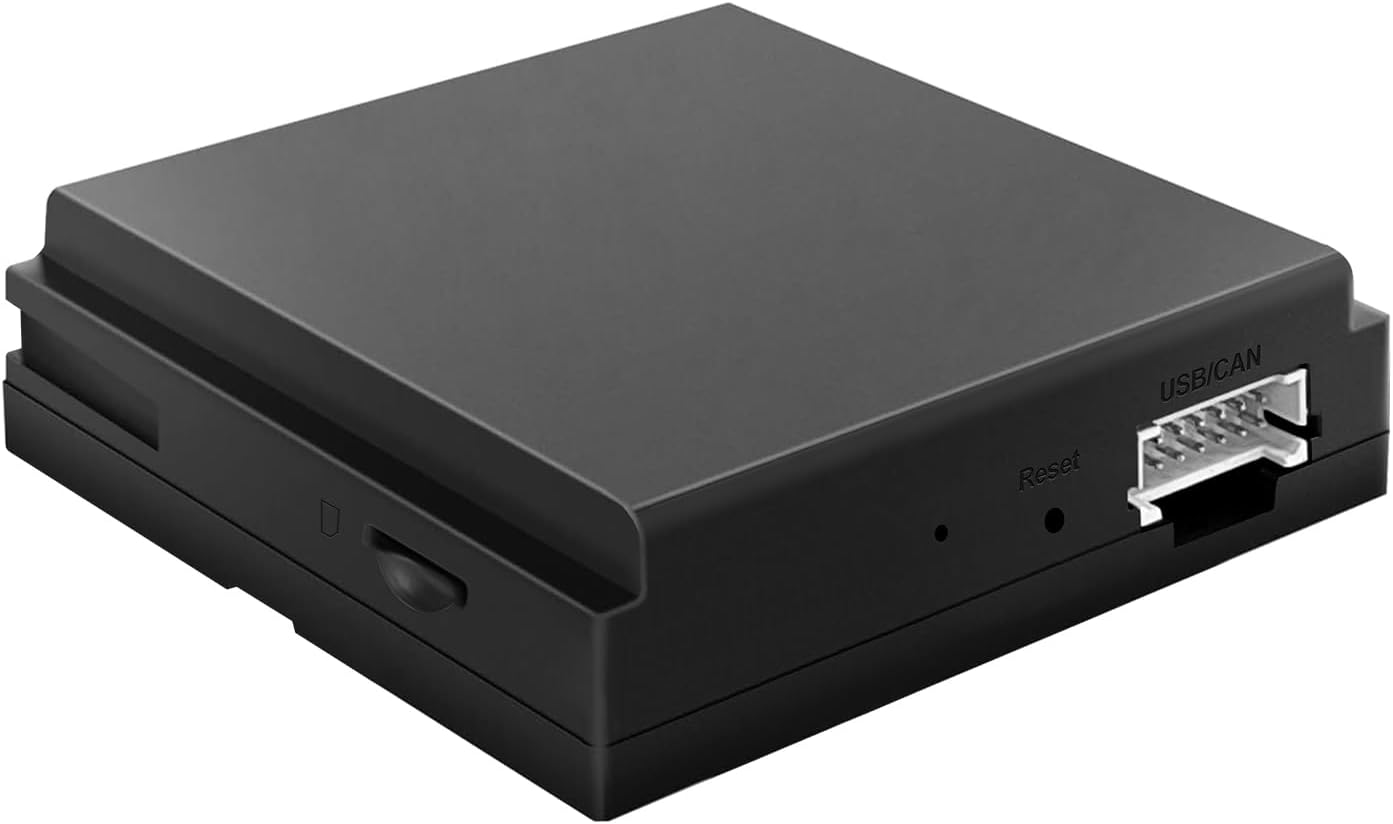
Image 1.1: LEXXSON Retrofit Kit Decoder main unit. This image shows the compact black box of the decoder unit with its various ports and connectors.

Image 1.2: Compatible Mercedes Benz models. This image lists various Mercedes Benz A, B, C, E, CLA, GLK, ML, SLD models from 2011-2015 that are compatible with the NTG 4.5 system, emphasizing the requirement for a Harman Becker Navi-Dock.
2. Setup and Installation
This retrofit kit features a plug-and-play design, integrating with your vehicle's existing system without requiring modifications to the original wiring. Proper installation ensures optimal performance.
2.1 Pre-Installation Check
Before installation, it is crucial to confirm that your Mercedes Benz vehicle has the NTG 4.5 system with a Harman Becker slot. The Harman Becker slot is typically located in the glove box on the passenger side. The NTG 4.5 system also features a specific LVDS port.
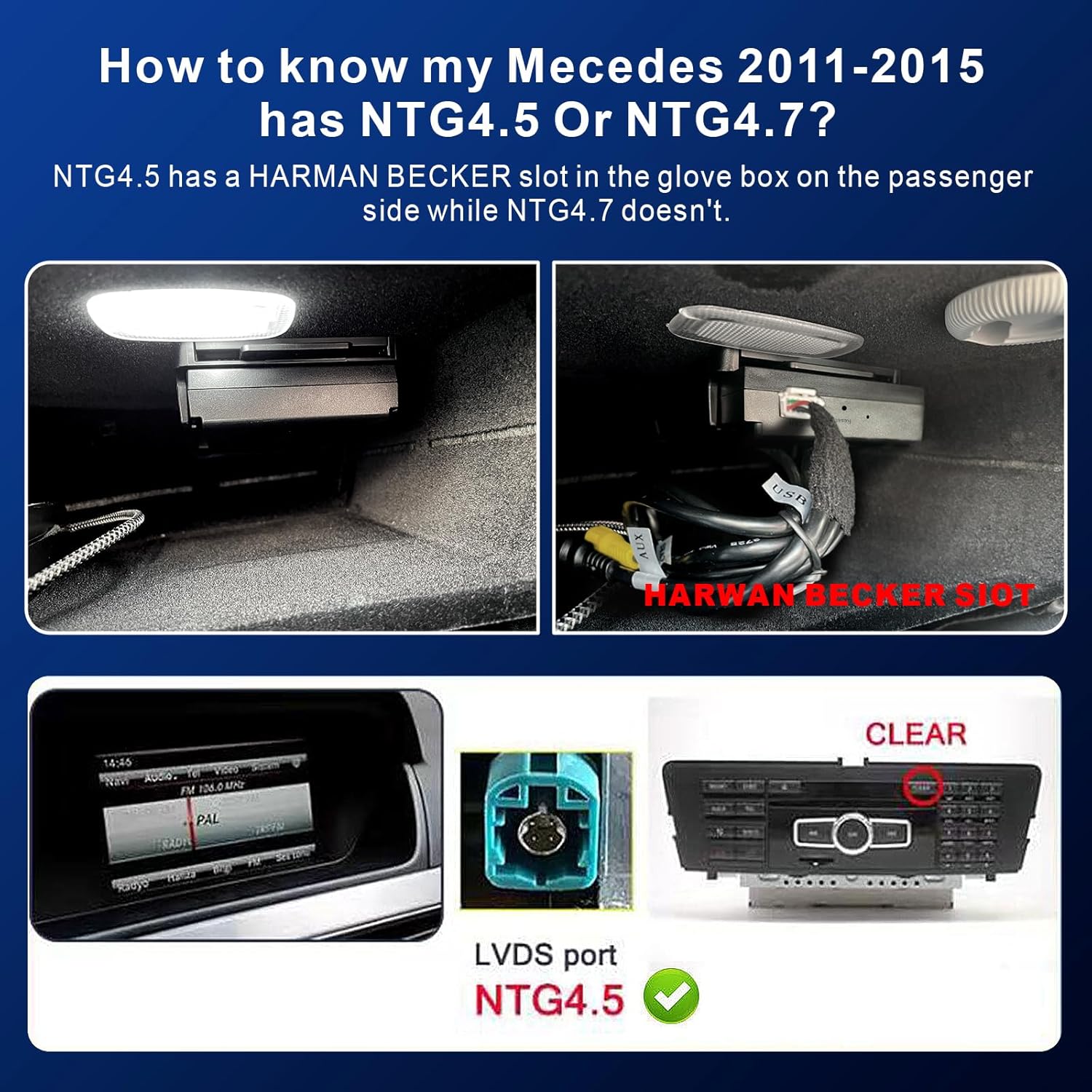
Image 2.1: Identifying NTG 4.5 system. This image provides visual guidance on how to distinguish between NTG 4.5 and NTG 4.7 systems by showing the Harman Becker slot in the glove box and the specific LVDS port for NTG 4.5.
2.2 Installation Steps
- Connect the Decoder: Align and plug the retrofit kit decoder directly into the Harman Becker socket in your vehicle.
- Pair Bluetooth: After installation, turn on your vehicle's ignition. Access the Bluetooth settings on your original car stereo and pair with the device's Bluetooth, typically labeled "MB Bluetooth" or similar.
- Connect Smartphone: Once the Bluetooth is paired, connect your smartphone to the system for CarPlay or Android Auto functionality.
The kit includes a USB expansion cable for connecting mobile phones and for future software upgrades.

Image 2.2: Installation steps and USB expansion. This image illustrates the three main steps for installation: plugging into the Harman Becker socket, pairing Bluetooth, and connecting a smartphone. It also shows the dimensions of the unit and the USB expansion cable.
3. Operating Instructions
The LEXXSON Retrofit Kit Decoder supports Wireless and Wired CarPlay, Android Auto, and MirrorLink functionalities. After the initial connection, the system will automatically connect to your smartphone.
3.1 CarPlay and Android Auto
Access your smartphone's features directly on your car's display. This includes navigation, music, messages, and calls.
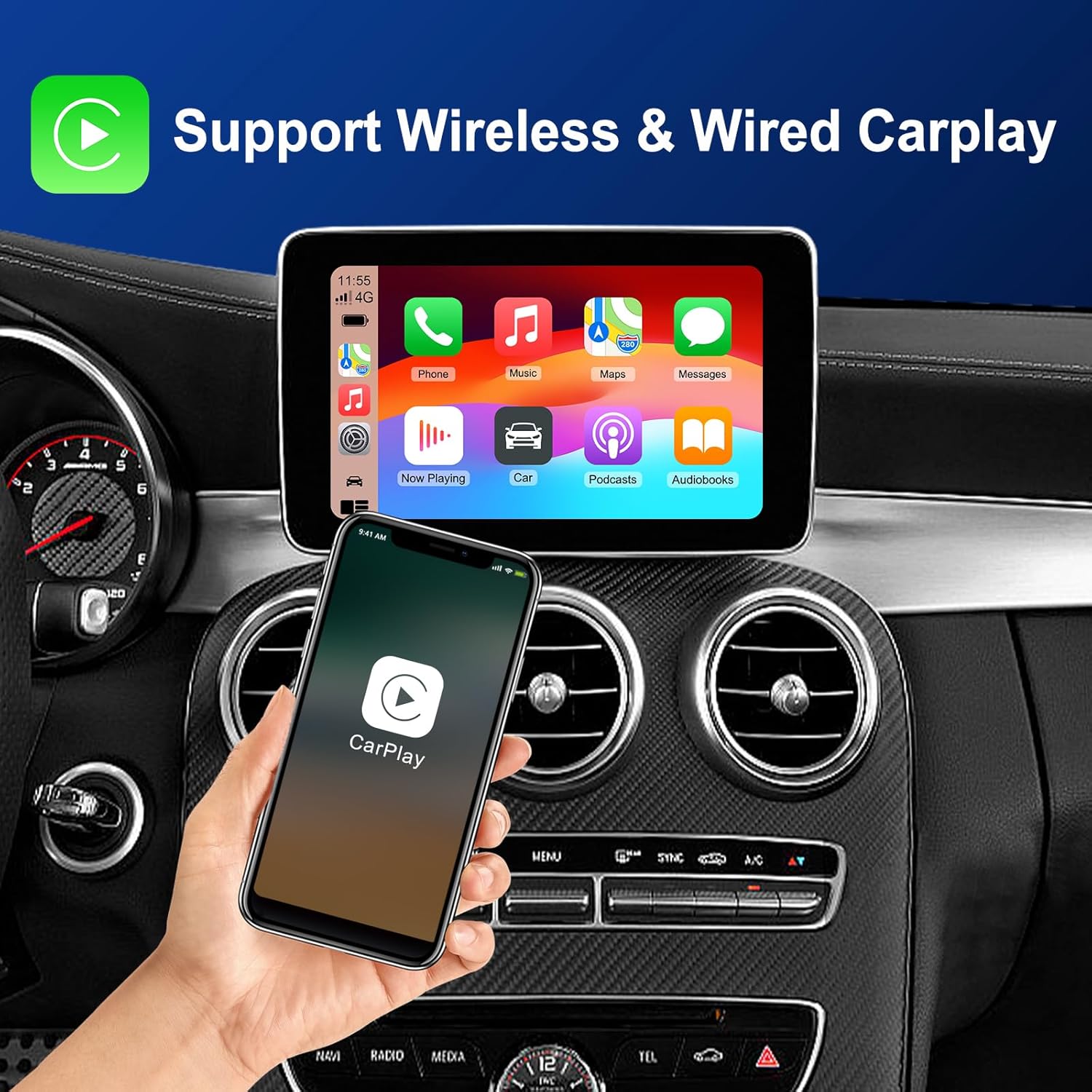
Image 3.1: Wireless and Wired CarPlay. This image displays the CarPlay interface on the car's screen, showing various app icons like Phone, Music, Maps, and Messages, with a smartphone held in hand.

Image 3.2: Wireless and Wired Android Auto. This image shows the Android Auto interface on the car's screen, featuring apps like Google Maps, YouTube Music, and Spotify, with an Android smartphone in hand.
3.2 Control Methods
The system integrates with your vehicle's original controls for a familiar user experience:
- Steering Wheel Control: Use your car's steering wheel buttons to manage calls, audio, and navigation.
- Original Car Touch Screen Control: Interact directly with the display (if your vehicle has a touch-enabled screen).
- OEM Knob Control: Utilize the original equipment manufacturer (OEM) control knob for menu navigation.
- Voice Control: Activate voice commands (e.g., "Hey Siri") for hands-free operation of navigation and other functions.

Image 3.3: Original Car Control. This image illustrates the various control methods available, including steering wheel controls, original car touch screen control, OEM knob control, and Siri voice control.
3.3 Sound Settings for Wireless CarPlay / Android Auto
For wireless CarPlay or Android Auto, the audio is routed through your original car's Bluetooth audio source. Follow these steps:
- Enable Phone Wi-Fi: Ensure your smartphone's Wi-Fi is turned on.
- Pair Device Bluetooth: Use your phone to pair with the device's Bluetooth (e.g., "BK-xxxx") and grant all necessary requests.
- Select Bluetooth Audio Source: On your original car stereo, open the Bluetooth audio settings. Select "Connect via BT audio device" and then pair your phone with the "MB Bluetooth" option.

Image 3.4: Sound Setting for Wireless CarPlay / Android Auto. This image details the two main steps for audio setup: ensuring phone Wi-Fi is on and pairing Bluetooth, then selecting the correct Bluetooth audio source on the car stereo.
3.4 Parking Assistance
The system supports HD-360° camera systems (PAL/NTSC/CVBS), including dynamic guidelines, original radar integration, and parking remote control. Please note that cameras are sold separately.
4. Maintenance
To ensure the longevity and optimal performance of your LEXXSON Retrofit Kit Decoder, consider the following maintenance guidelines:
- Software Updates: The system supports software updates to ensure it remains current with the latest features and improvements. Regularly check for and apply available updates.
- Temperature Management: The unit features an efficient heat dissipation system, allowing stable operation up to 70°C. Avoid exposing the device to temperatures exceeding this limit.
- Cleaning: Keep the unit and its connections clean and free from dust or debris. Use a soft, dry cloth for cleaning.
- Connection Integrity: Periodically check all cable connections to ensure they are secure and free from damage.
5. Troubleshooting
If you encounter issues with your LEXXSON Retrofit Kit Decoder, refer to the following common troubleshooting tips:
- No Power/No Display:
- Ensure all connections are securely plugged into the Harman Becker socket.
- Verify that your vehicle's ignition is on.
- No Sound/Poor Audio Quality:
- Confirm that your smartphone's Wi-Fi is active.
- Re-pair the device's Bluetooth ("BK-xxxx") with your phone and ensure all permission requests are accepted.
- On your car stereo, ensure the correct Bluetooth audio source ("MB Bluetooth") is selected.
- CarPlay/Android Auto Not Connecting:
- Check your phone's settings to ensure CarPlay or Android Auto is enabled and allowed to connect to the vehicle.
- Try restarting both your smartphone and the vehicle's infotainment system.
- For wired connections, ensure the USB cable is functional and properly connected.
- System Lag or Unresponsiveness:
- Ensure your phone's operating system is up to date.
- Close unnecessary applications on your smartphone.
- Consider performing a software update on the retrofit kit if available.
- Incompatibility Message:
- Double-check that your Mercedes Benz model and year (2012-2015) are compatible and that your vehicle has the NTG 4.5 system with a Harman Becker port.
6. Specifications
| Feature | Description |
|---|---|
| Brand | LEXXSON |
| Model Number | RM-BZBK03 |
| Compatibility | Mercedes Benz A/B/C/E/CLA/GLK/ML/SLD (2012-2015) with NTG 4.5 System (Harman Becker Interface) |
| Connectivity | Bluetooth 5.0, Wi-Fi (2.4G + 5.8G Dual Band) |
| Supported Functions | Wireless/Wired Apple CarPlay, Wireless/Wired Android Auto, MirrorLink, Navigation, Voice Control (Siri), Parking Assistance (HD-360° camera support) |
| Control Methods | Original vehicle buttons, Steering Wheel Control, OEM Knob Control, Voice Control |
| Operating Temperature | Stable operation up to 70°C |
| Weight | 900 Grams |
| Dimensions (Approx.) | 3.15 inches (Length) x 3 inches (Width) x 0.9 inches (Height) |
7. Warranty and Support
LEXXSON is committed to providing quality products and excellent customer service.
- Manufacturer Warranty: This product comes with a 1-year manufacturer's warranty.
- After-Sales Service: For any inquiries or support needs, please contact our after-sales service team via email at lexxson@126.com.
- Technical Support: 24/7 technical support is available. We aim to provide a response within 18 hours.

Image 7.1: Quality Assurance. This image highlights LEXXSON's commitment to quality, including a 1-year warranty, after-sales service contact, 24/7 tech support, and an 18-hour response time.