
DFROBOT UNIHIKER K10
DFROBOT UNIHIKER K10 AI Coding Board User Manual
Model: UNIHIKER K10
Introduction
The DFROBOT UNIHIKER K10 is an all-in-one AI learning platform designed for STEM education and beginners. It integrates vision AI, offline voice recognition, and TinyML machine learning capabilities into a compact device. This manual provides detailed instructions for setting up, operating, and maintaining your UNIHIKER K10, enabling you to explore AI, IoT, and coding projects.
What's in the Box
Verify that all components are present upon unboxing:
- UNIHIKER K10 Board x1
- Type-C USB cable x1

Image: The UNIHIKER K10 board shown alongside its included Type-C USB cable.
Product Overview
The UNIHIKER K10 features a compact design with various integrated components and interfaces for diverse applications.
Front View

Image: Front view of the UNIHIKER K10, displaying the 2.8-inch color screen and the edge connector at the bottom.
- 2.8-inch Color Screen: For data visualization, displaying AI model outputs, and user interface.
- Edge Connector: Provides access to various I/O pins for expansion and connecting external modules.
Rear View and Components
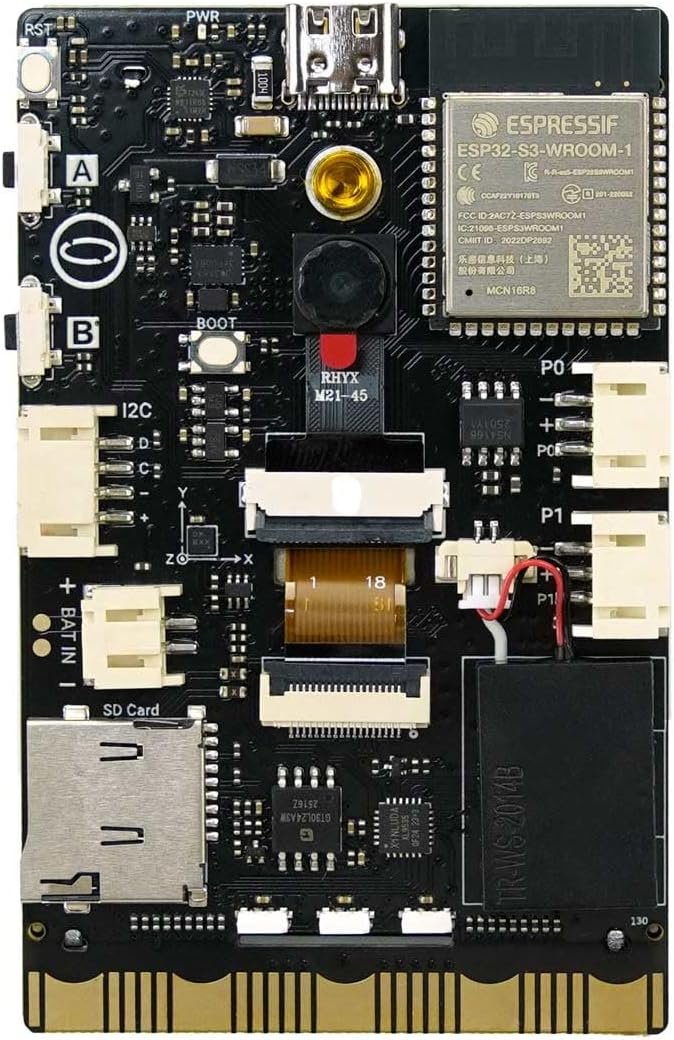
Image: Rear view of the UNIHIKER K10, highlighting the main components and interfaces.
- 2MP Camera: Used for computer vision tasks, image capture, and AI model training.
- ESP32-S3-WROOM-1 Module: The core processor providing Wi-Fi and Bluetooth connectivity.
- USB Type-C Port: For power supply and data communication.
- MicroSD Card Slot: For expandable storage.
- I/O Ports (P0, P1): General purpose input/output pins for connecting sensors and actuators.
- I2C Interface: For connecting I2C compatible devices.
- Battery Interface (BAT IN): For connecting an external battery.
- Buttons (A, B): User-programmable buttons.
- Boot Button: For entering bootloader mode.
- Speaker: For audio output.
- Microphone: For audio input and voice recognition.
- Light Sensor: Detects ambient light levels.
- Temperature & Humidity Sensor: Measures environmental conditions.
- Accelerometer: Detects motion and orientation.
- RGB Light: Programmable multi-color LED.

Image: Detailed diagram illustrating the location and names of various components and interfaces on the UNIHIKER K10 board.
Setup Guide
- Power Connection: Connect the UNIHIKER K10 to a power source using the provided Type-C USB cable. Plug the Type-C end into the board and the USB-A end into a computer or a 5V USB power adapter.
- Initial Boot: The device will power on automatically. The 2.8-inch screen will display the boot sequence.
- Software Installation (Optional): For advanced programming and development, install the Mind+ graphical programming software or set up your MicroPython development environment on your computer. Refer to the official DFRobot documentation for detailed instructions on software setup.
- Wi-Fi Configuration: If your project requires internet connectivity, configure Wi-Fi settings through the device's interface or via connected software.
Operating Instructions
Basic Navigation
The UNIHIKER K10 typically operates through its integrated screen and buttons, or via a connected computer for programming. The screen displays information and allows interaction with pre-loaded applications or custom programs.
AI Features
The UNIHIKER K10 comes with pre-loaded AI models and supports custom model training.
- Vision AI: The device includes 4 pre-installed vision AI models:
- Face Detection: Identifies human faces in the camera's view.
- Pet Recognition (Cat/Dog): Distinguishes between cats and dogs.
- QR Code Recognition: Scans and interprets QR codes.
- Motion Detection: Detects movement within the camera's field of view.

Face Detection

Pet Recognition

Motion Sensing
Images: Examples of pre-loaded vision AI models in action on the UNIHIKER K10.
- Offline Voice Recognition: The device supports speech recognition without requiring an internet connection, enabling voice-controlled projects.

Image: Illustration of various voice commands supported by the UNIHIKER K10's offline voice recognition feature.
- TinyML for Custom Models: Utilize TinyML to train your own custom vision or sensor-based AI models. This allows for personalized AI applications beyond the pre-loaded features.

Custom Plant Classification

Custom Animal Classification
Images: Examples of custom AI models trained with TinyML, such as plant and animal classification.
Programming and Development
- Graphical Programming (Mind+): For beginners, the Mind+ drag-and-drop graphical programming environment simplifies coding.
- MicroPython: Advanced users can program the UNIHIKER K10 using MicroPython, offering flexibility and control.
Connectivity and IoT
The UNIHIKER K10 supports dual Wi-Fi and Bluetooth for various IoT applications, remote control, and real-time data monitoring.
- Wi-Fi: Connect to local networks for internet access and cloud-based IoT services.
- Bluetooth: Establish short-range wireless connections with other Bluetooth-enabled devices.
Data Visualization
The built-in 2.8-inch color screen allows for instant visualization of sensor data, AI model outputs, and other project-specific information.

Image: Example of temperature and humidity data displayed graphically on the UNIHIKER K10's integrated screen.
Official Product Video
Video: An official product video from DFRobot demonstrating the UNIHIKER K10 AI Coding Board, showcasing its pre-loaded vision models for face detection, cat/dog detection, QR code recognition, and motion detection.
Maintenance
- Cleaning: Use a soft, dry cloth to clean the device. Avoid using liquids or abrasive cleaners.
- Storage: Store the UNIHIKER K10 in a cool, dry place away from direct sunlight and extreme temperatures.
- Handling: Handle the board with care to avoid damaging components or connectors. Avoid static discharge.
- Software Updates: Regularly check the official DFRobot website for firmware and software updates to ensure optimal performance and access to new features.
Troubleshooting
- Device does not power on:
- - Ensure the Type-C USB cable is securely connected to both the UNIHIKER K10 and a reliable 5V power source.
- - Try a different USB cable or power adapter.
- Screen is blank or unresponsive:
- - Restart the device by disconnecting and reconnecting the power.
- - If connected to a computer, ensure the correct drivers are installed and the programming environment is properly configured.
- Wi-Fi or Bluetooth connectivity issues:
- - Verify that the Wi-Fi network is active and within range.
- - Check Wi-Fi credentials if manually entered.
- - Ensure Bluetooth is enabled on the connecting device and the UNIHIKER K10 is in pairing mode (if applicable).
- AI models not detecting objects:
- - Ensure adequate lighting conditions for the camera.
- - Position objects clearly in front of the camera.
- - Verify that the correct AI model is selected or loaded.
Specifications
| Feature | Detail |
|---|---|
| Brand | DFROBOT |
| Model Name | UNIHIKER K10 |
| Operating System | MicroPython |
| Processor Brand | Espressif |
| Number of Processors | 1 |
| Memory Storage Capacity | 16 MB |
| Connectivity Technology | Bluetooth, USB, Wi-Fi |
| Item Weight | 3.2 ounces |
| Package Dimensions | 5.71 x 3.39 x 1.93 inches |
| Included Components | Type-C USB cable x1, UNIHIKER K10 x1 |
Warranty and Support
For warranty information, technical support, and additional resources, please refer to the official DFRobot website or contact their customer service directly. Keep your purchase receipt as proof of purchase.
DFRobot Official Website: www.dfrobot.com
Related documentsUNIHIKER K10


Ask a question about this manual
Ask about setup, troubleshooting, compatibility, parts, safety, or missing instructions. Manuals+ will review the question and use this page’s manual context to help answer it.