
1. Introduction
This manual provides detailed instructions for the assembly, operation, and maintenance of your SICOTAS SC135 Buffet Cabinet with 4 Doors. Please read all instructions carefully before assembly and use to ensure safe and proper functionality.
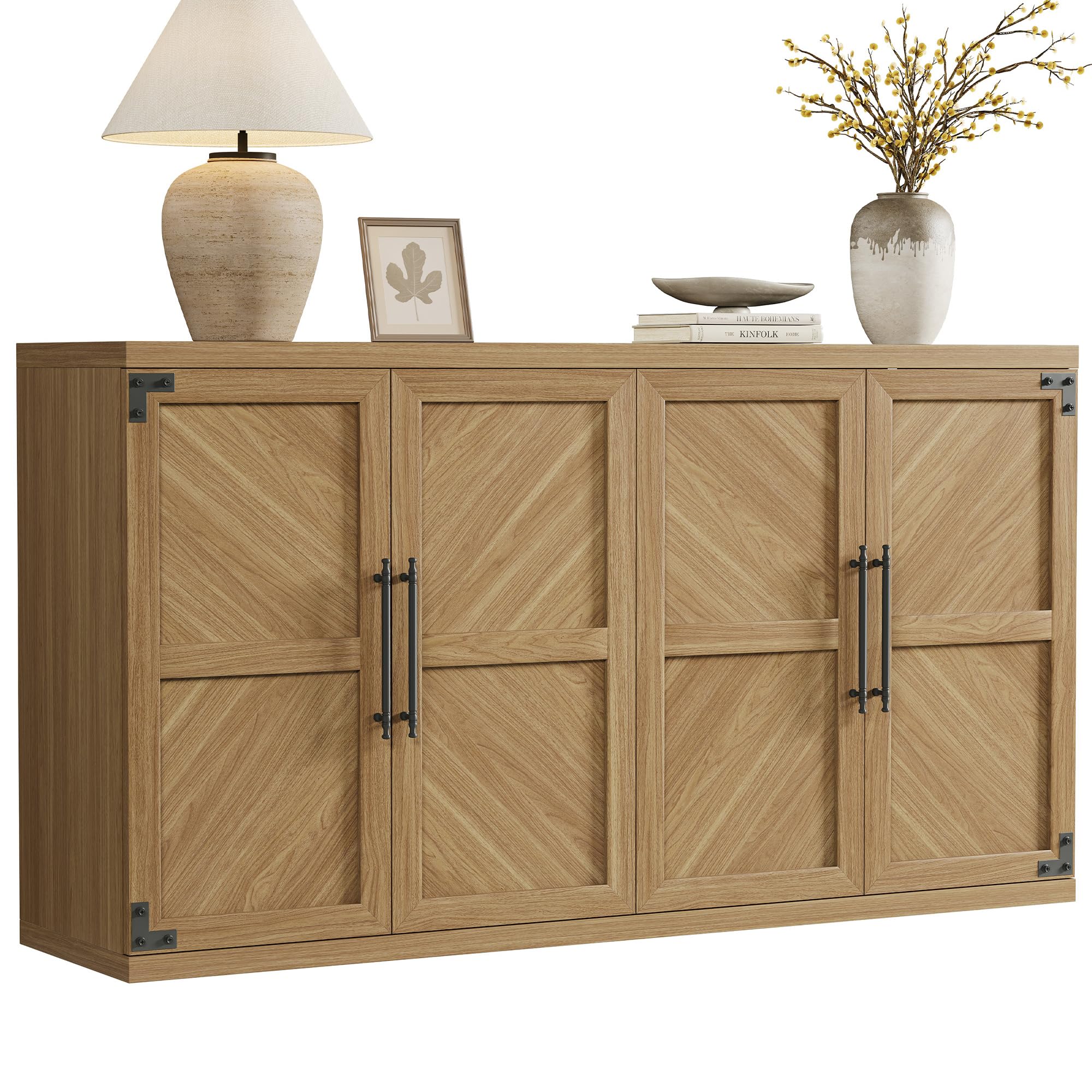
Image: The SICOTAS Buffet Cabinet in oak brown, showcasing its modern design with four doors and black handles, suitable for various home settings.
2. Safety Information
- Always follow the assembly instructions carefully.
- Keep hands and fingers away from door and drawer areas when in use.
- Securely mount the cabinet to the wall to prevent tipping. An anti-tipping kit is included for this purpose.
- Do not overload the cabinet, as this could cause it to tip or the shelves to collapse.
- Ensure all hardware is tightened securely before use. Periodically check and re-tighten as needed.
3. Package Contents
Your SICOTAS SC135 Buffet Cabinet package includes all necessary components and an installation kit for assembly. Please verify all parts are present before beginning assembly.
- Cabinet panels (top, bottom, sides, back, shelves)
- 4 Doors with handles
- Adjustable shelves (2)
- Hardware pack (screws, dowels, hinges, magnetic catches, anti-tipping kit)
- Assembly Instructions Manual
4. Setup and Assembly
The SICOTAS SC135 Buffet Cabinet is designed for straightforward assembly. It is recommended to have two people for easier and quicker setup. A screwdriver is required (not included).
4.1 Assembly Steps Overview
- Unpack all components and lay them out on a clean, soft surface to prevent scratches.
- Identify all parts using the provided parts list in the instruction manual.
- Assemble the main frame of the cabinet (top, bottom, and side panels).
- Install the back panels.
- Attach the door hinges to the doors and the cabinet frame.
- Mount the doors onto the cabinet.
- Insert the adjustable shelves into the desired positions.
- Install the door handles.
- Secure the anti-tipping kit to the cabinet and wall.
4.2 Assembly Visual Guide

Image: The assembled SICOTAS Buffet Cabinet in an oak brown finish, showcasing its modern design with four doors and black handles.
Video: Official product video demonstrating the features and assembly of the SICOTAS Willow Buffet Cabinet with Storage. This video highlights the cabinet's design and functionality.
5. Key Features
- Modern Fluted Design: Contemporary aesthetic with clean lines.
- Four Doors: Provides ample storage and a symmetrical appearance.
- Adjustable Shelves: Two shelves per compartment can be adjusted to multiple heights or removed for larger items.
- Slow-Closing Hinges: Ensures quiet and gentle closing of doors, preventing slamming.
- Sturdy Construction: Made from engineered wood with reinforced frame for durability.
- Anti-Tipping Kit: Included for enhanced safety and stability.

Image: An interior view of the cabinet showing the adjustable shelves. The shelves can be moved to different heights to accommodate various items.
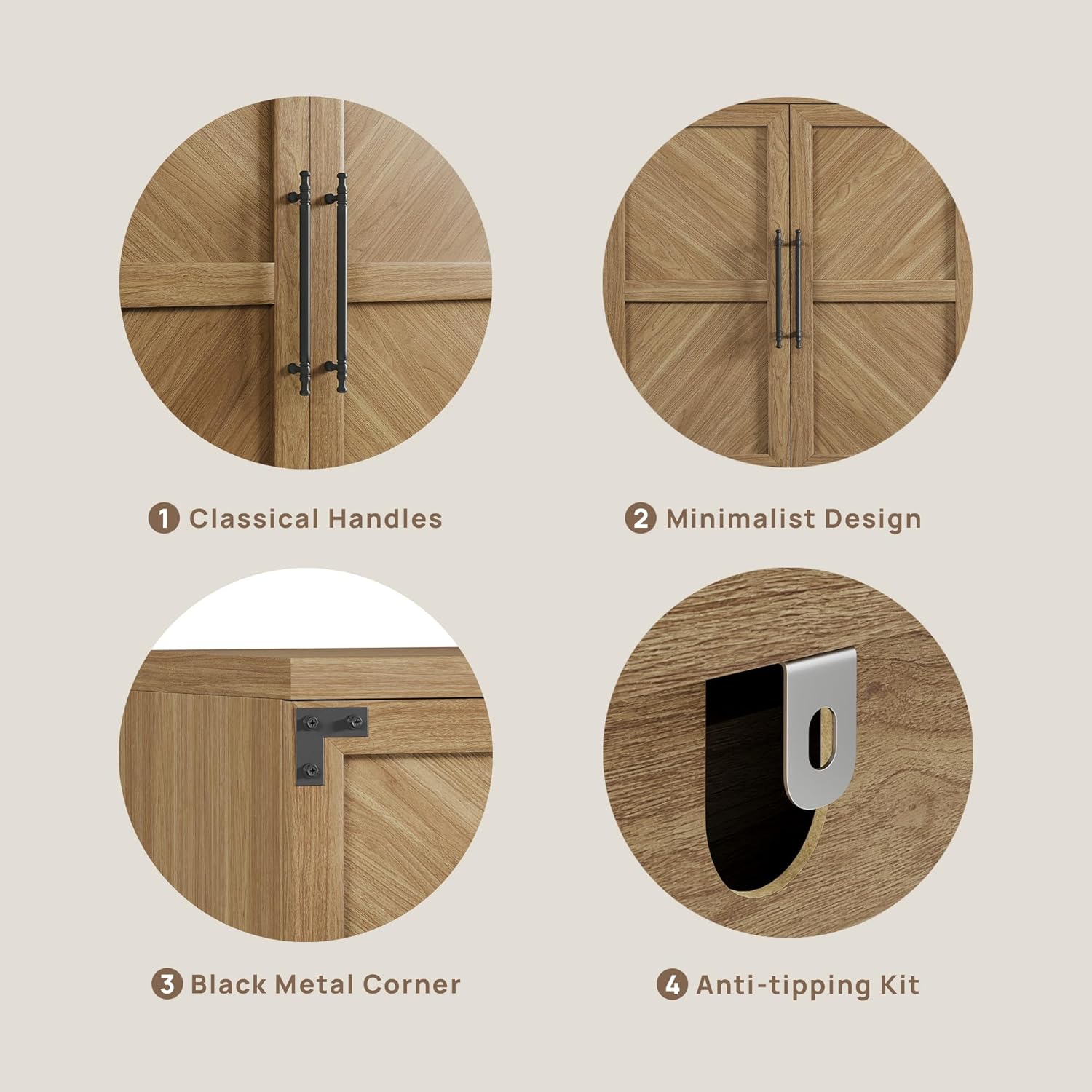
Image: Detailed view of the cabinet's features, including classical handles, minimalist door design, black metal corner accents, and the anti-tipping kit attachment point.
6. Usage and Operation
The SICOTAS SC135 Buffet Cabinet offers versatile storage solutions for various rooms in your home.
6.1 Storage
Utilize the adjustable shelves to organize items such as:
- Dining Room: Dinnerware, linens, serving pieces.
- Living Room: Media accessories, books, decorative items.
- Kitchen: Pantry items, small appliances, kitchenware.
- Office: Files, notebooks, office supplies.
6.2 Versatility
This cabinet can function as a:
- Buffet or Sideboard in dining areas.
- TV Stand or media console in living rooms.
- Storage unit in kitchens, hallways, or offices.

Image: The buffet cabinet configured as a TV stand in a living room, demonstrating its suitability for media storage.
7. Maintenance
- Cleaning: Wipe surfaces with a soft, damp cloth. Avoid harsh chemicals or abrasive cleaners.
- Spills: Clean spills immediately to prevent staining or damage to the engineered wood.
- Hardware: Periodically check all screws and fasteners to ensure they remain tight. Re-tighten as necessary.
- Sunlight: Avoid prolonged exposure to direct sunlight to prevent fading or discoloration.
- Moisture: Keep the cabinet away from excessive moisture or humidity.
8. Troubleshooting
8.1 Wobbly Cabinet
Ensure all cam locks and screws are fully tightened. Verify the cabinet is on a level surface. If necessary, use shims under the legs to stabilize. Confirm the anti-tipping kit is properly installed and secured to the wall.
8.2 Doors Not Aligning
Adjust the hinges on the doors. Most hinges allow for minor adjustments in three directions (up/down, left/right, in/out) using a screwdriver. Refer to the hinge adjustment section in the detailed assembly manual if available.
8.3 Missing Parts
If any parts are missing or damaged upon arrival, please contact SICOTAS customer support immediately for assistance.
9. Specifications
| Feature | Detail |
|---|---|
| Brand | SICOTAS |
| Model Number | SC135 |
| Color | Oak Brown |
| Material | Engineered Wood |
| Product Dimensions (D x W x H) | 15.4"D x 61.3"W x 33.46"H |
| Item Weight | 113 Pounds |
| Number of Doors | 4 |
| Number of Shelves | 2 (Adjustable) |
| Assembly Required | Yes |
| Mounting Type | Floor Mount |
| Style | Modern |
10. Warranty and Support
For warranty information, replacement parts, or technical support, please contact SICOTAS customer service through the retailer where the product was purchased or visit the official SICOTAS website. Please have your model number (SC135) and purchase date available when contacting support.
You can visit the SICOTAS store for more information: SICOTAS Store