1. Introduction
Thank you for purchasing the Stack Stone DS07 Bluetooth Turntable. This manual provides essential information for the safe and efficient operation of your device. Please read it thoroughly before use and retain it for future reference.
The DS07 combines classic vinyl playback with modern connectivity, featuring integrated Jamo stereo speakers, Bluetooth 5.2, and RCA output for versatile audio experiences.
2. Safety Instructions
- Power Source: Use only the specified power adapter. Ensure the voltage matches your local power supply.
- Water and Moisture: Do not expose the unit to rain, moisture, or liquids. Avoid placing objects filled with liquids, such as vases, on the unit.
- Heat: Keep the unit away from heat sources such as radiators, heat registers, stoves, or other apparatus (including amplifiers) that produce heat.
- Ventilation: Ensure proper ventilation. Do not block any ventilation openings.
- Cleaning: Unplug the unit from the wall outlet before cleaning. Use a soft, dry cloth. Do not use liquid cleaners or aerosol cleaners.
- Servicing: Do not attempt to service this product yourself. Refer all servicing to qualified service personnel.
- Placement: Place the unit on a stable, level surface to prevent damage from falling.
3. Package Contents
Verify that all items are present in the package:
- Stack Stone DS07 Turntable Unit
- Power Adapter
- RCA Cable
- User Manual (this document)
4. Product Overview
The Stack Stone DS07 turntable features a modern design with a combination of linen, champagne gold brushed metal, and walnut wood. It incorporates Jamo sound system components for enhanced audio performance.
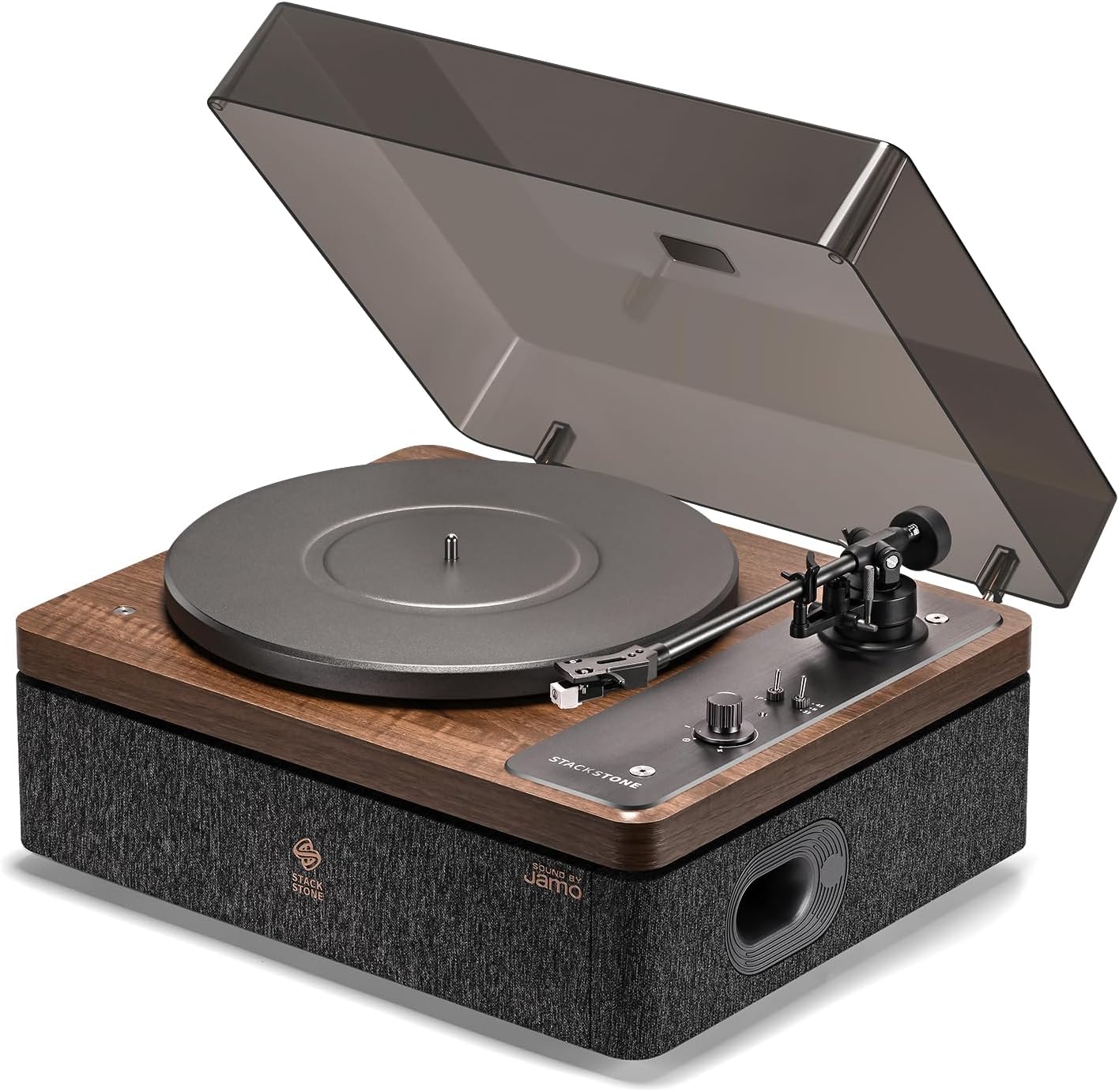
Image 4.1: Stack Stone DS07 Turntable with dust cover open, showcasing the platter, tonearm, and integrated speakers.
Key Components:
- Platter: Supports the vinyl record.
- Tonearm: Holds the cartridge and stylus.
- Audio-Technica AT3600L Cartridge: Provides detailed and warm analog sound.
- Speed Selector: For 33 ⅓ RPM and 45 RPM records.
- Integrated Jamo Speakers: Deliver dynamic sound with deep bass.
- Bluetooth 5.2: For wireless audio streaming.
- RCA Output: For connecting to external active speakers or amplifiers (PHONO/LINE modes).
- Bass Reflex Port: Optimized for enhanced air flow and resonance.
- Patented Double Spring Damping: Isolates vibrations for stable playback.

Image 4.2: Diagram illustrating the patented double spring damping system for vibration isolation.

Image 4.3: Close-up of the Audio-Technica AT3600L cartridge on the tonearm.

Image 4.4: Detailed view of the optimized bass reflex port on the side of the turntable.
5. Setup
5.1 Unpacking and Placement
- Carefully remove all components from the packaging.
- Place the turntable on a stable, level surface, away from direct sunlight, heat sources, and excessive dust or vibrations.
- Ensure adequate space around the unit for ventilation.
5.2 Connecting Power
- Connect the power adapter to the DC input port on the rear of the turntable.
- Plug the power adapter into a suitable wall outlet.
5.3 Platter and Belt Installation
The platter and drive belt may require installation or adjustment. Refer to the visual guides below for assistance.
Image 5.1: Diagram illustrating the correct placement of the platter and drive belt.
5.4 Tonearm Balance and Tracking Force
Proper tonearm balance and tracking force are crucial for optimal sound quality and to prevent damage to your records and stylus. The counterweight and anti-skate mechanism allow for precise adjustment.

Image 5.2: Close-up of the tonearm with its adjustable counterweight.

Image 5.3: Close-up of the anti-skate mechanism on the tonearm base.
- Balance the Tonearm: Gently move the tonearm off its rest. Rotate the counterweight until the tonearm floats horizontally.
- Set Tracking Force: Once balanced, rotate the numbered ring on the counterweight to '0' without moving the counterweight itself. Then, rotate the entire counterweight to the recommended tracking force (refer to cartridge specifications, typically 1.5-2.5 grams for AT3600L).
- Set Anti-Skate: Adjust the anti-skate dial to match the tracking force setting.
6. Operating Instructions
6.1 Powering On/Off
Locate the power switch, typically on the rear or side of the unit. Flip the switch to the 'ON' position to power on the turntable. Flip to 'OFF' to power down.
6.2 Playing a Vinyl Record
- Place a vinyl record on the platter.
- Select the appropriate speed (33 ⅓ RPM or 45 RPM) using the speed selector switch. For 45 RPM records, place the included 45 RPM adapter on the spindle if needed.
- Lift the tonearm using the cueing lever.
- Carefully position the stylus over the desired track on the record.
- Lower the tonearm gently using the cueing lever. The stylus will make contact with the record, and playback will begin.
- To stop playback, lift the tonearm using the cueing lever and return it to the tonearm rest.
6.3 Bluetooth Connection
The DS07 turntable supports Bluetooth 5.2 for wireless audio streaming from your smartphone or other compatible devices.

Image 6.1: Image showing the turntable's control panel with a smartphone displaying a music app, illustrating Bluetooth connectivity.
- Ensure the turntable is powered on.
- Switch the input selector on the turntable to 'BT' (Bluetooth) mode. The Bluetooth indicator light will begin to flash, indicating pairing mode.
- On your smartphone or Bluetooth device, enable Bluetooth and search for available devices.
- Select 'Stack Stone DS07' from the list of devices.
- Once connected, the Bluetooth indicator light will become solid. You can now stream audio wirelessly to the turntable.
6.4 RCA Output Usage
The turntable features RCA output ports on the rear, allowing connection to external active speakers or an amplifier.

Image 6.2: Rear view of the turntable showing RCA output ports and power input.
- Connect the included RCA cable from the 'RCA OUT' ports on the turntable to the corresponding input on your external audio system.
- Select either 'PHONO' or 'LINE' mode using the switch next to the RCA ports:
- PHONO: Use this mode if your external amplifier has a dedicated PHONO input with a built-in pre-amplifier.
- LINE: Use this mode if your external amplifier has a standard LINE input (e.g., AUX, CD) or if you are connecting to active speakers. The turntable's internal pre-amplifier will be active in this mode.
7. Maintenance
7.1 Cleaning the Unit
- Always unplug the turntable before cleaning.
- Use a soft, dry, lint-free cloth to wipe the cabinet and dust cover.
- Avoid using abrasive cleaners, waxes, or solvents as they can damage the finish.
7.2 Stylus Care
- The stylus is delicate. Handle it with extreme care.
- Clean the stylus regularly using a soft brush designed for stylus cleaning, brushing gently from back to front.
- A dirty or worn stylus can damage records and degrade sound quality. Replace the stylus when necessary.
7.3 Storage
- When not in use, ensure the dust cover is closed to protect the platter and tonearm from dust.
- If storing for an extended period, disconnect the power and consider placing the unit in its original packaging.
8. Troubleshooting
| Problem | Possible Cause | Solution |
|---|---|---|
| No power | Power adapter not connected; Power outlet not active | Ensure power adapter is securely connected and plugged into a working outlet. |
| No sound from speakers | Volume too low; Incorrect input mode; External speakers not connected/powered | Increase volume. Ensure correct input mode (Vinyl or Bluetooth). If using RCA, check connections and external speaker power. |
| Skipping or distorted sound | Dirty or damaged record; Dirty or worn stylus; Incorrect tracking force/anti-skate; Turntable not level | Clean record. Clean or replace stylus. Re-adjust tracking force and anti-skate. Ensure turntable is on a level surface. |
| Bluetooth not connecting | Turntable not in pairing mode; Device too far; Already connected to another device | Ensure turntable is in 'BT' mode and indicator is flashing. Move device closer. Disconnect from other Bluetooth devices. |
| Record plays at wrong speed | Incorrect speed selected | Adjust the speed selector switch to 33 ⅓ RPM or 45 RPM as appropriate for the record. |
9. Specifications
| Feature | Specification |
|---|---|
| Brand | STACK STONE |
| Model | DS07 |
| Product Dimensions | 42 x 34.4 x 21 cm |
| Net Weight | 10.2 kg |
| Compatible Record Sizes | 7", 10", 12" |
| Rotation Speeds | 33 ⅓ RPM, 45 RPM |
| Input | Bluetooth 5.2 |
| Output | RCA port (PHONO/LINE) |
| Power Output | 30 W |
| Power Supply | DC 15V 2000mA |
| Material | Aluminum, Wood, Fabric |
| Compatible Devices | Smartphone |
10. Warranty and Support
For warranty information and customer support, please refer to the documentation included with your purchase or visit the official STACK STONE website. Keep your proof of purchase for any warranty claims.
If you encounter any issues not covered in this manual, please contact STACK STONE customer service for assistance.