
1. Introduction
The HAKINAKU HD13 is a versatile 5-in-1 detector designed to enhance safety in your home, hotel, or travel environment. It integrates sensors for carbon monoxide (CO), smoke, natural gas, temperature, and humidity, providing real-time monitoring and alerts.
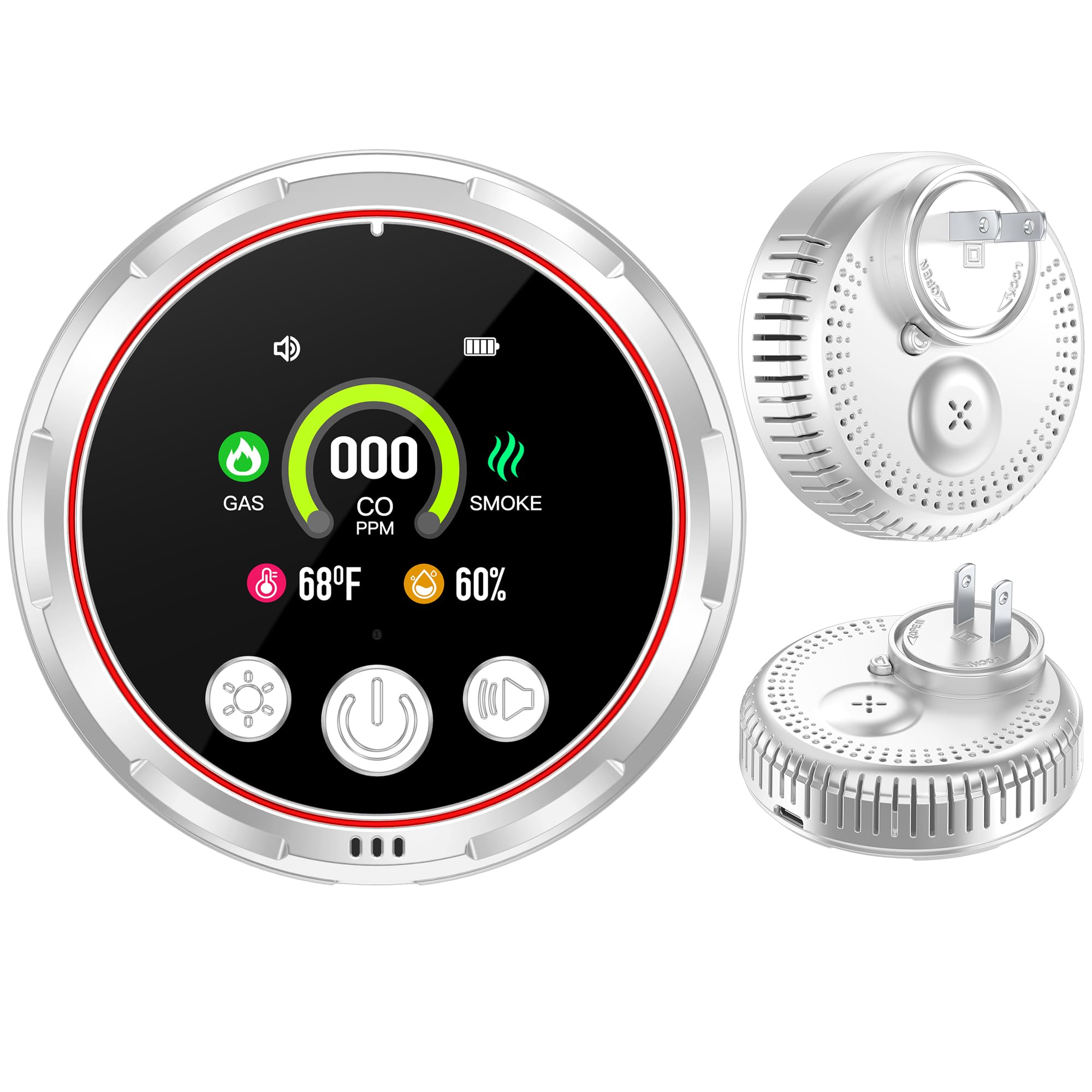
Figure 1: HAKINAKU HD13 5-in-1 Natural Gas, Smoke & Carbon Monoxide Detector.
This manual provides essential information for the proper installation, operation, and maintenance of your detector. Please read it thoroughly before use and keep it for future reference.

Figure 2: The HAKINAKU HD13 detector is suitable for various indoor environments, including homes, hotels, and RVs.
2. Key Features
- 5-in-1 Detection: Integrated carbon monoxide, smoke, natural gas, temperature, and humidity sensors for comprehensive environmental monitoring.
- Plug-in & Play Design: Compatible with 110-240V US standard outlets for easy installation.
- Built-in 1000mAh Backup Battery: Provides 10-14 hours of operation during power outages, ensuring continuous protection.
- Visible & Audible Alerts: HD screen displays real-time data (CO ppm, smoke/gas icons, humidity, temperature) and emits an 85dB alarm when concentrations exceed safe levels.
- High Precision Sensors: Equipped with independent CO, natural gas, and smoke sensors for accurate and stable detection.

Figure 3: The detector's display provides real-time monitoring of various environmental factors.

Figure 4: Illustration of the high-precision electrochemical and photoelectric sensors within the device.
3. Safety Information
Please observe the following safety precautions to ensure proper operation and prevent damage or injury:
- Do not paint the detector. Paint can clog the openings and interfere with sensor operation.
- Do not block the ventilation openings on the device.
- Do not install in areas with high humidity (e.g., bathrooms directly above showers) or extreme temperatures.
- Keep the detector away from direct sunlight, heat sources, and strong air currents.
- This device is designed for indoor use only.
- Regularly test the detector as instructed in this manual.
- In case of an alarm, follow your emergency plan immediately. Do not ignore alarms.
4. Setup
4.1 Unpacking
Carefully remove the detector from its packaging. Ensure all components, including the detector, testing guide, and manual, are present.
4.2 Installation
The HAKINAKU HD13 detector features a plug-in design for easy installation. Simply plug the device into a standard 110-240V AC US outlet. The device will automatically power on and begin monitoring.
- Choose an outlet that is not obstructed and allows for proper air circulation.
- Avoid placing the detector near windows, doors, or ventilation fans that could interfere with accurate readings.
- Ensure the outlet is easily accessible for maintenance and testing.
- The plug is designed to rotate for optimal positioning. Twist the plug to lock it in place after inserting into the outlet.

Figure 5: The detector plugs directly into a standard wall outlet, allowing the other outlet to remain usable.
Video 1: This video demonstrates the simple plug-in installation of the HAKINAKU HD13 detector, highlighting that no tools are needed for setup.
5. Operation
5.1 Display Overview
The HD color screen provides real-time information at a glance. Key indicators include:
- GAS: Indicates natural gas detection status.
- CO PPM: Displays the concentration of carbon monoxide in parts per million.
- SMOKE: Indicates smoke detection status.
- Temperature: Shows the ambient room temperature.
- Humidity: Displays the relative humidity level.
- Battery Indicator: Shows the backup battery level and charging status.
- Alarm Status: Indicates if the audible alarm is active or muted.

Figure 6: The Ultra HD color screen provides clear and dynamic display of all monitored data.

Figure 7: Real-time monitoring of combustible gas, CO concentration, temperature, and humidity.
5.2 Button Functions
The device features intuitive buttons for control:
- Light Button: Adjusts the brightness of the display or turns it off. Press once for dim, twice for bright, third time for off.
- Power Button: Used to power on/off the device (if not plugged in) or to activate the display if it's off.
- Alarm Mute Button: Temporarily mutes the audible alarm. The visual indicators will remain active.
5.3 Backup Battery
The built-in 1000mAh lithium polymer battery provides continuous operation for 10-14 hours during power outages. When plugged into an outlet, the battery automatically recharges.
Figure 8: The detector features a 1000mAh high-capacity battery for extended backup power.
Video 2: This video provides an overview of the detector's features, including its plug-in design and battery backup functionality.
6. Maintenance
Regular maintenance ensures the longevity and accuracy of your HAKINAKU HD13 detector.
- Cleaning: Gently wipe the exterior of the detector with a soft, damp cloth. Do not use harsh chemicals or abrasive cleaners. Ensure no liquid enters the device openings.
- Testing: It is recommended to test the detector weekly. Press and hold the test button (usually the power button or a dedicated test button, refer to the device for exact marking) until the alarm sounds. This confirms the alarm and sensors are functioning correctly.
- Battery Check: The display will show the battery status. Ensure it is charging when plugged in and holds a charge when unplugged.
Video 3: This review video demonstrates the detector's functionality, including its response to smoke and CO, which can be used as a reference for testing.
7. Troubleshooting
If you encounter issues with your detector, refer to the following table for common problems and solutions.
| Problem | Possible Cause | Solution |
|---|---|---|
| Detector not powering on | Not plugged in correctly; power outage; battery depleted. | Ensure secure connection to a live outlet. Check household power. Allow battery to charge. |
| Audible alarm sounds | High levels of CO, smoke, or natural gas detected. | Evacuate premises immediately. Call emergency services. Do not re-enter until safe. |
| False alarms | Steam, cooking fumes, dust, or strong chemicals near the detector. | Relocate the detector away from sources of false alarms. Clean the detector. |
| Display is off or dim | Display brightness setting; power saving mode. | Press the Light button to adjust brightness or turn the display on. |

Figure 9: The detector provides both sound and light alarms to alert users to potential dangers.
8. Specifications
| Feature | Detail |
|---|---|
| Brand | HAKINAKU |
| Model Number | HD13 |
| Detection Type | Carbon Monoxide, Smoke, Natural Gas, Temperature, Humidity |
| Power Source | AC (110-240V) + Built-in 1000mAh Lithium Polymer Battery |
| Alarm Loudness | 85dB |
| Color | White |
| Material | ABS |
| Item Weight | 3.2 ounces (0.2 Pounds) |
| Product Dimensions | 3.42 x 1 x 3.42 inches |
| Voltage | 5 Volts (AC) |
| Wattage | 5 Watt-hours |
| Usage | RV, Travel, Home, Indoor |
9. Warranty & Support
Warranty: The HAKINAKU HD13 detector comes with a 2-year warranty covering quality issues, offering free exchange for eligible defects.
Customer Support: For any questions, technical assistance, or warranty claims, please contact HAKINAKU customer support through the retailer where the product was purchased or refer to the contact information provided in the product packaging.