Introduction
The ZD Ultimate Legend Wireless Controller is a high-performance gaming peripheral designed for precision and versatility. Featuring TMR Joysticks, Hall Effect Triggers, and a modular design, it offers a customizable and responsive gaming experience across multiple platforms. This manual provides essential information for setting up, operating, maintaining, and troubleshooting your controller.
Getting Started
Package Contents
Before you begin, please ensure all items are present in the package:
- ZD Ultimate Legend Wireless Controller
- 2m Paracord Cable
- Wireless Dongle (2.4GHz receiver)
- Replaceable D-Pad
- User Manual
- 2 Thumbsticks
- NS Layout Keycap Puller
- Certificate

Image: Contents of the ZD Ultimate Legend Wireless Controller package, including the controller, cables, dongle, and accessories.
Charging the Controller
The controller is equipped with a 1500mAh lithium battery. To charge, connect the controller to a power source using the provided 2m Paracord Cable. A full charge typically takes 3-4 hours and provides 8-15 hours of playing time.

Image: Illustration of the controller's 1500mAh battery, showing 3-4 hours charging time and 8-15 hours playing time.
Connectivity Modes
The ZD Ultimate Legend supports three connectivity modes:
- 2.4GHz Wireless: Use the included wireless dongle for a stable, low-latency connection.
- Bluetooth: Connect wirelessly to compatible devices.
- Wired: Connect directly via the USB-C cable for the lowest latency (1ms) and highest polling rate (3000Hz).
Driver Installation (for PC)
For optimal performance on PC, ensure the correct drivers are installed. Follow these steps:
- Search for "Device Manager" in your Windows search bar and open it.
- Locate "Xbox 360 Controller for Windows" under "Xbox 360 Peripherals" or "Other devices".
- Right-click on it and select "Properties".
- Go to the "Driver" tab and click "Update Driver".
- Choose "Browse my computer for drivers" then "Let me pick from a list of available drivers on my computer".
- Select the option with fewer words (e.g., "Xbox 360 Controller for Windows Version: 2.1.0.1349 [8/13/2009]") and click "Next".
- After installation, restart your computer when prompted.
Video: A tutorial demonstrating how to install the necessary drivers for the ZD Ultimate Legend Wireless Controller on a Windows PC.
Operating Instructions
Modular Design
The ZD Ultimate Legend features a fully modular design, allowing you to customize various components. This includes swappable joysticks, ABXY buttons, D-Pad, thumbsticks, and faceplates. This modularity enables you to tailor the controller to your specific gaming preferences and replace components as needed.

Image: An exploded view of the ZD Ultimate Legend controller highlighting its modular components like swappable joysticks, ABXY buttons, D-Pad, thumbsticks, and faceplates.
Removing Faceplate and Modules
To remove the faceplate and joystick modules:
- First, remove the D-pad.
- From the side position, use your finger to gently pry the faceplate outward.
- Once the faceplate is partially detached, carefully take it out from the middle part of the controller.
- To remove a joystick module, press and hold the clip located next to the module.
- While holding the clip, use a key puller or similar tool to clamp the module and gently pull it out.
- To re-install, align the module with the corresponding position and gently press until it clicks into place.
Video: A step-by-step guide on how to safely remove the faceplate and joystick modules from the ZD Ultimate Legend Wireless Controller for customization or replacement.
Joystick Calibration
To ensure optimal joystick performance and prevent drift, periodic calibration is recommended:
- Hold down the 'A' button, D-Pad Up, and the Mode (triangle) button simultaneously.
- The LED lights on the controller will flash in three colors, indicating calibration mode.
- Rotate both joysticks three full turns clockwise and then three full turns counter-clockwise.
- Press the Mode (triangle) button again to complete the calibration.
- Verify calibration by moving the joysticks; the values should return to near zero (within 0.05) when centered.
Video: Instructions on how to calibrate the joysticks of the ZD Ultimate Legend Wireless Controller to ensure accuracy and prevent stick drift.
ZD Game App Customization
Utilize the ZD Game App for real-time customization of your controller. The app allows you to:
- Set macros for complex commands.
- Adjust trigger sensitivity.
- Customize vibration intensity.
- Map keyboard/mouse functions to controller buttons.
- Control RGB lighting effects.
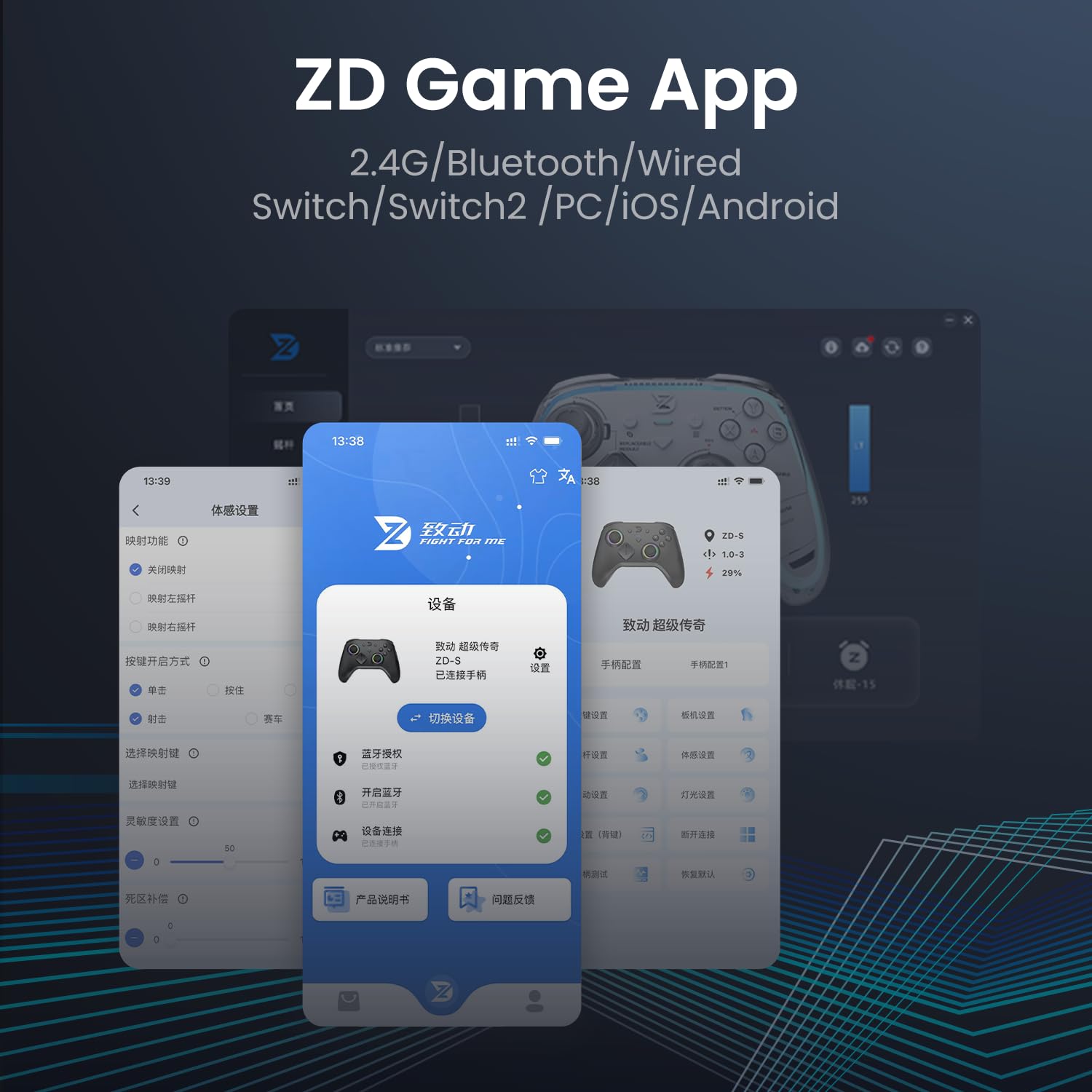
Image: Screenshot of the ZD Game App interface, showing various customization options for the controller, including button mapping and RGB settings.
Features Overview
RJ13-TMR Joysticks & Dual-Mode Hall Triggers
Experience precise control with RJ13-TMR Joysticks, designed for anti-drift performance and no dead zones, featuring a durable POM wear ring. The dual-mode Hall Triggers offer versatility:
- Linear Hall Triggers: 0.1mm–2mm travel for ultra-sensitive control.
- Mechanical Triggers: 8.5mm travel for tactile feedback.

Image: Close-up view of the controller's dual-mode Hall Effect Triggers, illustrating the 1.5mm Micro-Travel and 8.5mm Linear Travel options.
Enhanced Feedback System
The controller incorporates a sophisticated feedback system:
- 6 Vibration Motors: Includes HD Motor, Trigger Motor, and Grip Motor with an emergency stop function for immersive haptic feedback.
- 8 Extra Buttons: Two shoulder, two front, and two rear paddles, plus two additional rear buttons for advanced customization and macro programming.
- ABXY Buttons: HCNHK ABXY buttons with 100M+ lifespan and changeable Switch/Xbox layouts.
- D-Pad: 4th-Gen Micro-Switch D-Pad with 90gf actuation force and 0.8mm key travel.

Image: Depiction of the controller's 8 extra buttons and 6 vibration motors, highlighting their placement and function for enhanced gaming.
Maintenance
Cleaning
To maintain your controller's appearance and functionality, regularly wipe it with a soft, dry cloth. Avoid using harsh chemicals or abrasive materials. For hard-to-reach areas, use a cotton swab or compressed air.
Stabilizing Pads
Free stabilizing pads are available upon request from customer support to enhance joystick performance. These pads can help reduce wear and improve the longevity of the joysticks.
Troubleshooting
Connectivity Issues
- 2.4GHz/Bluetooth: Ensure the controller is fully charged. Check that the wireless dongle is securely plugged in (for 2.4GHz) or Bluetooth is enabled on your device and the controller is in pairing mode.
- Wired: Verify the USB-C cable is properly connected to both the controller and your device. Try a different USB port or cable if issues persist.
Joystick Drift
If you experience unintended movement from the joysticks, perform the joystick calibration procedure detailed in the "Operating Instructions" section. Regular calibration can help prevent and resolve minor drift issues.
Controller Not Responding
- Ensure the controller is charged and powered on.
- Check the connection mode (wired, 2.4GHz, Bluetooth) and ensure it matches your device's settings.
- Restart your device and the controller.
- If on PC, verify that the drivers are correctly installed as per the "Driver Installation" section.
Further Assistance
If you encounter issues not covered in this manual, please contact ZD customer support for further assistance.
Specifications
| Feature | Detail |
|---|---|
| Model | Ultimate Legend Wireless Controller |
| Manufacturer | ZD |
| Connectivity | 2.4GHz Wireless, Bluetooth, Wired |
| Compatibility | Switch/Switch2, Windows 10/11, Android, iOS (Not for Xbox/PS) |
| Polling Rate (Wired) | 3000Hz |
| Polling Rate (2.4G) | 900Hz |
| Polling Rate (Bluetooth) | 250Hz+ |
| Latency | 1ms (Wired) |
| Joystick Type | RJ13-TMR (Anti-Drift, No Dead Zone) |
| Trigger Type | Dual-Mode Hall Effect (Linear 0.1-2mm, Mechanical 8.5mm) |
| Vibration Motors | 6 (HD, Trigger, Grip with Emergency Stop) |
| Extra Buttons | 8 (2 Shoulder, 2 Front, 2 Back Paddles, 2 Rear) |
| ABXY Button Lifespan | 100M+ Presses |
| D-Pad Actuation Force | 90gf |
| D-Pad Key Travel | 0.8mm |
| Battery Capacity | 1500mAh Lithium-Ion |
| Product Dimensions | 6.18 x 4.33 x 1.5 inches (158 x 105 x 67 mm) |
| Item Weight | 10.6 ounces (302g) |
Warranty & Support
For warranty information, product registration, or technical support, please refer to the official ZD website or contact their customer service directly. Keep your purchase receipt for warranty claims.