
1. Safety Information
Please read and understand this entire manual before attempting to assemble, operate, or install the product. Failure to do so could lead to electric shock, fire, or serious injury.
- Ensure all electrical connections comply with local codes, ordinances, and the National Electrical Code (NEC).
- Consult a qualified electrician if you are unfamiliar with electrical wiring.
- Before installation, disconnect power by turning off the circuit breakers at the main fuse box.
- The mounting structure must be capable of supporting the weight of the fan (approximately 19.8 lbs).
- Do not operate the fan with damaged blades. Replace all blades if one is damaged.
- Avoid placing objects in the path of the fan blades.
2. What's Included
Verify that all components are present before beginning installation.

Image: Exploded view of Ohniyou 72-inch ceiling fan components including motor body, 8 blades, downrods, mounting bracket, light cover, remote control, and hardware.
- Motor Body
- 8 Fan Blades
- 16" Downrod and 8" Downrod (2 downrods included)
- Mounting Bracket
- Metal Plate Light Cover
- Remote Control & Receiver
- Installation Hardware (screws, balance kit, splice closure)
- User Manual
3. Setup & Installation
This section provides step-by-step instructions for assembling and installing your Ohniyou GLX072 ceiling fan. For a visual guide, please refer to the installation video below.
Video: Official Ohniyou 72-inch aluminum ceiling fan light installation video. This video demonstrates the complete assembly and mounting process for the ceiling fan.
3.1. Pre-Installation
- Turn off power at the circuit breaker.
- Ensure the mounting location can support the fan's weight.
3.2. Fan Blade Assembly
- Install Fan Blade Edge Cover: Take out a fan blade and identify its ends. Insert the edge cover into the fan blade at an angle. Flip the fan blade over and secure the cover with screws. Repeat for all 8 blades.

Image: Illustration of fan blade edge cover installation and an overview of the easy installation process.
- Attach Fan Blades to Motor: Insert the 3-hole end of each fan blade into the motor. Reinstall the screws that were previously removed from the motor to secure each blade. Ensure all 8 blades are firmly attached.

Image: Close-up of fan blades being attached to the motor body with screws.
3.3. LED Light Panel Installation
- Remove one screw from the motor.
- Place the metal plate on the motor, rotate it until the screws slide into the slots, and then tighten the screws.
- Place the LED light panel on the metal plate and connect the light wires.
3.4. Downrod Installation
- Remove the fixing screws from the steel wire.
- Loosen the three screws on the motor.
- Thread the canopy and splice closure through the downrod.
- Pass the steel wire and other wires through the downrod.
- Fix the cross pin and clamp pin.
- Tighten the three screws on the motor.
3.5. Mounting Bracket Installation
- Fix the mounting bracket to the ceiling with appropriate screws.
- Hang the downrod assembly onto the mounting bracket.
- Wrap the wire around one side of the hook and secure it through the lock hole.
3.6. Electrical Connections
- Connect the receiver and ceiling wire connections. Connect wires of the same color together.
- Connect the ceiling zero wire to the receiver's zero wire and the ceiling fire wire to the receiver's fire wire.
3.7. Final Assembly
- Cover the mounting bracket and receiver with the canopy. Finally, tighten the screws to secure.
- Cover the lampshade. Complete the ceiling fan installation.
4. Operation
Your Ohniyou GLX072 ceiling fan can be controlled via the included remote or a compatible mobile application.
4.1. Remote Control Functions
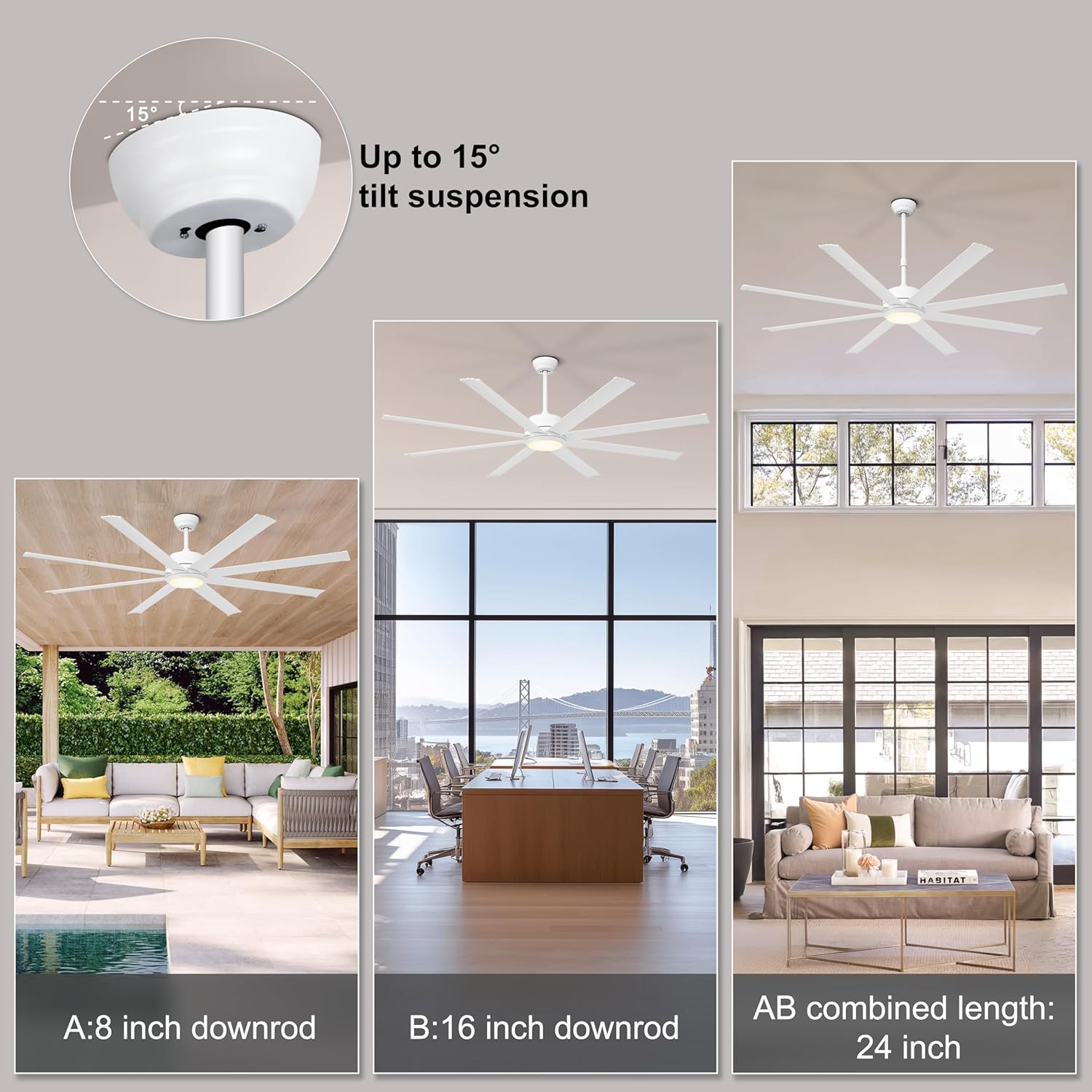
Image: Multifunctional remote control for the Ohniyou ceiling fan, detailing buttons for fan speed, light control, timer, and reverse function.
- Power On/Off: Turn the fan and light on or off.
- Fan Speed: Select from 6 adjustable wind speeds (1-2: Comfortable, 3-4: Natural, 5-6: Cool).
- Light Control: Adjust light brightness (10% to 100%) and color temperature (3000K Warm, 4500K Neutral, 6000K Cool).
- Reversible Function: Switch between summer mode (downward airflow for cooling) and winter mode (upward airflow for air circulation).
- Timer: Set the fan to turn off automatically after 1, 4, or 8 hours.
- Mute Mode: Enable quiet operation without beeps.
4.2. App Control
The fan supports app control for convenient operation from your smartphone. Refer to the specific app instructions for pairing and usage.
5. Maintenance
Regular maintenance ensures optimal performance and longevity of your ceiling fan.
- Cleaning: For general cleaning, use a soft, damp cloth. Do not use abrasive cleaners or solvents.
- Blade Care: The aluminum blades are designed to resist bending. Clean them gently with a soft cloth.
- Tighten Fasteners: Periodically check all screws and fasteners to ensure they are secure.
- Motor: The DC motor is designed for quiet operation and requires no lubrication.
6. Troubleshooting
If you encounter issues with your fan, refer to the following common solutions:
| Problem | Possible Cause | Solution |
|---|---|---|
| Fan does not start | No power supply; Loose wiring; Remote not paired. | Check circuit breaker; Verify all wire connections are secure; Pair remote control with fan (refer to remote instructions). |
| Light does not work | Loose wiring; LED panel issue. | Check light wire connections; Ensure LED panel is correctly installed. |
| Fan makes noise | Loose screws; Unbalanced blades. | Tighten all mounting and blade screws; Use the included balance kit to balance blades if necessary. |
| Remote control not working | Dead batteries; Not paired; Obstruction. | Replace batteries (2 AAA batteries, not included); Re-pair remote with fan; Ensure no obstructions between remote and receiver. |
7. Specifications
| Feature | Detail |
|---|---|
| Brand | Ohniyou |
| Model Name | GLX072 |
| Color | White-With Light |
| Size | 72 inch |
| Electric Fan Design | Ceiling Fan |
| Power Source | AC |
| Style | Industrial |
| Product Dimensions | 72"D x 72"W x 7.87"H |
| Room Type | Garage, Gym, Patio, Shop, Warehouse |
| Special Features | Aluminum Blades, App Operable, High CFM, Quiet Operation, Reversible Motor |
| Recommended Uses | Cooling |
| Noise Level | 30 Decibels |
| Wattage | 52 watts |
| Finish Type | Painted |
| Number of Blades | 8 |
| Air Flow Capacity | 7600 Cubic Feet Per Minute |
| Blade Length | 32.48 Inches |
| Voltage | 220 Volts |
| Item Weight | 19.8 Pounds |
| Included Components | 2 Downrods, Fan Blades, Installation Hardware, Light Kit, User Manual |
| Control Method | Remote |
| Number of Power Levels | 6 |
| Motor Type | Brushless DC Motor |
| Installation Type | Ceiling Mount |
| Assembly Required | Yes |
| Batteries Required | No (for fan, but remote requires 2 AAA batteries) |
| Mounting Type | Downrod Mount |
8. Warranty & Support
For warranty information or technical support, please contact Ohniyou customer service. Keep your purchase receipt as proof of purchase.
Contact information can typically be found on the product packaging or the official Ohniyou website.


