
GarveeTech SAC12-S22-B
Contents
GarveeTech SAC12-S22-B Split Air Conditioner User Manual
Model: SAC12-S22-B | Brand: GarveeTech
1. Introduction
This manual provides essential information for the safe and efficient operation, installation, and maintenance of your GarveeTech SAC12-S22-B Split Air Conditioner. Please read this manual thoroughly before using the appliance and retain it for future reference.
The GarveeTech SAC12-S22-B is a 12,000 BTU 115V 22 SEER2 split air conditioning system designed to provide year-round comfort with its 4-in-1 functionality: cooling, heating, dehumidifying, and fan-only modes. It features an AI-driven inverter for precise climate control and energy efficiency, smart connectivity, and quiet operation.
2. Safety Information
Always observe the following safety precautions to reduce the risk of electric shock, fire, or injury.
- Professional Installation Required: Installation, maintenance, and repair must be performed by qualified service personnel. Improper installation can result in electric shock, fire, or water leakage.
- Power Supply: Ensure the power supply matches the unit's specifications (115V). Do not use extension cords.
- Grounding: The unit must be properly grounded to prevent electric shock.
- Clearances: Maintain adequate clearances around both indoor and outdoor units for proper airflow and service access.
- Refrigerant: This unit uses R32 refrigerant. Handle with care and only by certified technicians.
- Cleaning: Disconnect power before cleaning. Use a soft, dry cloth. Do not use harsh chemicals or abrasive cleaners.
- Children and Pets: Keep children and pets away from the unit during operation and maintenance.
3. Package Contents
Verify that all components are present and undamaged upon unpacking. If any items are missing or damaged, contact customer service immediately.
- Indoor Unit
- Outdoor Unit
- Remote Control
- Mounting Accessories (e.g., refrigerant lines, communication cable, drain hose)
- User Manual (this document)
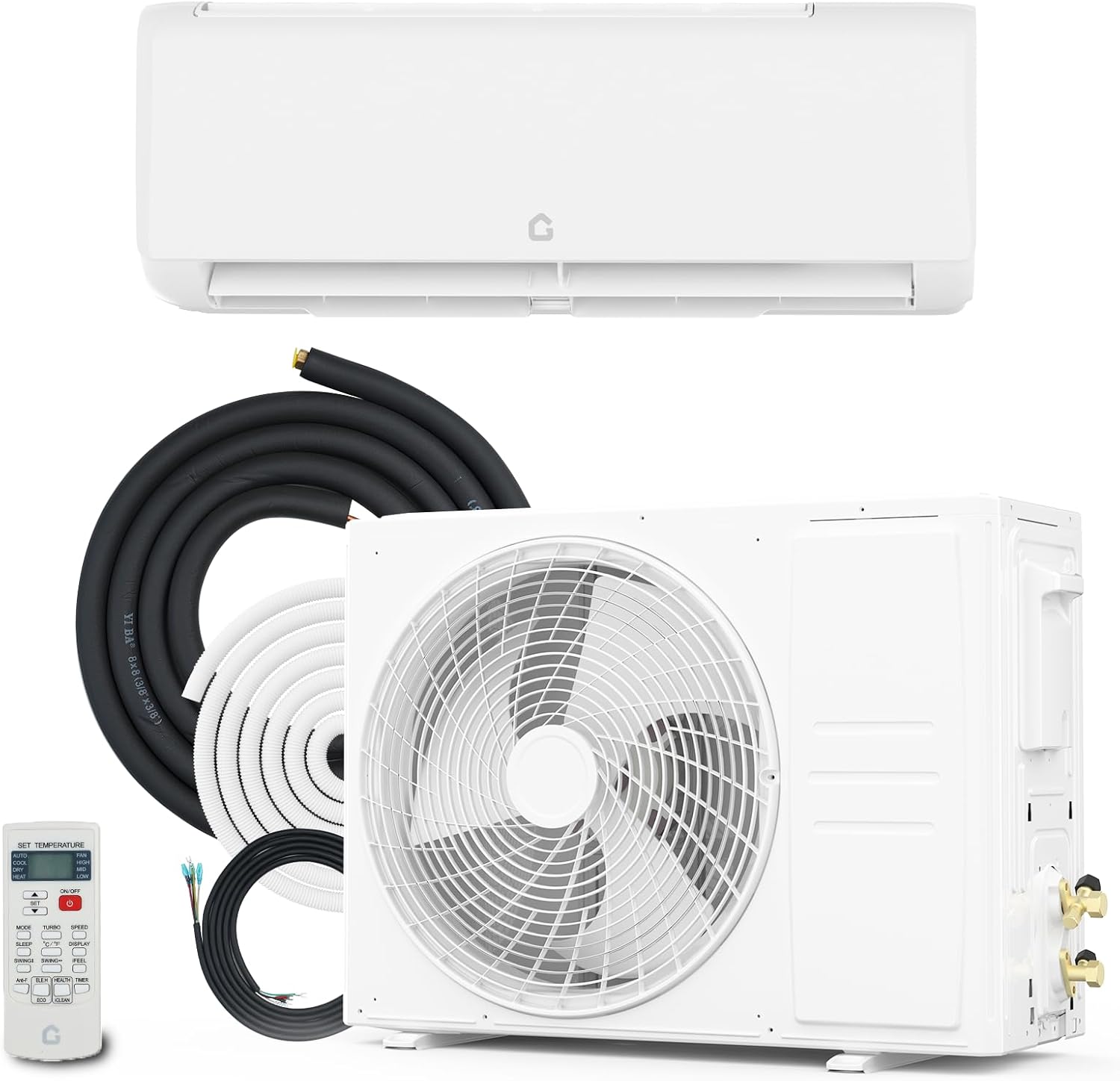
This image displays the main components included with your GarveeTech SAC12-S22-B system: the sleek indoor unit, the compact outdoor condenser, the wireless remote control, and the necessary refrigerant lines and communication cables for installation.
4. Setup and Installation
The GarveeTech SAC12-S22-B requires professional installation to ensure optimal performance, safety, and compliance with local regulations. Installation brackets are not included and must be sourced separately.
- Site Selection: Choose a location for the indoor unit that allows for even air distribution and a suitable location for the outdoor unit with adequate airflow and drainage. The outdoor unit is designed to be 23% smaller than standard models, allowing for more flexible placement on balconies or rooftops.
- Mounting: Securely mount the indoor and outdoor units according to the detailed installation guide provided to your professional installer.
- Refrigerant Piping: Connect the refrigerant lines between the indoor and outdoor units. This process requires specialized tools and expertise to prevent leaks and ensure proper refrigerant charge.
- Electrical Wiring: Connect the power supply and communication wiring as per the electrical diagram. Ensure all connections are secure and comply with local electrical codes.
- Drainage: Install the condensate drain line to ensure proper water removal from the indoor unit.
- Vacuuming and Charging: Evacuate the refrigerant lines and charge the system with the correct amount of R32 refrigerant.

This image provides a visual representation of the compact dimensions of both the indoor and outdoor units, aiding in pre-installation planning and ensuring sufficient space is allocated for optimal performance and maintenance access.
5. Operating Instructions
5.1. Basic Operation Modes
The unit offers four primary operating modes:
- Cooling Mode: Provides rapid cooling, reducing room temperature to your desired setting. Ideal for spaces up to 750 sq ft.
- Heating Mode: Delivers turbo-heating to warm your space efficiently.
- Dry Mode (Dehumidifier): Reduces humidity levels in the room without significant temperature change.
- Fan-Only Mode: Circulates air without cooling or heating.

This image visually represents the operational capabilities of the unit, showing its effective coverage area and its cooling and heating power, which are crucial for understanding its suitability for different room sizes.
5.2. Temperature Control and Airflow
- Precision Control: The AI-driven vector inverter maintains your setpoint to within ±0.1 °C (0.18 °F).
- 4-Way Swing: Utilize the 4-way swing function for uniform air distribution throughout the room.
5.3. Smart Connectivity and Control
The SAC12-S22-B offers multiple control options:
- Remote Control: Use the included full-function remote control for convenient operation up to 26 feet away.
- Wi-Fi App Control: Connect the unit to your home Wi-Fi network (Wi-Fi 2.0) and use the dedicated mobile application to power on/off, change modes, and program schedules from anywhere.
- Voice Control: The unit is compatible with Alexa and Google Assistant for hands-free operation.

This image illustrates the flexibility of controlling your air conditioner, showing both the traditional remote control and the modern smartphone application for convenient management of settings and schedules.
5.4. Special Features
- Whisper-Quiet Performance: Operates as low as 23 dB in Sleep mode, making it suitable for bedrooms and quiet environments. Maximum noise level in Turbo mode is 41 dB.
- Sleep Mode: Optimizes temperature and fan speed for comfortable sleep while maintaining low noise levels.
- Turbo Mode: Provides rapid cooling or heating when quick temperature changes are desired.
- Filter Light Reminder: Indicates when the air filter needs cleaning.

This image demonstrates the unit's ability to maintain a peaceful environment, particularly in a bedroom setting, by showcasing its exceptionally low noise output during operation.
6. Maintenance
Regular maintenance ensures the longevity and efficiency of your air conditioner.
- Air Filter Cleaning: The unit features a filter light reminder. When illuminated, clean the air filters. To clean, open the front panel of the indoor unit, remove the filters, and wash them with lukewarm water and mild detergent. Rinse thoroughly and allow to air dry completely before reinserting. Clean filters every 2-4 weeks, or more often if the unit is used frequently or in dusty environments.
- Self-Cleaning Function: The unit includes a 56°C high-temperature self-cleaning function to maintain internal hygiene and ensure fresh air. Refer to the remote control or app instructions for activating this feature.
- Outdoor Unit Cleaning: Periodically check the outdoor unit for debris, leaves, or obstructions around the coils and fan. Carefully remove any blockages to ensure proper airflow.
- Seasonal Checks: Before the start of each cooling or heating season, inspect the unit for any visible damage or unusual noises. Consider professional servicing annually.

This image demonstrates the straightforward process of accessing and cleaning the air filters, a key maintenance task for ensuring efficient operation and air quality.
7. Troubleshooting
Before contacting customer support, review the following common issues and their potential solutions.
| Problem | Possible Cause | Solution |
|---|---|---|
| Unit does not turn on | No power supply; circuit breaker tripped; remote control batteries dead. | Check power connection; reset circuit breaker; replace remote control batteries. |
| Insufficient cooling/heating | Dirty air filters; blocked outdoor unit; wrong mode selected; room size exceeds capacity. | Clean air filters; clear obstructions from outdoor unit; select appropriate mode; ensure unit matches room size (up to 750 sq ft). |
| Unusual noise | Loose parts; fan obstruction; refrigerant issues (hissing/gurgling). | Check for loose components; remove fan obstructions. If noise persists or is unusual, contact professional service. |
| Water leakage from indoor unit | Blocked drain hose; improper installation angle. | Check and clear drain hose. If issue persists, professional re-installation may be required. |
| Wi-Fi connectivity issues | Incorrect Wi-Fi password; router issues; unit too far from router. | Verify Wi-Fi password; restart router; ensure unit is within Wi-Fi range. Refer to app instructions for detailed setup. |
For issues not listed here or if solutions do not resolve the problem, please contact GarveeTech customer service.
8. Specifications
| Feature | Detail |
|---|---|
| Model Number | SAC12-S22-B |
| Brand | GarveeTech |
| Cooling Capacity | 12,000 BTU |
| Heating Capacity | 12,300 BTU |
| Voltage | 115 Volts |
| SEER2 Rating | 22 |
| Coverage Area | Up to 750 sq ft |
| Noise Level (Sleep Mode) | 23 dB |
| Noise Level (Turbo Mode) | 41 dB |
| Refrigerant Type | R32 |
| Product Dimensions (Indoor Unit) | 29.96"W x 7.87"D x 11.61"H |
| Product Dimensions (Outdoor Unit) | 29.61"W x 11.73"D x 22.28"H (approximate, based on image) |
| Item Weight | 68.3 pounds (total system) |
| Special Features | Inverter Compressor, Heating & Cooling, Dehumidifier, 4 Way Swing, Turbo Mode, Sleep Mode, Air Purification Filter, Filter Light Reminder, Remote Controlled, Wi-Fi 2.0, Alexa/Google Assistant Compatible, 56°C Self-cleaning |
9. Warranty and Support
Your GarveeTech SAC12-S22-B Split Air Conditioner is backed by a 5-year manufacturer's warranty. This warranty covers:
- Shipping damage
- Normal-use part failures
- Any functional defects
For installation guidance, troubleshooting assistance, or to request replacement parts, please contact our dedicated customer service team first. This ensures you receive accurate support and helps avoid unnecessary third-party fees.
Contact Information: Please refer to the GarveeTech official website or your purchase documentation for the most current customer service contact details.
Documents and downloads
Ask a question about this manual
Ask about setup, troubleshooting, compatibility, parts, safety, or missing instructions. Manuals+ will review the question and use this page’s manual context to help answer it.