
1. Product Overview
The AQQA LED Aquarium Light 24W (Model AQ206) is designed to provide optimal lighting for your aquarium, featuring full spectrum LEDs, adjustable brightness, and multiple operating modes. Its IP68 waterproof rating ensures durability and safe use in aquatic environments.
Key Features:
- High Lumen LED Aquarium Light: Utilizes high-quality 5050 and 2835 LED beads for bright, uniform illumination.
- Full DIY Control: Offers 9 vibrant colors, 10 brightness levels, and 3 preset timer options (6H/10H/12H).
- Smart 24/7 Mode: Simulates a natural 24-hour day cycle with sunrise, noon, and moonlight phases.
- True IP68 Submersible Rating: Fully waterproof for safe in-water use.
- Durable Metal Housing & Adjustable Fit: Constructed with aluminum alloy for heat dissipation and includes extendable brackets (up to 4.92 inches) for various tank sizes.
2. What's in the Box
- 1 x AQQA LED Aquarium Light (Model AQ206)
- 1 x AC/DC Adapter
- 1 x User Manual
- 2 x Metal Brackets
3. Setup Instructions
3.1 Attaching the Brackets
Insert the metal brackets into the slots on each end of the LED light fixture. Adjust the brackets to fit securely on the edges of your aquarium. The extendable design allows for a flexible fit on tanks ranging from 12 to 18 inches.

Image: AQQA LED Aquarium Light showing the extendable metal brackets for tank mounting.
3.2 Power Connection
Connect the AC/DC adapter to the light fixture and then plug the adapter into a standard power outlet. Ensure all connections are secure.
3.3 Initial Placement
Place the light fixture on top of your aquarium, ensuring the brackets are firmly seated. The IP68 waterproof design allows for safe placement directly over or even submerged in water, though surface placement is typical for optimal light spread.
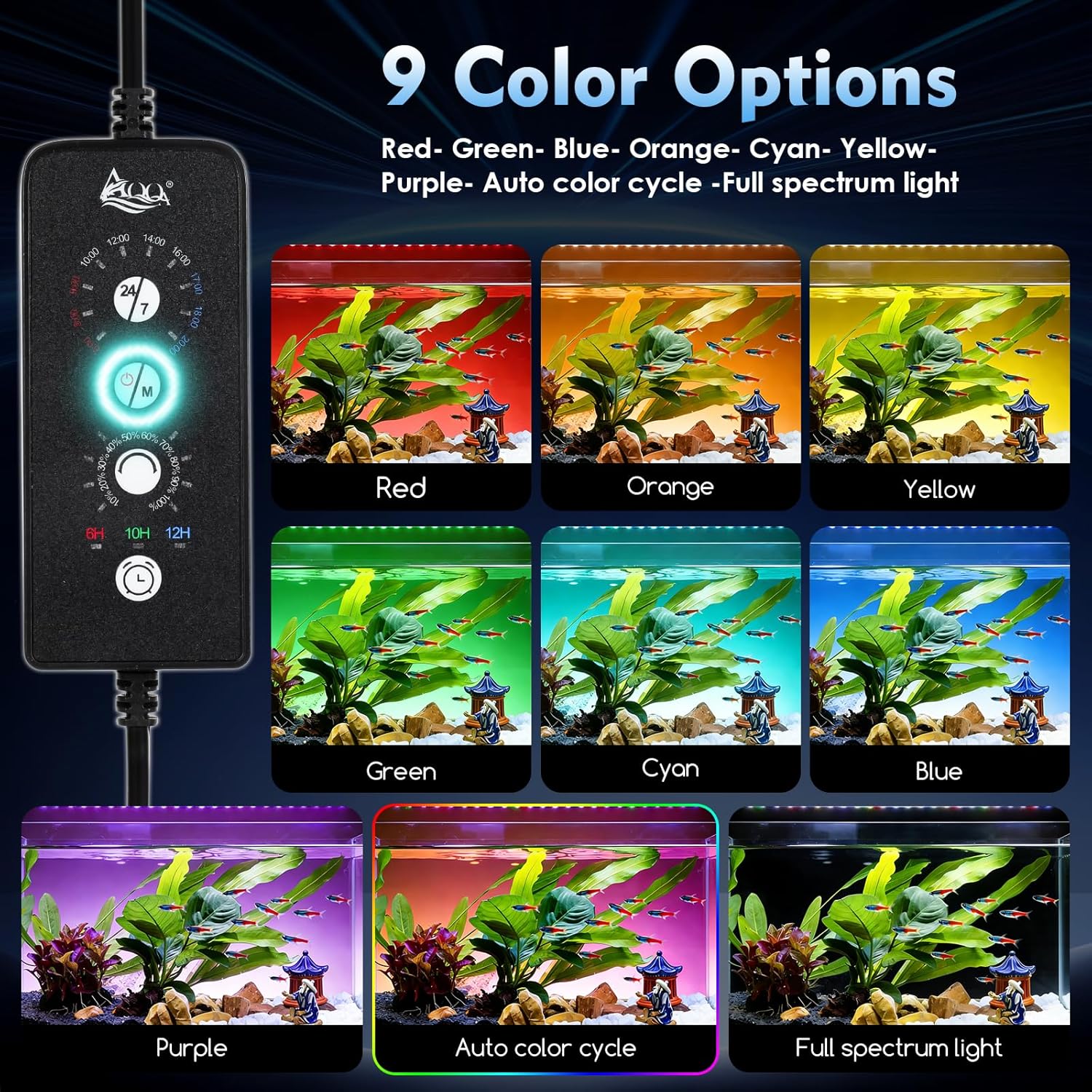
Image: AQQA LED Aquarium Light mounted on top of a fish tank, showcasing its design and placement.
4. Operating Instructions
The AQQA LED Aquarium Light features an integrated controller for easy operation and customization.

Image: Close-up of the AQQA LED Aquarium Light controller, showing the 24/7 mode dial, power/mode button, brightness dial, and timer buttons.
4.1 Power On/Off & Mode Selection
- Power On: Short press the 'M' (Mode/Power) button.
- Power Off: Press and hold the 'M' button for 3-5 seconds.
- Change Color/Mode (DIY Mode): Short press the 'M' button repeatedly to cycle through 9 color options (Red, Green, Blue, Orange, Cyan, Yellow, Purple, Auto Color Cycle, Full Spectrum Light).
4.2 Brightness Adjustment (DIY Mode Only)
In DIY Mode (when a specific color or full spectrum is selected manually), use the brightness dial to adjust the light intensity from 10% to 100% across 10 levels.

Image: The controller displaying the 10 levels of light brightness, from 10% to 100%.
4.3 Timer Options (DIY Mode Only)
In DIY Mode, select a desired timer duration by pressing the 'L' (Timer) button to choose between 6H, 10H, or 12H. The light will operate for the selected duration and then turn off.
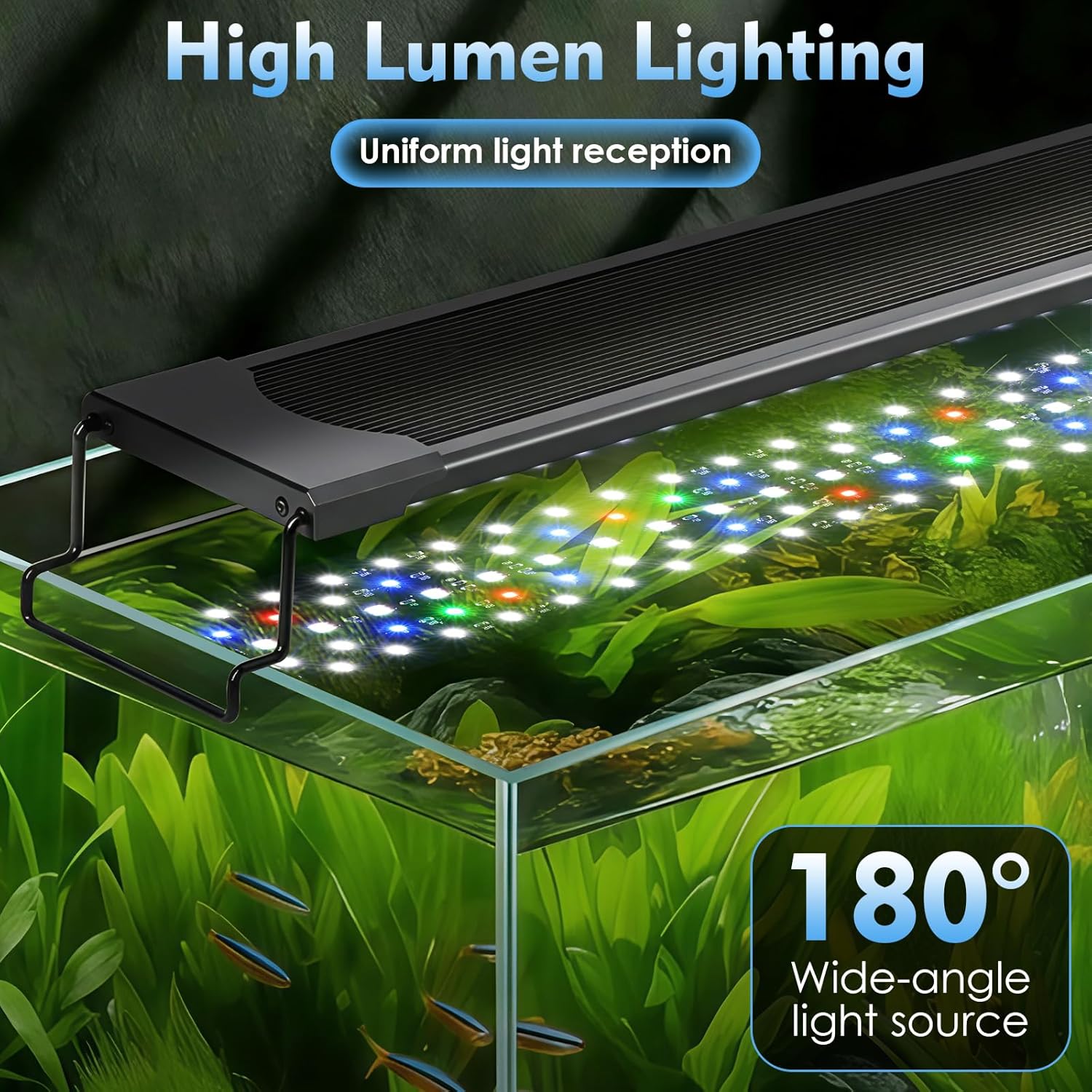
Image: The controller highlighting the 6H, 10H, and 12H timer options.
4.4 Smart 24/7 Mode
This preset mode simulates a full natural day cycle. It begins with a sunrise glow, peaks with bright noon light for plant growth, and fades to a moonlight blue at night. The cycle runs automatically from 6 AM to 11 PM. Brightness and color cannot be manually adjusted in 24/7 mode.
To activate: Rotate the 24/7 dial to the current time. The light will then follow its pre-programmed cycle from that point onward.

Image: A visual representation of the 24/7 mode, showing light intensity and color changes throughout a simulated day, from sunrise to night.
4.5 Memory Function
The light features a memory function that retains your last selected settings (mode, brightness, timer) even after a power interruption.
4.6 Official Product Video: Controller and Features Overview
Video: This video provides a detailed overview of the AQQA LED Aquarium Light's controller, demonstrating how to switch between different color modes, adjust brightness, and set the 24/7 natural light cycle. It also highlights the IP68 waterproof design and extendable brackets.
5. Maintenance
5.1 Cleaning
The aluminum alloy body is designed for easy cleaning. Gently wipe the light fixture with a soft, damp cloth. Avoid using abrasive cleaners or solvents that could damage the surface or the waterproof seal.
5.2 Waterproofing
The light has an IP68 submersible rating, meaning it is fully protected against dust and can withstand continuous immersion in water. This ensures longevity and safety in humid aquarium environments.

Image: The AQQA LED Aquarium Light fully submerged in water, illustrating its IP68 waterproof capability.
6. Troubleshooting
6.1 Light Not Turning On
- Check if the power adapter is securely plugged into both the light fixture and the wall outlet.
- Ensure the wall outlet is functional by testing it with another device.
- Press and hold the 'M' button for 3-5 seconds to ensure the light is not just in an off state.
6.2 Incorrect Color or Brightness
- If in 24/7 mode, manual adjustments are not possible. The light will follow its pre-programmed cycle.
- If in DIY mode, short press the 'M' button to cycle through colors or use the brightness dial to adjust intensity.
6.3 Timer Not Functioning Correctly
- For 24/7 mode, ensure the dial is set to the correct current time.
- For DIY timer, ensure the 'L' button has been pressed to select 6H, 10H, or 12H. The light will turn off after the set duration.
7. Specifications
| Attribute | Value |
|---|---|
| Model Number | AQ206 |
| Power | 24 Watts |
| Input Voltage | AC 100-240V |
| Output Voltage | DC 12V 2A |
| LED Quantity | 60 pcs |
| Light Size | 10.24" (26cm) |
| Applicable Aquarium Size | 12-18 inches (30-45cm) |
| Waterproof Rating | IP68 |
| Material | Aluminum, Metal |
| Item Weight | 0.55 Kilograms |
8. Warranty & Support
This AQQA LED Aquarium Light (Model AQ206) comes with a 365-day manufacturer's warranty.
For technical support, warranty claims, or any product-related inquiries, please contact AQQA customer service through your retailer or the official AQQA website.


