
Introduction
This manual provides detailed instructions for the installation, operation, and maintenance of your Hampton Bay MENA 44-inch LED Indoor/Outdoor Ceiling Fan with Light Kit. Please read all instructions carefully before beginning installation and retain this manual for future reference. This ceiling fan is designed for both indoor and outdoor use, featuring a matte white finish and reversible blades for versatile aesthetic and functional integration.
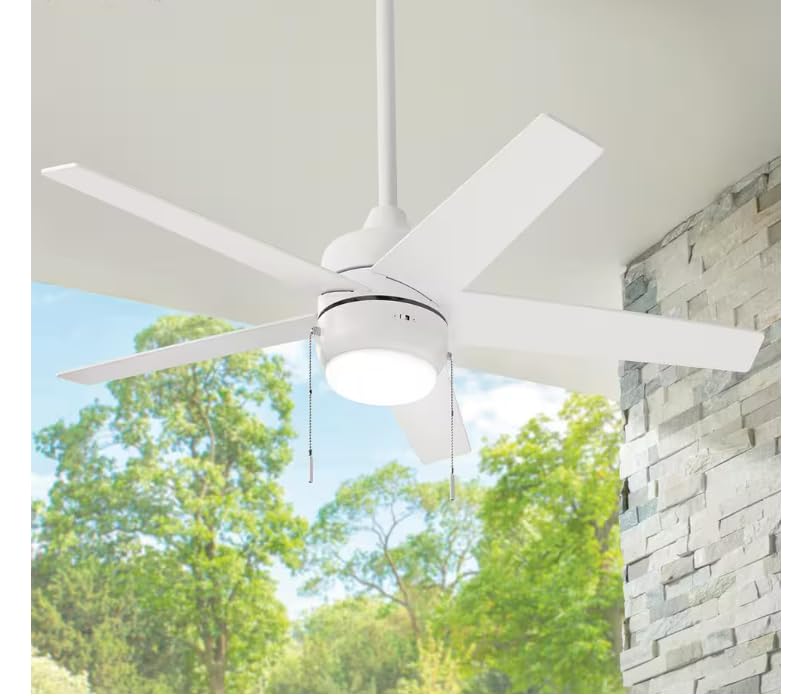
Figure 1: Hampton Bay MENA 44-inch LED Indoor/Outdoor Ceiling Fan with Light Kit.
Safety Information
- Always disconnect power at the circuit breaker before installation or servicing.
- Ensure all electrical connections comply with local codes and ordinances.
- Consult a qualified electrician if you are unsure about wiring procedures.
- Mount the fan to a ceiling joist or support structure capable of supporting the fan's weight.
- Keep hands and objects clear of fan blades during operation.
Package Contents
Verify that all components listed below are included in your package:
- Ceiling Fan Motor Assembly
- Fan Blades (5)
- Light Kit Assembly
- Remote Control with Wall Mount
- Mounting Bracket
- Downrod Assembly
- Hardware Pack (screws, washers, wire nuts)
- Instruction Manual
Setup and Installation
Professional installation is recommended. Follow these general steps for installation:
- Turn Off Power: Locate the circuit breaker for the fan's location and turn off the power.
- Mounting Bracket Installation: Secure the mounting bracket to the ceiling outlet box and ceiling joist using appropriate hardware.
- Assemble Downrod: Attach the downrod to the fan motor assembly.
- Hang Fan: Carefully lift the fan assembly and hang it from the mounting bracket.
- Wiring Connections: Connect the fan's electrical wires to the household wiring according to the wiring diagram provided in the full installation guide (not included in this summary). Ensure all connections are secure with wire nuts.
- Attach Fan Blades: Securely attach the fan blades to the motor housing.
- Install Light Kit: Connect and install the LED light kit to the bottom of the fan motor assembly.
- Canopy Installation: Raise the canopy to cover the mounting bracket and wiring, securing it in place.
- Restore Power: Turn the power back on at the circuit breaker.
Operating Instructions
Your Hampton Bay MENA ceiling fan is operated using the included remote control. The remote allows for control over fan speed, light on/off, light dimming, and light color temperature.
Remote Control Functions:
- Power Button (⏻): Turns the fan and light on or off.
- Fan Speed Button (💨): Cycles through different fan speeds (low, medium, high).
- Light On/Off Button (💡): Toggles the light on or off.
- Hold to Dim Button (🔆): Press and hold to dim or brighten the light.
- Light Color Temperature Button (🌈): Cycles through different light color temperatures (e.g., warm white, cool white, daylight).
Figure 2: Remote control for the Hampton Bay MENA ceiling fan, showing buttons for power, fan speed, light on/off, dimming, and color temperature adjustment.
Maintenance
Regular maintenance ensures optimal performance and longevity of your ceiling fan.
- Cleaning: Use a soft, damp cloth to clean the fan blades and motor housing. Do not use abrasive cleaners or solvents.
- Blade Inspection: Periodically check that all blade screws are tight. Loose blades can cause wobbling and noise.
- Light Kit: The integrated LED light kit does not require bulb replacement. If the light malfunctions, consult the troubleshooting section or contact customer support.
- Remote Control: Replace batteries in the remote control as needed (typically 2 AAA batteries).
Troubleshooting
| Problem | Possible Cause | Solution |
|---|---|---|
| Fan does not start. | No power to the fan; loose wire connections; remote control not paired or batteries dead. | Check circuit breaker. Ensure all wiring connections are secure. Replace remote batteries or re-pair remote. |
| Fan wobbles. | Loose blade screws; unbalanced blades; loose mounting bracket. | Tighten all blade screws. Use a balancing kit (not included) if necessary. Ensure mounting bracket is secure. |
| Light does not work. | Loose wire connection in light kit; remote control issue. | Check light kit wiring. Ensure remote batteries are fresh and remote is functioning. |
| Remote control not responding. | Dead batteries; remote not paired with fan. | Replace remote batteries. Follow pairing instructions (refer to full manual for specific steps). |
Specifications
| Feature | Detail |
|---|---|
| Brand | Hampton Bay |
| Model Number | 92405 |
| Color | White |
| Material | Aluminum (Housing), Plastic (Shade) |
| Style | Modern |
| Room Type | Indoor/Outdoor |
| Control Method | Remote |
| Light Source | LED |
| Number of Light Sources | 1 |
| Wattage | 9 watts |
| Water Resistance Level | Water Resistant |
| Mounting Type | Ceiling Mount |
| Required Assembly | No (Minor assembly required for installation) |
| UPC | 082392924058 |
Warranty Information
Hampton Bay products are manufactured to high-quality standards. For specific warranty details regarding your MENA 44-inch LED Indoor/Outdoor Ceiling Fan, please refer to the warranty card included with your purchase or visit the official Hampton Bay website. Keep your proof of purchase for warranty claims.
Customer Support
If you have any questions, require assistance with installation, or need to troubleshoot an issue not covered in this manual, please contact Hampton Bay customer support. Contact information can typically be found on the product packaging or the official Hampton Bay website.
- Online Support: Visit the Hampton Bay official website for FAQs and support resources.
- Telephone Support: Refer to your product packaging or warranty card for customer service phone numbers.


