
1. Introduction
Thank you for choosing the Kaiser KBB-5022BK Portable Bluetooth Speaker. This manual provides essential information for the safe and efficient operation of your device. Please read it thoroughly before use and retain it for future reference.
The KBB-5022BK is a versatile portable speaker featuring 22W RMS power, Bluetooth connectivity, IPX5 water resistance, LED lighting, FM radio, USB and Micro SD playback, and an auxiliary input. It is designed for various environments, including outdoor use.
2. Safety Information
- Do not expose the speaker to extreme temperatures, direct sunlight, or high humidity.
- The speaker has an IPX5 water resistance rating, meaning it is protected against splashing water. Do not submerge the speaker in water.
- Keep the speaker away from heat sources and open flames.
- Do not attempt to disassemble, repair, or modify the speaker. This will void the warranty and may cause damage or injury.
- Use only the provided charging cable or a certified equivalent.
- Dispose of the battery and speaker according to local regulations.
- Avoid listening at high volume levels for extended periods to prevent hearing damage.
3. Package Contents
Please check that all items are present in the package:
- Kaiser KBB-5022BK Portable Bluetooth Speaker
- USB-A to USB-C Charging Cable
- Wireless Microphone
- Instruction Manual (this document)
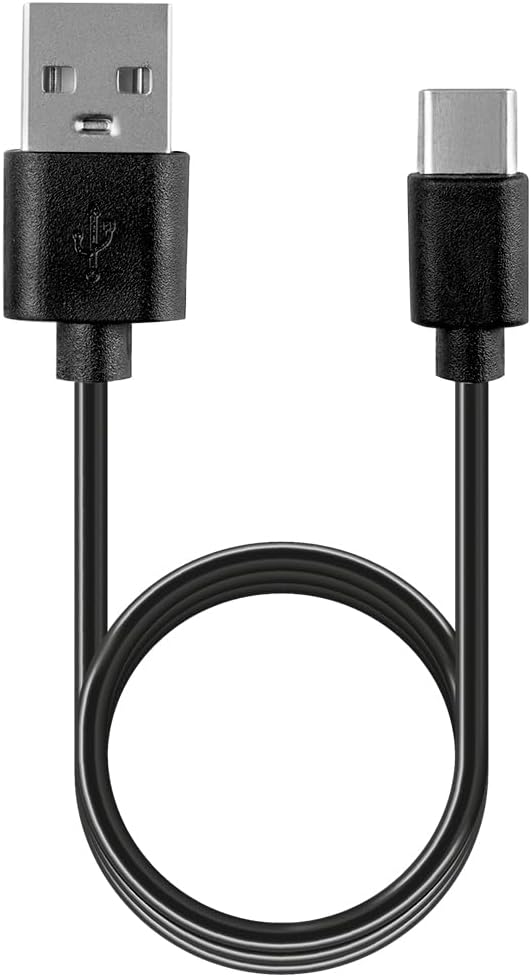
Figure 3.1: USB-A to USB-C charging cable.
This image shows the black USB-A to USB-C charging cable provided with the speaker, used for recharging the device's internal battery.
4. Product Overview and Controls
4.1 Front View

Figure 4.1: Front view of the speaker.
This image displays the front of the Kaiser KBB-5022BK speaker, featuring a black grille and the gold 'KAISER' logo prominently in the center.
4.2 Top View and Control Buttons
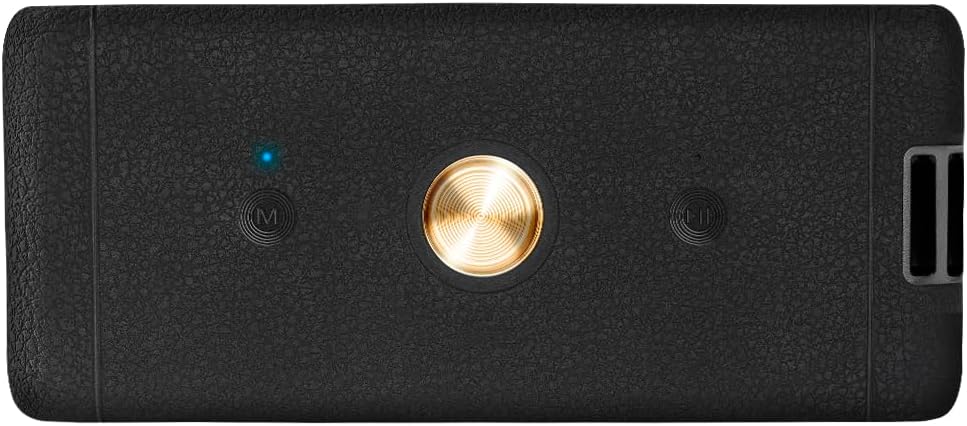
Figure 4.2: Top view with control buttons.
The top panel of the speaker is shown, featuring a central circular button (likely Play/Pause/Power) and two 'M' buttons on either side (likely Mode and Microphone functions), along with an LED indicator.
- Power/Play/Pause Button: Press and hold to power on/off. Press briefly to play or pause audio.
- Mode (M) Button: Press to switch between Bluetooth, FM Radio, USB, Micro SD, and AUX input modes. May also control LED light effects.
- Volume/Track Control Buttons: Press briefly to adjust volume. Press and hold to skip tracks (in playback modes) or change FM stations (in FM mode).
4.3 Rear View and Ports

Figure 4.3: Rear view with input ports.
This image shows the rear panel of the speaker, revealing the USB port, Micro SD card slot, AUX input (3.5mm), and the DC 5V USB-C charging port.
- USB Port: For USB flash drive playback.
- Micro SD Card Slot (TF): For Micro SD card playback.
- AUX Input: 3.5mm jack for connecting external audio devices.
- DC 5V (USB-C) Port: For charging the speaker.
5. Setup
5.1 Initial Charging
- Before first use, fully charge the speaker.
- Connect the USB-C end of the charging cable to the DC 5V port on the speaker.
- Connect the USB-A end to a USB power adapter (not included) or a computer USB port.
- The charging indicator light will illuminate. It will turn off or change color once fully charged.
5.2 Powering On/Off
- To power on, press and hold the Power button (central circular button on top) for approximately 3 seconds.
- To power off, press and hold the Power button again for approximately 3 seconds.
6. Operating Instructions
6.1 Bluetooth Mode
- Power on the speaker. It will automatically enter Bluetooth pairing mode, indicated by a flashing LED light.
- Enable Bluetooth on your smartphone, tablet, or other Bluetooth-enabled device.
- Search for available devices and select "KBB-5022BK" from the list.
- Once paired, the speaker will emit a confirmation tone, and the LED light will stop flashing.
- You can now play audio from your device through the speaker. Use the speaker's volume buttons or your device's controls to adjust the volume.
6.2 FM Radio Mode
- Press the Mode (M) button repeatedly until you hear static, indicating FM Radio mode.
- Press the Play/Pause button briefly to initiate an automatic scan for FM stations. The speaker will scan and save available stations.
- Once scanning is complete, use the Volume/Track Control Buttons to navigate between saved stations.
6.3 USB / Micro SD Playback
- Insert a USB flash drive or a Micro SD card (with audio files) into the corresponding port on the rear of the speaker.
- The speaker will automatically switch to USB or Micro SD mode and begin playing audio.
- Use the Play/Pause button to pause or resume playback.
- Use the Volume/Track Control Buttons to skip tracks.
6.4 AUX Input Mode
- Connect one end of a 3.5mm audio cable (not included) to the AUX input port on the speaker.
- Connect the other end to the audio output jack of your external device (e.g., MP3 player, computer).
- The speaker will automatically switch to AUX mode.
- Control audio playback and volume directly from your connected external device.
6.5 LED Light Control
The speaker features integrated LED lights. Press the Mode (M) button briefly to cycle through different light effects or to turn them off.
6.6 KSR Link Technology (True Wireless Stereo)
The KSR Link technology allows you to pair two KBB-5022BK speakers together for a true wireless stereo experience.

Figure 6.1: KSR Link, Bluetooth, and Battery Life.
This graphic highlights the speaker's KSR Link technology for stereo pairing, Bluetooth connectivity, and a rechargeable battery providing up to 4.5 hours of playback.
- Ensure both KBB-5022BK speakers are powered on and in Bluetooth mode, but not yet paired to any device.
- On one of the speakers (this will be the primary speaker), press and hold the Mode (M) button for a few seconds until you hear a pairing tone.
- The two speakers will automatically connect to each other. Once connected, the primary speaker's LED will flash, indicating it's ready to pair with your device.
- Now, connect your Bluetooth device to the primary speaker as described in Section 6.1. Audio will play through both speakers in stereo.
7. Charging
When the battery is low, the speaker may emit an audible alert. Connect the speaker to a power source using the provided USB-C charging cable.
- A full charge provides up to 4.5 hours of playback time, depending on volume level and usage.
- The charging indicator light will show the charging status.

Figure 7.1: Speaker in use, highlighting battery life and charging port.
This image shows the speaker in an indoor setting, emphasizing its 4.5-hour battery life and providing a close-up of the rear input/charging ports.
8. Maintenance
- Cleaning: Use a soft, dry cloth to clean the speaker's exterior. Do not use abrasive cleaners, alcohol, or other chemical solvents.
- Storage: When not in use for extended periods, store the speaker in a cool, dry place, away from direct sunlight and extreme temperatures.
- Battery Care: To prolong battery life, charge the speaker at least once every three months if not used regularly.
9. Troubleshooting
| Problem | Possible Cause | Solution |
|---|---|---|
| Speaker does not power on. | Low battery. | Charge the speaker fully. |
| No sound. | Volume too low; incorrect mode; device not connected. | Increase volume on speaker and source device. Ensure correct mode (Bluetooth, AUX, etc.). Reconnect device. |
| Bluetooth pairing fails. | Speaker not in pairing mode; device Bluetooth off; interference. | Ensure speaker is in Bluetooth pairing mode. Turn Bluetooth on/off on your device. Move closer to the speaker. Clear previous pairings on your device. |
| Poor FM radio reception. | Weak signal. | Reposition the speaker to improve signal reception. |
| USB/Micro SD not playing. | Unsupported file format; corrupted files; incorrect mode. | Ensure audio files are in a supported format (e.g., MP3). Check if the storage device is properly inserted. Press the Mode button to switch to USB/Micro SD mode. |
10. Specifications

Figure 10.1: Speaker dimensions.
This diagram illustrates the physical dimensions of the Kaiser KBB-5022BK speaker: 20.2 cm in length, 7.9 cm in width, and 7.8 cm in height.
| Feature | Specification |
|---|---|
| Model Number | KBB-5022BK |
| Output Power | 22W RMS |
| Connectivity | Bluetooth, USB, Micro SD, AUX (3.5mm), FM Radio |
| Water Resistance | IPX5 (Splash-proof) |
| Battery Life | Up to 4.5 hours (at moderate volume) |
| Wireless Range | Up to 10 meters (33 feet) |
| Power Source | Rechargeable Battery (DC 5V via USB-C) |
| Dimensions (L x W x H) | 20.2 cm x 7.9 cm x 7.8 cm |
| Weight | 1000 grams (1 kg) |
| Material | Metal, Plastic |
| Control Method | Push Button, Touch |
| Special Features | LED Lights, KSR Link (TWS) |
11. Warranty and Support
Kaiser products are designed and manufactured to the highest quality standards. For warranty information or technical support, please refer to the warranty card included with your product or contact Kaiser customer service through their official channels. Please have your model number (KBB-5022BK) and proof of purchase ready when contacting support.


