
AIFEN A9E
AIFEN A9E Soldering Station User Manual
Model: A9E
Brand: AIFEN
1. Introduction
This manual provides essential information for the safe and efficient operation of your AIFEN A9E Soldering Station. Please read this manual thoroughly before using the device to ensure proper function and to prevent damage or injury. Keep this manual for future reference.
2. Safety Information
Always observe the following safety precautions to prevent electric shock, fire, or personal injury:
- Ensure the power supply voltage matches the requirements specified on the device.
- Do not operate the soldering station in damp or wet conditions.
- The soldering iron tip reaches very high temperatures. Avoid direct contact with skin or flammable materials.
- Use the soldering station in a well-ventilated area to avoid inhaling fumes from solder.
- Always place the soldering iron in its stand when not in use.
- Disconnect the power cord before cleaning or performing maintenance.
- Keep out of reach of children.
3. Package Contents
Verify that all items are present in your package:
- AIFEN A9E Soldering Station Host
- Soldering Iron Handle (compatible with 115/210/245 series tips)
- Soldering Iron Tips (typically 3 included: e.g., knife, chisel, pointed)
- Power Cord
- Copper Wire Cleaning Ball
- Cleaning Sponge
- User Manual (this document)

Figure 3.1: AIFEN A9E Soldering Station with its handle and three interchangeable soldering tips.
4. Product Overview
Familiarize yourself with the components of the AIFEN A9E Soldering Station:

Figure 4.1: Key components of the AIFEN A9E Soldering Station.
- HUB: Connection point for the soldering iron handle.
- Temperature Unit Display: Shows the selected temperature unit (e.g., ℃).
- Setting Key: Button for entering settings menu.
- Soldering Iron Tip Pull-out Box: Storage for soldering tips.
- Actual Temperature Display: Shows the current temperature of the soldering iron tip.
- Power Progress Bar: Indicates heating status.
- Save Button (CH1, CH2, CH3): Buttons to save and recall temperature presets.
- Temperature Adjustment Button (TEMP): Buttons for increasing or decreasing temperature.
- Aluminum Bracket: Holder for the soldering iron handle.
- Copper Wire Cleaning Ball: Used for dry cleaning of soldering tips.
- Cleaning Sponge: Used for wet cleaning of soldering tips.
- Handle: The soldering iron handle.
5. Setup
- Unpacking: Carefully remove all components from the packaging. Inspect for any damage.
- Placement: Place the soldering station on a stable, heat-resistant surface in a well-ventilated area.
- Connect Handle: Insert the soldering iron handle connector firmly into the HUB port on the soldering station.
- Insert Tip: Select the desired soldering tip and insert it into the soldering iron handle. Ensure it is securely seated.
- Power Connection: Connect the power cord to the soldering station and then plug it into a suitable AC110-220V, 50/60Hz power outlet.
6. Operation
6.1 Power On/Off
Press the power button (if available, otherwise plugging in powers it on) to turn on the soldering station. The display will illuminate, showing the current temperature and settings. To turn off, disconnect the power cord or use the power button.
6.2 Temperature Adjustment
Use the “TEMP” adjustment buttons to increase or decrease the desired temperature. The A9E station features rapid heating, reaching operating temperature in approximately two seconds, and fast temperature recovery.

Figure 6.1: The AIFEN A9E features rapid heating and temperature recovery.
6.3 Using Memory Presets (CH1, CH2, CH3)
The A9E station allows you to store and recall up to three different temperature settings. To save a temperature:
- Adjust the temperature to your desired value.
- Press and hold one of the “CH1”, “CH2”, or “CH3” buttons until the display confirms the setting is saved.
To recall a saved temperature, simply press the corresponding “CH1”, “CH2”, or “CH3” button.

Figure 6.2: The AIFEN A9E features three memory storage keys for temperature presets.
6.4 Tip Compatibility
The AIFEN A9E Soldering Station is compatible with C115, C210, and C245 series soldering iron tips and handles, offering versatility for various soldering tasks.
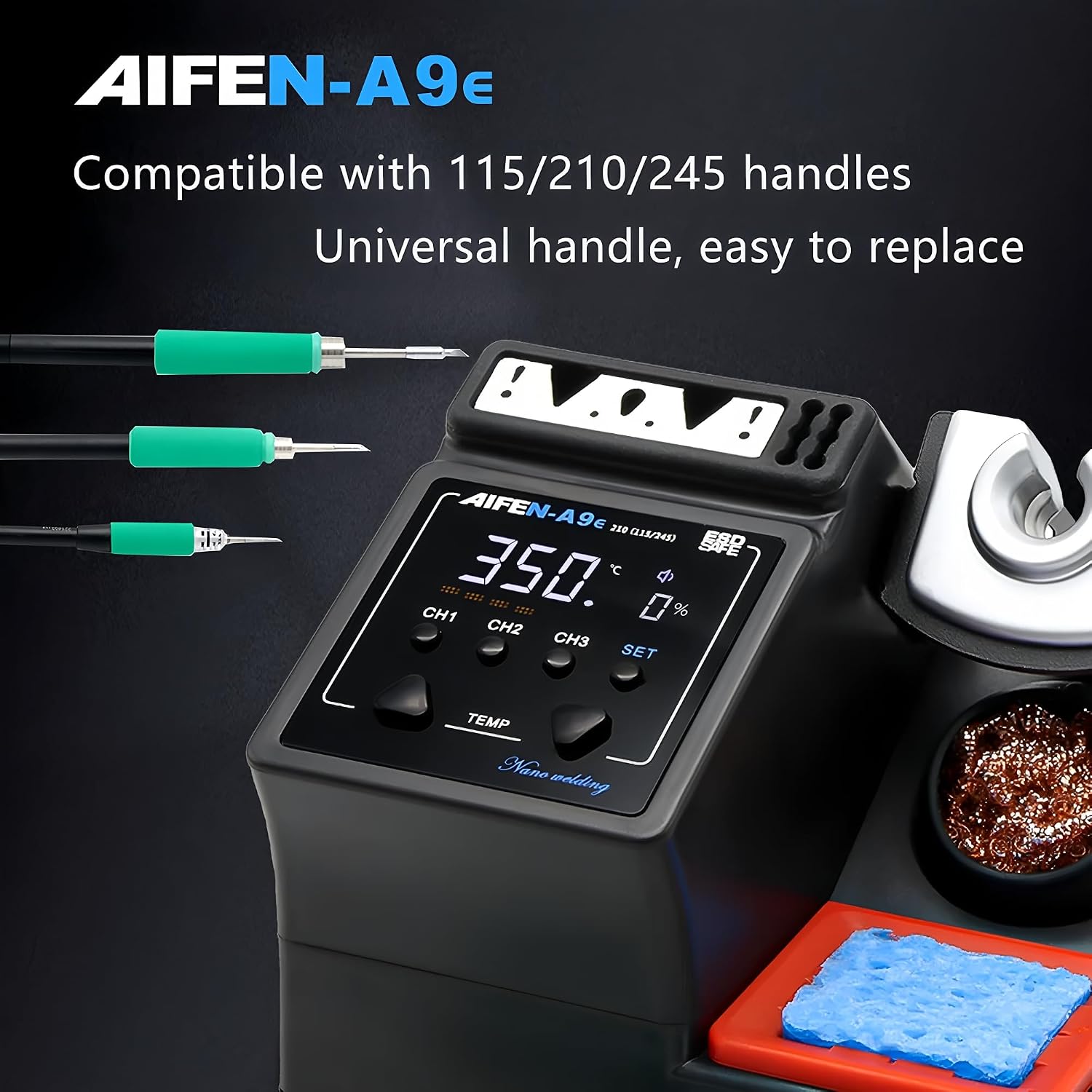
Figure 6.3: The A9E station supports various handle and tip types.

Figure 6.4: Example of T210 series soldering tips.
7. Maintenance
7.1 Tip Cleaning
Regular cleaning of the soldering tip is crucial for optimal performance and longevity.
- Copper Wire Cleaning Ball: Use the copper wire cleaning ball for dry cleaning to remove excess solder and oxidation. This method helps preserve the tip's plating.
- Cleaning Sponge: Dampen the cleaning sponge with distilled water (do not use tap water as minerals can damage tips). Wipe the hot tip on the sponge to clean.
7.2 Tip Replacement
To replace a soldering tip:
- Ensure the soldering iron is cool or use a heat-resistant tool to handle the hot tip.
- Gently pull the old tip out of the handle.
- Insert the new tip firmly into the handle until it is fully seated.
7.3 General Cleaning
Wipe the exterior of the soldering station with a soft, dry cloth. Do not use abrasive cleaners or solvents. Ensure the device is unplugged before cleaning.
8. Troubleshooting
- No Power: Check the power cord connection to both the station and the wall outlet. Ensure the outlet is functional.
- Tip Not Heating: Verify the soldering iron handle is securely connected to the HUB. Ensure the tip is correctly inserted into the handle. If the issue persists, the tip or handle may need replacement.
- Inaccurate Temperature Reading: Ensure the tip is clean and properly seated. If the problem continues, contact support.
- Solder Not Melting: Increase the set temperature. Ensure the tip is clean and properly tinned.
9. Specifications
| Feature | Specification |
|---|---|
| Model | A9E |
| Manufacturer | AIFEN/SUGON |
| Max Power | 160W |
| Input Voltage | AC110-220V, 50/60Hz |
| Temperature Range | 100℃ - 450℃ |
| Compatible Tips | C115, C210, C245, C470 series |
| Host Weight | 0.87 kg |
| Dimensions (L x W x H) | 140mm x 135mm x 120mm |
| Country of Origin | China |

Figure 9.1: Physical dimensions of the AIFEN A9E Soldering Station.
10. Warranty and Support
For warranty information or technical support, please refer to the documentation provided at the point of purchase or contact your retailer. Keep your purchase receipt as proof of purchase.
Related documentsA9E


Ask a question about this manual
Ask about setup, troubleshooting, compatibility, parts, safety, or missing instructions. Manuals+ will review the question and use this page’s manual context to help answer it.