
1. Introduction
Thank you for choosing the Torder Steam Mop HY-803. This versatile steam cleaner is designed to provide efficient and chemical-free cleaning for various surfaces in your home. By harnessing the power of high-temperature steam, it effectively dissolves stubborn stains and sanitizes surfaces. This manual provides essential information for safe operation, assembly, use, and maintenance of your steam mop.
2. Product Overview
2.1 Key Features
- 13 Multi-functional Accessories: Includes grout brushes, window squeegees, and more for comprehensive cleaning.
- Powerful Steam Cleaning: Utilizes high-temperature steam for deep, residue-free cleaning.
- Rapid & Efficient: Heats up in approximately 30 seconds with a 550ml water tank capacity for extended cleaning sessions.
- User-Friendly Design: Features 4 washable mop pads, a lightweight build, and a flexible chassis for easy maneuvering.
- All-Floor Compatibility: Suitable for wood, marble, tiles, and various other hard surfaces.
2.2 Components and Accessories
The Torder Steam Mop HY-803 comes with a range of components and accessories to facilitate diverse cleaning tasks. Refer to the diagram below for identification.

Image: Torder Steam Mop with its full set of 13 accessories, including various brushes, nozzles, and mop pads.

Image: A closer look at the various attachments included with the steam mop, such as brushes, scrapers, and pads.

Image: Diagram illustrating the main parts of the Torder Steam Mop, including the handle, telescopic rod, water tank, and mop head.
3. Safety Instructions
Please read all safety warnings and instructions carefully before using this appliance to prevent electric shock, fire, and/or serious injury.
- Always ensure the power plug is firmly inserted into a grounded electrical outlet.
- Do not leave the steam mop unattended while it is powered on or generating steam.
- Keep children and pets away from the appliance when it is in use.
- Do not direct steam at people, animals, or electrical appliances.
- Use only distilled or demineralized water in the water tank to prevent mineral buildup and damage.
- Never immerse the appliance in water or other liquids.
- Unplug the appliance from the power outlet before filling, emptying, cleaning, or performing any maintenance.
- Do not use the appliance if the cord or plug is damaged.
- Allow the appliance to cool completely before storing.
4. Setup
4.1 Assembly
- Insert the telescopic aluminum rod into the main body of the steam mop until it clicks securely into place.
- Attach the handle to the top of the telescopic rod.
- Securely attach the electric rotating mop head to the bottom of the main body.
- Press the washable mop pads firmly onto the rotating mop head. Ensure they are centered and fully attached.
4.2 Filling the Water Tank
- Ensure the steam mop is unplugged from the power outlet.
- Remove the detachable water tank from the main unit.
- Open the water tank cap and fill the tank with up to 550ml of distilled or demineralized water. Do not overfill.
- Close the water tank cap securely and reinsert the tank into the main unit until it clicks into place.

Image: Close-up of the steam mop's control panel, showing buttons for motor and steam, and the detachable water tank being removed.
5. Operating Instructions
5.1 Powering On and Preheating
- Plug the steam mop into a grounded electrical outlet. The power indicator light will illuminate.
- Press the ON/OFF button. The steam mop will begin to preheat.
- Wait approximately 30 seconds for the appliance to heat up. The steam indicator light will change (e.g., from flashing to solid) when it is ready for use.

Image: An indicator showing the steam mop is ready in 30 seconds.
5.2 Floor Cleaning Mode
- Once preheated, press the 'Select' button to choose your desired steam level (e.g., low, medium, high).
- Gently push the steam mop across the floor surface. The rotating mop pads will assist in cleaning.
- For stubborn stains, hold the mop over the area for a few seconds to allow the steam to penetrate.
- The steam mop is suitable for various hard floor types, including wood, marble, and tile.

Image: The steam mop effectively cleaning dirt, water stains, and dust from wooden, marble, and tile floors.
5.3 Handheld Steam Cleaner Mode
The Torder Steam Mop can be converted into a handheld steam cleaner for targeted cleaning tasks.
- Unplug the appliance and allow it to cool slightly.
- Detach the main body from the telescopic rod and mop head.
- Select the appropriate accessory for your cleaning task (e.g., bending nozzle for tight spaces, round head brush for scrubbing, window scraper for glass).
- Attach the chosen accessory to the handheld unit.
- Plug in the handheld unit and allow it to preheat.
- Direct steam towards the area to be cleaned. Use caution as steam is hot.
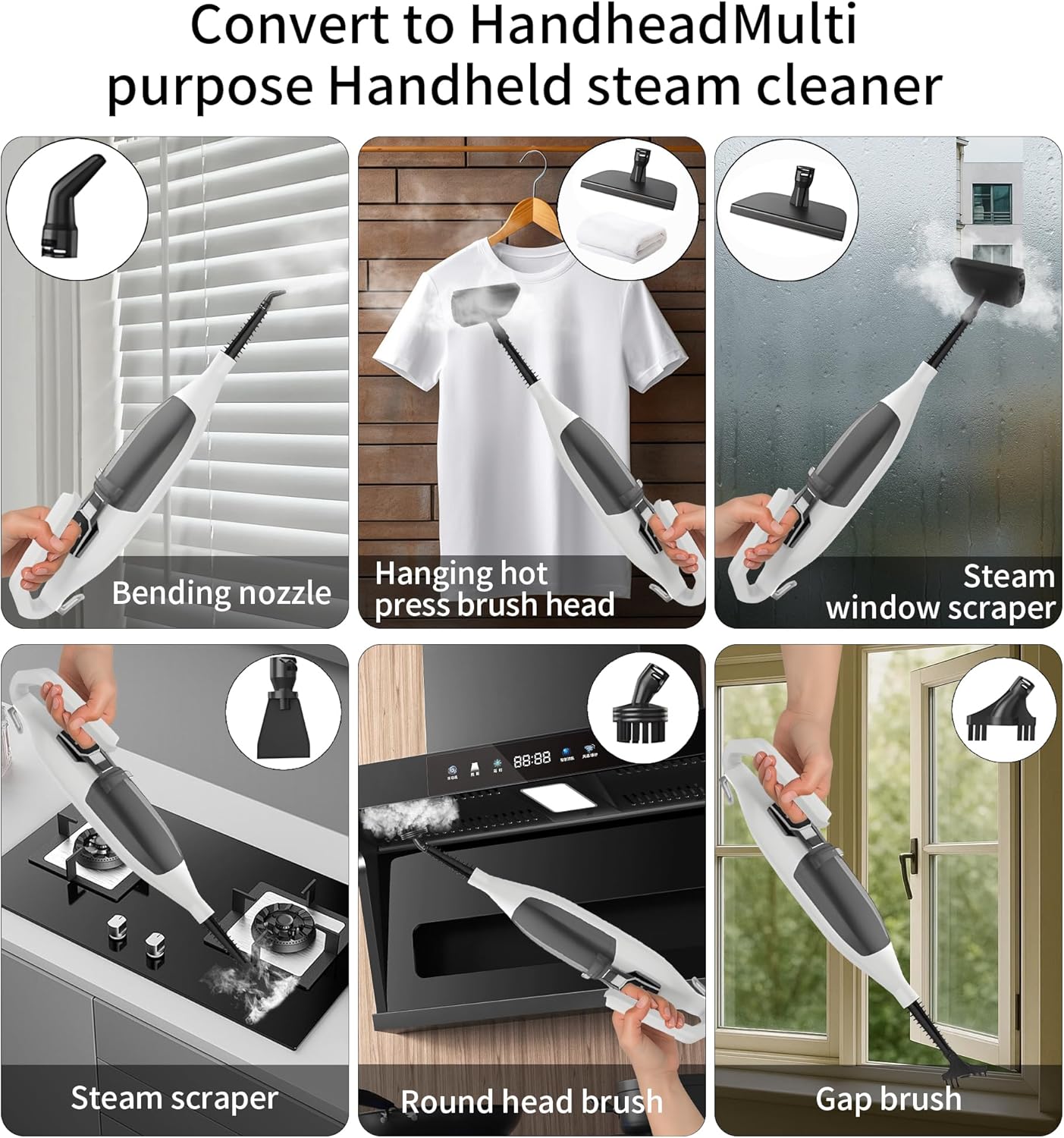
Image: Various handheld accessories being used for cleaning blinds, steaming clothes, cleaning windows, scraping surfaces, and brushing.

Image: Before and after comparison of a dirty stove top cleaned using the handheld steam cleaner with a brush attachment.
6. Maintenance and Care
6.1 Cleaning Mop Pads
The included microfiber mop pads are washable and reusable.
- After each use, remove the mop pads from the rotating head.
- Machine wash the pads with similar colors using a mild detergent. Do not use bleach or fabric softeners.
- Air dry or tumble dry on low heat.

Image: Illustration showing the simple process of installing and removing the washable microfiber mop pads from the steam mop head.
6.2 Emptying and Storing the Water Tank
- Always unplug the appliance and allow it to cool before emptying the water tank.
- Remove the water tank and empty any remaining water.
- Wipe the exterior of the steam mop with a damp cloth.
- Store the steam mop in a cool, dry place, away from direct sunlight.
7. Troubleshooting
If you encounter any issues with your Torder Steam Mop, refer to the following troubleshooting guide:
7.1 Steam Mop Does Not Generate Steam
- Ensure the power plug is firmly inserted into the power socket.
- Verify that the water tank is full.
- Confirm the power supply is connected and the mode button is activated.
- If the indicator light is not on, try a different power outlet.
- If the indicator light flashes, press the mode button to select a cleaning gear.
- If the indicator light is always on, wait 30 seconds for preheating to complete.
7.2 Steam Mop Generates Steam Intermittently
- Select the "high" mode if more steam is required.
- Confirm that the water tank is full.
7.3 Cleaning Gear Cannot Be Selected
- Ensure the power plug is securely in the socket and the indicator light is flashing.
- If the steam mop is generating steam but the indicator light is not on, please contact customer support.
8. Specifications
| Specification | Detail |
|---|---|
| Brand | TORDER |
| Model Number | HY-803 |
| Colour | Black |
| Product Dimensions | 9 x 21 x 7 cm |
| Item Weight | 4.21 kg |
| Water Tank Capacity | 550 ml |
| Power/Wattage | 1200 watts |
| Voltage | 120 |
| Heat Time | 30 Seconds |
| Special Feature | Steam Control |
| Surface Recommendation | Floor |
| Included Components | 13 accessories |
9. Warranty and Support
For warranty information and customer support, please refer to the documentation included with your purchase or contact the retailer. You may also visit the official TORDER store for additional resources and contact details.
Visit the TORDER Store.